Agentic Document Extraction: What It Means and How to Build It
Agentic document extraction means an AI agent calls a parser as a tool during a multi-step autonomous workflow. Here's what that requires, when it's worth it, and how to build it with Airparser's MCP server and API.

TL;DR: Agentic document extraction means an AI agent calls a document parser as a tool during an autonomous multi-step workflow — deciding when to extract, what schema to use, and what to do with the results, without a human directing each step. Airparser supports this natively via its MCP server and REST API.
Agentic document extraction means a document parser is called by an AI agent as one step in a larger autonomous workflow — not as a standalone event triggered by a human or a fixed schedule. The agent decides when to extract, which parser to use, and what to do with the results, combining document parsing with other reasoning steps like search, database writes, or conditional logic.
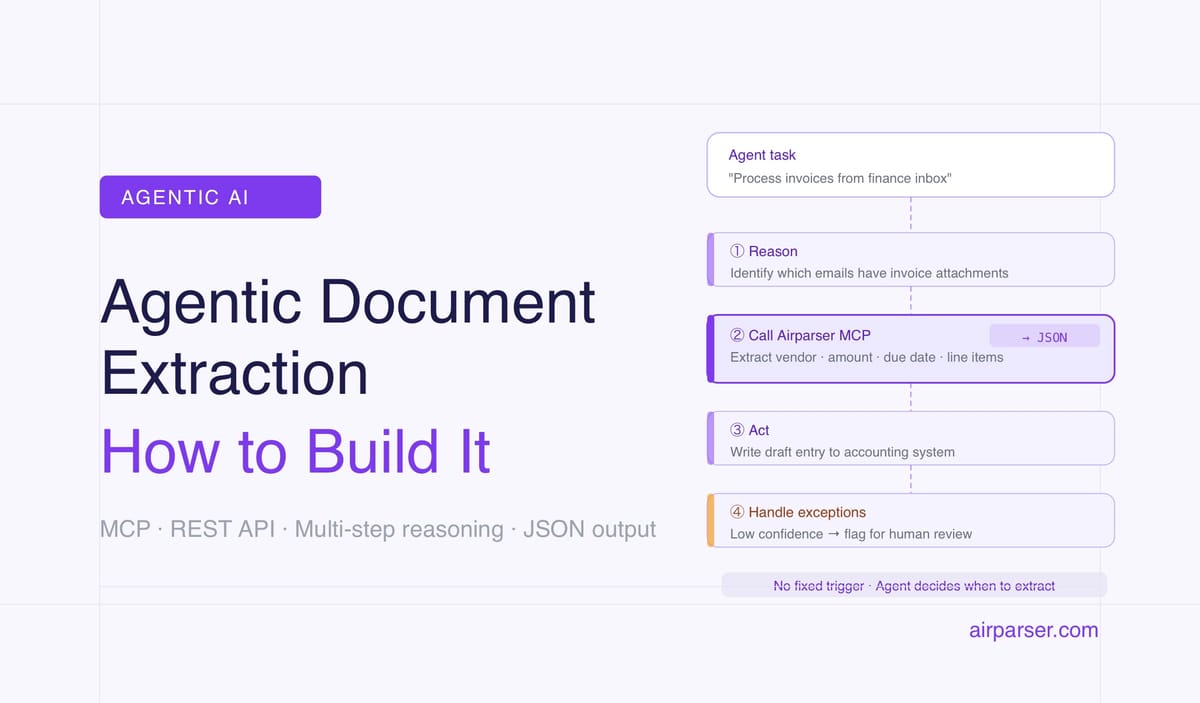
This is meaningfully different from standard document automation. A Zapier workflow that runs when an email arrives is automated — but it's not agentic. The agent case is when an AI system receives an open-ended task ("process all invoice attachments from this thread and update the ledger") and figures out on its own that it needs to parse documents, calls the parser, interprets the results, and continues.
Why does the distinction matter? Because the tooling requirements are different. A webhook-based parser works fine for triggered automation. An agent-native parser needs an interface that AI agents can call directly: a clean API, structured JSON output, and ideally an MCP server that exposes the parser as a native tool in the agent's tool set. These are the infrastructure pieces that determine whether document parsing can actually participate in agentic workflows.
The term is getting significant attention in 2026. LandingAI built their entire platform around it. Parseur wrote a positioning piece claiming agentic principles. Enterprise teams working with Claude, GPT-4o, and open-source agent frameworks are looking for document parsing tools that fit into those pipelines without friction. This article explains what the term actually covers, when it's the right approach, and how to build it using Airparser.
What Makes Document Extraction "Agentic"
Agentic extraction isn't a technology — it's an architecture pattern. The same underlying parser (OCR + LLM field extraction) can be used agentically or non-agentically depending on how it's called and what happens before and after.
Three characteristics separate agentic extraction from standard automation:
1. The agent initiates extraction based on reasoning, not a fixed trigger
In standard automation, extraction fires when a specific event occurs: email arrives, file is uploaded, schedule runs. The trigger is external and pre-defined. In agentic extraction, an AI agent decides that extraction is needed as part of completing a task. The agent might receive an email thread, determine that one attachment is relevant to a task, and call the parser — without a human or a pre-defined rule specifying "parse this attachment." The decision emerges from the agent's reasoning about the task.
2. Extraction is one tool call among several
Agentic workflows combine multiple tool calls in sequence. Parse this document, look up the vendor ID in the database, check against the purchase order, write the result to the ERP. Each tool call depends on the result of the previous one. A document parser that returns clean, structured JSON fits naturally into this chain — an agent can use the output immediately as input to the next step.
3. The agent handles exceptions without human escalation
When extraction fails or returns low confidence, an agentic system can try a fallback — re-extract with a different schema, request clarification from an external system, or route to a different workflow branch. A non-agentic system would typically fail or alert a human. Agentic exception handling is one of the main reasons enterprise teams are interested in this pattern.
Three Ways Documents Enter Agentic Workflows
Before an agent can extract from a document, the document has to reach the parser. There are three practical integration patterns, each suited to different contexts.
Email inbox submission
The simplest pattern. Airparser provides a dedicated email inbox for each parser. An agent monitoring an email account can forward relevant messages (with attachments) to the inbox address. Extraction happens automatically; results are delivered via webhook to the agent's receiving endpoint or retrieved via the API.
This pattern works well when documents already arrive by email — invoices, statements, contracts — and the agent's job is to identify which ones need processing and route them accordingly.
Direct API submission
The agent submits documents programmatically via the Airparser REST API. This is the pattern for agents working with documents from non-email sources: storage buckets, CRMs, download URLs, generated files. The agent POSTs the document (as a URL or binary upload), waits for or polls for results, and receives structured JSON.
POST /api/v1/documents
{
  "parser_id": "your-parser-id",
  "document_url": "https://example.com/invoice.pdf"
}
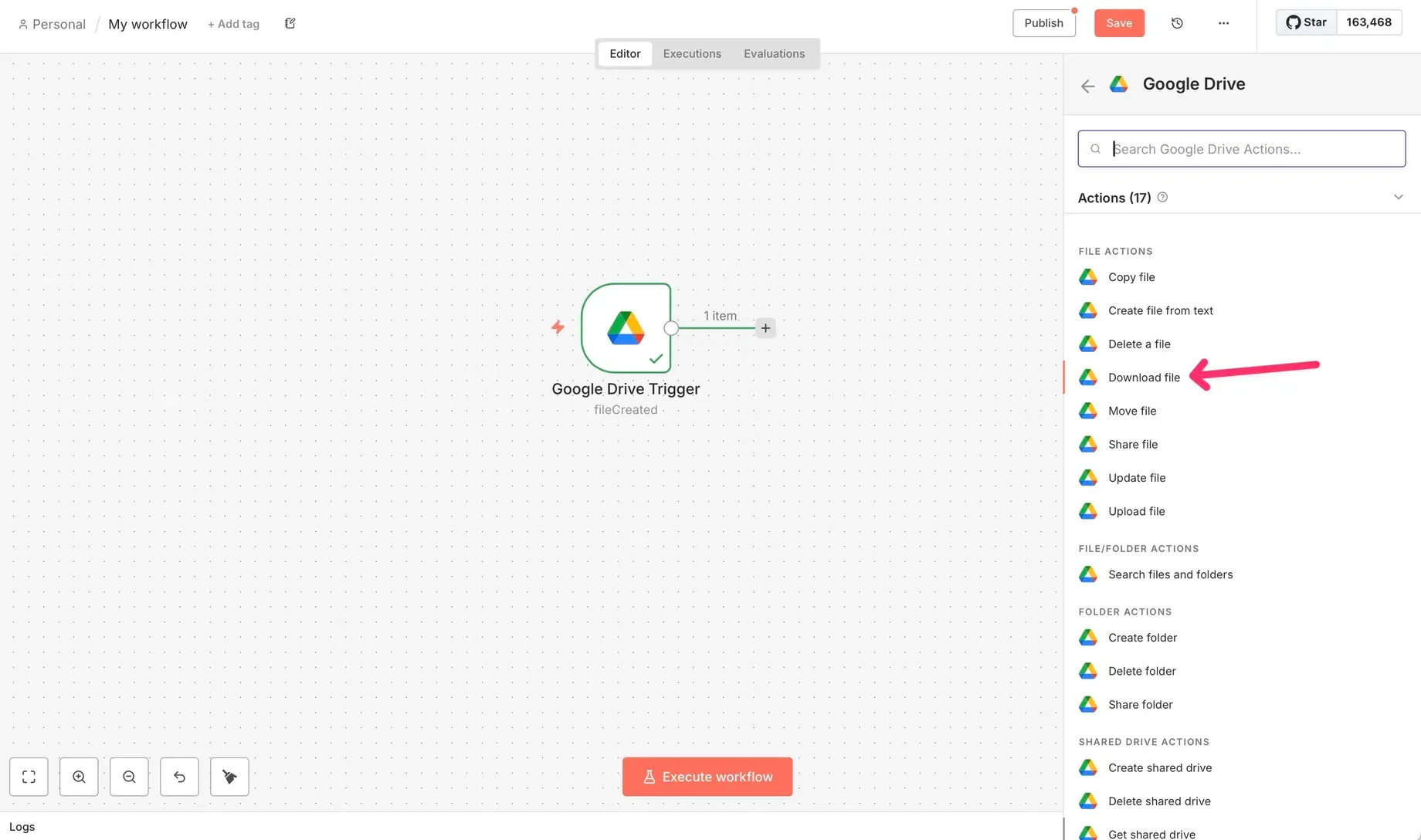
The API pattern gives the agent full control: it chooses which parser to call, passes the document programmatically, and gets results back in the same request cycle. Full API documentation: help.airparser.com/public-api.
MCP tool call (native agentic integration)
The cleanest integration for AI agents is through the Airparser MCP server. MCP (Model Context Protocol) is an open standard that lets AI agents call external tools as native capabilities — without custom integration code per agent. The agent sees Airparser's tools listed in its tool set and calls them directly.
When an AI agent built on Claude, ChatGPT, or another MCP-compatible framework connects to Airparser's MCP server, it can list available parsers, submit documents for extraction, and retrieve results — all as native tool calls, in the same way it would call a web search or a database query. The parser becomes part of the agent's built-in capabilities rather than an external system it has to interact with through custom code.
This is the architecture that makes agentic document extraction practical at scale. The agent framework handles authentication, retries, and result routing; you configure the parser in Airparser; the MCP server handles the connection.
How Airparser Is Built for Agentic Workflows
Several Airparser design decisions make it well-suited for agentic extraction specifically, not just standard automation.
MCP server with native tool exposure
Airparser's MCP server at mcp.airparser.com exposes document parsing as a native tool for any MCP-compatible AI agent. Claude, ChatGPT with plugins, n8n AI agent nodes, and custom agent frameworks using the MCP SDK can call Airparser without writing custom integration code. This is the key infrastructure piece that separates agent-native parsers from tools that require custom wrappers.
Multi-engine routing without agent-side logic
In agentic workflows, the agent usually doesn't know in advance what type of document it's about to receive. Is the attached PDF a native digital file or a scanned image? Is it handwritten? Airparser handles this internally: multi-engine routing selects the right extraction approach based on document characteristics — OCR, vision model, LLM extraction, or a combination — without requiring the agent to detect document type and branch accordingly. The agent calls the parser; the parser handles the rest.
Structured JSON output for immediate downstream use
Agent workflows need outputs they can use in the next reasoning step. Airparser returns extraction results as structured JSON matching the schema you defined — field names, types, and values ready to pass directly to a database write, an API call, or the agent's next reasoning step. No intermediate parsing of the parser output needed.
Configurable data retention for privacy in agentic pipelines
Agentic workflows often process sensitive documents at scale — invoices with financial data, resumes with personal information, contracts with proprietary terms. Airparser allows setting retention per parser: delete documents immediately after extraction, or retain for 1, 7, or 30 days. For agents processing GDPR-regulated personal data, choosing immediate or short-term retention keeps the pipeline compliant without manual cleanup. Related: GDPR-compliant document parsing.
Practical Example: Invoice Processing Agent
Here's how an invoice processing agent uses Airparser agentically, end to end.
The task: "Process all unread invoices from the finance inbox and create draft entries in the accounting system."
Step 1 — Email monitoring. The agent polls the finance inbox for unread emails with PDF or image attachments. It identifies messages likely to contain invoices based on sender, subject, or attachment name.
Step 2 — Document submission. For each identified attachment, the agent calls the Airparser MCP tool (or API endpoint) with the parser ID for the configured invoice parser. Airparser's invoice parser schema captures: vendor name, invoice number, invoice date, due date, line items (description, quantity, unit price, total), subtotal, tax, and total amount due.
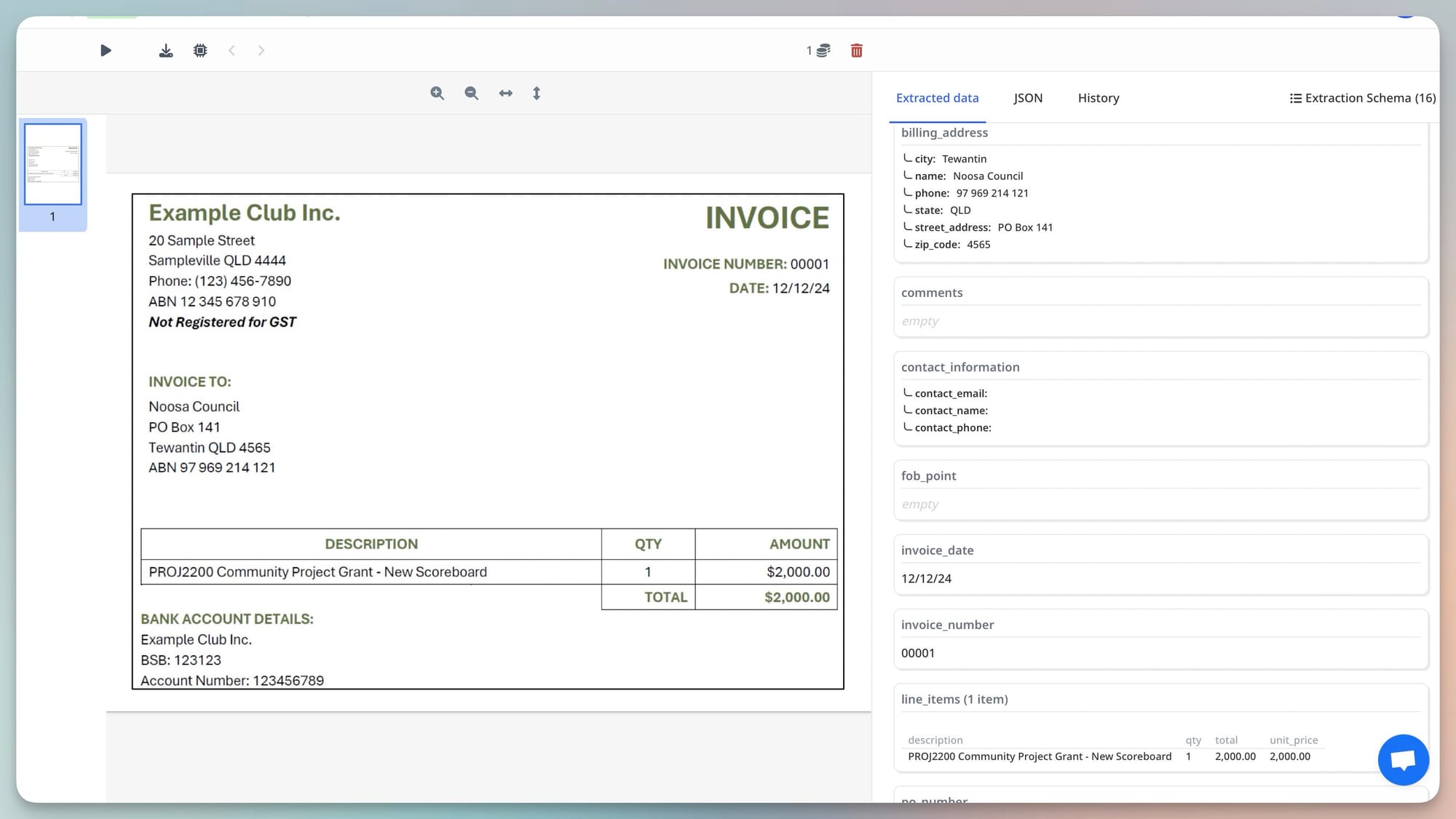
Step 3 — Result handling. Airparser returns structured JSON. The agent reads the vendor_name field, looks it up in the accounting system to find the vendor ID, then creates a draft payable entry using the extracted amounts and dates.
Step 4 — Exception handling. If invoice_total is missing or the confidence score is below threshold, the agent flags the document for human review rather than creating an incomplete entry. It posts a summary to the finance Slack channel: "Invoice from [Vendor], amount unclear — please review."
The human involvement in this workflow is only for genuine edge cases. The agent handles the rest — and because Airparser returns clean JSON, there's no ambiguity about what the agent is working with at each step.
Practical Example: Resume Screening Agent
An HR team receives job applications by email. Resumes arrive as PDFs and Word documents from candidates with no consistent format.
The task given to the agent: "Screen all new applications for the Senior Engineer role and shortlist candidates who meet the minimum requirements."
Step 1. Agent detects new application emails, extracts the resume attachment.
Step 2. Agent calls Airparser's resume parser via MCP. The parser is configured with a schema that extracts: full name, email, years of experience, current title, skills (as an array), education level, and most recent employer.
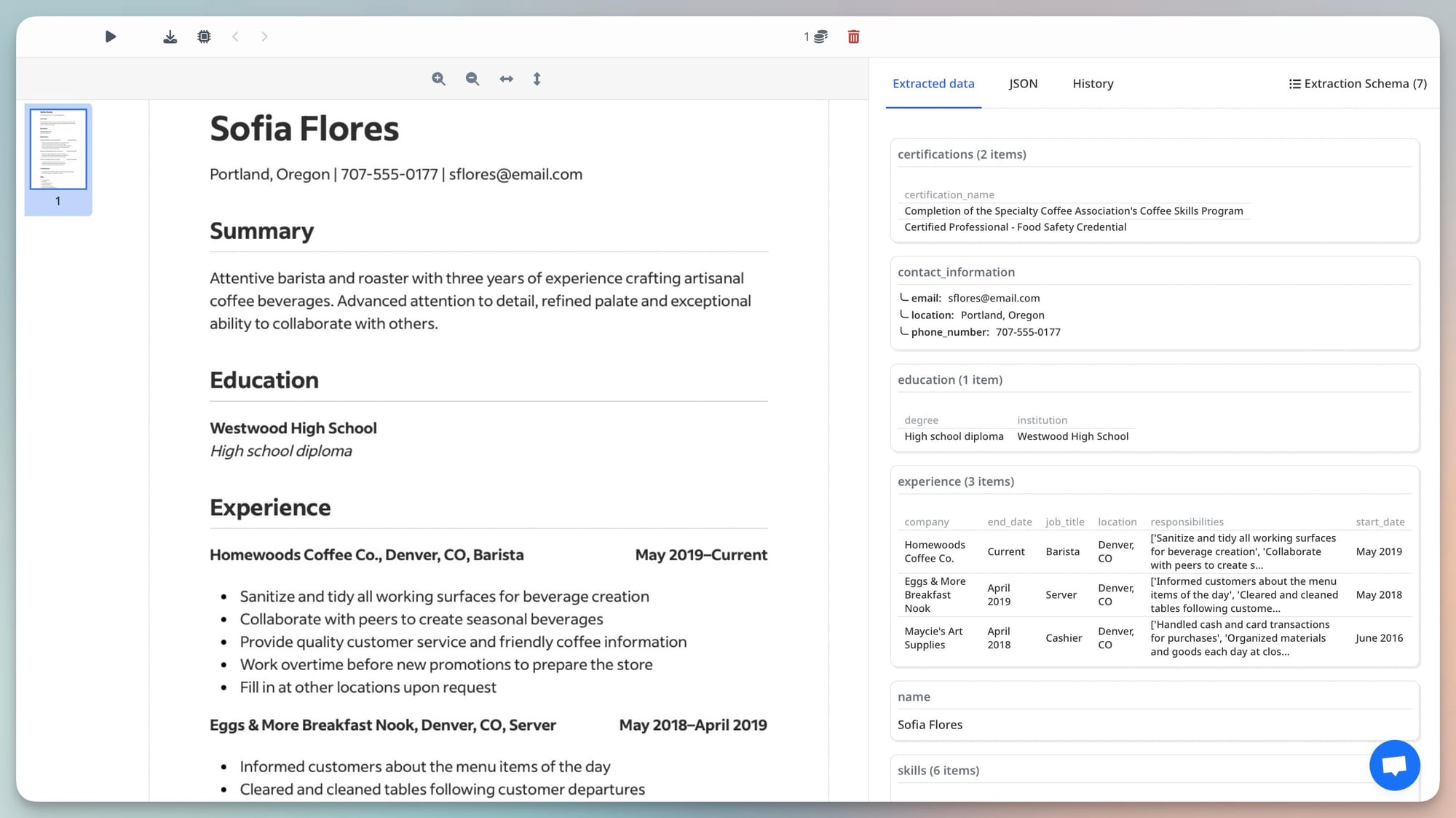
Step 3. Agent receives structured JSON. It evaluates the extracted data against the role requirements (stored separately): minimum 5 years experience, Python or Go required in skills, Bachelor's degree minimum. Candidates who pass all three criteria are added to the shortlist in the ATS.
Step 4. For candidates who don't meet the criteria, the agent generates a rejection summary noting which criteria were unmet — useful audit trail without any human reviewing each resume individually.
Related: Resume parsing in the age of LLMs.
When Agentic Extraction Is the Right Choice (And When It Isn't)
Agentic extraction is not always the right architecture. Understanding when it adds value and when it adds unnecessary complexity is important for making practical decisions.
Use agentic extraction when:
- The workflow requires reasoning about document content. If the agent needs to evaluate extracted data against external criteria, make conditional decisions based on what the document says, or combine extraction with search or database lookups — the agentic pattern adds real value.
- Documents arrive in unpredictable contexts. When an agent handles diverse incoming tasks and encounters documents as part of broader work rather than in a fixed pipeline, agentic extraction fits naturally.
- Exception handling requires judgment. When the right response to a failed extraction depends on context that only the agent has (what the task is, what system is downstream, what the user expects), the agent can make that call rather than defaulting to a fixed error response.
Use standard webhook automation instead when:
- Documents arrive in a consistent, predictable pattern. High-volume invoices from a fixed supplier, daily statements from a bank, standardized forms from a system — these are better handled with Zapier, Make, or a simple webhook integration. Faster, cheaper, more reliable.
- The workflow after extraction is always the same. If every extracted invoice always goes to the same accounting system field for field, you don't need an agent to reason about the results. A direct webhook integration is more appropriate.
- Latency matters at scale. Agentic extraction adds latency because the agent's reasoning loop takes time. For high-throughput pipelines processing hundreds of documents per minute, direct API integration with queued processing is more efficient than routing through an agent.
The honest answer is that most current document automation use cases don't need full agentic architecture. A well-configured Airparser webhook delivering JSON to Zapier handles the majority of invoice, receipt, and form workflows cleanly. Agentic patterns become compelling when documents are one part of a larger task that requires judgment — not when they're the entire task.
What "Agentic" Actually Requires From a Document Parser
Not every parser can participate in agentic workflows effectively. The requirements are specific:
- Clean, structured JSON output. An agent needs to use extraction results as data in its next step. A parser that returns semi-formatted text or nested HTML requires the agent to do its own parsing — negating much of the value.
- A schema the agent controls. The agent may need to extract different fields from different document types. The parser must support schema customization — ideally at the parser level, so the agent can target the right parser for the right document type.
- An API the agent can call programmatically. Email-only or UI-only parsers can't participate in agent workflows. A REST API (or MCP server) is the minimum requirement.
- Reliable multi-document-type handling. Agents receive diverse documents. The parser must handle scanned PDFs, native PDFs, images, and handwritten documents without requiring the agent to pre-classify document type and choose a different integration path.
- Fast enough for interactive workflows. If the agent is used in an interactive product — a user asks a question, the agent extracts from a document as part of answering — latency matters. Extraction should complete in seconds, not minutes.
Airparser meets all five requirements. The areas where other parsers commonly fall short: no MCP integration (requires custom API code per agent framework), inconsistent handling of mixed document types (agent must pre-classify), or output formats that require post-processing before the agent can use them.
Frequently Asked Questions
What is the difference between agentic document extraction and standard document automation?
Standard document automation fires on a fixed trigger — an email arrives, a file is uploaded, a schedule runs — and the workflow that follows is pre-defined. Agentic document extraction means an AI agent calls the parser as one step in a larger task it's reasoning about, without a human or a fixed rule specifying when to extract. The agent decides that parsing is needed, calls the parser, uses the results, and continues with the next reasoning step. The difference matters for tooling: standard automation works fine with webhook-based parsers; agentic workflows need parsers with clean APIs, structured JSON output, and ideally native MCP integration so the agent can call them without custom code.
What is an MCP server and why does it matter for document parsing?
MCP (Model Context Protocol) is an open standard that lets AI agents call external tools as native capabilities. An MCP server exposes what a tool can do — what functions it offers, what parameters they accept, what they return — in a format any MCP-compatible agent can read and call directly. Without MCP, connecting a document parser to an AI agent requires writing custom integration code for each agent framework. With MCP, the agent discovers the parser's capabilities automatically and calls them like any built-in tool. Airparser's MCP server at mcp.airparser.com exposes document submission, result retrieval, and parser listing as native tools for Claude, ChatGPT, and other MCP-compatible frameworks. Documentation: help.airparser.com/airparser-mcp-server.
How does agentic document extraction handle documents the parser hasn't seen before?
This is where LLM-based extraction has a significant advantage over template-based parsers. An LLM-based parser doesn't need to have seen a specific document layout before — it understands what fields mean semantically and can find them in new layouts. Airparser uses LLM-based extraction as part of its multi-engine pipeline, which means it can handle invoice layouts from vendors it has never processed before, resume formats from new applicant tracking systems, or contract structures from new counterparties — without needing a new template. For agentic workflows where the agent encounters diverse document sources, this generalization capability is critical. Template-based parsers break when they encounter new layouts; LLM-based parsers adapt.
What happens when extraction fails in an agentic workflow?
Failure handling is one of the key architectural questions for agentic extraction. The agent has several options: retry with a different schema, fall back to a different parser (text vs. vision engine), request additional context, or escalate to a human reviewer with a summary of what failed and why. Airparser returns field-level confidence scores with each extraction, which gives the agent a signal it can act on — rather than treating all results as equally reliable. An agent might accept results with confidence above 0.90, flag results between 0.70 and 0.90 for soft review, and escalate results below 0.70 to a human. The structured JSON output makes it straightforward to inspect individual field confidence before acting.
Is agentic document extraction more expensive than standard automation?
Yes, generally. Agentic extraction adds cost at two levels. First, LLM inference for the agent's reasoning loop costs more than a simple webhook trigger. Second, if the agent uses a vision model for extraction (as opposed to text-based OCR), per-document costs are higher than template-based parsers. The tradeoff is accuracy and flexibility: the agentic approach handles document variation that would break template-based systems. For high-volume, consistent documents (invoices from a single supplier, forms from a single system), standard webhook automation with a simpler parser is more cost-effective. For variable document sources where template maintenance overhead is high, the per-document cost of agentic extraction often wins on total cost of ownership. Related: Document parsing: build vs. buy.
Do I need to write code to connect Airparser to an AI agent?
It depends on the agent framework. For agents that support MCP natively — Claude Desktop, Claude API with MCP, and frameworks using the official MCP SDK — you connect Airparser's MCP server without any custom code. You add the server URL and API key to your agent configuration, and the agent discovers Airparser's tools automatically. For agents using direct API integration (OpenAI Assistants API function calling, LangChain, LlamaIndex), you define Airparser's API endpoints as tool functions in your agent setup — a small amount of code that you write once and reuse. For no-code agent builders like n8n AI agents or Make AI modules, you use HTTP request nodes pointed at the Airparser API. Full API documentation: help.airparser.com/public-api.
Which document types work best for agentic extraction?
Agentic extraction works best for semi-structured documents with variable layouts from multiple sources — invoices from different suppliers, resumes from diverse candidates, contracts from different counterparties, medical forms from different providers. These are documents where the fields are consistent and meaningful (every invoice has a total) but the layout changes per source. Fully structured documents (CSV exports, machine-generated XML) don't need agentic extraction at all — they parse deterministically. Fully unstructured documents (free-text emails, narrative reports) are harder and require careful schema design with rich field descriptions. The sweet spot is semi-structured documents at scale from variable sources — which is also where template-based parsers fail and where Airparser's LLM-based extraction adds the most value.