We Tested 5 Document Parsers on a Bad Scan, a Phone Photo and a 14-Page Manifest
Five hard documents, five document parsers: a bad scan, a phone photo, a Japanese era date, an invoice with no subtotal and a 14-page manifest. What each tool returned, where it slipped, and how to run the same test on your own documents.

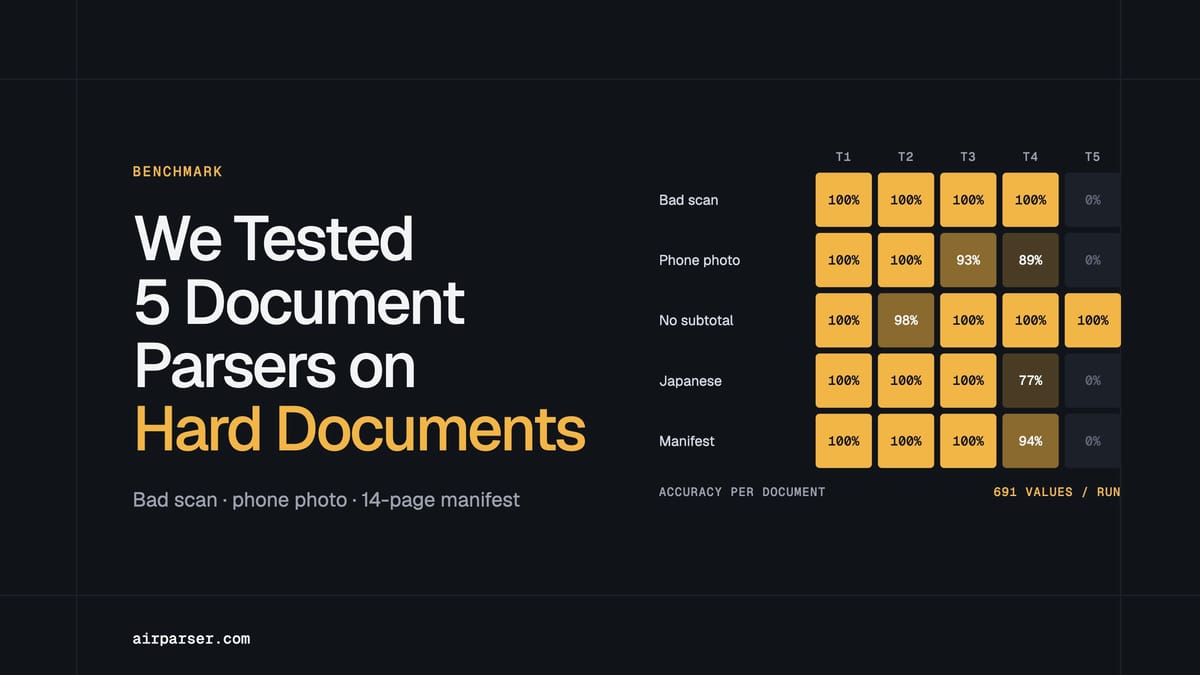
TL;DR: We ran five hard documents (a bad scan, a phone photo, a Japanese era date, an invoice with no subtotal and a 14-page manifest) through five document parsers. Airparser returned all 691 checked values correctly in every run. Parsio's Prompt parser scored 99.6 %, Parseur 98.5 % on the values it returned, Nanonets 91.9 % and Docparser's free pre-built templates 20 %. On readable documents the top three were close. The real differences came from setup, from whether dates and amounts come back import-ready, from values a tool invents, and from scans. We make Airparser and Parsio, so we publish the five documents and the scoring rules so you can check the result yourself.
If you are choosing a document parser, accuracy on clean PDFs will not tell you much: almost every modern tool reads a clean digital invoice. The documents that separate tools are the ones your suppliers actually send: a sideways scan, a phone photo, a date written in a local calendar, an invoice that simply does not print a subtotal, a table that runs for 14 pages. This article reports what happened when we put exactly those five documents through five parsers.
The short version: all of the AI-based tools read the hard documents well, and the interesting findings are not about reading. They are about what each tool does with the result: whether it returns an ISO date or the text as printed, whether it invents a subtotal that is not on the page, and which fields exist at all. The full results table and the documents are on our open benchmark page. This article explains what the numbers mean and how to run the same test on your own files.
Key takeaways
- Reading is no longer the hard part. The bad scan, the phone photo, the Japanese era date and the 112-row manifest were read almost completely right by Airparser, Parsio and Parseur (98.5 to 100 % of the values each returned).
- Import-ready output is where tools differ. Airparser and Parseur returned ISO dates and plain numbers in 100 % of the correct cases. Parsio returned 58 % with the plain field list we gave it, and Nanonets 66 %, because both return values as printed unless you tell them otherwise.
- Setup decides which fields you get. Parseur created its fields from the first invoice we uploaded. That invoice prints no subtotal or tax, so the other invoices came back without them: 6 to 7 of 12 fields.
- Dates are where tools slip. On a French phone photo, one tool read 05/10/2026 as 10 May. Another dropped the year from a Japanese invoice date.
- Templates struggle with hard layouts. Docparser's free pre-built Invoices template returned nothing at all for the bad scan. Its AI option was not tested.
The five documents and why each one is hard
We picked five documents that stress different parts of extraction. They are a mix of an open dataset and documents we generated from invented data (no customer or competitor documents). The files are available to download on the benchmark page.
| Document | Format | What makes it hard |
|---|---|---|
| Bad scan | JPEG, English | Turned 90 degrees, tilted, grey, blurred and noisy |
| Phone photo | JPEG, French | Invoice photographed on a desk: angle, shadow, glare, day/month dates |
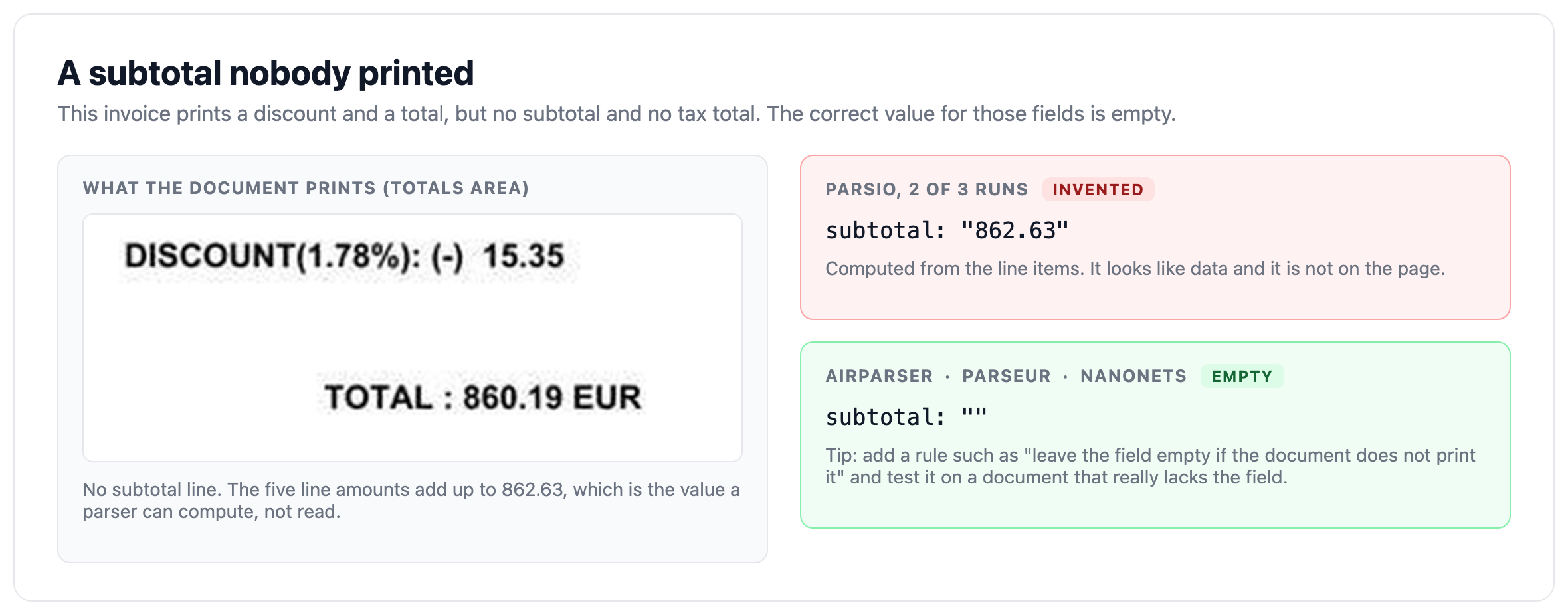
| Invoice with no subtotal or tax | JPEG, English | Fields that are not printed must stay empty: a parser that adds up the lines is inventing data |
| Japanese invoice | PDF, Japanese | Due date written in the Reiwa era calendar, yen amounts, a company name with a legal-form prefix |
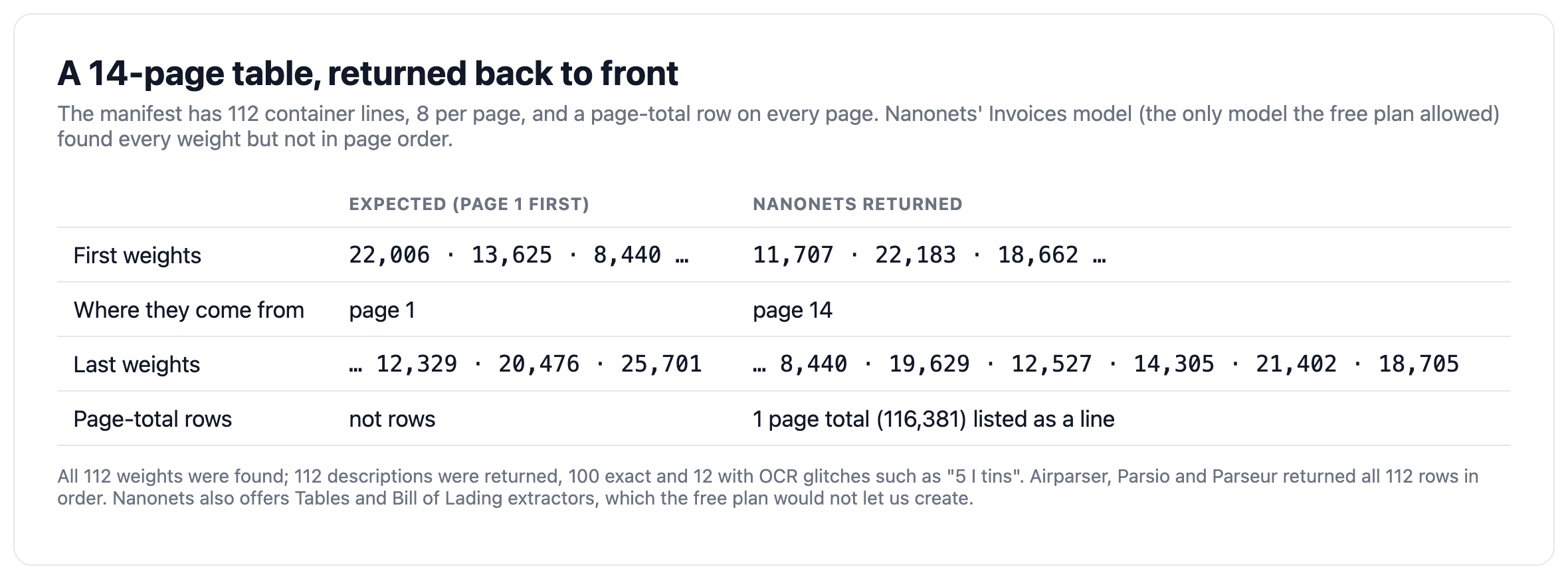
| 14-page manifest | PDF, English | 112 container lines, a page-total row on every page that is not a container |
Each document was checked field by field against an answer key: 12 header fields and a line-items table for the invoices, and manifest fields plus 112 container rows for the manifest. In total that is 691 checked values per run, including fields that the document does not print and that must stay empty.
Results: accuracy, import-ready output and invented values
We measured three things. Accuracy is the share of correct values among those a product returned, judged by meaning (a German "1.200" is 1200, and "05/10/2026" is 5 October in French). Import-ready is the share of correct dates and amounts delivered as an ISO date or a plain number that an accounting system can import without cleanup. Invented values counts values returned for fields the document does not print.
| Product | Accuracy | Import-ready | Invented values | Fields found |
|---|---|---|---|---|
| Airparser (core-1.5 model) | 100.0 % | 100 % | 0 | all 12 |
| Parsio (Prompt parser) | 99.6 % | 58 % * | 2 | all 12 |
| Parseur | 98.5 % | 100 % | 0 | 6 to 7 of 12 |
| Nanonets | 91.9 % | 66 % * | 0 | 7 to 9 of 12 |
| Docparser (pre-built templates) | 20.0 % | 100 % (17 values) | 0 | 0 to 3 of 12 |
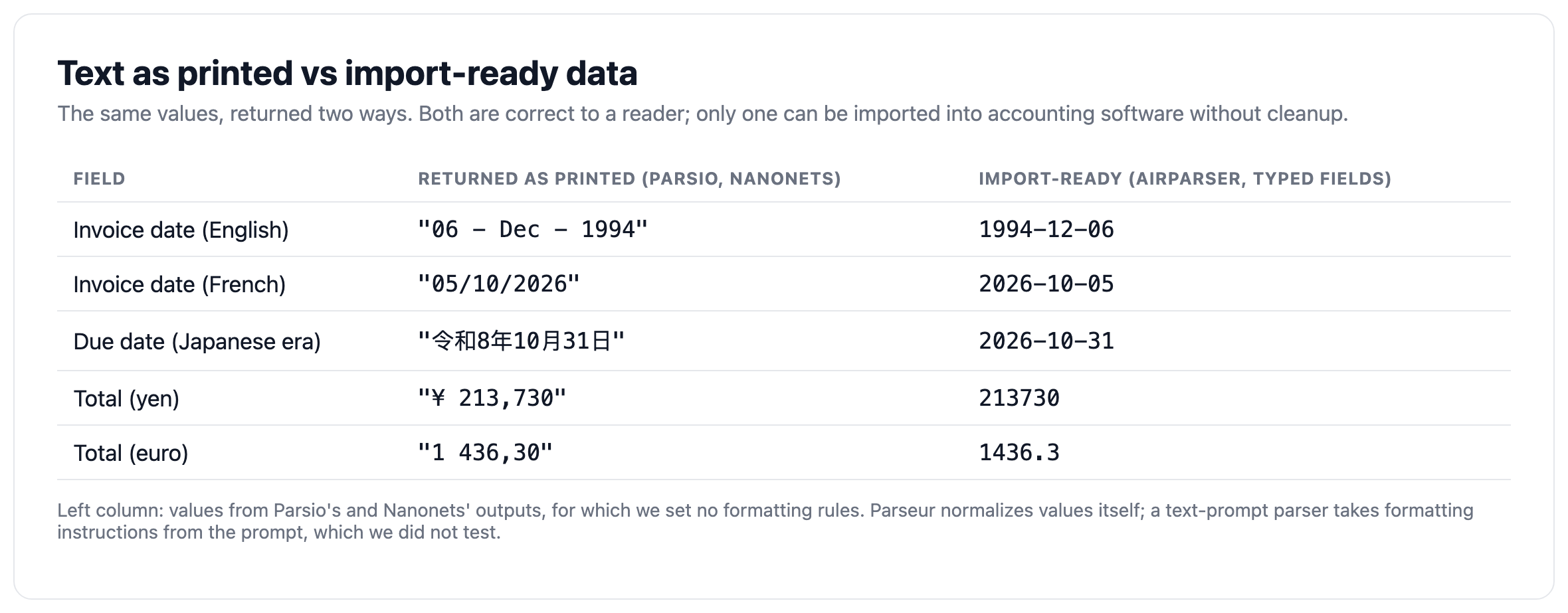
* Expected, not a reading error. These products returned the values as printed: we did not set any rules for how dates and amounts should be interpreted or formatted, so "21 - Dec - 2000" or "1.416,00 €" stays exactly as it appears on the document.
Two caveats matter for reading this table. First, the products were not set up the same way, because they work differently (see the next section). Second, Parseur's Accuracy counts only the values it returned: if the fields it never created were counted as errors, it would score 91.5 %. Docparser's Import-ready share rests on 17 values from a single document, and a document where a product returned nothing relevant counts as 0 in its Accuracy.
Accuracy per document
| Document | Airparser | Parsio | Parseur | Nanonets | Docparser |
|---|---|---|---|---|---|
| Bad scan | 100 % | 100 % | 100 % | 100 % | 0 % |
| Phone photo | 100 % | 100 % | 93 % | 89 % | 0 % |
| Invoice with no subtotal or tax | 100 % | 98 % | 100 % | 100 % | 100 % |
| Japanese invoice | 100 % | 100 % | 100 % | 77 % | 0 % |
| 14-page manifest | 100 % | 100 % | 100 % | 94 % | 0 % |
Nanonets' manifest row comes from its pre-built Invoices model: the free plan allowed only one model, so we could not create the Tables or Bill of Lading extractors that Nanonets also offers. That row shows what the free plan does out of the box, not what Nanonets can do on a manifest.
How each product was set up
Parsers do not start from the same place, and a fair comparison has to say so. Here is exactly what we did.
- Airparser (core-1.5 model). We gave it the field list, with dates and amounts as typed fields. Typed fields are what make Airparser return an ISO date and a plain number instead of text. Airparser also straightens and de-skews image uploads (photos and scans) before extraction, which matters for the bad scan and the phone photo.
- Parsio (Prompt parser). Parsio works from a text prompt. We gave it the same field list as a prompt, with no formatting rules. Parsio is made by the same company as Airparser.
- Parseur. We set no fields. Parseur created them itself from the first invoice we uploaded.
- Nanonets. We used its pre-built Invoices extractor (fixed fields). The free plan allows one model only, so the manifest also went through the Invoices model.
- Docparser. We used its pre-built Invoices template (Bill of Lading for the manifest). It is rule-based. Its AI option, SmartAI Parser, is Premium and was not tested.
Five failure patterns we saw
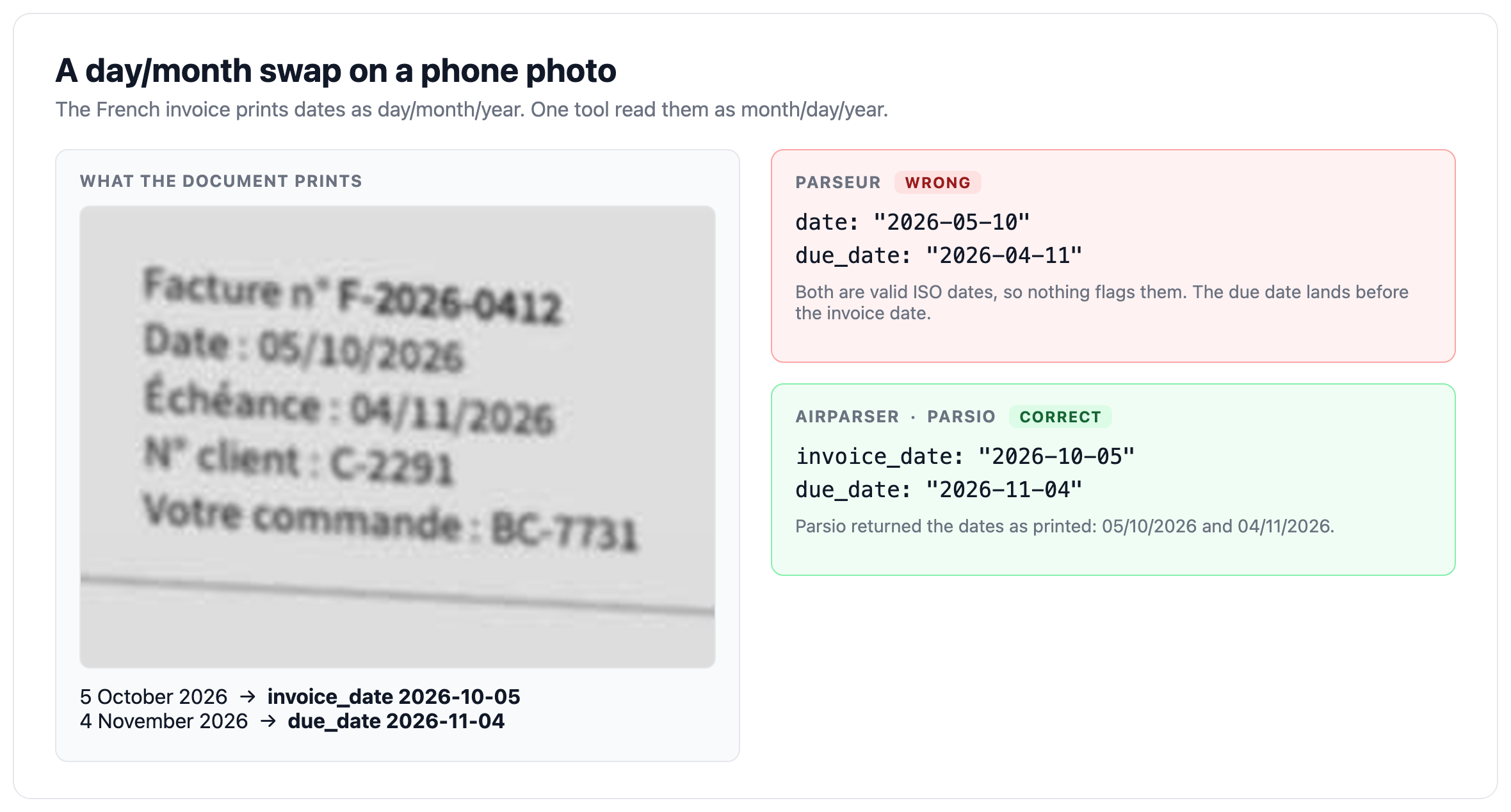
1. Day and month swapped on a phone photo
The French invoice prints its dates as 05/10/2026 and 04/11/2026, meaning 5 October and 4 November. One tool read the invoice date as 10 May and the due date as 11 April. Both are valid-looking ISO dates, so nothing flags them, and a payment term of "due before invoiced" only shows up when someone reads the output. Day/month confusion is the classic silent failure of invoice extraction: if your suppliers write dates in more than one convention, test a document in each. Airparser and Parsio returned both French dates correctly, and Nanonets returned the invoice date correctly.
2. A scan that returned nothing
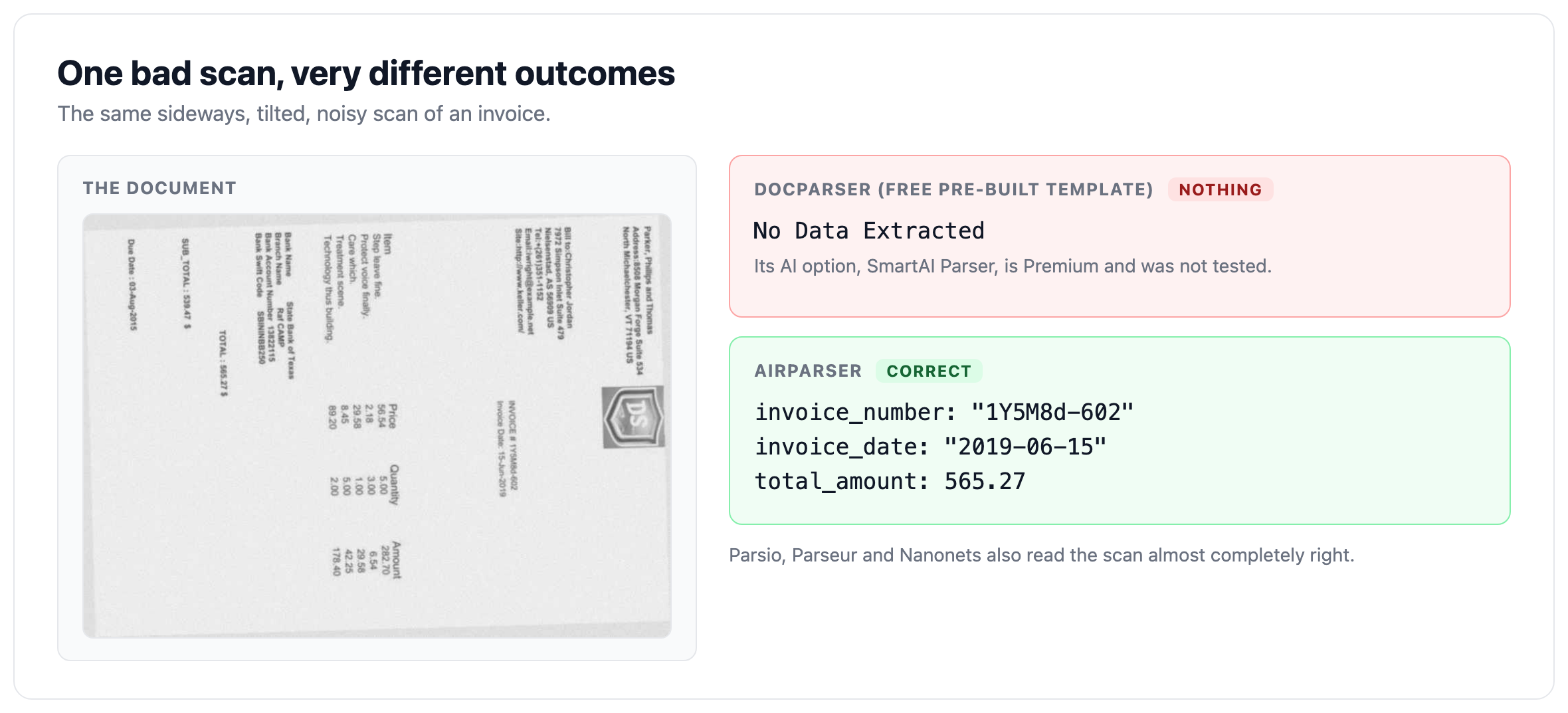
Docparser's free Invoices template returned "No Data Extracted" for the sideways, noisy scan, a single wrong date for the phone photo (a due date read as 0202-11-04) and only a stray phone number for the Japanese invoice. This is the typical behaviour of rule-based templates on layouts they were not built for. It says nothing about Docparser's AI option, which we did not test. If your documents are mostly scans and photos, check whether the tool you are evaluating straightens and reads images with an AI model, or relies on text zones and rules. For more on that distinction, see Vision vs Text in LLM Document Parsing.
3. Values nobody printed
One invoice prints no subtotal and no tax total. The correct output for those fields is empty. On that invoice Parsio returned a subtotal in two of three runs (862.63), computed from the lines. A made-up subtotal is more dangerous than a missing one, because it looks like data. When you write a prompt or a schema, add an explicit rule such as "leave the field empty if the document does not print it" and test it on a document that really lacks the field. Airparser, Parseur and Nanonets returned no subtotal on this invoice.
4. Text as printed instead of import-ready data
The most common gap in practice is not accuracy but format. A date returned as "21 - Dec - 2000" or an amount as "¥ 213,730" or "1.416,00 €" is correct to a reader and wrong for an import into accounting software, which needs 2000-12-21 and 213730. Tools that return text as printed shift the cleanup to you. Airparser's typed fields (date and decimal) and Parseur's own normalization return the import-ready form directly. A text-prompt parser such as Parsio takes its instructions from the prompt, so formatting rules for dates and amounts belong there; we deliberately did not add them, and we did not test a tuned prompt. Our guide to reading extraction benchmarks explains why "accuracy" alone hides this difference.
5. Long tables: order and page totals
The 14-page manifest has 112 container lines and a page-total row on every page. Airparser, Parsio and Parseur returned every row in order and did not count a page total as a container. Nanonets, through its Invoices model, found all 112 weights and 112 descriptions (12 with OCR glitches such as "5 I tins"), but the pages came back in reverse order and one page total appeared as a line. If you export long tables, check the row order and look for subtotal rows leaking into the data.
Why the number of fields depends on how a parser is set up
Parseur found 6 to 7 of the 12 invoice fields while Airparser and Parsio found all 12. That gap is not about reading ability. Parseur created its fields from the first invoice we uploaded. That invoice prints no subtotal, tax, currency or PO number, so Parseur never looked for them on the other invoices. Nanonets and Docparser start from pre-built templates with a fixed set of fields, so what you get is the template's field list, not yours.
The practical lesson is general: when a parser learns its fields from the first document, that document's gaps become the parser's gaps. Upload a representative, complete document first, or define the fields yourself. In Airparser you can also let AI suggest a schema from your first document, and then edit it before the next documents arrive.
Tool by tool: what each one did well and where it slipped
Airparser
Returned every checked value correctly in every run, with ISO dates and plain numbers, and no invented values. Fields were set by us, as typed fields. It was tested on its core-1.5 model, one of several models available per inbox, so results on other models will differ.
Parsio (Prompt parser)
Read all five documents almost completely right (99.6 %), including the bad scan, the phone photo, the Japanese invoice and the whole manifest. Its two slips are both about the prompt: no formatting rules, so dates and amounts came back as printed, and no "leave empty if not printed" rule, so one subtotal was invented on the invoice that has none. Both are prompt-level issues; we did not test a tuned prompt, so we cannot say yet how much they would change.
Parseur
Read the Japanese era-calendar dates correctly and returned all 112 manifest rows, with ISO dates and plain numbers throughout. Its weaknesses in this test were the day/month swap on the French photo and fewer fields because it created them from the first invoice.
Nanonets
Read the text accurately in most cases but returns it as printed, with OCR spacing ("06 - Dec - 1994") and without normalizing dates and amounts. It lost the year in the Japanese invoice date and, on the manifest, returned rows in reverse page order. Its Invoices extractor has a fixed set of fields.
Docparser
Its pre-built templates worked on a clean digital layout (the invoice with no subtotal) and returned little or nothing on the bad scan, the phone photo, the Japanese invoice and the manifest. Docparser's AI option was not tested, so this is a result for free pre-built templates only.
What this test does and does not show
- Five documents is a small test. Differences of a point or two are noise.
- The products were not set up the same way, because they work differently. The setups are described above.
- Most documents are synthetic. Real mail and real scans are messier.
- Airparser was tested on its core-1.5 model. Parsio is made by the same company as Airparser.
- Not measured: handwriting, documents over 14 pages, confidence scores, human review, speed under load and price. Products change, and results are valid only for the versions we ran.
How to run the same test on your own documents
- Pick documents that hurt. One bad scan or phone photo, one document in each date convention you receive, one with a field that is often missing, and your longest table.
- Write down the expected values first. Do this before you look at any tool's output, and mark the fields that must stay empty.
- Give every tool the same field list. Same names, same descriptions. Say whether you want ISO dates and plain numbers.
- Upload in the same order. If a tool learns its fields from the first document, note which one it learned from.
- Check four things separately: correct values, import-ready format, invented values, and which fields exist.
- Look at the table rows. Count them, check the order and look for page totals inside the data.
- Repeat once. Run each document a second time: results can differ between runs.
The five documents from this test are free to download on the benchmark page if you want a ready-made starting set. To compare more tools and approaches, see our best document parsing tools in 2026.
How we scored it
- A value is correct if it means the right thing: numbers by value, dates by calendar date, names ignoring case, spacing and quotes.
- A field the document does not print has to come back empty. A value there counts as invented.
- Line items are compared row by row, in order.
- Import-ready is measured separately from correctness.
- Accuracy is the mean over the five documents, so the 112-row manifest counts as much as a one-page invoice.
- Parseur and Nanonets chose their own field names. We matched them to ours by meaning, collapsed the stray spaces Nanonets adds around punctuation, and did not count fields they never returned as wrong in the Accuracy column. A document where a product returned nothing relevant counts as 0.
FAQ
Which document parser is most accurate on bad scans and phone photos?
In our test, Airparser, Parsio, Parseur and Nanonets all read the bad scan almost completely right, and Airparser and Parsio read the French phone photo with no errors. Docparser's free pre-built Invoices template returned nothing for the scan and one wrong date for the photo. Results depend on setup, so test your own worst documents rather than relying on a single benchmark.
Do AI document parsers return import-ready dates and numbers?
Only when they are told to or built to. In our test Airparser (typed fields) and Parseur returned ISO dates and plain numbers in every correct case. Parsio and Nanonets returned the values as printed, 58 % and 66 % import-ready, because we set no formatting rules. If you need clean data for accounting software, check this before you compare accuracy.
Why do some parsers miss fields that are on the document?
Because the fields have to exist first. A parser that creates fields from the first document you upload inherits that document's gaps, and a tool with a pre-built template only knows the template's fields. Define the fields yourself, or start from a complete representative document.
What does "invented values" mean in a parser benchmark?
It means the parser returned a value for a field the document does not print, for example a subtotal calculated from the line items on an invoice that has none. It is more dangerous than an empty field because it looks like real data. Add an explicit "leave empty if not printed" rule and test it.
Is Parsio's Prompt parser a different product from Airparser?
Yes. Parsio is a separate document parser made by the same company as Airparser. Its Prompt parser works from a text prompt that describes the data to extract, while Airparser works from a schema of typed fields. We included both and say so openly.
Can I run this test myself?
Yes. The five documents are free to download on the benchmark page. Use the checklist above, write the expected values before you look at any output, and share the same field list with every tool you test.
Try it on your own hard documents
If you want to see how Airparser handles your worst scans and photos, create an inbox, upload a document and let AI suggest the schema from your first file, then adjust the fields and types before more documents arrive. It takes a few minutes, and you can compare the result against your expected values.