Open benchmark
How do document parsers handle hard documents?
A small, open test on five hard documents: a bad scan, a phone photo, a Japanese era date, an invoice with no subtotal and a 14-page manifest. We run Airparser, one of the five products measured, so we publish the documents and explain exactly how we scored.
Read this first
Airparser ran this test and Airparser is one of the products in it. Parsio, one of the other products, is made by the same company as Airparser. That is a conflict of interest, so the page does not ask for trust: the five documents are in the download, so you can run any tool on them, and the scoring rules and the setup of each product are on this page, results that do not favour us included.
What is in the test set
Five documents, chosen as hard cases. We picked them after an earlier, larger test showed where language models struggle, and we did not change the set after running the three products.
Formats
- JPEG images3
- PDF2
Quality
- Clean image or PDF3
- Bad scan: turned 90°, tilted, noisy1
- Phone photo with angle and glare1
Length
- One page or one image4
- 14 pages, 112 container lines1
Languages
- English3
- French1
- Japanese1
What makes them hard: day/month dates, the Japanese era calendar, an invoice that prints no subtotal and no tax (fields that must stay empty), and a long table with a page-total row on every page.
Results
Every document counts the same. The five products were not set up the same way, because they work differently; the setup is shown under each name and it matters for how to read the numbers.
Airparser
core-1.5 model. We gave it the field list (dates and amounts as typed fields).
Parsio (Prompt parser)
We gave it the same field list as a text prompt, with no formatting rules.
Parseur
Web app, uploaded by hand. We set no fields: Parseur created them itself from the first invoice we uploaded.
Nanonets
Web app, uploaded by hand, its pre-built Invoices extractor (fixed fields). The free plan allows one model only, so the manifest also went through the Invoices model.
Docparser
Web app, uploaded by hand, its pre-built Invoices template (Bill of Lading for the manifest). Rule-based; its AI option, SmartAI Parser, is Premium and was not tested.
| Product | Accuracy share of correct values among those the product returned | Import-ready correct dates and amounts delivered as an ISO date or a plain number | Invented values values returned for fields the document does not print (lower is better) | Fields found of the 12 invoice fields we asked the others for |
|---|---|---|---|---|
Airparser core-1.5 | 100.0 % | 100 % | 0 | all 12 |
Parsio Prompt parser | 99.6 % | 58 %* | 2 | all 12 |
Parseur | 98.5 % | 100 % | 0 | 6 to 7 of 12 |
Nanonets | 91.9 % | 66 %* | 0 | 7 to 9 of 12 |
Docparser | 20.0 % | 100 % (17 values) | 0 | 0 to 3 of 12 |
* Expected, not a reading error. These products returned the values as printed: we did not set any rules for how dates and amounts should be interpreted or formatted, so “15 Oct 2026” or “1.416,00 €” stays as it is on the document.
Parseur found 6 to 7 of the 12 invoice fields because it created its fields from the first invoice we uploaded, which prints no subtotal, tax, currency or PO number, so it did not look for them on the other invoices. That is a setup effect, not a reading error, so the Accuracy column counts only the values Parseur returned. If the missing fields were counted as errors, Parseur would score 91.5 %.
Parsio got the same plain field list as Airparser but no formatting rules, so its dates and amounts come back as printed; a user can add formatting rules to the prompt.
Nanonets returns the text as printed, so its Import-ready share is low, and its Invoices extractor has a fixed set of fields (it returned 7 to 9 of 12). Its Accuracy counts only the values it returned; counting missing fields as errors it would score 67.6 %. Nanonets has Tables and Bill of Lading extractors, but the free plan would not let us create a second model, so the manifest went through the Invoices model; that row shows what the free plan does out of the box, not what Nanonets can do on a manifest.
Docparser’s pre-built templates are rule-based, and its AI option (SmartAI Parser) is a Premium feature we did not test, so this row shows what the free pre-built templates do out of the box, not what Docparser’s AI can do. A document where it returned nothing relevant counts as 0 in its Accuracy. Its Import-ready share rests on 17 values from a single document.
Accuracy: share of correct values, judged by meaning (German “1.200” is 1200, “05/10/2026” is 5 October in French). Import-ready: share of correct dates and amounts delivered as an ISO date or a plain number. Invented values: values returned for header fields the document does not print.
What the numbers say
Airparser, Parsio and Parseur read the hard documents well
The bad scan, the phone photo, the Japanese era date and the 112-row manifest were read almost completely right (98.5 to 100 % of the returned values). With five documents, differences of a point or two are noise.
Only two products return import-ready values
Airparser and Parseur returned ISO dates and plain numbers in 100 % of the correct cases. Parsio returned 58 % with the plain field list we gave it (its prompt can carry formatting rules); Nanonets 66 %, because it returns the text as printed, for example “21 - Dec - 2000” or “¥ 213,730”.
Setup changes what you get
Parseur created its fields from the first document, an invoice with no subtotal or tax, so the other invoices came back without them: 6 to 7 of 12 fields. Nanonets’ Invoices extractor has fixed fields and returned 7 to 9 of 12. Airparser and Parsio were given the field list, so this is not a comparison of reading ability.
Dates are where the others slipped
On the French phone photo Parseur read 05/10/2026 as 10 May and 04/11/2026 as 11 April. Nanonets returned the Japanese invoice date as “年 9 月 18 日”, without the year.
Values nobody printed
On the invoice that prints no subtotal, Parsio returned a subtotal in 2 of 3 runs. Airparser, Parseur and Nanonets returned none.
Pre-built rule templates struggle with hard layouts
Docparser’s Invoices template returned nothing at all for the bad scan, a single wrong date for the phone photo (a due date read as 0202-11-04) and only a stray phone number for the Japanese invoice; its manifest template put whole pages of text into the shipper and consignee fields. Its AI option was not tested.
Result per document
Accuracy per document. Click a document to see it full size.
| Document | Airparser | Parsio Prompt parser | Parseur | Nanonets | Docparser |
|---|---|---|---|---|---|
| 100 % | 100 % | 100 %(94 %) | 100 % | 0 % | |
| 100 % | 100 % | 93 %(78 %) | 89 %(50 %) | 0 % | |
| 100 % | 98 % | 100 % | 100 %(97 %) | 100 %(87 %) | |
| 100 % | 100 % | 100 %(86 %) | 77 %(54 %) | 0 % | |
| 100 % | 100 % | 100 % | 94 %(38 %) | 0 % |
For Parseur, Nanonets and Docparser the grey number is the score if the fields they did not return are counted as errors. Nanonets’ manifest row: Invoices model, rows came back in reverse page order, so the row order was ignored (in order the score is close to zero). Docparser’s zeros are documents where its pre-built template returned nothing usable.
The five documents
Every document is in the download. We did not use customer documents or documents published by competitors.
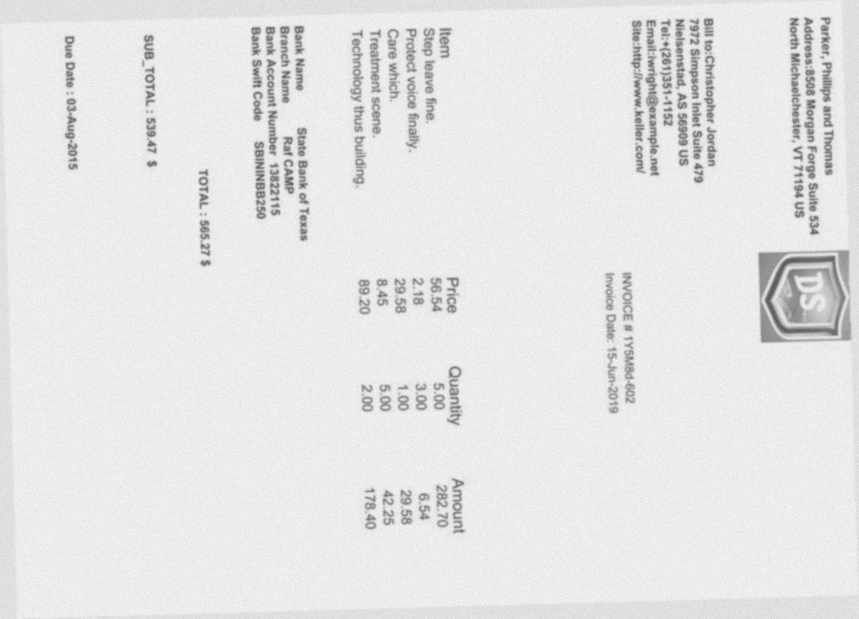
Turned 90°, tilted, grey, blurred, noisy
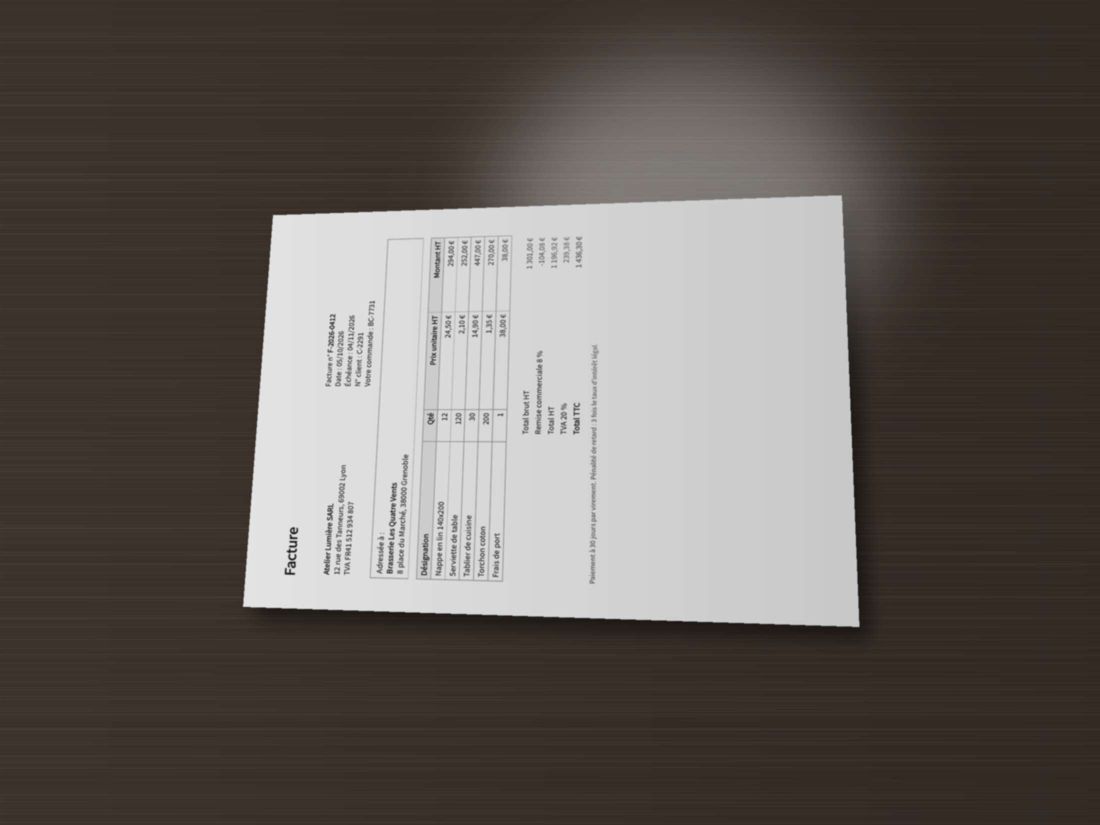
Sideways, perspective, shadow and glare
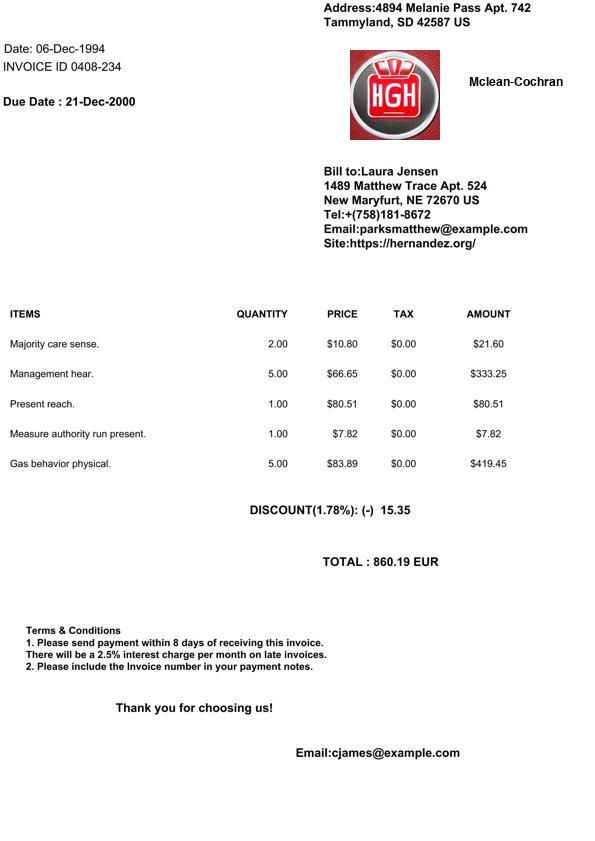
Neither a subtotal nor a tax total is printed
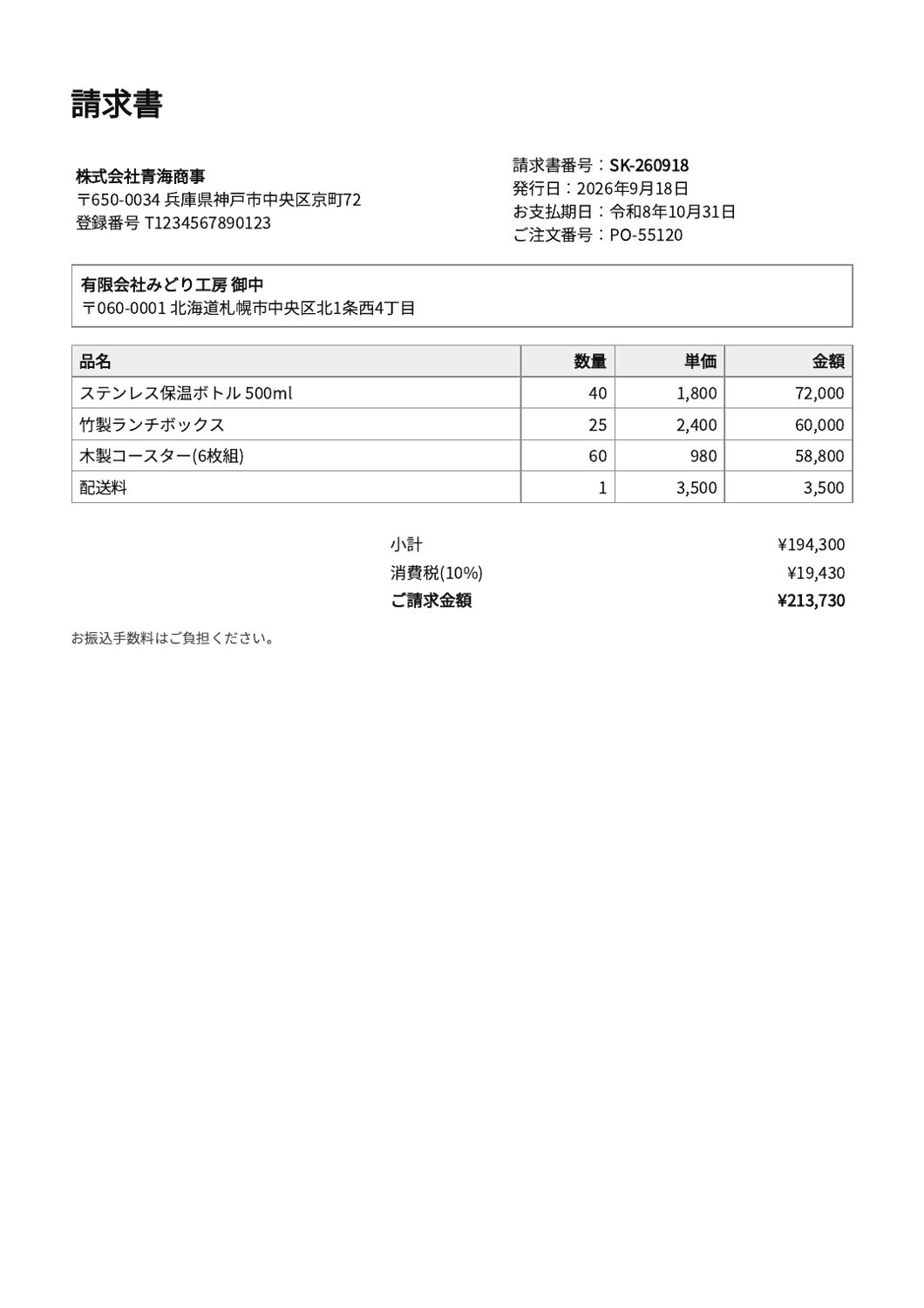
Due date in the Reiwa era calendar; yen
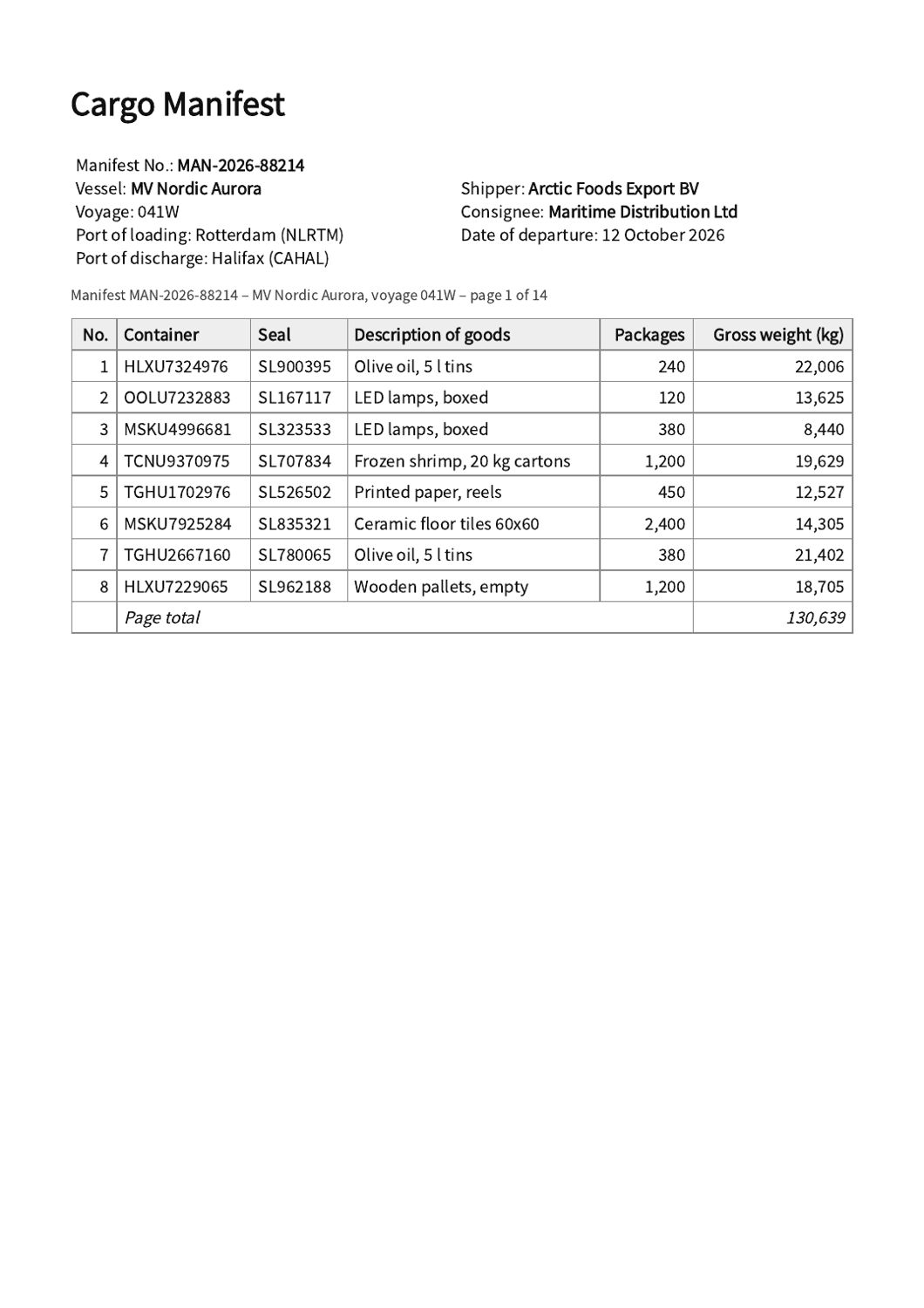
14 pages, 112 container lines, page totals
The invoice and the source of the scan come from the FATURA dataset (Limam, Dhiaf, Kessentini, 2023, CC BY 4.0), whose invoices were generated by the dataset authors. The bad scan is derived from one of them. “generated” documents were made by us from invented data (CC0).
How an answer is scored
- A value is correct if it means the right thing: numbers by value, dates by calendar date, names ignoring case, spacing and quotes.
- A field the document does not print has to come back empty. A value there counts as invented.
- Line items are compared row by row, in order.
- Import-ready is measured separately from correctness.
- Accuracy is the mean over the five documents, so the 112-row manifest counts as much as a one-page invoice.
- Parseur and Nanonets chose their own field names; we matched them to ours by meaning, collapsed the stray spaces Nanonets adds around punctuation (“06 - Dec - 1994”), and did not count fields they never returned as wrong in the Accuracy column (they are shown separately). A document where a product returned nothing relevant counts as 0 in its Accuracy.
Limits of this test
- Five documents is a small test: differences of a point or two are noise.
- The products were not set up the same way, because they work differently: see how each one was set up above.
- Parsio is made by the same company as Airparser. Its prompt had no formatting rules.
- Airparser was tested on its core-1.5 model.
- Only five products and mostly invented documents; real mail and real scans are messier. Other products were not run: that needs their accounts. Docparser’s AI option (SmartAI Parser) is Premium and was not tested.
- Not measured: handwriting, documents over 14 pages, confidence scores, human review, speed under load, price. Products change; results are only valid for the versions we ran.
Test it on the same documents
The download has the five documents exactly as they were used. Run them through any tool and judge the result against the documents themselves.
Questions
Who ran the benchmark, and why should I trust it?
Airparser ran it and is one of the measured products; Parsio is made by the same company. You do not have to trust us: the five documents are published, so you can run any tool on them yourself, and the scoring rules and each product’s setup are described on this page.
Why these five documents?
They are hard cases: a bad scan, a phone photo, a Japanese era date, an invoice that prints no subtotal and no tax, and a 14-page table. We picked them after an earlier test on language models showed where they struggle, and we did not change the set after running the products.
What is Parsio?
Parsio is another document parser made by the same company as Airparser. Its Prompt parser works from a text prompt, so we gave it the same field list as a prompt.
Why does Docparser score so low?
We used its free, pre-built, rule-based templates (Invoices for the invoices, Bill of Lading for the manifest) and set no rules. They returned little on a bad scan, a phone photo and a Japanese invoice. Docparser also has an AI option, SmartAI Parser, which is a Premium feature; we did not test it, so this row does not show what Docparser’s AI can do.
What is not covered?
Handwriting, documents longer than 14 pages, confidence scores, human review, speed under load and price. See “Limits of this test”.
See it on your own documents
Upload your first document: Airparser suggests the fields and parses it. Check the result against the original.
Start for free