PDF table parser
Extract the table columns you need from PDFs
Define your columns, extract table rows from PDFs, and send the results to spreadsheets or your automation workflow.
Free trial: 20 credits per month, no credit card required.
Try it on a sample
Try it on a two-page sample table
Download a PDF with one table that continues across two pages, upload it to your own inbox, and see how your columns come out.
- Synthetic document: the companies, the items, and all numbers are fictional.
- 2 pages and 16 rows: one table that continues on page 2, not an excerpt.
- The header row repeats on page 2, and 12 of the 16 descriptions wrap onto a second line.
- Columns: item code, description, quantity, unit price, and line total.
Rows (16 of 16)
| item_code | description | quantity | unit_price | line_total |
|---|---|---|---|---|
| WH-1001 | Steel bolt M8 x 40 mm, zinc plated (box of 100) | 12 | 14.50 | 174.00 |
| WH-1002 | Hex nut M8, zinc plated (box of 100) | 12 | 9.80 | 117.60 |
| WH-1015 | Flat washer M8, stainless (box of 200) | 8 | 11.25 | 90.00 |
| WH-1120 | Cable tie 300 mm, black (pack of 100) | 25 | 4.60 | 115.00 |
| WH-1121 | Cable tie 200 mm, natural (pack of 100) | 20 | 3.75 | 75.00 |
| WH-1210 | Work gloves, nitrile coated, size L (pair) | 40 | 2.90 | 116.00 |
| WH-1211 | Safety glasses, clear lens, anti-fog coating | 30 | 3.40 | 102.00 |
| WH-1305 | Duct tape 48 mm x 50 m, silver | 18 | 5.20 | 93.60 |
| WH-1306 | Masking tape 24 mm x 50 m | 24 | 2.35 | 56.40 |
| WH-1410 | LED work light, rechargeable, 10 W, with magnetic base | 6 | 27.90 | 167.40 |
| WH-1411 | Extension cord 5 m, 3 x 1.5 mm2, indoor use | 10 | 12.60 | 126.00 |
| WH-1502 | Pallet wrap film 500 mm x 300 m, clear | 15 | 8.40 | 126.00 |
| WH-1503 | Packing tape 48 mm x 66 m, brown | 36 | 1.95 | 70.20 |
| WH-1620 | Storage bin 600 x 400 x 220 mm, stackable, with lid | 14 | 9.15 | 128.10 |
| WH-1621 | Label roll 100 x 150 mm, direct thermal (roll of 500) | 10 | 13.70 | 137.00 |
| WH-1700 | Hand truck, folding, 70 kg capacity | 2 | 64.00 | 128.00 |
Result: what Airparser returned for this sample PDF, shown unedited; the download is the Excel export of the same run. Field names and formats come from the schema used for this run; yours follow the schema you define. This is one example run, not an accuracy benchmark.
Set up an inbox with columns like these and upload the sample PDF, or go straight to your own document.
Parse your first tableWhat to expect
Your columns, not a copy of the layout
Airparser extracts the values of the columns you name and returns them as rows. It does not reproduce how the table looks.
What Airparser extracts
- The columns you define, as named fields such as item code, description, or quantity.
- One record per table row: rows in Excel or CSV, or an array in JSON.
- Values in the type you choose: text, number, or date.
What it does not do
- Preserve the table's visual formatting: fonts, colors, borders, or column widths.
- Copy the whole page: only the columns you define are extracted.
- Keep anything you do not define: headings, logos, and footers are left out unless you add fields for them.
Need a quick one-off conversion of a digital PDF instead? The free PDF to Excel tool needs no signup. Free PDF to Excel converter
In the app
A real extraction in the app
This screenshot shows a handwritten employment application in Airparser. The table of previous jobs is extracted as rows with named columns, next to the original document.
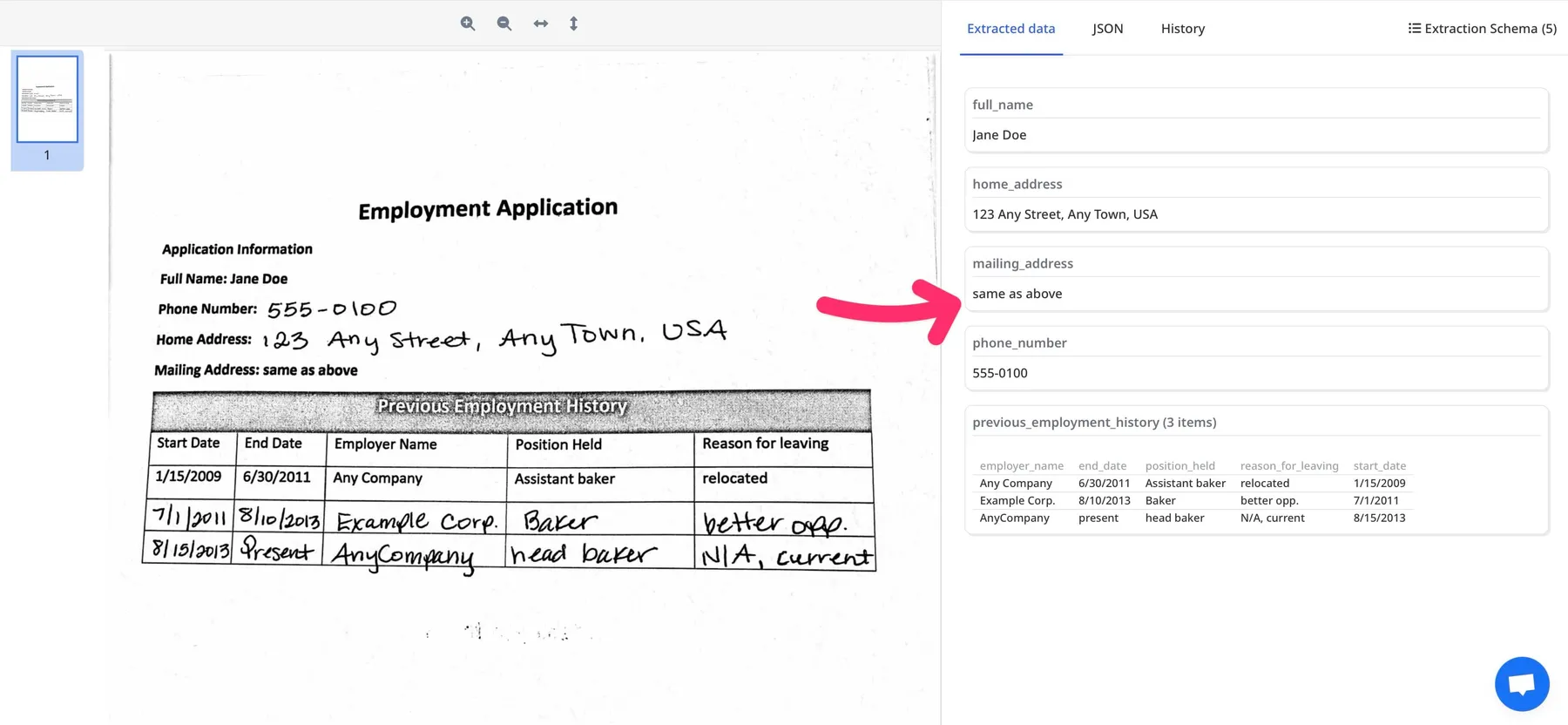
From PDF to CSV
How to parse a PDF table with Airparser
1. Create an inbox
Name it and click Create. The inbox is where your PDFs arrive and where your column definitions live.
2. Upload and parse
Drop a PDF into the inbox, or forward it by email to the inbox address. Airparser can set up the fields and parse it automatically, or you can define your own fields for more control.
3. Export or send it anywhere
Check the extracted rows and amounts against the original before exporting. Configure an integration before sending data automatically. Export XLSX, CSV, or JSON, or send the data anywhere: Google Sheets, webhooks, the API, Zapier, Make, or n8n.
Quality
Check the results on your own tables
Tables vary by layout and scan quality, so we don't publish a single accuracy figure. These are the places worth checking first:
Scan quality
When possible, use the original digital PDF.
Repeated headers
When a table continues on the next page, its header row often repeats. Check that the repeated header did not become a data row.
Wrapped cells
A long cell that continues on a second line belongs to one row. Check that no wrapped line turned into a separate row.
Numbers and separators
Confirm that decimal and thousands separators, currencies, and signs were read correctly.
Totals reconcile
If the table has a total, the rows should add up to it. If they do not, a row is missing or misread.
If a layout gives you trouble, tell us at [email protected].
Credits and data handling
How credits work
Airparser uses credits: 1 credit per PDF page, so a two-page PDF uses 2 credits. The free trial includes 20 credits per month, no credit card required.
See pricingYour documents and your data
Documents you send are not used to train AI models. You can delete any document at any time, and retention can be set from 1 to 180 days (the free trial keeps documents for 30 days).
PDF Table Parsing Use Cases
Financial Reports
Extract financial data from balance sheets, income statements, and financial reports automatically.
Invoice Processing
Extract line items and product tables from invoices for accounting and expense management.
Data Migration
Extract table data from PDF reports for migration to databases and data warehouses.
Research & Analysis
Extract data tables from research papers and reports for analysis and comparison.
System Integration
Extract table data and integrate with Excel, Google Sheets, and database systems automatically.
Data Analytics
Extract structured table data for analytics, reporting, and business intelligence.
What our customers say
What Airparser users say
The Right Product for quick integration of smart extraction of data from PDF.
Marty N.
CEO, Information Technology
on Capterra
The simplicity of creating the data capture fields. I also like the webhook feature.
Allen M.
Owner Realtor, Real Estate
on Capterra
The AI schema creator made it quite literally a 60 second job.
NKNick K.
Family Owner, Retail
on Capterra
Frequently Asked Questions
How do I get only the columns I need?
Define the columns as fields in your inbox, or upload a document and let Airparser propose them. Only the fields you define are extracted, and each table row becomes one row in the result.
Does it keep the table's formatting?
No. Airparser returns the values of your columns as structured data, not a copy of the table's visual layout. For a quick one-off conversion of a digital PDF, the free PDF to Excel tool is an alternative.
Can it handle a table that continues on the next page?
The sample on this page is one table that continues on page 2, with a repeated header row and wrapped descriptions. Results depend on the layout, so check the rows on your own documents, and compare the totals when the table has them.
What file types can I upload?
PDFs, including scanned PDFs, and images (JPG, PNG, BMP). Results on scans and photos depend on image quality, so a digital PDF usually gives the cleanest input.
What export formats are available?
XLSX, CSV, and JSON, from the app. For ongoing exports, use the Google Sheets integration, webhooks, the API, or an automation platform such as Zapier, Make, or n8n.
How are credits used?
One credit is used per PDF page, so a two-page PDF uses 2 credits. The free trial includes 20 credits per month, no credit card required.
See pricingHow secure is my data?
Your documents are not used to train AI models. You can delete any document at any time, and retention can be set from 1 to 180 days (the free trial keeps documents for 30 days). Data is encrypted in transit and at rest.
Read more in the Trust Center