AI Invoice Parser
Automatically extract invoice numbers, amounts, line items, and vendor details using AI.
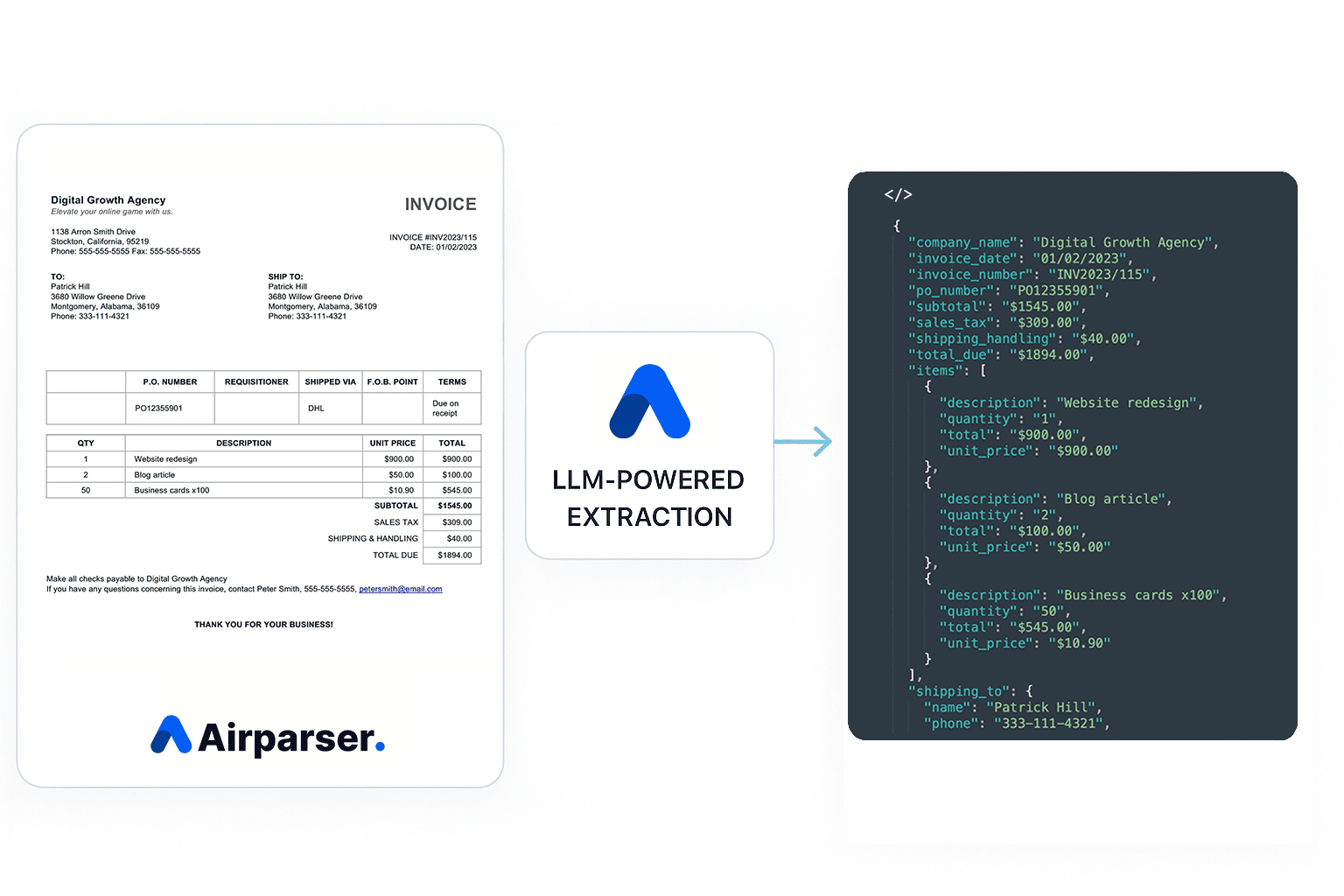
From Raw Invoice to Structured Data
TL;DR
Airparser uses AI to read your invoices and extract structured data into JSON, webhooks, Google Sheets, or any downstream system — without templates, regex, or vendor-specific rules. Works on invoices from any country, in any language.
What is an AI Invoice Parser?
An AI-powered invoice parser is an intelligent tool that automatically extracts structured data from invoices using advanced machine learning and natural language processing. Unlike traditional OCR tools that only convert text to digital format, our AI understands the context, meaning, and relationships within your invoices.
Airparser's custom AI technology uses LLM and vision models to process invoices like a human would, automatically identifying and extracting key information such as:
- Invoice numbers and reference codes
- Vendor information and contact details
- Line items, quantities, and unit prices
- Tax amounts and payment terms
- Due dates and payment instructions
- Handwritten notes and signatures
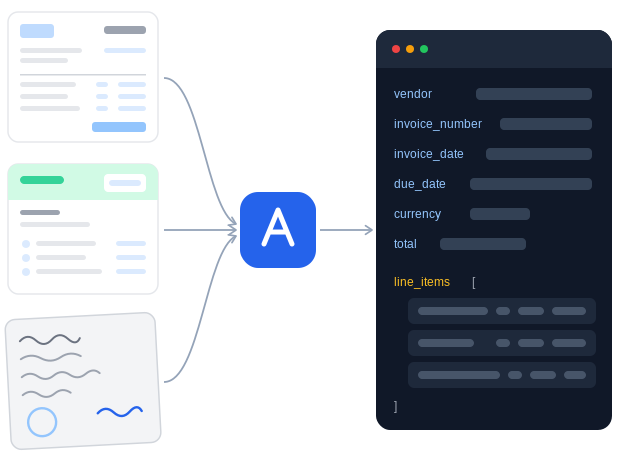
Transform Your Invoice Processing
Process Any Invoice Format
Our AI handles all invoice types and formats automatically - no templates or setup required.
PDF Invoices
Digital invoices, scanned documents, and print-ready PDFs
Email Attachments
Invoices sent via email or forwarded to your parser
Image Files
Photos, screenshots, and scanned images of invoices
Handwritten
Handwritten invoices and notes with AI recognition
Every field your finance team needs
Define exactly which fields to extract — or start from Airparser's invoice template and customize from there.
Vendor name
e.g. Acme Corp
Invoice number
e.g. INV-2024-0042
Invoice date
e.g. 2024-03-15
Due date
e.g. 2024-04-14
Bill-to / Ship-to
e.g. buyer name and address
Currency
e.g. USD, EUR, GBP
Subtotal
e.g. 1,200.00
Tax / VAT amount
e.g. 240.00 (20%)
Total amount due
e.g. 1,440.00
Payment terms
e.g. Net 30
Line items (array)
desc · qty · unit price · total
PO number
e.g. PO-9981
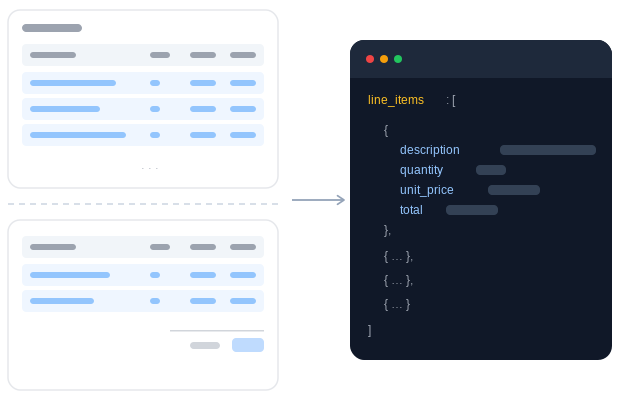
Line-item extraction — including tables
Most invoice parsers extract header fields (vendor, total, date) but fail on line items. Airparser extracts full line-item tables as structured arrays — including description, quantity, unit price, and line total — even from scanned PDFs.
Output: line_items: [{ description, qty, unit_price, total }]
Sample extracted data:
{
  "invoice_number": "INV2023/115",
  "invoice_date": "01/02/2023",
  "due_date": "01/03/2023",
  "vendor": {
    "name": "Digital Growth Agency",
    "address": "1138 Arron Smith Drive, Stockton, CA",
    "phone": "555-555-5555"
  },
  "total_amount": "$1894.00",
  "line_items": [
    {
      "description": "Website redesign",
      "quantity": "1",
      "unit_price": "$900.00",
      "total": "$900.00"
    }
  ],
  "payment_terms": "Net 30"
}
Try it on sample invoices
Three invoices in three languages, and the results to expect
Download an invoice, upload it to your own inbox and compare your result with the one below. The invoices are invented, so every name and number is fictional, and each one has a feature that often trips up simple parsers.
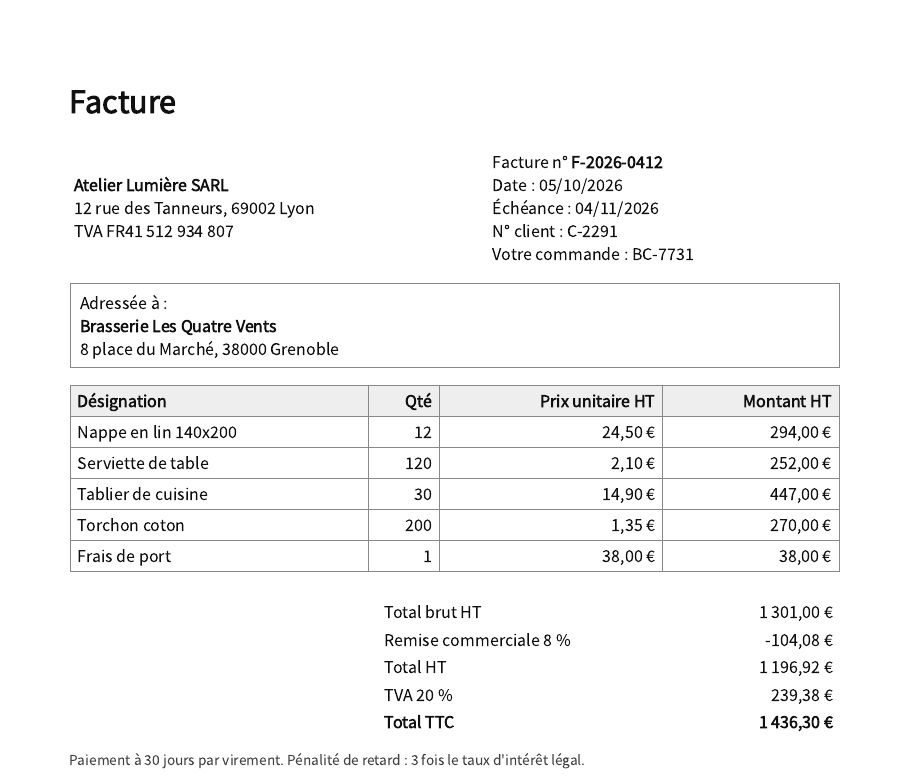
French invoice
Dates written day/month/year, a commercial discount, and three totals that look alike (gross, net of the discount, with VAT).
Invoice fields
- buyer_name
- Brasserie Les Quatre Vents
- currency
- EUR
- customer_number
- C-2291
- discount_amount
- 104.08
- due_date
- 2026-11-04
- invoice_date
- 2026-10-05
- invoice_number
- F-2026-0412
- po_number
- BC-7731
- seller_name
- Atelier Lumière SARL
- subtotal
- 1196.92
- tax_amount
- 239.38
- total_amount
- 1436.3
Line items (5)
| description | quantity | unit_price | line_total |
|---|---|---|---|
| Nappe en lin 140x200 | 12 | 24.5 | 294 |
| Serviette de table | 120 | 2.1 | 252 |
| Tablier de cuisine | 30 | 14.9 | 447 |
| Torchon coton | 200 | 1.35 | 270 |
| Frais de port | 1 | 38 | 38 |
German invoice
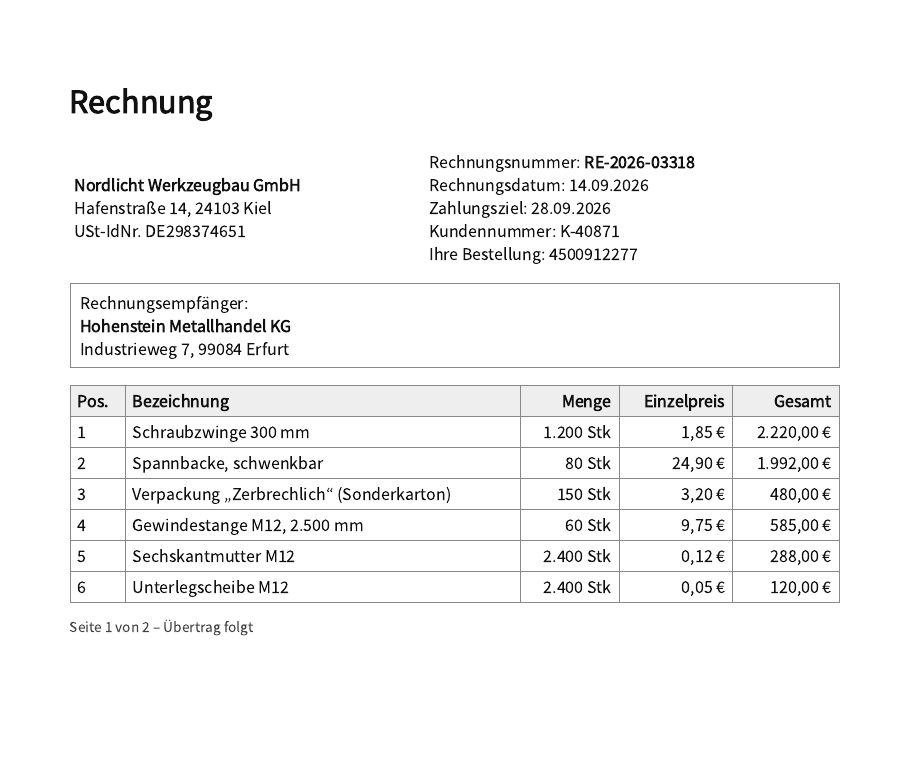
Two pages with nine line items, thousands separators (1.200), quotation marks inside a description, and a cash-discount percentage with no amount.
Invoice fields
- buyer_name
- Hohenstein Metallhandel KG
- currency
- EUR
- customer_number
- K-40871
- discount_amount
- –
- due_date
- 2026-09-28
- invoice_date
- 2026-09-14
- invoice_number
- RE-2026-03318
- po_number
- 4500912277
- seller_name
- Nordlicht Werkzeugbau GmbH
- subtotal
- 7030
- tax_amount
- 1335.7
- total_amount
- 8365.7
Line items (9)
| description | quantity | unit_price | line_total |
|---|---|---|---|
| Schraubzwinge 300 mm | 1200 | 1.85 | 2220 |
| Spannbacke, schwenkbar | 80 | 24.9 | 1992 |
| Verpackung „Zerbrechlich“ (Sonderkarton) | 150 | 3.2 | 480 |
| Gewindestange M12, 2.500 mm | 60 | 9.75 | 585 |
| Sechskantmutter M12 | 2400 | 0.12 | 288 |
| Unterlegscheibe M12 | 2400 | 0.05 | 120 |
| Werkzeugkoffer, leer | 25 | 38.4 | 960 |
| Sicherungsring Ø20 | 3000 | 0.08 | 240 |
| Fracht und Versicherung | 1 | 145 | 145 |
Japanese invoice
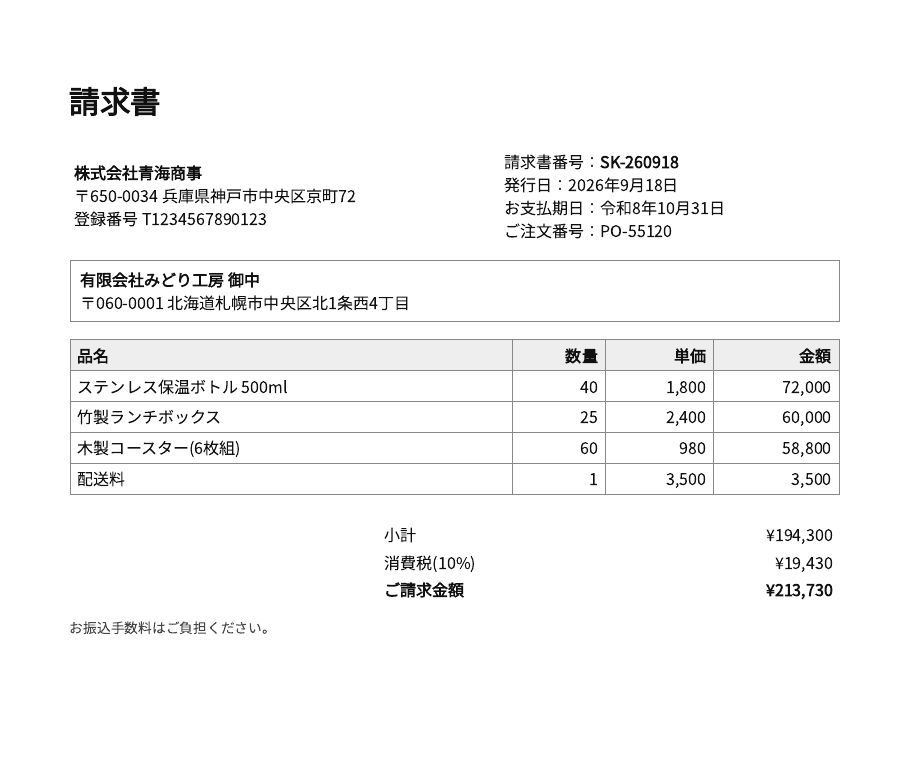
A due date written in the Reiwa era calendar, yen amounts, and a buyer name with the honorific 御中.
Invoice fields
- buyer_name
- 有限会社みどり工房
- currency
- JPY
- customer_number
- –
- discount_amount
- –
- due_date
- 2026-10-31
- invoice_date
- 2026-09-18
- invoice_number
- SK-260918
- po_number
- PO-55120
- seller_name
- 株式会社青海商事
- subtotal
- 194300
- tax_amount
- 19430
- total_amount
- 213730
Line items (4)
| description | quantity | unit_price | line_total |
|---|---|---|---|
| ステンレス保温ボトル 500ml | 40 | 1800 | 72000 |
| 竹製ランチボックス | 25 | 2400 | 60000 |
| 木製コースター(6枚組) | 60 | 980 | 58800 |
| 配送料 | 1 | 3500 | 3500 |
Result: what Airparser returned for each invoice through its API, shown unedited. Field names and formats (ISO dates, plain numbers) come from the schema used for this run; yours follow the schema you define. Check extracted values before you use them.
Set up an inbox with fields like these and upload a sample invoice, or go straight to your own.
Parse your first invoiceHow AI Invoice Parsing Works
1. Upload Invoices
Upload PDFs, forward emails, or use our API. Process individual invoices or batch upload thousands.
2. AI Analysis
Our AI analyzes the invoice content, understands context, and extracts structured data using LLM technology.
3. Get Clean Data
Access structured data via API, export to Excel/CSV, or integrate with your accounting software automatically.





Invoice Processing Use Cases
Accounts Payable
Automate invoice processing, approval workflows, and payment scheduling for faster vendor payments.
Expense Management
Process employee expense reports, receipts, and vendor invoices for accurate expense tracking.
Financial Reporting
Generate accurate financial reports with automated data extraction and categorization.
Vendor Management
Maintain vendor databases with automatically extracted contact and payment information.
Compliance & Audit
Ensure compliance with automated data extraction and audit trail creation.
System Integration
Seamlessly integrate with QuickBooks, Xero, SAP, and other accounting systems.


What our customers say
See why teams switch to Airparser
The Right Product for quick integration of smart extraction of data from PDF.
Marty N.
CEO, Information Technology
on Capterra
Airparser Makes Email Parsing Effortless With LLM-Powered Engine
Emily C.
Content Director
on Capterra
It extracted scanned PDF info better than all the others.
DPDevon P.
Marketing Manager
on Capterra
Frequently Asked Questions
How accurate is the invoice parsing?
On typical, clearly written invoices we aim for 99% accuracy, but it depends on how clear the source is and how well the fields are described. Every parsed result can be opened and checked in the app, you can add post-processing checks, and you can hold results for human review before they are sent on.
What invoice formats do you support?
We support all invoice formats - PDF, scanned documents, email attachments, images, and even handwritten invoices. Our AI adapts to any structure automatically.
Can I extract data from handwritten invoices?
Yes! Our advanced AI can read handwritten text, signatures, and notes with high accuracy using LLM-powered recognition technology.
How does it integrate with my accounting software?
Airparser integrates with QuickBooks, Xero, Sage, and other accounting systems via API, webhooks, or through Zapier and Make.com for 7000+ app connections.
Is there a free trial available?
Yes. You can sign up without a card and try Airparser on your own emails and documents with the free monthly credits. Upgrade only when you need more pages per month.
How secure is my invoice data?
Data is encrypted in transit and at rest, and you choose how long documents are kept (retention settings), after which they are deleted. Your documents are not used to train AI models, and you can delete them at any time. Airparser is GDPR compliant.
Learn more about our security measuresCan I process invoices in different languages?
Absolutely! Our AI supports 60+ languages and can process invoices in any language automatically, understanding context and extracting data accurately.
Can Airparser extract line items from invoices?
Yes. Airparser extracts full line-item tables as structured arrays, including description, quantity, unit price, and line total. This works even on scanned PDFs and multi-page invoices.
Does it work with invoices from different countries and formats?
Yes. Because Airparser uses AI rather than templates, it adapts to any invoice layout automatically — regardless of vendor, country, or language. You don't need to configure separate rules per vendor.
How do I get extracted data into my accounting software?
You can connect Airparser to your accounting system via Zapier, Make, webhooks, or the REST API. Integrations are available for QuickBooks, Xero, and other tools via automation platforms.
Can I automate the whole invoice workflow — not just extraction?
Yes. Airparser handles the extraction step. You can connect extracted data to Zapier, Make, or n8n to trigger the rest of your workflow — approval routing, payment creation, Slack notifications, and more.
What's the difference between Airparser and traditional OCR?
Unlike traditional OCR that only extracts text, our AI understands context and meaning. This means better accuracy, no templates needed, and the ability to handle complex layouts and handwritten text.
Is there an invoice parser API?
Yes. Airparser has a REST API: upload an invoice (PDF, scan or image) and get the extracted fields back as JSON, or let Airparser push the result to your server with a webhook as soon as parsing finishes. The API is plain HTTP, so you can call it from any language. If you prefer no code, the same inbox works with Zapier, Make and n8n.
How does AI invoice data extraction work?
You list the fields you want, such as invoice number, dates, vendor, totals and line items, or let Airparser suggest them from a sample invoice. Each uploaded invoice is read by an AI model that returns those fields as structured data, and you can open the original document next to the result to check it. Then export to Excel, CSV or JSON, or send the data on automatically.
Can I extract plain text from an invoice, not just fields?
Airparser's main job is returning the fields you define. For scanned or photographed invoices it can read the page as an image (Vision engine), and for digital PDFs it can use the text inside the file (Text engine). If you only need the raw text or a searchable PDF, our free OCR tools do that without an account.
Can Airparser parse commercial invoices and other trade documents?
Yes, as long as the data is printed on the page. Add the fields you need to the extraction schema, for example exporter, consignee, incoterms, HS code, country of origin and total value, and Airparser looks for them on each document. Test it on a few of your own commercial invoices with the free trial before you rely on it.
Need to integrate invoice parsing into your app?
See the Document Extraction API — how it works, endpoints, and code examples.
