Bank statement parser
Extract bank statement transactions into structured data
Define the fields you need, extract transactions from PDF statements, and export the results to Excel, CSV, or your existing workflow.
Free trial: 20 credits per month, no credit card required.
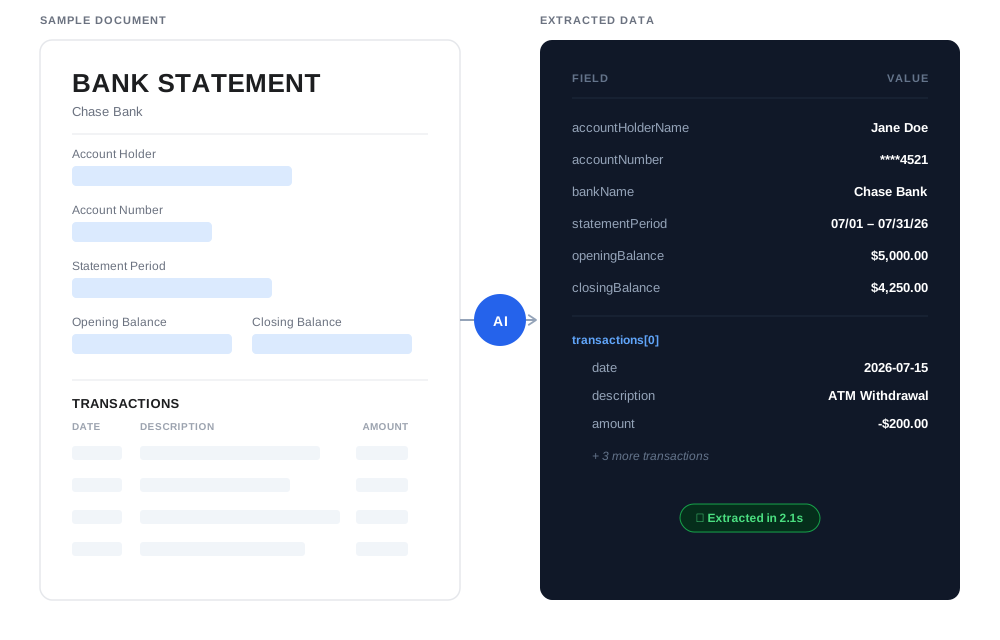
Try it on a sample
A sample statement and the result to expect
Download a two-page PDF statement, upload it to your own inbox, and compare your result with the one below. The statement is complete: every transaction of the period is in the table, and the balances add up (opening balance + deposits − withdrawals = closing balance).
- Synthetic statement: the bank, the account holder, and all numbers are fictional.
- 2 pages and 14 transactions: the full period, not an excerpt.
- Separate withdrawal and deposit columns, plus a running balance.
- The table header repeats on page 2, and some descriptions wrap onto a second line.
Account fields
- account_holder_name
- Alex Sample
- account_number_masked
- ****4821
- account_type
- Checking
- bank_name
- Lakeside Sample Bank
- closing_balance
- $8,932.34
- currency
- USD
- opening_balance
- $4,250.00
- statement_period_end
- 08/31/2026
- statement_period_start
- 08/01/2026
- total_deposits
- $6,210.87
- total_withdrawals
- $1,528.53
Transactions (14 of 14)
| transaction_date | transaction_description | withdrawal_amount | deposit_amount | transaction_balance |
|---|---|---|---|---|
| 08/03/2026 | CARD PURCHASE - GREENLEAF GROCERY #114 | 86.42 | 4,163.58 | |
| 08/04/2026 | ACH DEPOSIT - BRIGHTWAVE PAYROLL | 2,480.00 | 6,643.58 | |
| 08/05/2026 | CHECK #1042 | 750.00 | 5,893.58 | |
| 08/07/2026 | ONLINE TRANSFER TO SAVINGS ****7788 | 300.00 | 5,593.58 | |
| 08/10/2026 | CARD PURCHASE - CITY TRANSIT AUTHORITY | 42.00 | 5,551.58 | |
| 08/12/2026 | AUTOPAY - PINE VALLEY POWER | 118.37 | 5,433.21 | |
| 08/14/2026 | WIRE TRANSFER IN - ORCHARD & SONS LLC INVOICE 2291 CONSULTING | 1,250.00 | 6,683.21 | |
| 08/17/2026 | CARD PURCHASE - RIVERSIDE PHARMACY | 23.15 | 6,660.06 | |
| 08/19/2026 | ATM WITHDRAWAL - 210 ELM ST | 100.00 | 6,560.06 | |
| 08/21/2026 | MONTHLY MAINTENANCE FEE | 12.00 | 6,548.06 | |
| 08/24/2026 | ACH DEPOSIT - BRIGHTWAVE PAYROLL | 2,480.00 | 9,028.06 | |
| 08/26/2026 | AUTOPAY - NORTHLINK INTERNET | 64.99 | 8,963.07 | |
| 08/28/2026 | CARD PURCHASE - HARBOR BOOKS | 31.60 | 8,931.47 | |
| 08/31/2026 | INTEREST PAID | 0.87 | 8,932.34 |
Result: what Airparser returned for this sample statement, shown unedited; the download is the Excel export of the same run. Field names and formats come from the schema used for this run; yours follow the schema you define. This is one example run, not an accuracy benchmark.
Set up an inbox with fields like these and upload the sample PDF, or go straight to your own statement.
Parse your first statementFrom PDF to CSV
How to parse a bank statement with Airparser
Upload or email a bank statement PDF. Define fields for account details and transactions. Review and edit extracted values, then export to Excel, CSV or JSON, or connect Google Sheets. Reuse your inbox and schema for future statements.
Illustrative workflow using sample data. Review extracted values before export.
1. Create an inbox
Name it and click Create. The inbox is where statements arrive and where your field definitions live. You can leave the parser engine on its default, Vision.
2. Upload and parse
Drop a PDF into the inbox, or forward it by email to the inbox address. Airparser can set up the fields and parse it automatically, or you can define your own fields for more control.
3. Export or send it anywhere
Export XLSX, CSV, or JSON, or send the data anywhere: Google Sheets, webhooks, the API, Zapier, Make, or n8n.
In the app
See it in the app
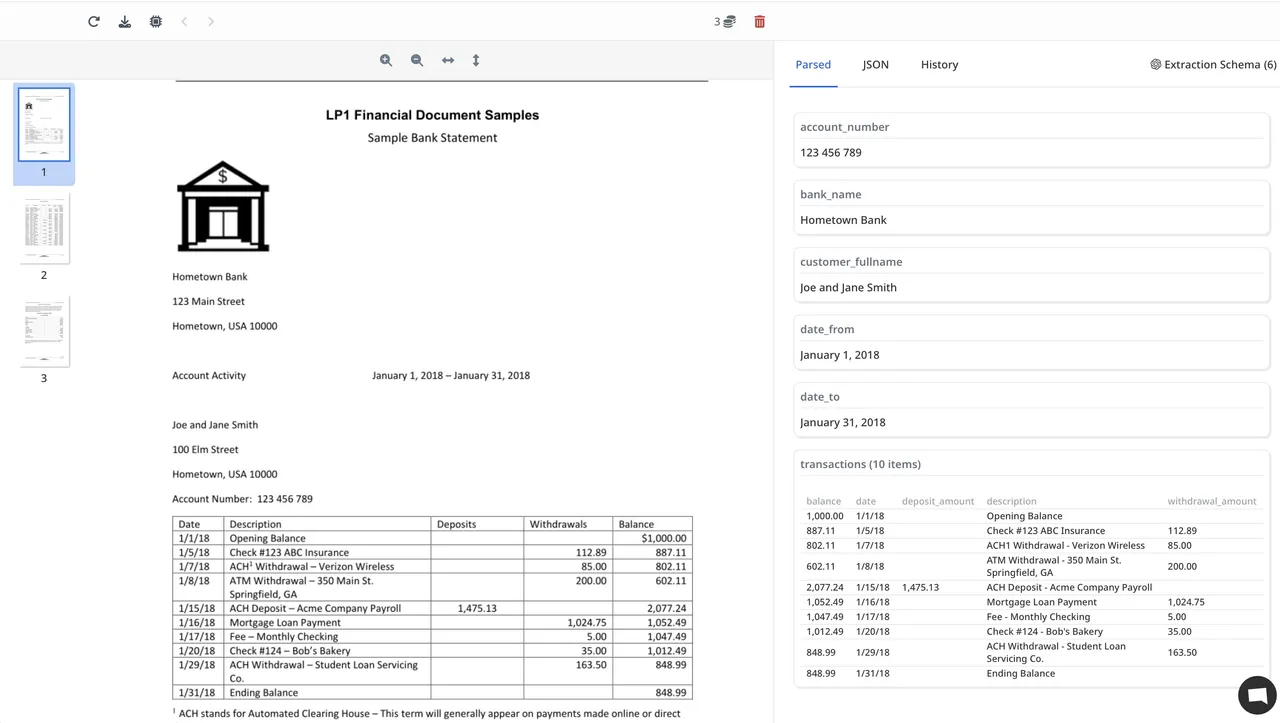
Statements in PDF are hard to reuse: copying tables into Excel can break the column alignment. In Airparser the original document stays next to the parsed fields, so you can check each value against the source.
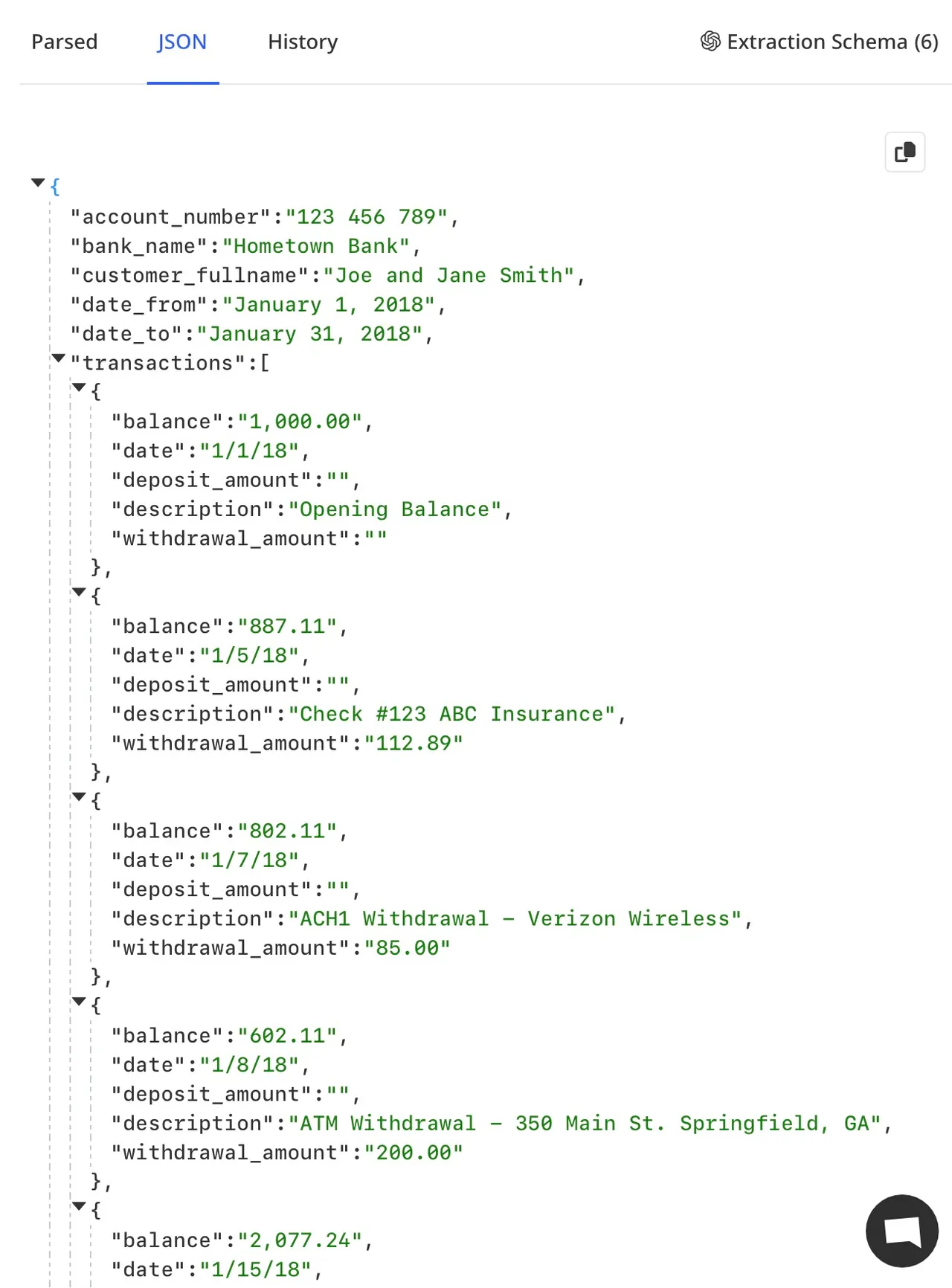
These screenshots show a public sample statement processed in Airparser, with the transactions extracted as a table and available as JSON.
- Review values side by side with the original
- Export the transactions to Excel or CSV
- Send rows to Google Sheets
- Push results to your own systems with webhooks or the API
The statement next to the parsed fields
The same result as JSON
Vision engine for complex layouts
The default parser engine in a new inbox is Vision, which we recommend for statements with complex layouts or multi-column tables. You can switch to the Text engine in the inbox's advanced settings.
Every statement is different, so check the results on your own documents before relying on them. See the quality notes below.
Exports are available as XLSX, CSV, or JSON. For a recurring flow, connect Google Sheets, a webhook, or an automation platform such as Zapier, Make, or n8n.
Learn more about converting PDF bank statements to Excel or CSV →
Regular use
Set it up once, then keep the statements coming
Fields belong to the inbox, so every new statement is parsed against the same definition. What happens next depends on where the data needs to go.
Built into Airparser
- Upload PDFs in the app, or forward them by email to the inbox address.
- Export XLSX, CSV, or JSON on demand.
- Google Sheets integration: each transaction row becomes a spreadsheet row.
- Webhooks: send the parsed data to your server or another platform.
- REST API for your own code.
Through Zapier, Make, n8n, or your own code
- Route parsed data to other apps, such as accounting tools, CRMs, or databases, using the connectors of these platforms.
- The destination side is configured in the platform, not in Airparser, so test the workflow with the sample statement before running real ones.
Quality
Check the results on your own statements
Statements vary by bank, layout, and scan quality, so we don't publish a single accuracy figure. These are the places worth checking first:
Scan quality
Blurry, skewed, or low-resolution scans are harder to read. When you can, start from the PDF your bank generated rather than a photo or scan.
Wrapped descriptions
A long description that continues on a second line belongs to one transaction. Check that no wrapped line turned into a separate row.
Amounts and signs
Confirm that withdrawals and deposits land in the right column and that decimal and thousands separators were read correctly.
Page breaks
Check the rows around page breaks, and make sure a repeated table header did not create an extra row.
Balances reconcile
Opening balance + deposits − withdrawals should equal the closing balance. If it does not, a row is missing or misread.
If a layout gives you trouble, tell us at [email protected].
Credits and data handling
How credits work
Airparser uses credits: 1 credit per PDF page, so a two-page statement uses 2 credits. The free trial includes 20 credits per month, no credit card required.
See pricingYour statements and your data
Documents you send are not used to train AI models. You can delete any document at any time, and retention can be set from 1 to 180 days (the free trial keeps documents for 30 days).
What you can extract
Fields you define
Account information
Account number, bank name, account holder, statement period
Transaction details
Date, description, amount, reference or check number
Withdrawals & deposits
Separate withdrawal and deposit amounts, or a single signed amount, depending on how your statement is laid out
Balances
Opening balance, closing balance, running balance
Your own fields
Add any field your workflow needs and choose its type, such as text, number, date, or table
Result for the sample statement (first 3 of 14 transactions):
{
  "account_holder_name": "Alex Sample",
  "account_number_masked": "****4821",
  "account_type": "Checking",
  "bank_name": "Lakeside Sample Bank",
  "closing_balance": "$8,932.34",
  "currency": "USD",
  "opening_balance": "$4,250.00",
  "statement_period_end": "08/31/2026",
  "statement_period_start": "08/01/2026",
  "total_deposits": "$6,210.87",
  "total_withdrawals": "$1,528.53",
  "transactions": [
    {
      "deposit_amount": "",
      "transaction_balance": "4,163.58",
      "transaction_date": "08/03/2026",
      "transaction_description": "CARD PURCHASE - GREENLEAF GROCERY #114",
      "withdrawal_amount": "86.42"
    },
    {
      "deposit_amount": "2,480.00",
      "transaction_balance": "6,643.58",
      "transaction_date": "08/04/2026",
      "transaction_description": "ACH DEPOSIT - BRIGHTWAVE PAYROLL",
      "withdrawal_amount": ""
    },
    {
      "deposit_amount": "",
      "transaction_balance": "5,893.58",
      "transaction_date": "08/05/2026",
      "transaction_description": "CHECK #1042",
      "withdrawal_amount": "750.00"
    }
  ]
}
Overview
What is a bank statement parser?
A bank statement parser reads statements, usually PDFs, and turns the account details and transaction lines into structured data you can sort, reconcile, and import. Instead of retyping or copy-pasting tables into Excel, you get rows and columns.
Airparser uses LLM and vision models to read the document, and you decide which fields to extract. Typical fields for a bank statement:
- Account numbers and bank details
- Statement period
- Transaction dates and descriptions
- Withdrawal and deposit amounts
- Opening, closing, and running balances
- Check numbers and reference codes
- Customer name and address
- List of transactions with full details
What our customers say
What Airparser users say
The Right Product for quick integration of smart extraction of data from PDF.
Marty N.
CEO, Information Technology
on Capterra
The simplicity of creating the data capture fields. I also like the webhook feature.
Allen M.
Owner Realtor, Real Estate
on Capterra
The AI schema creator made it quite literally a 60 second job.
NKNick K.
Family Owner, Retail
on Capterra
Bank Statement Parsing Use Cases
Accounting & Bookkeeping
Turn statement lines into rows you can reconcile against your books.
Financial Analysis
Extract transaction data for cash flow analysis, expense tracking, and financial reporting.
Loan Applications
Extract balances and transactions from applicants' statements for credit review.
Compliance & Audit
Extract transaction data for compliance reporting and audit purposes.
System Integration
Send parsed rows onward: Google Sheets, webhooks, the API, or Zapier, Make, and n8n.
KYC & Verification
Extract account information and transaction history for KYC processes and identity verification.
Frequently Asked Questions
How accurate is the bank statement parsing?
Accuracy depends on the statement's layout and scan quality, so we don't quote a single number. Try it on your own statements (the free trial includes 20 credits per month), then check the rows: opening balance + deposits − withdrawals should equal the closing balance, and you can correct any value with Edit data.
What file types can I upload?
PDFs, including scanned PDFs, and images (JPG, PNG, BMP). Results on scans and photos depend on image quality, so a PDF generated by your bank usually gives the cleanest input.
Can I convert PDF bank statements to Excel or CSV?
Yes. Create an inbox, define the fields you want (account details and a table for the transactions), upload the statement, and export the parsed data as XLSX, CSV, or JSON. You can also send transaction rows to Google Sheets, or onward through webhooks, the API, or Zapier, Make, and n8n.
How are credits used for bank statements?
One credit is used per PDF page, so a two-page statement uses 2 credits. The free trial includes 20 credits per month, no credit card required.
See pricingHow secure is my bank statement data?
Your documents are not used to train AI models. You can delete any document at any time, and retention can be set from 1 to 180 days (the free trial keeps documents for 30 days). Data is encrypted in transit and at rest.
Read more in the Trust CenterWhat export formats are available?
XLSX, CSV, and JSON, from the app. For ongoing exports, use the Google Sheets integration, webhooks, the API, or an automation platform such as Zapier, Make, or n8n.