AI Bank Statement Parser
Automatically extract transactions, balances, account details, and financial data from bank statements with 99% accuracy. Convert PDF bank statements to Excel or CSV with ease.
What is an AI Bank Statement Parser?
An AI-powered bank statement parser is an intelligent tool that automatically extracts structured financial data from bank statements using advanced machine learning and natural language processing. Unlike manual data entry, our AI understands financial terminology, transaction patterns, and account structures.
Airparser's custom AI technology uses LLM and vision models to process bank statements like a financial analyst would, automatically identifying and extracting key information such as:
- Account numbers and bank details
- Transaction dates and descriptions
- Debit and credit amounts
- Account balances and running totals
- Transaction categories and types
- Check numbers and reference codes
- Customer name and address
- List of transactions with full details
Convert PDF Bank Statements to Excel or CSV
Bank statements in PDF format can be tricky to work with. The data is often stuck in a non-editable format, making it difficult to extract, analyze, or manage. If you've ever tried to copy and paste data from a PDF into Excel, you know how frustrating it can be — the data doesn't always align properly, and formatting can get messy.
With Airparser, you can easily convert your PDF bank statements into Excel or CSV format in just a few steps. Having your bank statement data in Excel or CSV format makes it easy to:
- Analyze financial information
- Track expenses
- Integrate data with accounting software
- Use the data in automations
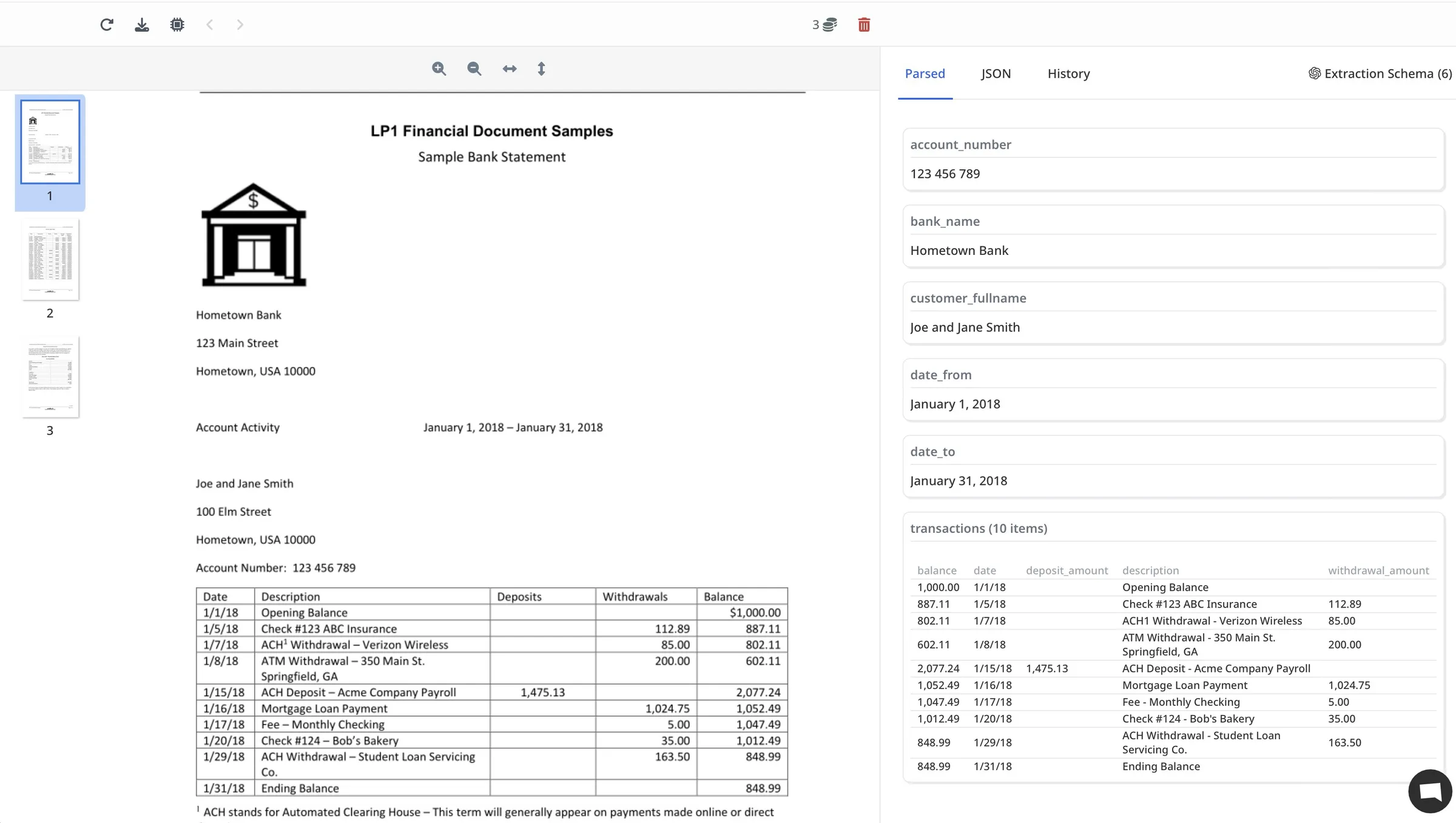
Vision LLM Engine for Complex Layouts
Airparser uses advanced AI models to automate document parsing. For bank statements with complex layouts, tables, multiple sections, or various fonts, we recommend using the Vision LLM Engine. This engine is designed to handle the intricate formatting typically found in financial documents.
The Vision LLM Engine ensures that complex bank statement layouts are properly parsed, extracting all transaction details accurately even from multi-column tables and varied formatting styles.
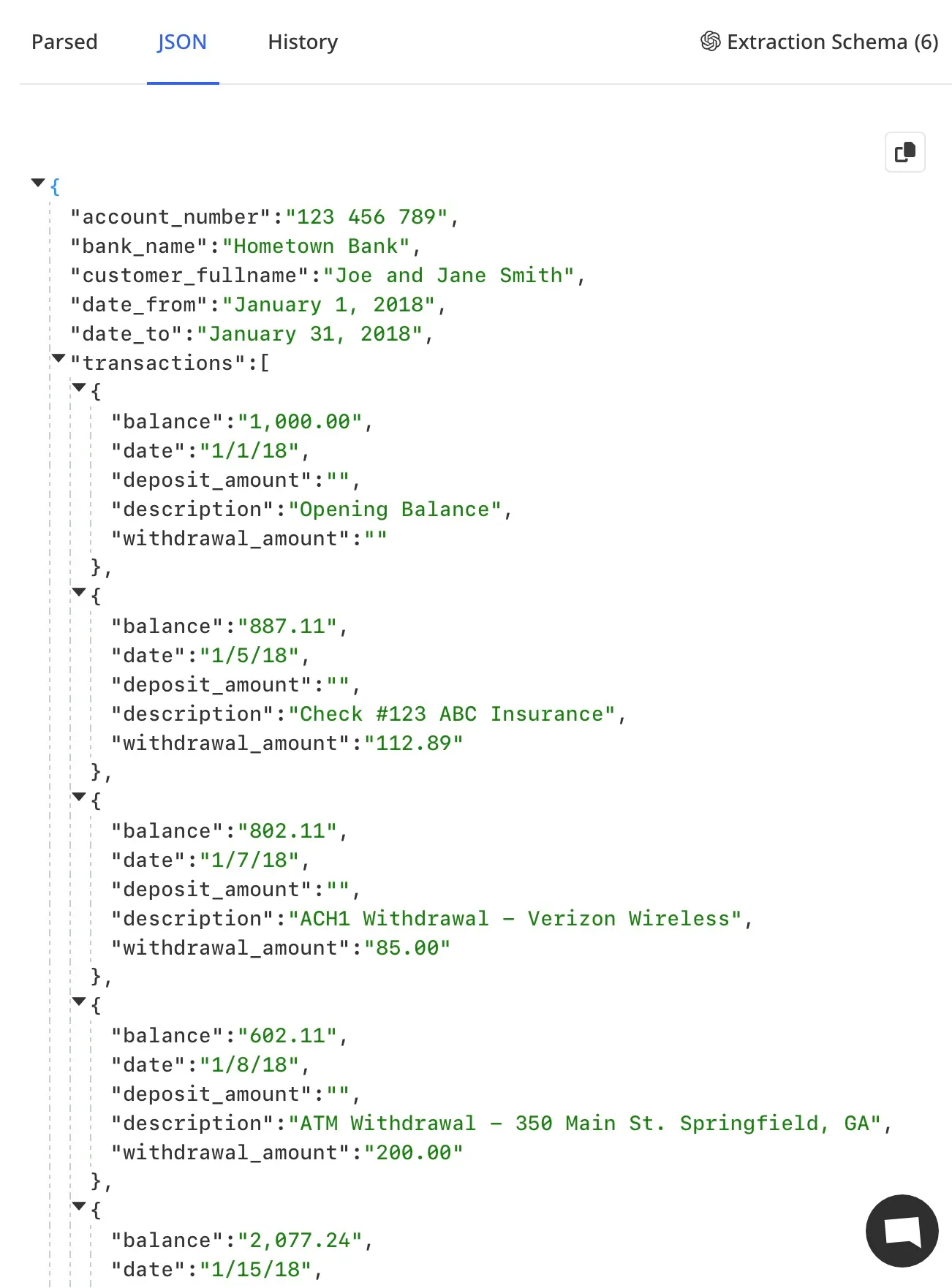
After extraction, Airparser supports exporting to Excel, CSV, or JSON formats. You can also set up real-time exports to Google Sheets, accounting software (via API), Zapier/Make automations, or webhooks. This flexibility allows you to integrate Airparser directly into your workflow.
Learn more about converting PDF bank statements to Excel or CSV →
Transform Your Bank Statement Processing
Complete Bank Statement Data Extraction
Extract Every Transaction
Account Information
Account number, bank name, account type, statement period
Transaction Details
Date, description, amount, transaction type, reference number
Debits & Credits
Debit amounts, credit amounts, transaction direction
Balances
Opening balance, closing balance, running balance
Categorization
Transaction categories, merchant names, payment types
Sample Extracted Data:
{
  "account": {
    "account_number": "****1234",
    "bank_name": "Chase Bank",
    "account_type": "Checking",
    "statement_period": "2024-01-01 to 2024-01-31"
  },
  "opening_balance": "$5,000.00",
  "closing_balance": "$4,250.00",
  "transactions": [
    {
      "date": "2024-01-15",
      "description": "ATM Withdrawal",
      "amount": "-$200.00",
      "type": "Debit",
      "balance": "$4,800.00"
    },
    {
      "date": "2024-01-18",
      "description": "Direct Deposit - Salary",
      "amount": "+$3,000.00",
      "type": "Credit",
      "balance": "$7,800.00"
    },
    {
      "date": "2024-01-20",
      "description": "Electric Bill Payment",
      "amount": "-$150.00",
      "type": "Debit",
      "balance": "$7,650.00"
    }
  ]
}
How AI Bank Statement Parsing Works
1. Upload Statements
Upload PDF bank statements, forward emails, or use our API. Process individual statements or batch upload hundreds.
2. AI Analysis
Our AI analyzes the statement content, understands financial context, and extracts structured transaction data using LLM technology.
3. Get Clean Data
Access structured transaction data via API, export to accounting software, or integrate with financial systems automatically.
Bank Statement Parsing Use Cases
Accounting & Bookkeeping
Automate bank reconciliation and transaction entry into accounting systems for accurate financial records.
Financial Analysis
Extract transaction data for cash flow analysis, expense tracking, and financial reporting.
Loan Applications
Process bank statements for loan applications and credit assessments automatically.
Compliance & Audit
Extract transaction data for compliance reporting and audit purposes.
System Integration
Seamlessly integrate bank statement data with QuickBooks, Xero, and other accounting systems. Export to Excel, CSV, Google Sheets, or via API/webhooks.
KYC & Verification
Extract account information and transaction history for KYC processes and identity verification.
Frequently Asked Questions
How accurate is the bank statement parsing?
Our AI-powered bank statement parser achieves 99% accuracy on most statement formats. The system continuously learns and improves, handling even complex, multi-page statements with human-like understanding.
What bank statement formats do you support?
We support all bank statement formats - PDF, scanned documents, email attachments, images, and statements from any bank. Our AI adapts to any structure automatically.
Can I convert PDF bank statements to Excel or CSV?
Yes! Airparser makes it easy to convert PDF bank statements to Excel or CSV format. Simply upload your PDF bank statements, define what data you want to extract (account number, transactions, balances, etc.), and export the parsed data to Excel, CSV, or JSON. You can also set up automatic exports to Google Sheets or integrate with accounting software via API or webhooks.
How secure is my bank statement data?
We take security seriously. All data is encrypted in transit and at rest. We're GDPR compliant and never store your statements longer than necessary for processing. We never use your data for training or improving our models. Your data remains yours at all times, and you can manually remove it or set up automatic data removal schedules.
Learn more about our security measuresWhat export formats are available?
Airparser supports exporting parsed bank statement data to Excel, CSV, and JSON formats. You can also set up real-time exports to Google Sheets, accounting software (via API), Zapier/Make automations, or webhooks. This allows you to integrate bank statement data directly into your existing workflows and systems.
