AI Email Parser for Lead, Order and Invoice Emails
Upload your first email: Airparser suggests the fields and parses it. Every new email then flows into Google Sheets, your CRM or your API.
Email text + attachments • Sheets, CRM, webhooks, API • 7,000+ apps • GDPR compliant
See industry-specific use cases
What is an Email Parser?
An email parser reads incoming emails and turns the details inside them into structured data. Instead of copying names, order numbers or amounts from each email into a spreadsheet or CRM by hand, you describe the fields once and every new email is filled in for you.
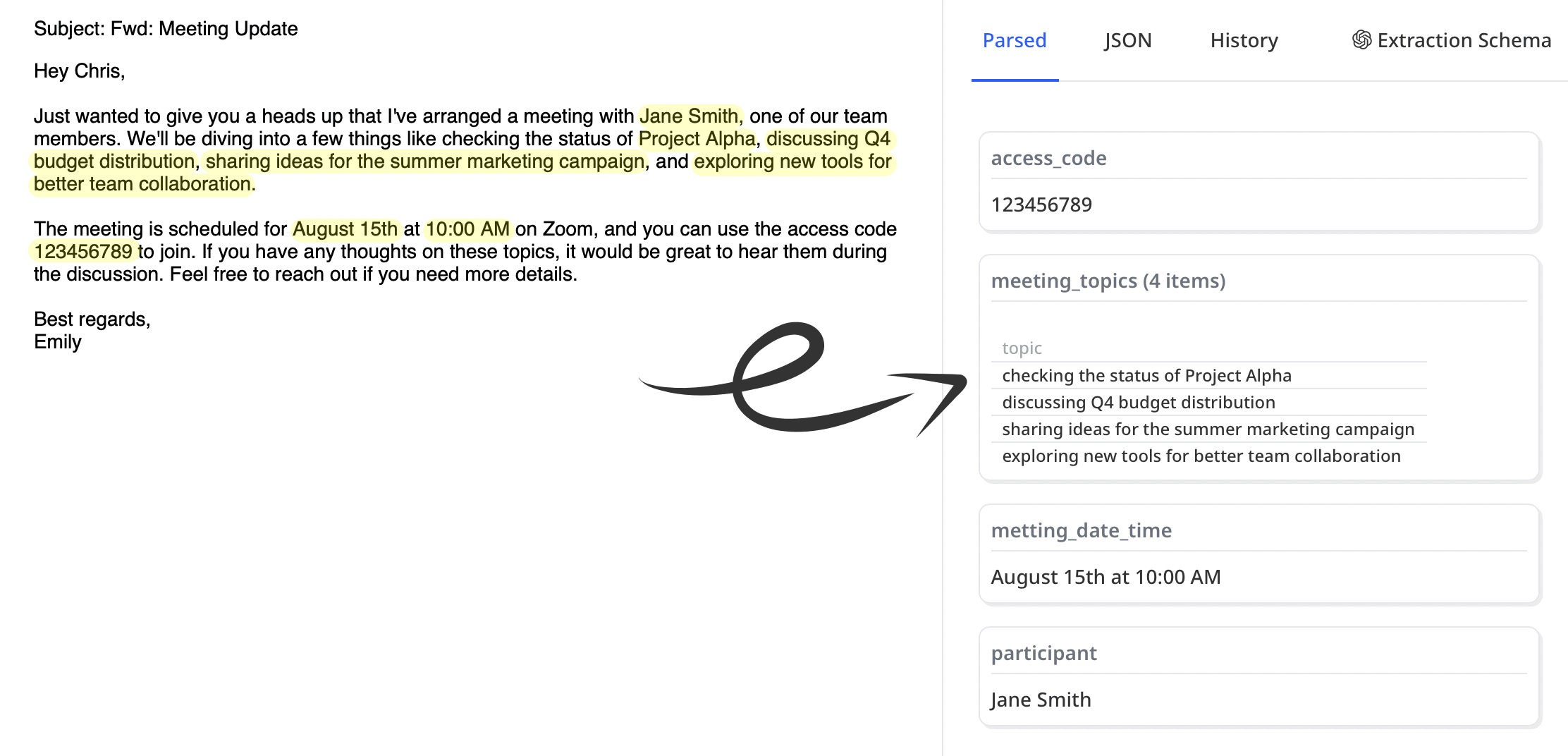
Airparser uses advanced AI and natural language processing to understand emails like a human would, automatically identifying and extracting key information such as:
- Order details and shipping information
- Customer contact information
- Tables and structured data
- Invoice and payment details
- Dates and tracking numbers
- Data from email attachments
What you get
Templates to build
Upload one email and the fields are detected and parsed automatically. Adjust the schema when you want more control.
Accuracy Rate
AI-powered extraction with human-like understanding
Apps to send data to
Google Sheets, CRMs and more through Zapier, Make, n8n, webhooks or the API.
See Email Parsing in Action 👇
Industry-Specific Solutions
Tailored email parsing solutions for your industry's unique needs and workflows.
E-commerce & Retail
What We Extract:
- Order numbers and customer details
- Product SKUs, quantities, and prices
- Shipping addresses and tracking info
- Return requests and refund details
Integration Examples:
- Shopify order management
- WooCommerce inventory updates
- QuickBooks invoice creation
- ShipStation label generation
Real Estate
What We Extract:
- Property inquiries and requirements
- Client contact information
- Viewing requests and availability
- Offer details and negotiations
Integration Examples:
- CRM lead management
- Calendar scheduling
- Property database updates
- Follow-up automation
Automotive & Dealerships
What We Extract:
- Buyer name, phone and email
- Vehicle of interest, stock number and price
- Lead source and enquiry date
- Customer message and trade-in details
Integration Examples:
- Dealer CRM via Zapier or Make
- ADF/XML lead export
- Google Sheets lead log
- Slack alert for each new lead
Extract Any Email Data
From simple contact details to complex order information, automatically process any type of email data.
Sales & Orders
Extract order numbers, items, quantities, prices, and delivery details from confirmation emails.
Order confirmation parserLead Information
Capture contact details, inquiry specifics, and lead source data from portal and web-form notification emails.
Lead capture parserDocuments & Invoices
Process attachments to extract invoice data, signatures, and important dates.
Invoice parserShipping Updates
Track shipment statuses, delivery dates, and carrier information from shipping notification emails.
Support Tickets
Extract ticket numbers, customer issues, and priority levels from support system emails.
Travel Itineraries & Bookings
Extract flight times, hotel details, and booking numbers from travel emails.
Why AI-Powered Parsing is Superior
Traditional Parsers
- Require complex regex patterns and templates
- Break when email formats change
- Can't handle natural language variations
- Limited to structured, predictable emails
- Require technical expertise to maintain
Airparser AI
- Understands context like a human reader
- Adapts to any email format automatically
- Handles natural language and variations
- Works with unstructured, human-written emails
- No technical setup required
Advanced Features
Table Extraction
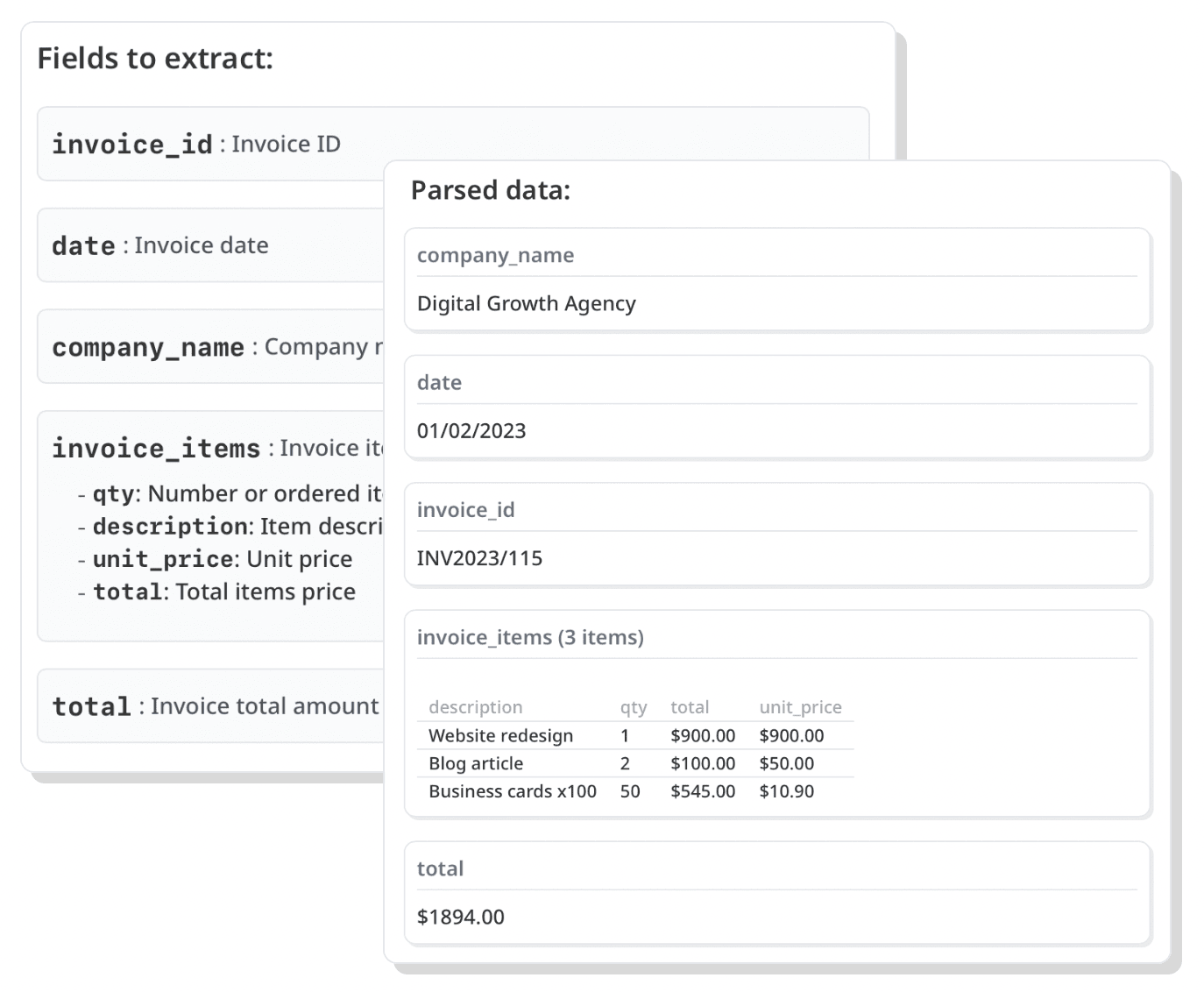
Automatically extract tables from emails and attachments, preserving structure and formatting.
Data Normalization
Post-processing ensures consistent data format, dates, currencies, and units across all extracted information.
Attachment Parsing
Process PDFs, Word documents, and other attachments to extract comprehensive data from your emails.
Export & Integration Options
Export to Excel
Automatically send parsed data to Excel spreadsheets for easy analysis and reporting.
Google Sheets Integration
Direct integration with Google Sheets for real-time data updates and collaboration.
CRM Connection
Seamlessly connect with popular CRM systems to update customer records automatically.
How it works
1. Upload Your First Email
Upload a sample email, or forward one to your dedicated Airparser inbox. The fields to extract are detected and the email is parsed automatically.
2. Fine-tune the Fields
If something is off, edit the schema: rename, add or remove fields and describe each one for more control and precision.
3. Get Clean Data
Access structured data via API, export to spreadsheets, or integrate with 7000+ apps.
Detailed Setup Process
Create Your Parser
Sign up for free and create a new email parser. Give it a name - no complex configuration needed.
Upload Your First Email
Upload a sample email or forward one to your parser's unique address. Airparser proposes the fields to extract and parses the email automatically.
Fine-tune the Schema
If a field is missing or wrong, edit the schema: rename fields, add new ones and describe exactly what to extract. Every new email then follows it.
Export or Integrate
Download your data as CSV/Excel, send to Google Sheets, or integrate with 7000+ apps via Zapier and Make.com.
Why Choose Airparser
Intelligent Processing
Unlike traditional template and rule-based parsers, our AI understands email context and meaning, handling any format or layout change automatically.
- One inbox can take emails from many different senders, with no template per sender
- Handle format changes without needing to create templates or update configurations
- Extract data from email bodies and attachments
Powerful Integrations
Connect parsed data with your existing tools and automate your entire workflow.
- RESTful API for direct access
- Export to Google Sheets, Excel, CSV, and more
- Connect with 7000+ apps via Zapier & Make.com

What Our Customers Say
"Easiest AI powered data extraction tool!"

"The best part of Airparser is its ability to easily extract data from multiple types of content — even emails AND email attachments."

"A great AI-powered parser for those old mailing lists."

Frequently Asked Questions
Can I send parsed emails to Google Sheets or a CRM?
Yes. Parsed data can go to Google Sheets, Excel or CSV, to a webhook or the API, and to CRMs and thousands of other apps through Zapier, Make and n8n. Each new email adds a row or triggers an action as soon as it is parsed.
Can it parse lead notifications from property, car and other marketplaces?
Yes. These notification emails always carry the same kind of details (name, phone, email, the item asked about, the message), so you list those fields once. The same inbox can take emails from several portals, and a change in a portal's layout does not break it.
See the lead capture parserWhat happens when the sender changes the email layout?
Nothing needs to be rebuilt. Template-based parsers are tied to the exact layout of each sender, so a redesign breaks them. Airparser reads the email for meaning, so it keeps finding the fields you listed.
Is Airparser free to use?
Yes. You can sign up without a card and try Airparser on your own emails with the free monthly credits. Upgrade only when you need more pages per month.
How accurate is the email parsing, and can I check the results?
On typical, clearly written emails we aim for 99% accuracy, but it depends on how clear the email is and how well the fields are described. Every parsed email can be opened and checked in the app, you can add post-processing checks, and you can hold results for human review before they are sent on. We also test model changes on a fixed set of real documents before they reach your inbox.
Can I process historical emails?
Yes. Forward existing emails to your parser address or upload them through the API. Each page processed uses credits from your plan.
What email formats are supported?
Airparser works with any email format - HTML, plain text, rich text, and even emails with complex layouts. Our AI adapts to any structure automatically.
How does Airparser compare to Mailparser?
Unlike traditional template and rule-based solutions, Airparser uses advanced AI to understand email context naturally. This means no complex setup, no templates to maintain, and better accuracy even when email formats change.
Learn moreHow does Airparser compare to Zapier's Email Parser?
Airparser offers more advanced features like AI-powered parsing, attachment processing, and data normalization. While Zapier's parser requires manual templates, Airparser automatically understands and extracts data from any email format.
Can I extract data from email attachments?
Yes! Airparser can process PDFs, Word documents, Excel files, and other attachments. The AI extracts data from both the email body and any attached files automatically.
How secure is my email data?
Data is encrypted in transit and at rest, and you choose how long documents are kept (retention settings), after which they are deleted. Your documents are not used to train AI models, and you can delete them at any time. Airparser is GDPR compliant.
Do you offer an API?
Yes! Airparser provides a robust RESTful API that allows you to programmatically access parsed data, manage parsing rules, and integrate with your existing systems.
Learn moreHow long does setup take?
Most people are running within minutes: create an inbox, upload a sample email so Airparser can suggest the fields and parse it, adjust the fields if needed, and start forwarding emails. No technical configuration is required.