Turn PDFs into structured data for your workflow.
List the fields you need, upload a PDF, and get the values back as structured data.
Export to Excel, CSV, or JSON, or send the data to Google Sheets, webhooks, the API, Zapier, Make, or n8n.
Not sure where to start? Pick your kind of document below.
Choose your document
Start from the route that matches your PDFs.
Upload or email a PDF to your Airparser inbox. Define the fields and table columns you need, review the extracted values, then export to Excel, CSV or JSON, or connect Google Sheets. Reuse your schema for new documents.
Illustrative workflow using sample data. Review extracted values before export.
What is an LLM PDF Parser?
An LLM-powered PDF parser is an advanced AI tool that extracts structured data from PDF documents using Large Language Models (LLMs) and GPT technology. Unlike traditional OCR tools that only convert text, our custom AI understands the context, meaning, and relationships within your documents.
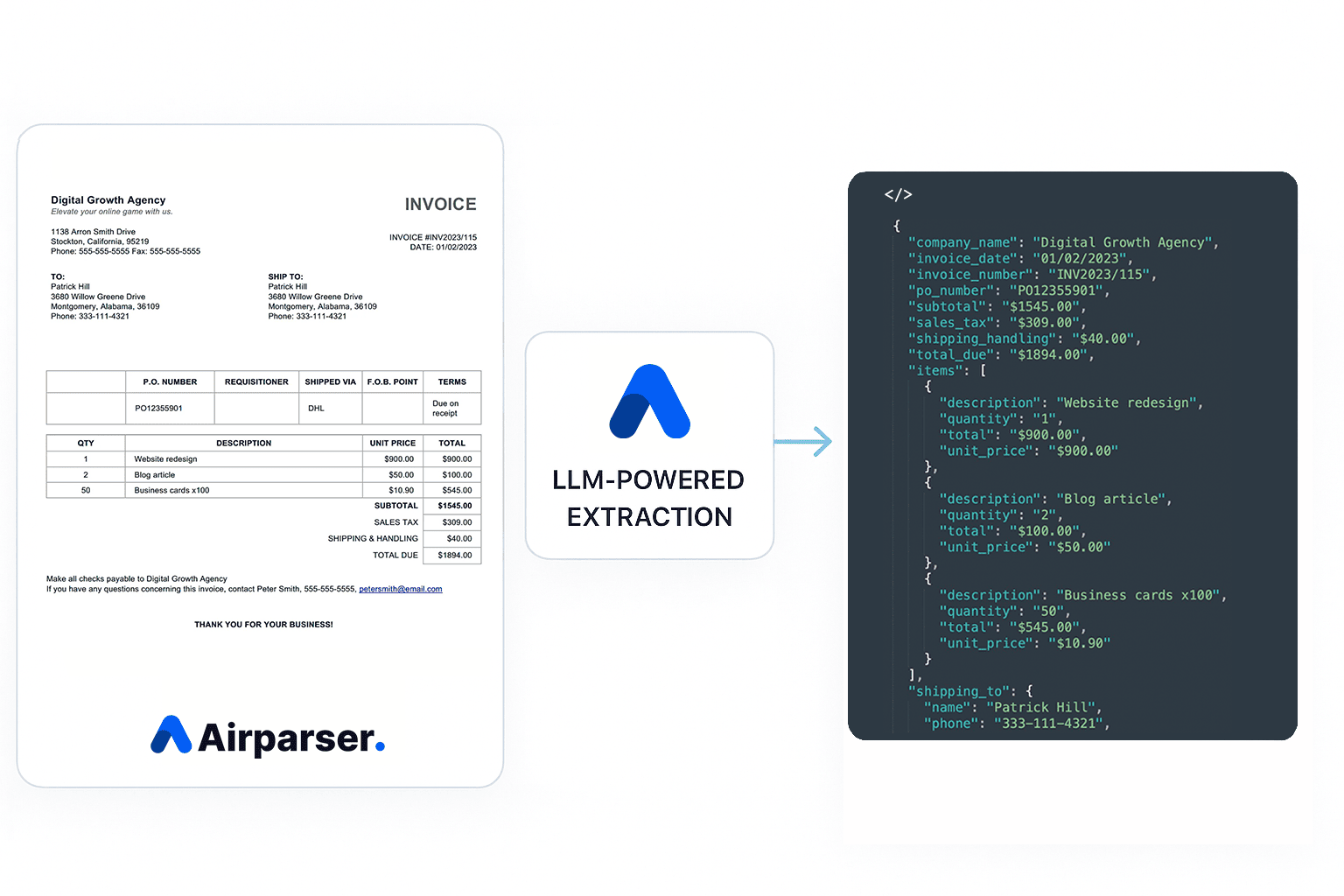
Airparser's custom LLM technology uses advanced AI and natural language processing to understand PDFs like a human would, automatically identifying and extracting key information such as:
- Invoice data and payment information
- Contract terms and legal clauses
- Tables and structured data
- Form fields and applications
- Handwritten text and signatures
- Financial statements and reports
Text or structured data
Document text
- Text extracted from a PDF.
Table Extraction
- Extract the table columns you define as rows and export them to Excel, CSV, or JSON. The visual layout of the table is not reproduced.
- Airparser extracts the fields you specified and organizes them into structured data. Open the document to check the result next to the original.
Industry-Specific PDF Solutions
Tailored LLM-powered PDF parsing solutions for your industry's unique document processing needs.
Invoice & Receipt Processing
Extract structured data from invoices and receipts automatically. Invoice parser
What Our LLM Extracts:
- Invoice numbers, amounts, and payment terms
- Vendor information and contact details
- Line items, quantities, and unit prices
- Tax information and approval workflows
AI-Powered Features:
- Airparser extracts the fields you specified and organizes them into structured data. Open the document to check the result next to the original.
- Check the extracted rows and amounts against the original before exporting. Configure an integration before sending data automatically.
Contract & Legal Document Parsing
What Our LLM Extracts:
- Contract terms and conditions
- Party information and signatures
- Key dates and deadlines
- Financial terms and obligations
AI-Powered Features:
- Airparser extracts the fields you specified and organizes them into structured data. Open the document to check the result next to the original.
- Check the extracted rows and amounts against the original before exporting. Configure an integration before sending data automatically.
Form & Application Processing
What Our LLM Extracts:
- Form fields and user inputs
- Personal information and contact details
- Checkboxes and selection options
- Handwritten responses and signatures
AI-Powered Features:
- Airparser extracts the fields you specified and organizes them into structured data. Open the document to check the result next to the original.
- Check the extracted rows and amounts against the original before exporting. Configure an integration before sending data automatically.
Advanced LLM Features
Table Extraction
Extract the table columns you define as rows and export them to Excel, CSV, or JSON. The visual layout of the table is not reproduced.
Handwriting Recognition
Airparser can read handwritten text and notes. Results depend on the handwriting and the scan, so check them on your own documents.
Multi-Language Support
Process PDFs in any language. Our custom LLM understands context across multiple languages and dialects.
Data Normalization
AI-powered post-processing ensures consistent data format, dates, currencies, and units across all extracted information.
Security & Compliance
Enterprise-grade security with GDPR compliance, data encryption, and secure processing for sensitive documents.
Create Your PDF Parser
Sign up for free and create a new PDF parser. Simply list the fields you want to extract - no complex configuration needed.
How LLM-Powered PDF Parsing Works
1. Upload Your PDFs
Upload PDFs in the app, forward them by email, or send them through the API.
2. AI Analysis & Extraction
Our LLM analyzes the PDF content, understands context, and extracts structured data using GPT technology.
3. Get Clean Data
Export XLSX, CSV, or JSON, or send the data to Google Sheets, webhooks, the API, Zapier, Make, or n8n. Check the extracted rows and amounts against the original before exporting. Configure an integration before sending data automatically.
Detailed Setup Process
Create Your PDF Parser
Sign up for free and create a new PDF parser. Simply list the fields you want to extract - no complex configuration needed.
Upload Your PDFs
Upload PDFs directly through the web interface or use our API for automated processing.
AI Processes Your PDFs
Airparser extracts the fields you specified and organizes them into structured data. Open the document to check the result next to the original.
Export or Integrate
Download your data as XLSX, CSV, or JSON, send it to Google Sheets, or connect it to your workflow with webhooks, the API, Zapier, Make, or n8n. Check the extracted rows and amounts against the original before exporting. Configure an integration before sending data automatically.
Export & Integration Options
Export to Excel
Automatically send parsed data to Excel spreadsheets for easy analysis and reporting.
Google Sheets Integration
Direct integration with Google Sheets for real-time data updates and collaboration.
CRM Connection
Seamlessly connect with popular CRM systems to update customer records automatically.
What Our Customers Say
"Amazing results. It works out of the box on a lot of different PDF files we use for customers. It is easily integrated into existing applications."

"Overall, Airparser is a really great user-friendly tool that delivers exactly what it promises and more. The best part of Airparser (at least for me and my needs) is its ability to easily extract data from multiple types of content—even emails AND email attachments."

"That's what impressed me the most - it could look at John Smith, recognize that as a name, and extract "Smith" into its own column because that's the surname. Definitely will be using this again in the future."

Frequently Asked Questions
Is Airparser free to use?
Yes. The free trial includes 20 credits per month, no credit card required, so you can test all features, including data export and integrations. Upgrade when you need more capacity.
How accurate is the LLM PDF parsing?
Accuracy depends on the document's layout and scan quality, so we don't quote a single number. Try it on your own PDFs (the free trial includes 20 credits per month) and check the results next to the original.
What types of PDFs can you process?
PDFs, including scanned PDFs, and images: invoices, contracts, forms, reports, tables, and more. Results depend on the document's layout and scan quality.
Can you extract data from tables?
Yes. Define the table columns you need and each table row becomes a row in the result. The visual layout is not reproduced. See the PDF table parser for a two-page sample.
PDF table parserDo you support handwritten text?
Airparser can read handwritten text and notes, but results depend on the handwriting and the scan quality. Test it on your own documents.
How does Airparser compare to traditional OCR?
Traditional OCR only converts an image to text. Airparser uses LLM and vision models to read the document and return the fields you define, without building a template for each layout. Check the results on your own documents.
How secure is my PDF data?
Your documents are not used to train AI models. You can delete any document at any time, and retention can be set from 1 to 180 days (the free trial keeps documents for 30 days). Data is encrypted in transit and at rest.
Do you offer an API?
Yes! Airparser provides a robust RESTful API that allows you to programmatically process PDFs, manage parsing rules, and integrate with your existing systems.
Learn moreCan an AI agent use Airparser directly?
Yes. Airparser MCP lets a compatible AI agent (Claude, ChatGPT, or another MCP client) inspect your inboxes, upload documents, and retrieve the parsed JSON from your saved schema, instead of a one-off chat upload.
See Airparser MCPHow long does setup take?
Create an inbox, list the fields you want to extract (or let Airparser propose them from a sample document), and upload a PDF.