AI-Powered Extraction
Credit Card Statement Data Extraction
Extract cardholder details, every transaction, and payment info from credit card statements automatically — built for expense management and reconciliation.
Why it matters
What is credit card statement extraction?
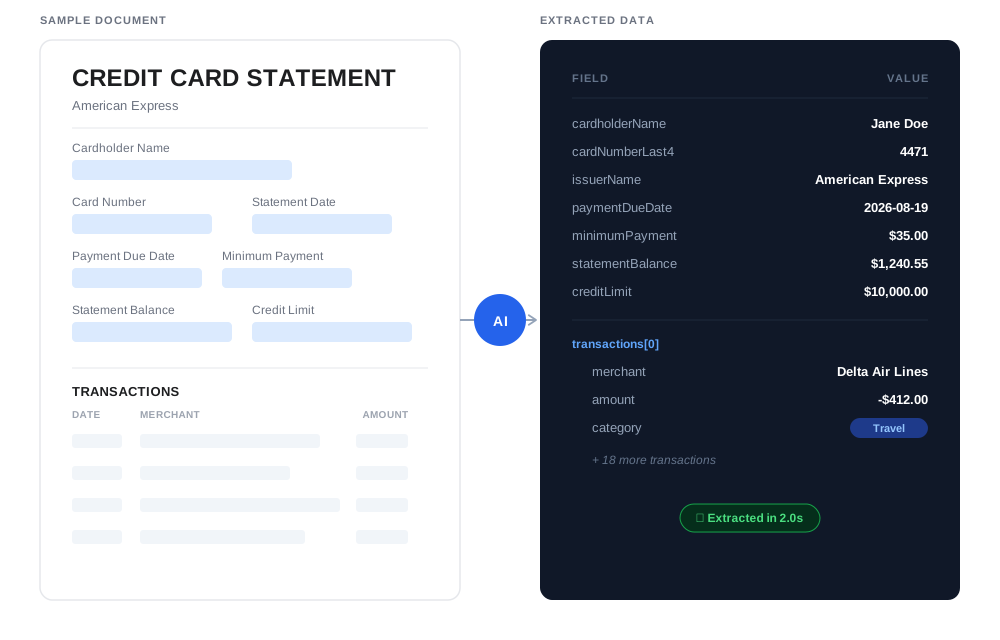
Credit card statements pack a different set of fields than a checking account statement — minimum payment, due date, credit limit, APR — plus a transaction list. Credit card statement extraction pulls all of that into structured data automatically.
This is especially useful for expense management: instead of employees manually entering card transactions, Airparser extracts the full transaction list ready to feed into your expense tool.
Three steps, zero setup
How It Works
1. Upload Statements
Upload PDF statements, forward emails, or use our API. Process a single statement or batch upload a whole team's card statements at once.
2. AI Analysis
Our AI reads the statement content, understands cardholder and transaction structure, and extracts structured data using LLM technology.
3. Get Clean Data
Export natively to Excel, CSV, or JSON — or push data to your expense tool via API, Zapier, Make, n8n, or webhooks.
What fields can Airparser extract?
Grouped from a typical credit card statement — actual fields depend on what your statement includes.
| Field | Type | Example |
|---|---|---|
| cardholderName | string | Jane Doe |
| cardNumberLast4 | string | 4471 |
| issuerName | string | American Express |
| statementDate | date | 2026-07-25 |
| paymentDueDate | date | 2026-08-19 |
| minimumPayment | currency | $35.00 |
| statementBalance | currency | $1,240.55 |
| creditLimit | currency | $10,000.00 |
| apr | percentage | 21.99% |
| transactions[] | array | { date, merchant, amount } |
| category | enum (custom field) | Travel, Meals, Software, Office… |
Why choose Airparser for credit card statements?
Full transaction extraction
Every line item extracted, ready to feed into your expense management workflow.
Custom categorization
Define an enum field in your extraction schema (Travel, Meals, Software…) and have every transaction categorized automatically.
Vision LLM engine
Built for statements with dense, multi-column transaction tables.
Batch processing
Upload a whole team's card statements in one batch instead of one at a time.
What our customers say
See why teams switch to Airparser
Frequently Asked Questions
How accurate is the transaction extraction on dense statements?
Our AI is designed to handle dense, multi-column transaction tables using the Vision LLM engine, extracting each line item accurately even on long statements.
Can it categorize transactions by merchant type?
Yes. Add an enum field to your extraction schema (for example Travel, Meals, Software, Office) and Airparser's AI will classify each transaction into one of those categories as it extracts the data.
Does it work with corporate card programs issuing multiple cards under one account?
Yes. Since you define the extraction schema yourself, you can set it up to capture multiple cardholders and their individual transactions from a single consolidated statement.
Can I export straight to an expense management tool?
Excel, CSV, and JSON are native export formats. For direct integration with an expense tool, export via API, Zapier, Make, n8n, or webhooks.
Is my card data secure?
All data is encrypted in transit and at rest, and we never use your statements to train our models. Airparser only extracts what's printed on the statement — it never handles full card numbers or CVV codes, since those aren't present on a statement.
Learn more about our security measuresCan I set automatic deletion after processing?
Yes, retention is configurable from immediate deletion up to 180 days.