AI Document Extraction Accuracy: What the Benchmarks Actually Mean
Vendors claim 95–99% accuracy, but accuracy at what? Character accuracy, field accuracy, document accuracy, and confidence calibration measure completely different things. Here's what each metric means, why "99% accuracy" is often misleading, and what to measure when evaluating document parsers.

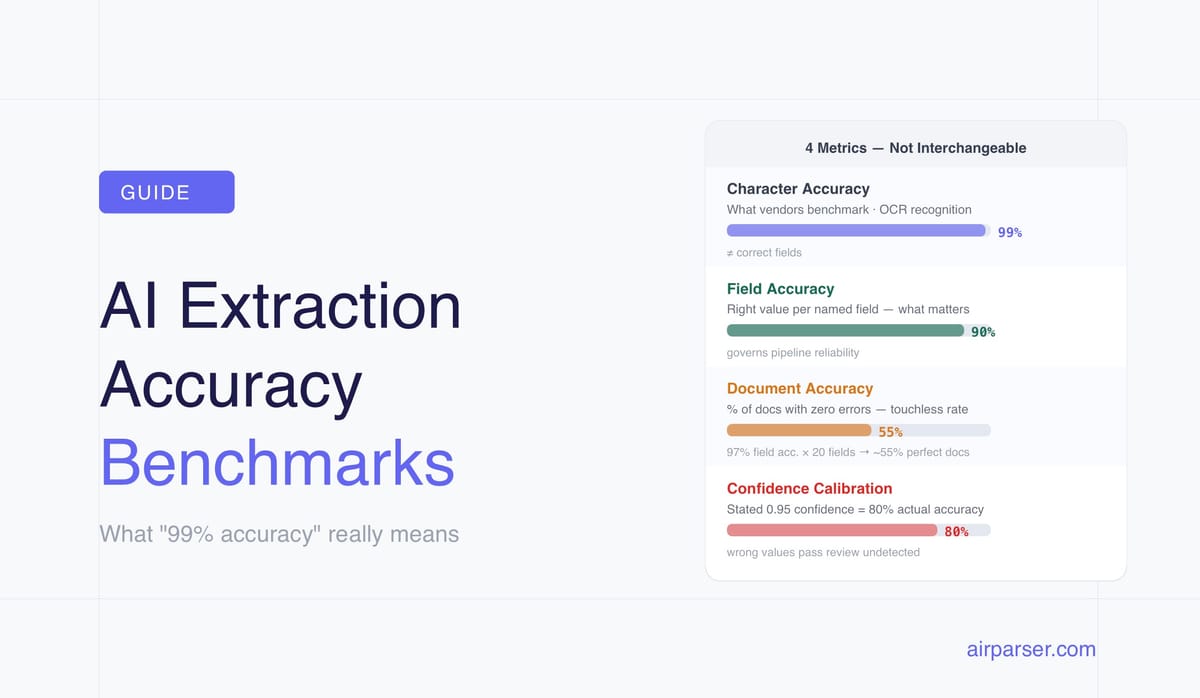
TL;DR: "99% accuracy" in document extraction almost always refers to character accuracy — a number that has little bearing on whether your extracted invoice data is actually correct. The metric that matters is field accuracy: was the right value extracted for each named field? And the number that governs real-world automation is document accuracy: what percentage of documents had zero extraction errors? Here's how to interpret accuracy claims and what to actually measure.
Every document parsing vendor claims high accuracy. "99% accurate." "Industry-leading extraction." "Superhuman performance on DocVQA." These claims are real — and largely meaningless for evaluating whether a parser will work for your use case.
The problem is not that vendors are lying. It's that they're measuring something different from what you need to know. Understanding the gap between how accuracy is reported and what it means in production is the most important thing you can learn before evaluating any document extraction tool.
The Four Accuracy Metrics — and Why They're Not Interchangeable
Character Accuracy (CER — Character Error Rate)
Character accuracy measures what percentage of individual characters in a document were correctly recognized. A 98% character accuracy rate on a 500-character invoice means 10 characters were misread. If those 10 characters happen to fall in an invoice number or a monetary amount, the field is wrong. If they fall in a decorative footer or boilerplate text, the extraction is effectively perfect.
Character accuracy is the metric traditional OCR systems are benchmarked on. It measures text recognition quality, not extraction quality. A parser that achieves 99% character accuracy but consistently misreads the digit "1" as "l" in invoice numbers has a 99% character accuracy rate and a broken invoice number field.
Field Accuracy
Field accuracy measures what you actually care about: for each named field in your extraction schema, was the returned value correct? A single character error anywhere in a field value counts as a field failure.
This is the metric that governs whether your downstream processes work. A wrong invoice number breaks reconciliation. A wrong total amount causes payment errors. A wrong due date breaks scheduling. Field accuracy is what determines the real-world reliability of a document automation pipeline.
Modern AI-based extractors on clean structured documents (printed invoices, standardised forms) achieve 95–99% field accuracy. Traditional OCR on complex or variable-layout forms can fall to 40–60% field accuracy — while still reporting 95%+ character accuracy.
Document Accuracy (Zero-Error Rate)
Document accuracy asks: what percentage of documents had zero extraction errors across all fields? This is the number that determines your "touchless processing" rate — the percentage of documents that can flow through the pipeline without human review.
The mathematics are unforgiving. Consider a parser at 97% field accuracy on a 20-field invoice schema. Each field has a 3% chance of error. The probability of all 20 fields being correct simultaneously is 0.97^20 ≈ 55%. A parser with 97% field accuracy touchlessly processes roughly half your invoices correctly. The other half has at least one wrong field.
This is why high-volume document operations can't rely on field accuracy alone. They need document accuracy — and they need it to be high enough that the remaining review rate is operationally manageable.
Confidence Calibration
A confidence score of 0.95 should mean the extracted value is correct 95% of the time at that confidence level. Poorly calibrated systems over-report confidence — they say 0.95 but are correct only 80% of the time at that threshold. This is one of the most dangerous failure modes in production: you route low-confidence results to human review, but high-confidence results that are actually wrong pass through undetected.
The best systems provide calibrated confidence scores where the stated probability actually corresponds to observed accuracy at that threshold. When evaluating a parser, test this: sample 100 extractions that the system marked as 0.90+ confidence and manually verify them. If more than 10% contain errors, the confidence scores are miscalibrated.
Why "99% Accuracy" Claims Are Misleading
Five specific ways vendors inflate accuracy claims:
1. Character accuracy presented as field accuracy. A tool advertising 99% character accuracy might deliver 80% field accuracy on real-world invoices. The gap between these two numbers is routinely 15–20 percentage points. Character accuracy is easier to achieve and easier to measure — it's also the less relevant number for any downstream business process.
2. Benchmark cherry-picking. Academic benchmarks like DocVQA are run on curated, controlled datasets. LandingAI's widely cited 99.16% DocVQA result is real — on that specific benchmark dataset. Enterprise buyers consistently report a 15–25 percentage point drop between vendor benchmark performance and production performance on their own document mix.
3. Silent failures not counted. The most dangerous extraction failure is a confident wrong answer — the system returns an incorrect value without a low-confidence flag. These pass through review routing and enter downstream systems as correct data. Best-in-class systems target a silent failure rate below 0.5%. Vendors reporting accuracy numbers rarely specify how they count silent failures.
4. Header fields vs. line items. Extracting the invoice total is easier than extracting line-item descriptions, tax codes, and product SKUs. A system may achieve 99% on header fields while performing at 70% on line items. Vendors choose which fields to benchmark — typically the easier ones.
5. Clean test documents. Accuracy benchmarks are typically run on the cleanest, best-formatted documents available. Real production document mixes include scanned copies of photocopies, phone photographs taken in poor lighting, faxed documents, and PDFs exported from five different accounting systems. Production performance on real document mixes consistently underperforms benchmark numbers.
Real-World Accuracy by Document Type
These are observed ranges across production deployments, not vendor claims:
| Document type | Field accuracy range | Key variables |
|---|---|---|
| Native (digital) PDFs | 98–99% | Machine-encoded text; no OCR needed |
| Clean scanned docs, 300+ DPI | 95–98% | Flatbed scan, good print quality |
| Scanned docs, 150–300 DPI | 88–95% | Quality degradation becomes measurable |
| Below 150 DPI scans | 60–75% | All engines degrade sharply |
| Faxed or photocopied documents | 80–90% | Significant generation loss |
| Handwritten (neat block letters) | 80–92% | Best-case handwriting scenario |
| Handwritten (cursive, variable) | 60–85% | High variance by writer |
| Structured invoices (AI extraction) | 97–99% | Header fields; line items lower |
| Complex tables (line items) | 85–95% | Depends on table structure consistency |
A 5-degree scan skew reduces traditional OCR accuracy by 3–8%. For organisations where 30% of incoming documents are faxed or heavily photocopied, the blended accuracy across the full document mix is considerably below any headline number.
What to Actually Measure When Evaluating a Parser
Four measurements that tell you what you actually need to know:
Field-level accuracy on your own documents. Submit 100–200 documents from your actual production mix — including your worst cases — and manually verify the extracted values against the source documents. Measure per-field accuracy: what percentage of invoice_number extractions were correct? Of total_amount? Of due_date? The fields where accuracy is lowest are your primary risk area.
Silent failure rate. From the same sample, identify cases where the system returned a wrong value with high confidence (above your review threshold). These are the failures that won't be caught. A parser with 2% overall error rate but 1.5% silent failure rate is worse in production than one with 3% overall error rate and 0.2% silent failure rate.
Automation rate at your quality threshold. Pick your acceptable error rate — say, you need 99% field accuracy on financial fields. What percentage of your documents can the parser handle touchlessly at that threshold, without human review? This number determines how much labour automation actually saves you. Related: Human-in-the-loop document extraction.
Accuracy by document source. Break down accuracy by supplier, document type, and document quality level. A parser that achieves 99% on invoices from Supplier A and 75% on invoices from Supplier B has an average that obscures the real problem. You need per-source breakdowns to know which document types need closer monitoring or human review routing.
How Confidence Scores Enable Practical Accuracy Management
The most practical approach to accuracy in production is not to maximise accuracy across all documents — it's to maximise the automation rate at a given quality threshold using confidence scores to route intelligently.
A well-calibrated parser with 92% field accuracy becomes effectively much higher accuracy in practice if 85% of documents are processed at confidence above 0.95 (where accuracy is 99%) and only 15% require human review (where accuracy may be 70%). The human review step provides a quality gate for the uncertain cases.
Airparser provides per-field confidence scores with each extraction. This enables: routing documents above threshold directly to downstream systems, routing documents below threshold to a human review queue, and tracking accuracy over time by measuring the correction rate in the review queue. The confidence score is the mechanism that bridges the gap between "98% average accuracy" and "99%+ accuracy on auto-processed documents." Related: Data validation in document parsing.
Frequently Asked Questions
What accuracy rate should I require from a document parser?
The right threshold depends entirely on the cost of errors in your specific workflow. For invoice processing where wrong amounts cause payment errors, field accuracy on financial fields should be above 98% on your actual document mix — not on vendor benchmarks. For resume screening where an occasional missed field means a candidate gets manually reviewed rather than auto-qualified, 90% field accuracy on non-critical fields may be acceptable. Define your acceptable error rate per field based on downstream consequences, not a universal number. A missed invoice number is annoying; a wrong payment amount is expensive. Set different thresholds for different fields accordingly.
Is 99% accuracy actually achievable in production?
For field accuracy on clean, native, well-structured PDFs from consistent sources — yes. For field accuracy on a realistic mixed document volume that includes scans, photographs, handwritten forms, and documents from many different sources — 99% is achievable on the clean subset, not the full mix. Realistically, a well-configured AI parser on a mixed production document mix achieves 93–97% field accuracy on average, with the accuracy distribution heavily skewed: excellent on native PDFs and poor-quality scans pulling the average down. The practical target is high automation rate on the high-confidence documents (95%+ of your volume) with reliable human review routing for the rest — which together produce better effective accuracy than chasing a universal 99% that isn't realistic across all document types.
What is DocVQA and should I care about it when evaluating a parser?
DocVQA is an academic benchmark dataset of 12,767 document images with associated question-answer pairs — "what is the invoice total?", "who is the sender?" The metric is ANLS (Average Normalized Levenshtein Similarity), which measures how close the extracted answer is to the ground truth answer. High DocVQA scores (LandingAI's widely cited 99.16%, for example) indicate strong visual document understanding capability on that specific dataset. Whether that translates to your use case depends on how similar your documents are to the DocVQA dataset composition and how the vendor's system generalises to your specific document types. DocVQA is a useful signal for capability, not a reliable predictor of production performance. Always test on your own documents.
Why does accuracy drop between a vendor demo and my production environment?
Vendor demos use the best-case documents: clean, well-formatted, native PDFs or high-quality scans in standard layouts the vendor's system has seen frequently during development. Your production documents include edge cases the vendor hasn't optimised for: unusual supplier invoice formats, low-quality scans from specific sources, documents in languages or regional formats that behave differently from the training distribution, and document types that are common in your industry but not in general training data. The 15–25 percentage point gap between benchmark and production performance is consistent across the industry and documented by independent researchers. It's not vendor deception — it's the unavoidable reality of testing on idealised samples and deploying on real-world variety.
How does Airparser's vision engine affect accuracy on scanned documents?
For scanned documents, Airparser's vision engine processes the document image directly rather than relying on an OCR text layer. This matters because traditional OCR accuracy degrades sharply with scan quality — below 300 DPI, character accuracy drops measurably and field accuracy drops further. A vision engine applies contextual visual reasoning to interpret characters in their document context, handling skewed scans, low-resolution images, and variable print quality more robustly than pattern-based OCR. On clean scans, the difference is marginal. On poor-quality scans, phone photographs, and faxed documents, the vision engine approach maintains higher field accuracy than OCR-based extraction. Confidence scores per field identify which extractions from degraded documents need human verification. Related: Why vision engine AI parses documents that break traditional OCR.