Best Document Parsing Tools for Property Management Teams in 2026
The best document parsing tools for property management in 2026 — Airparser, Docparser, Nanonets, Google Document AI, and DocSumo — compared for vendor invoices, leases, and maintenance work orders.

TL;DR
Property management teams process vendor invoices, lease documents, maintenance work orders, tenant applications, and inspection reports — often in dozens of different formats. The best document parsing tools for property management in 2026 are: Airparser (best for format variety and email-based ingestion), Docparser (best for rule-based processing of consistent layouts), Nanonets (best for high-volume AP automation), Google Document AI (best for Google Cloud-native teams), and DocSumo (best for structured financial documents). Airparser stands out for property management because it handles any vendor invoice layout, processes handwritten inspection reports via its vision engine, and accepts documents forwarded by email — the way most vendor invoices actually arrive.
The best document parsing tool for property management teams is one that handles format variety without requiring a template for every vendor. Property managers receive invoices from dozens of different contractors — each formatted differently — plus lease PDFs from multiple brokers, handwritten inspection reports, and scanned insurance certificates. Airparser handles all of these via a single email-based inbox with no template setup, making it the most practical choice for teams dealing with high document variety.
This guide compares the five strongest options available in 2026, with specific attention to the documents property managers deal with most: vendor invoices, lease documents, maintenance work orders, tenant application packages, and inspection and compliance certificates.
Each tool is evaluated on format flexibility, ingestion method, integration with property management software, and ability to handle the mixed document types that are unique to property operations — not just AP invoice processing.
Why Document Parsing Matters for Property Management Teams
Property management is one of the most document-heavy business operations outside of healthcare and legal services. A single mid-sized residential portfolio — say 200 units across 15 properties — can generate hundreds of documents every month: utility bills, landscaping invoices, plumbing work orders, tenant renewal letters, move-in inspection checklists, and lease addendums. Manually entering this data into property management software, spreadsheets, or accounting systems consumes hours of staff time and introduces consistent data entry errors.
The core challenge is format diversity. Unlike AP teams in manufacturing that only process invoices from a small set of known suppliers, property managers receive bills from dozens of ad hoc vendors — a local electrician, a new landscaping company, a one-time pest control provider. No two invoice formats are the same. This is why template-based OCR tools, which require you to configure a separate template for each document layout, are impractical for property operations. AI-based parsers that can infer field locations from context — regardless of layout — are the more realistic solution.
A well-configured document parsing workflow for property management typically replaces three separate manual steps: opening the email or attachment, reading the document, and copying values into a spreadsheet or software system. Airparser's email inbox feature compresses all three into a single automated step: forward (or auto-forward) the document to a dedicated parsing inbox, and the extracted data appears in your connected sheet or webhook within seconds.
What to Look for in a Document Parsing Tool for Property Management
Most document parsing tools are designed for one workflow: structured AP invoice processing. Property management teams need more than that. Before evaluating any tool, check whether it handles all five of these requirements:
Format flexibility without templates
Property managers receive invoices and maintenance quotes from dozens of vendors with different layouts. A template-based tool requires you to configure a separate template for each vendor's format — and will fail silently if a vendor changes their layout. Look for AI-based tools that infer field locations from content rather than fixed coordinates. Airparser, Nanonets, and Google Document AI all operate without templates; Docparser requires templates per layout.
Email-based document ingestion
Most vendor invoices, maintenance work order confirmations, and lease PDFs arrive via email. A parsing tool that requires manual uploads adds friction back into the workflow. Airparser and Docparser both support dedicated parsing inboxes — you forward the email, and the attachment is parsed automatically. Nanonets requires integration via Zapier or n8n to achieve the same result.
Vision engine for scanned and handwritten documents
Inspection reports, handwritten maintenance logs, and poorly-scanned insurance certificates are common in property management. Standard OCR tools — which extract text character by character — frequently fail on these inputs. A vision-based AI parser reads the document as an image and infers meaning from layout, handwriting, and visual context. Airparser's vision engine is specifically built for this use case.
Export to property management software and spreadsheets
Extracted data needs to reach your accounting system, property management platform, or at minimum a shared Google Sheet. Look for tools that offer native Google Sheets integration or a webhook/API that can feed data into Buildium, AppFolio, Yardi, or QuickBooks. Airparser supports webhooks, Google Sheets, Zapier, Make, and n8n out of the box.
Handles multi-document workflows
Property management teams often deal with document packages — a tenant application that includes an application form, a pay stub PDF, a bank statement, and a reference letter. The best tools can process each attachment separately from the same email and route the output to different destinations depending on document type.
Best Document Parsing Tools for Property Management Teams in 2026
1. Airparser — Best for Format Variety and Email-Based Ingestion
Airparser is the strongest general-purpose document parsing tool for property management teams because it handles the core challenge of the workflow: high format diversity across many document types, arriving primarily by email.
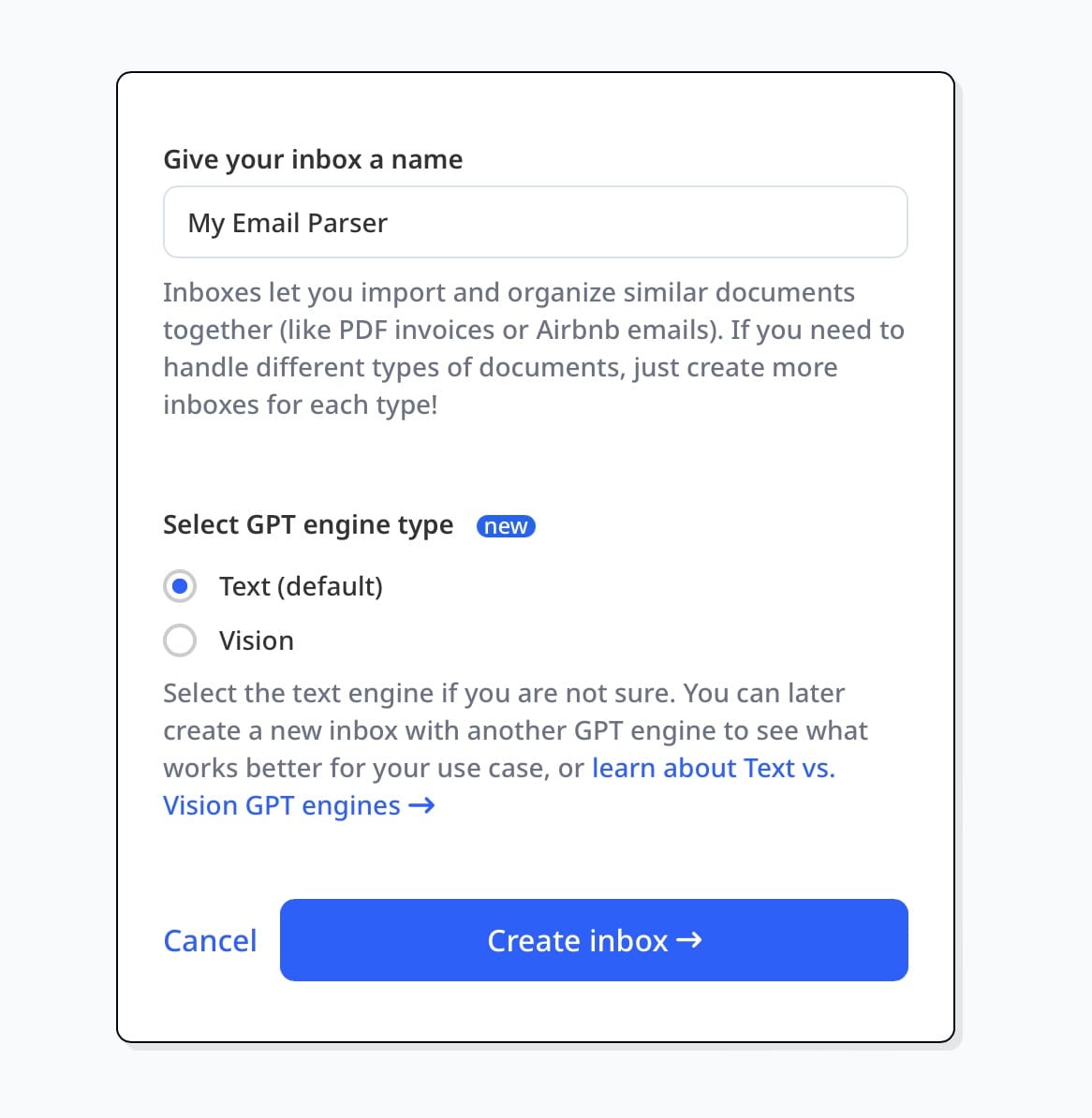
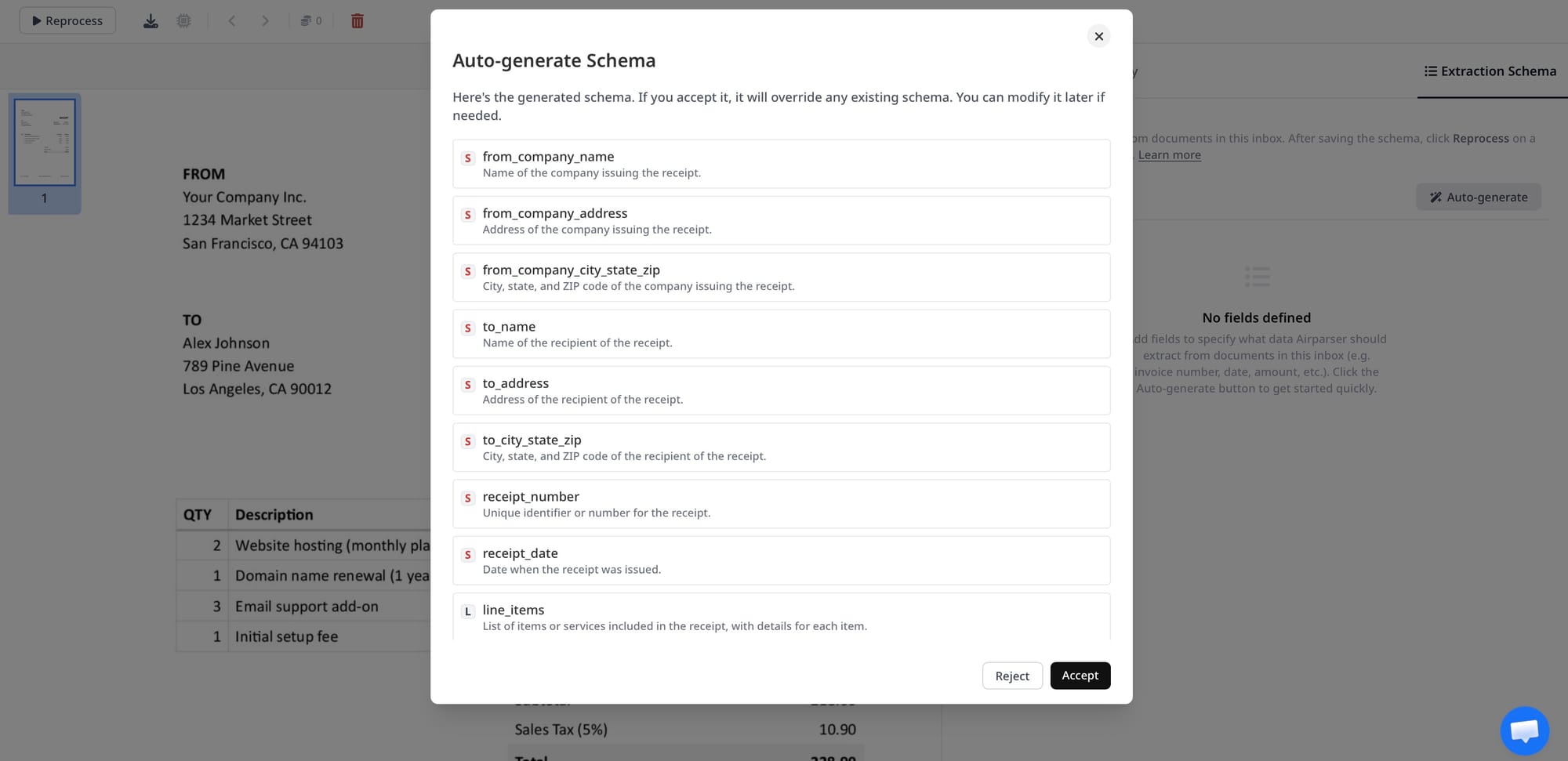
How it works: You create a named inbox in Airparser (e.g., "Vendor Invoices" or "Maintenance Work Orders"), choose between the text engine and the vision engine depending on whether your documents are native PDFs or scanned/handwritten, define the fields you want to extract (or let Airparser suggest them from a sample document), and then forward documents to the inbox email address. Parsed data is available immediately as structured JSON, and can be sent automatically to Google Sheets, webhooks, Zapier, Make, or n8n.
Why it works for property management: The email inbox model matches how property management documents actually flow — vendors send invoices to your email, contractors send work order confirmations, and brokers send lease PDFs as attachments. Airparser's vision engine processes scanned invoices, handwritten inspection notes, and certificates of insurance that would fail in a text-only OCR tool. You can set up separate inboxes for each document category and route them to different destinations in your stack.
Property management use cases it handles well:
- Vendor invoices and bills from contractors — any format, any supplier
- Maintenance work order confirmations and service reports
- Certificates of insurance from tenants and vendors
- Lease PDFs for key term extraction (rent amount, start/end dates, deposit)
- Move-in/move-out inspection reports (including handwritten forms)
- Utility bills for common area expense tracking
Best for: Property managers handling more than 5 different vendor formats and document types who want a single tool for the entire document stack rather than separate tools per use case.
Limitations: Airparser does not offer a native mobile app for field-based teams. If your maintenance technicians need to capture and submit documents from a phone, you'll need to combine Airparser with a mobile form or a Zapier trigger from Google Drive.
2. Docparser — Best for Rule-Based Processing of Consistent Document Layouts
Docparser is a strong option for property management teams whose vendor base is stable and predictable. If you pay the same 10–15 vendors month after month and their invoice formats never change, Docparser's template-based approach delivers reliable, high-accuracy extraction with minimal AI cost.
How it works: Docparser uses "parsing rules" — you upload a sample document, draw zones around the fields you want to extract, and Docparser captures those fields from all future documents matching that layout. The tool also supports email parsing inboxes similar to Airparser's.
Why it works for some property management workflows: For portfolios managed by institutional operators — where vendor relationships are contracted and layouts are standardized — Docparser's rule-based approach is fast and accurate. It also integrates with Zapier and can push data to Google Sheets, Airtable, and most accounting systems.
Limitations: Docparser requires a separate template for each unique document layout. A property manager dealing with 40 different vendors would need 40 templates, and each time a vendor changes their invoice format, the template breaks. The tool also handles handwritten or scanned documents less well than vision-based AI parsers.
Best for: Institutional or commercial property operators with a fixed, predictable vendor base and consistent document formats.
3. Nanonets — Best for High-Volume AP Automation
Nanonets is designed for accounts payable teams processing large volumes of invoices. For property management companies with a large portfolio (1,000+ units) that process thousands of vendor invoices monthly and want AP workflow features — approval routing, three-way matching, payment integration — Nanonets offers a more complete solution than a pure parsing tool.
How it works: Nanonets uses AI models trained on millions of invoices to extract structured fields without templates. It adds AP workflow features: invoice review queues, approval chains, and direct integration with accounting software like QuickBooks, Xero, and Sage.
Why it works for some property management workflows: For large property management firms with a centralized AP function, Nanonets reduces the manual touchpoints in invoice approval — extraction, coding, routing, and posting can all flow through one platform. It also handles high volumes well and supports multi-currency for international portfolios.
Limitations: Nanonets is primarily invoice-focused. It does not handle lease document term extraction, inspection reports, or tenant application packages as well as a more general-purpose tool. Pricing is also significantly higher than Airparser or Docparser, making it hard to justify for smaller or mid-sized property portfolios. Integration typically requires Zapier, Make, or developer work for email-based ingestion.
Best for: Large property management companies or REITs with a dedicated AP function processing thousands of invoices monthly.
4. Google Document AI — Best for Google Cloud-Native Teams
Google Document AI is a developer-facing platform with pre-trained processors for common business document types, including invoices, receipts, and general form parsing. For property management teams whose tech stack runs on Google Cloud — using BigQuery for reporting, Google Sheets for operations, and Workspace for communication — Document AI integrates cleanly.
How it works: Document AI provides API-accessible processors trained on specific document categories (Invoice Parser, Receipt Parser, General Document Parser). Developers send document files via API and receive structured JSON extraction results. There is no native GUI or no-code setup.
Why it works for some property management workflows: If your engineering team maintains the property management tech stack and you want AI document extraction as an infrastructure component rather than a standalone SaaS product, Google Document AI offers accurate extraction at competitive API pricing with the reliability of Google Cloud infrastructure.
Limitations: Google Document AI has no GUI, no email inbox, and no built-in workflow or export features. It requires developer effort to integrate, and it does not handle handwritten or complex scanned documents as reliably as Airparser's vision engine. For non-technical property operations teams, this tool requires a dedicated engineering build before it can be used.
Best for: Technology-led property management companies with engineering capacity and an existing Google Cloud infrastructure.
5. DocSumo — Best for Structured Financial Documents
DocSumo specializes in financial document extraction — bank statements, P&L reports, rent rolls, and structured invoices. For property management teams that need to process financial documents as part of tenant underwriting or portfolio reporting, DocSumo offers strong accuracy on structured financial layouts.
How it works: DocSumo uses AI extraction with human-in-the-loop review options. It handles bank statements, income statements, and structured invoice formats with high accuracy and provides an annotation interface for reviewing and correcting extractions before export.
Why it works for some property management workflows: When evaluating tenant applications that include bank statement PDFs or pay stubs, DocSumo's financial document specialization delivers reliable income and balance extraction. It also handles rent roll spreadsheets and financial summary documents that property managers submit to lenders during refinancing.
Limitations: DocSumo is less flexible than Airparser for the operational document types that dominate day-to-day property management — maintenance work orders, inspection forms, certificates of insurance, and vendor invoices from informal contractors. Its strength is financial data from structured sources.
Best for: Property management teams or operators that process tenant financial packages, rent rolls, and investment-grade financial documents.
How to Set Up Document Parsing for Property Management with Airparser
The most practical workflow for most property management teams starts with vendor invoice processing — the document type with the highest volume and the clearest ROI from automation. Here is how to set up a working invoice parsing pipeline in Airparser:
- Create a named inbox. In Airparser, create a new inbox called "Vendor Invoices." Each inbox gets a dedicated email address (e.g., [email protected]). You can create separate inboxes for maintenance work orders, lease documents, and inspection reports.
- Choose the engine. Select "Vision" for scanned invoices or any documents that are not digitally generated PDFs. Select "Text" for native PDF invoices from software like QuickBooks or FreshBooks. When in doubt, use Vision — it handles both correctly.
- Upload a sample document. Send one invoice to the inbox email address. Airparser will process it and suggest an extraction schema — fields like vendor name, invoice number, invoice date, due date, line items, and total amount. Adjust the schema to match the fields you need in your accounting system.
- Set up auto-forwarding. In your email client (Gmail or Outlook), create a filter that automatically forwards all emails from vendor domains (or with "invoice" in the subject) to the Airparser inbox. From this point, all future invoices arrive in Airparser automatically, with no manual upload step.
- Connect to Google Sheets or your accounting system. In Airparser's export settings, connect the inbox to a Google Sheets spreadsheet. Each parsed invoice will add a new row with all extracted fields. Alternatively, use the webhook to push to QuickBooks, Buildium, or any other system that accepts incoming data.
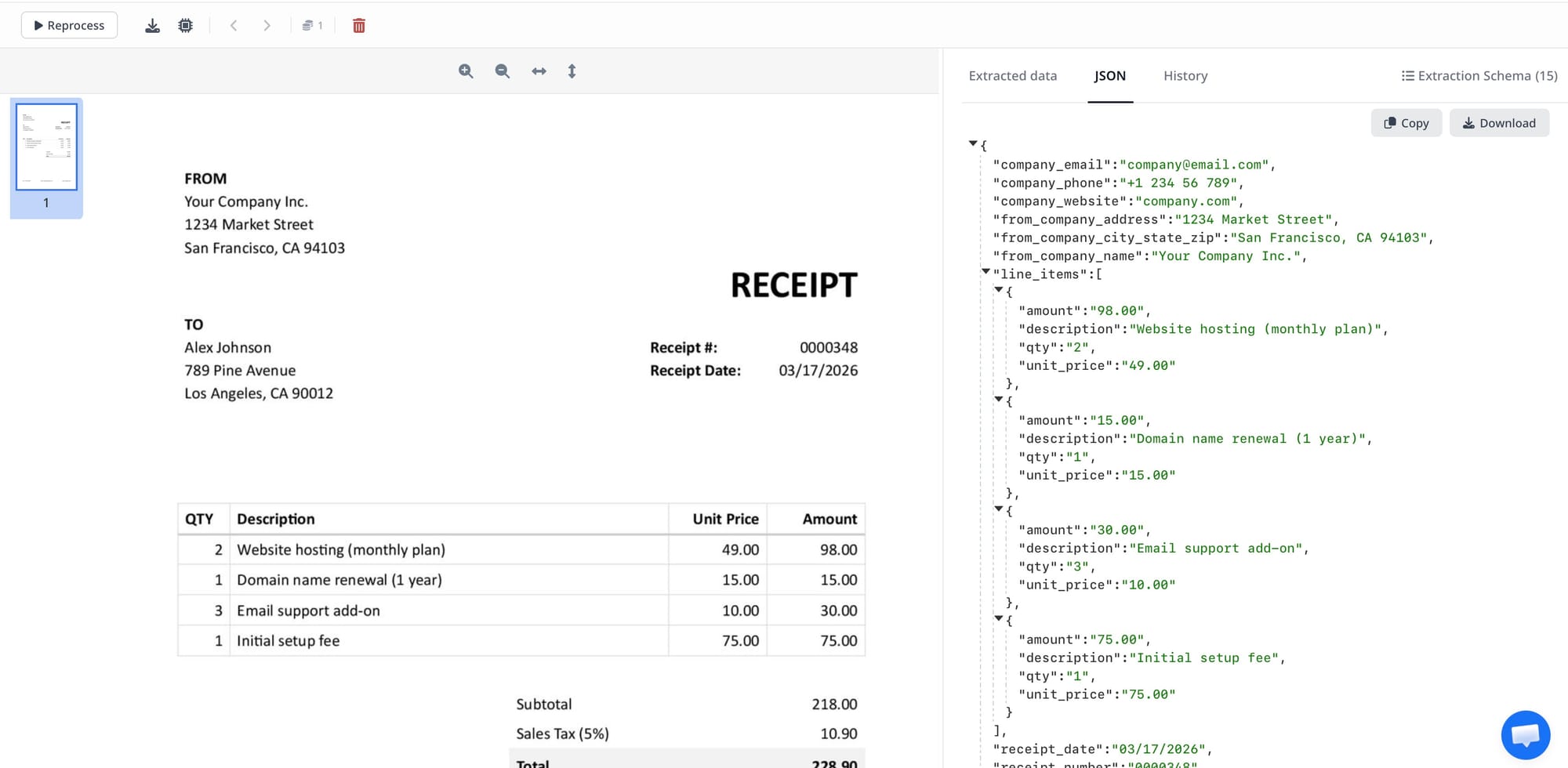
For maintenance work orders, the setup is identical — create a second inbox, define a schema that captures work order number, property address, vendor, service type, date, and total cost, then route the data to the same spreadsheet (different tab) or to a maintenance tracking system. Airparser's vision engine handles handwritten notes and partially scanned work orders, which are common in residential property management.
For lease document key term extraction — useful for tracking renewal dates and rent escalations across a portfolio — create a third inbox with schema fields for tenant name, property address, lease start date, lease end date, monthly rent, security deposit, renewal option, and rent escalation clause. Forward lease PDFs to this inbox when new leases are signed, and you'll have a spreadsheet index of every lease's critical dates updated automatically.
This three-inbox setup — vendor invoices, work orders, and lease terms — covers the three highest-value parsing workflows for most property management teams and can be fully configured in under two hours.
If you manage documents from Google Drive rather than email (for example, contractors upload PDFs to a shared Drive folder), you can connect Airparser via Zapier's Google Drive trigger to monitor the folder and push new files to the parsing inbox automatically.
Document Parsing Use Cases in Property Management
Each document type in property management has a specific extraction challenge and a specific downstream destination. Here is how AI document parsing applies to the five most common document workflows:
Vendor invoices and contractor bills
Challenge: Every vendor has a different invoice format. Extract vendor name, invoice number, invoice date, line items, and total. Downstream destination: accounting system (QuickBooks, Yardi) or AP approval workflow. Airparser's vision engine handles scanned invoices from small contractors who email PDFs from their phone. Use the accounts payable automation workflow to route parsed data directly to your AP system for coding and approval.
Maintenance work orders and service reports
Challenge: Work orders often include handwritten notes, partial scans, or varying formats from different vendors. Extract work order number, property address, service type, technician name, date of service, and cost. Downstream destination: maintenance tracking spreadsheet or CMMS. The work order data extraction workflow covers the schema setup for common maintenance document formats.
Tenant applications and screening packages
Challenge: Application packages typically include a form, income documents (pay stubs or bank statements), and often a reference letter — each as a separate PDF attachment in one email. Extract applicant name, income figures, employment status, and rental history. Downstream destination: tenant screening spreadsheet or property management software (Buildium, AppFolio). Set up a separate inbox for application packages and define one schema per document type within the package.
Certificates of insurance
Challenge: COIs come from both vendors (liability coverage required before starting work) and tenants (renters insurance requirements). Extract policy number, insurer, coverage amounts, named insured, and expiration date. Downstream destination: compliance tracking spreadsheet with expiration date alerts. Airparser's vision engine handles COIs in all their varied formats, including acrobatic-formatted ACORD 25 templates that traditional OCR struggles with.
Lease documents and renewal notices
Challenge: Lease agreements vary significantly in structure — from one-page month-to-month agreements to 40-page commercial leases. Extract tenant name, property address, lease start and end dates, monthly rent, security deposit amount, renewal option details, and rent escalation terms. Downstream destination: lease tracking spreadsheet or calendar reminders for renewal dates. This enables proactive lease renewal outreach months before expiration — a workflow that most property managers currently run manually.
Frequently Asked Questions
What is the best document parsing tool for a small property management company?
For a small property management company managing fewer than 200 units, Airparser is the most practical starting point. The reasons come down to pricing and flexibility. Small property managers deal with ad hoc vendors whose invoice formats change constantly, and a template-based tool like Docparser requires maintaining a separate template per vendor layout — a significant ongoing overhead for a small team. Airparser handles any format without templates and costs significantly less than enterprise AP platforms like Nanonets. The email inbox feature is particularly valuable for small teams: you forward the vendor email to Airparser, and the extracted data appears in a Google Sheet with no additional steps. Setup for the most common workflow — vendor invoice parsing to Google Sheets — takes under an hour and does not require any technical expertise or coding. If your team also processes scanned inspection reports or handwritten maintenance forms, Airparser's vision engine handles these cases, which most small-team tools do not. The most important decision for small property managers is not which tool has the most features, but which tool removes the most friction from the daily document intake workflow. Airparser's email-first design is the right fit for that.
Can AI document parsing handle lease agreements reliably?
Yes, AI-based document parsers can extract structured fields from lease agreements reliably when the fields you need are clearly stated in the document — which they are in virtually all residential and commercial leases. Tenant name, property address, lease start date, lease end date, monthly rent, and security deposit are nearly always explicitly stated and extractable. More complex clauses — such as rent escalation formulas, option-to-renew conditions, and early termination provisions — can also be extracted, but may require a more specific schema definition and benefit from a human review step before relying on the data operationally. Template-based tools fail on lease agreements because no two leases have the same layout. AI-based tools like Airparser use the content and context of the text to locate fields regardless of where they appear on the page. For property management teams, the most valuable lease parsing use case is not replacing legal review — it is building a tracking index of key dates and amounts across a lease portfolio so that renewal reminders, rent increases, and deposit return deadlines are never missed. That specific workflow works reliably with current AI parsing tools.
How does document parsing integrate with property management software like Buildium or AppFolio?
Most property management software platforms (Buildium, AppFolio, Yardi, Rent Manager) do not offer native direct integration with standalone document parsing tools. The practical integration path is to use Airparser's webhook or Zapier/Make integration to send parsed document data to an intermediary — typically Google Sheets or Airtable — and then use that spreadsheet as the data source for manual or semi-automated entry into your property management software. For teams with developer resources, Airparser's API can push parsed data directly to any endpoint, including custom-built integrations with AppFolio's or Yardi's APIs. For vendor invoice processing specifically, the most common path is Airparser → Zapier → QuickBooks Online, which pushes extracted invoice data as a QuickBooks bill draft for review and approval before posting. This eliminates the manual data entry step while keeping a human in the review and approval loop — which most accounting teams correctly require for expense processing. As property management software platforms add more open API capability (a trend accelerating in 2025–2026), direct integrations will become easier. For now, the spreadsheet-as-intermediary approach works well for most property management teams under 500 units.
Do I need a separate parsing tool for each document type in property management?
No. With Airparser, you create a separate inbox for each document type — vendor invoices, work orders, lease documents, certificates of insurance — but all of these run through the same Airparser account. Each inbox has its own extraction schema and its own export destination. You pay one subscription for the whole set of document workflows. This is a significant practical advantage over building a separate automation for each document category, or using multiple tools with different vendor relationships, billing cycles, and UI paradigms. The inbox model is also easier to explain to the rest of your team: "Send all vendor invoices to this email address" is a workflow instruction anyone can follow, regardless of technical skill. Separate tools per document type introduce coordination overhead that a single configurable platform avoids. The main exception is if you have one very specific document type — say, only bank statement extraction for tenant underwriting — where a specialized tool like DocSumo might offer higher out-of-the-box accuracy for that one use case. In practice, most property management teams benefit more from the operational simplicity of a single platform than from the marginal accuracy improvement of a specialized one.
How much does document parsing software cost for property management teams?
Document parsing tool pricing varies significantly depending on volume and feature set. Airparser operates on a credit-based pricing model where each parsed document consumes credits — making it cost-effective for smaller or variable-volume property management operations where document intake is uneven month to month. Docparser uses a tier-based subscription that scales with the number of documents processed monthly and is competitively priced for consistent mid-volume workflows. Nanonets targets enterprise buyers and prices accordingly — typically at a level that requires AP volumes in the thousands of invoices per month to justify. Google Document AI charges per page processed via API, which can be economical at scale but requires developer integration to use. DocSumo's pricing is available on request and is generally positioned in the mid-to-enterprise range. For most property management teams under 500 units processing fewer than 500 documents per month, Airparser is the most cost-effective option that still handles the full range of document types the workflow requires. Larger portfolios with centralized AP functions processing thousands of invoices monthly may find that Nanonets' AP workflow features justify its higher cost, even if the per-document extraction capability is similar across tools.
Can document parsing tools handle handwritten maintenance inspection forms?
Some can, and some cannot — and this distinction matters for property management. Traditional OCR tools and template-based parsers like Docparser are designed for digitally generated documents where text is embedded in the PDF. Handwritten forms — inspection checklists, move-in/move-out condition reports, field service confirmations — fail in these tools because the text layer is not present and the layout varies by person and pen. Vision-based AI parsers like Airparser's vision engine use image recognition and language modeling to read handwritten content from a scan or photograph, inferring both the content and the structure of the form. In testing, Airparser's vision engine handles clearly written block-letter inspection forms reliably and extracts ratings, comments, and room labels accurately. Cursive handwriting with significant variation or forms with faint ink or high background noise perform less reliably and benefit from a human review step. For most property management teams, the practical answer is: configure your work order inbox with the vision engine enabled, and add a review step for any extraction where AI confidence is below your threshold. Airparser's human-in-the-loop review feature surfaces low-confidence extractions for manual confirmation before they flow to downstream systems.