Why Vision Engine AI Parses Documents That Break Traditional OCR
Traditional OCR fails on scanned documents, handwriting, complex tables, variable layouts, and mixed content. A vision engine handles all of these by understanding documents visually — not by reading characters more accurately, but by replacing the approach entirely.

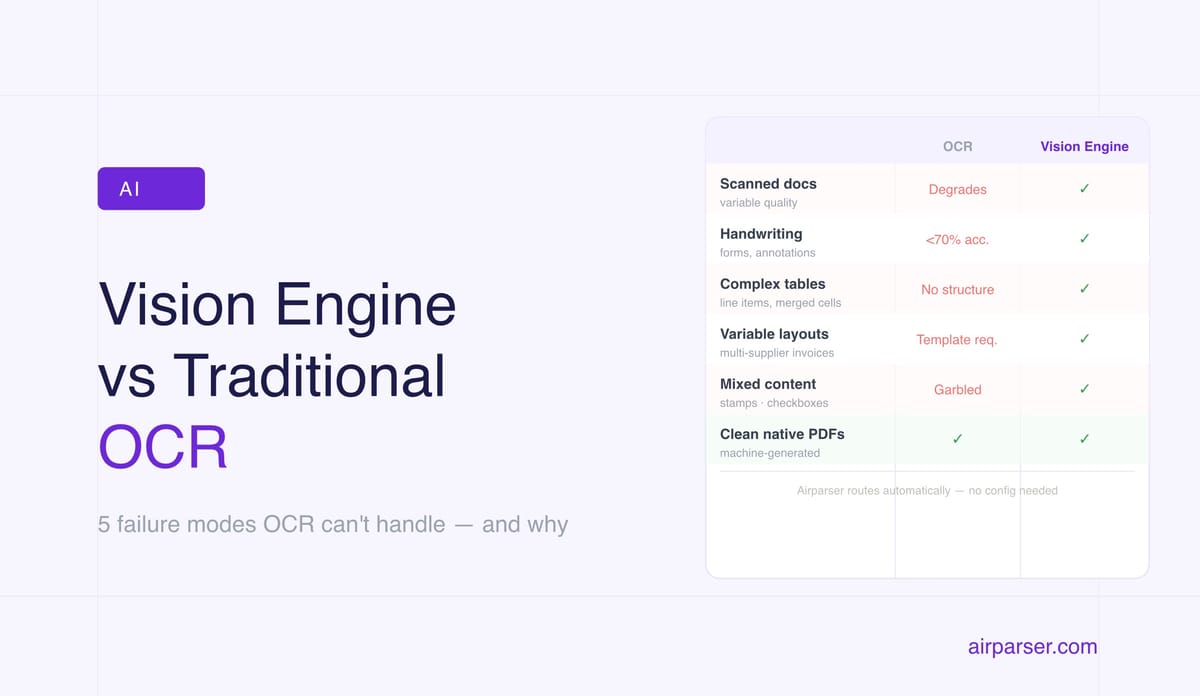
TL;DR: Traditional OCR fails on scanned documents with variable quality, handwritten text, complex tables, and inconsistent layouts. A vision engine handles all of these — not by reading characters more accurately, but by understanding the document visually the way a human would. These are not edge cases. They're the majority of real-world document automation.
Traditional OCR works well on exactly one type of document: clean, printed, high-contrast text on a white background, in a standard font, at a standard size. Everything else is a failure mode.
The problem is that most documents people actually need to process automatically are not clean, printed, high-contrast text on a white background. They're photographs of invoices taken in bad lighting. Scanned forms with handwritten fields. Multi-column PDFs with tables that span pages. Contracts with stamps and annotations. Medical records with a mix of printed and handwritten entries.
Vision engine AI was built specifically to handle these documents — not by doing OCR better, but by replacing the fundamental approach. Instead of reading characters, a vision engine looks at the document as an image and understands its structure, the way a human reader does.
Here are the specific failure modes where traditional OCR breaks, and what a vision engine does instead.
Failure Mode 1: Scanned Documents With Variable Quality
OCR accuracy degrades sharply with document quality. A perfectly scanned invoice from a flatbed scanner at 300 DPI achieves 98–99% character accuracy. A phone photograph of the same invoice, slightly angled, in office lighting, achieves something closer to 85–90% — and that 10–15% error rate propagates into corrupted field values, missed data, and failed extractions.
In practice, scanned documents arrive in every quality level: photocopied from a photocopy, faxed and printed, scanned at 150 DPI to keep file size small, photographed on a smartphone by someone in a hurry. OCR systems degrade proportionally to quality. When OCR reads "lnv-2026-00441" instead of "INV-2026-00441" because a capital I looked like a lowercase L, that invoice number is wrong in your database.
A vision engine applies visual reasoning rather than pattern matching. It interprets the overall context of the document — if the surrounding content indicates this is an invoice number, a plausible invoice number value is inferred even from degraded input. It handles skewed pages, shadows, bleed-through from the reverse side, and low-resolution scans that would produce garbage from OCR. Related: How to make a scanned PDF searchable.
Failure Mode 2: Handwritten Text
Standard OCR was trained on printed fonts. Human handwriting violates virtually every assumption it makes: characters are the same size, shapes are consistent, spacing is predictable, letterforms match a known set. None of this is true for handwriting.
OCR accuracy on handwritten text typically falls below 70% on clean, neat handwriting and below 50% on typical real-world handwriting. For forms where a field might be filled in by any of a hundred different people — intake forms, expense reports, customs declarations, insurance claims, survey responses — OCR-based extraction produces results that are unreliable by default.
A vision engine handles handwriting the way a human does: by interpreting letter shapes in context. The word in a field labeled "Date of birth" that looks like it might be "09/15/1988" or "09/13/1988" is resolved using the surrounding context, the visual shape of the contested characters, and the logical constraints of the field. Airparser supports handwritten document extraction as a core capability — not a special mode that needs configuration, but part of what the vision engine handles by default.
Failure Mode 3: Complex Tables and Line Items
PDF tables are one of the most notoriously difficult challenges in document parsing. PDF has no native table structure — the visual appearance of a table is created by positioning individual text elements at specific coordinates. OCR returns those elements as isolated strings with no information about their relationships to each other.
When you ask OCR-based extraction to get the line items from an invoice, it finds all the text on the page and has no way to know which price belongs to which product, which quantity belongs to which line, or where one row ends and another begins. Tables with merged cells, multi-line descriptions, or rows that continue across pages are even harder. Rule-based parsers can apply heuristics about column spacing — but those heuristics break when a new supplier uses a different table structure.
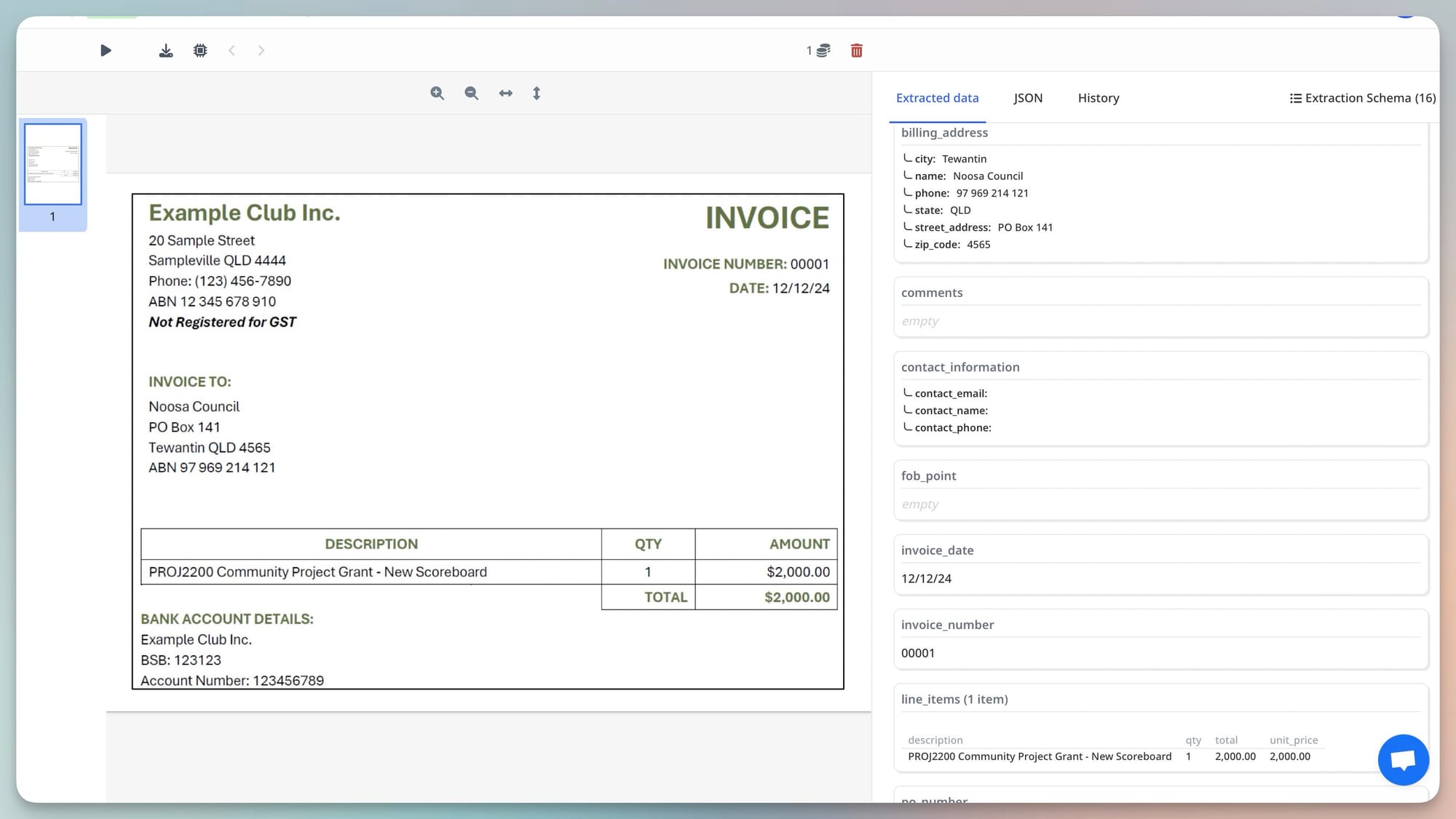
A vision engine sees tables as visual structures. It identifies that a grid is a table. It understands that the header row at the top defines what each column contains. It follows rows across the page and across page breaks. It handles merged cells because it sees the visual spanning, not just text at coordinates. Invoice line items — the most common complex table case in document automation — are reliably extracted even from variable supplier formats.
Failure Mode 4: Variable Layouts From Multiple Sources
Template-based parsing is the dominant approach for extracting data from documents with consistent layouts. You define where each field is located — the invoice number is always in the top right, the total is always at the bottom — and the parser extracts from those coordinates reliably.
This breaks completely when documents arrive from multiple sources. An invoice from Supplier A has the total at the bottom right. Supplier B puts it at the top right in a header box. Supplier C uses a summary table on a separate page. Three suppliers, three layouts, three templates to build and maintain. At fifty suppliers, template maintenance becomes a full-time job. When any supplier updates their invoice design, that template breaks until someone rebuilds it.
A vision engine requires no templates because it doesn't use position to locate fields. It locates the invoice total by understanding what an invoice total looks like — a labeled amount in a summary context, typically near the bottom, typically larger than line-item amounts — regardless of where on the page it appears. The same configuration that extracts correctly from Supplier A's layout works on Supplier B, Supplier C, and every new supplier without modification. Related: Document parsing: build vs. buy.
Failure Mode 5: Mixed Content Documents
Many real-world documents contain more than text. A medical record might include printed fields, handwritten annotations, and a photograph. An insurance form might have a printed base with handwritten entries, a stamp, and a signature. A shipping document might include a barcode, a logo, a QR code, and typed text in three different sections.
OCR processes the text elements and ignores or misreads everything else. Stamps get read as garbled characters. Logos produce nonsense output. Handwritten annotations are either missed or corrupted. Checkboxes — a fundamental element of forms — are invisible to OCR, which reads the text around them but not their state.
A vision engine processes the entire image. It recognizes stamps as stamps and doesn't try to read them as document text. It interprets checkbox states visually — checked or unchecked — without needing to find a text representation of the state. It separates handwritten annotation from printed form content. It treats the document as a human reviewer would: the whole thing, in context.

Where Traditional OCR Still Makes Sense
OCR is not the wrong tool for every job. For clean, machine-generated PDF documents — invoices from accounting software, statements from financial systems, forms generated by enterprise applications — the text layer is already present and reliable. Extracting from these documents with OCR or direct text parsing is faster and cheaper than running vision engine inference.
Airparser routes documents to the appropriate extraction approach automatically: text-based extraction for native PDFs with reliable text layers, vision engine for everything else. You don't configure this manually — the routing happens per document based on what Airparser detects. The result is that you get vision engine accuracy where it matters and text extraction efficiency where it's sufficient.
The practical guidance: if all your documents come from a single software system as machine-generated PDFs, a simpler text-based approach may be adequate. If your documents come from multiple sources, involve any scanning, photographing, or handwriting, or require reliable table extraction, a vision engine is not optional — it's the only approach that works consistently.
Frequently Asked Questions
Why does OCR fail on scanned invoices from different suppliers?
Two separate problems compound each other on scanned multi-supplier invoices. First, scan quality varies: different scanner settings, different paper conditions, different print quality. OCR accuracy degrades with quality, and that degradation corrupts field values. Second, layouts vary: each supplier uses a different invoice design, so even if OCR reads all the characters correctly, a template-based system looking for the total in a specific rectangle won't find it in a document where the total is in a different location. A vision engine solves both problems simultaneously — it handles variable scan quality through visual reasoning and variable layouts by understanding document structure contextually rather than positionally. Related: What is a vision engine in document parsing.
Can a vision engine extract data from handwritten forms reliably?
Yes, significantly more reliably than OCR, though with important caveats. Vision engine accuracy on handwriting depends on handwriting legibility — very neat, careful handwriting achieves high accuracy; illegible scrawl is a challenge for any automated system, including human readers. The practical benchmark: if a human reading the document could extract the field value with confidence, a vision engine generally can too. If a human would struggle, the engine will also return lower confidence. Airparser exposes per-field confidence scores so you can identify which handwritten fields need human verification and route them accordingly, rather than treating all results as equally reliable. This confidence-based routing is the practical approach to handwritten document automation — automate the clear cases, flag the ambiguous ones. Related: Document parsing glossary: confidence score.
Do I need to configure anything differently in Airparser to use the vision engine for scanned documents?
No. Airparser detects whether a document has a usable text layer and routes to the appropriate extraction approach automatically. When you submit a scanned PDF, an image file, or a document where the embedded text is insufficient, the vision engine is applied without any additional configuration. You set up your extraction schema once — the fields you want extracted — and that schema works across document types and quality levels. The engine routing is transparent: you see the extracted fields and confidence scores, not which internal processing path was used. For the majority of document automation use cases, this means you configure one parser and it works on clean PDFs, scanned PDFs, and photographed documents without separate handling.
What happens when a vision engine encounters a document it cannot parse accurately?
When confidence is low — severely degraded documents, illegible handwriting, documents with unusual structures — Airparser returns the extracted fields it could identify along with their confidence scores. Low-confidence results signal that a field may need human review rather than being used directly. This is more useful than the alternative (failing silently or returning empty fields) because it lets you build exception-handling workflows: route high-confidence extractions to your downstream system automatically, flag low-confidence ones for a human reviewer to verify. The practical result is that a vision engine extends the range of documents you can automate while giving you the signal you need to identify the remaining cases that need human judgment.
Is vision engine document parsing more expensive than OCR?
Per-document, yes — vision language model inference costs more compute than character-pattern OCR. In Airparser's pricing, this is reflected in the credit model rather than a separate charge per technology: the same credit covers the full extraction regardless of which engine processes the document. The relevant comparison is not OCR cost vs. vision engine cost — it's the total cost of ownership. Template-based OCR systems require ongoing template maintenance as layouts change. Extraction errors from OCR on variable-quality documents create downstream data cleanup work. Failed extractions require manual processing. When you account for maintenance, error correction, and manual fallback, vision engine extraction is typically more cost-efficient for document automation scenarios involving real-world document diversity — even though the per-document compute cost is higher.