What Is a Vision Engine in Document Parsing?
A vision engine reads documents as images — the way a human does — understanding layout, tables, handwriting, and structure without templates or training data. Here's how it works and why Airparser uses it as the default extraction layer.

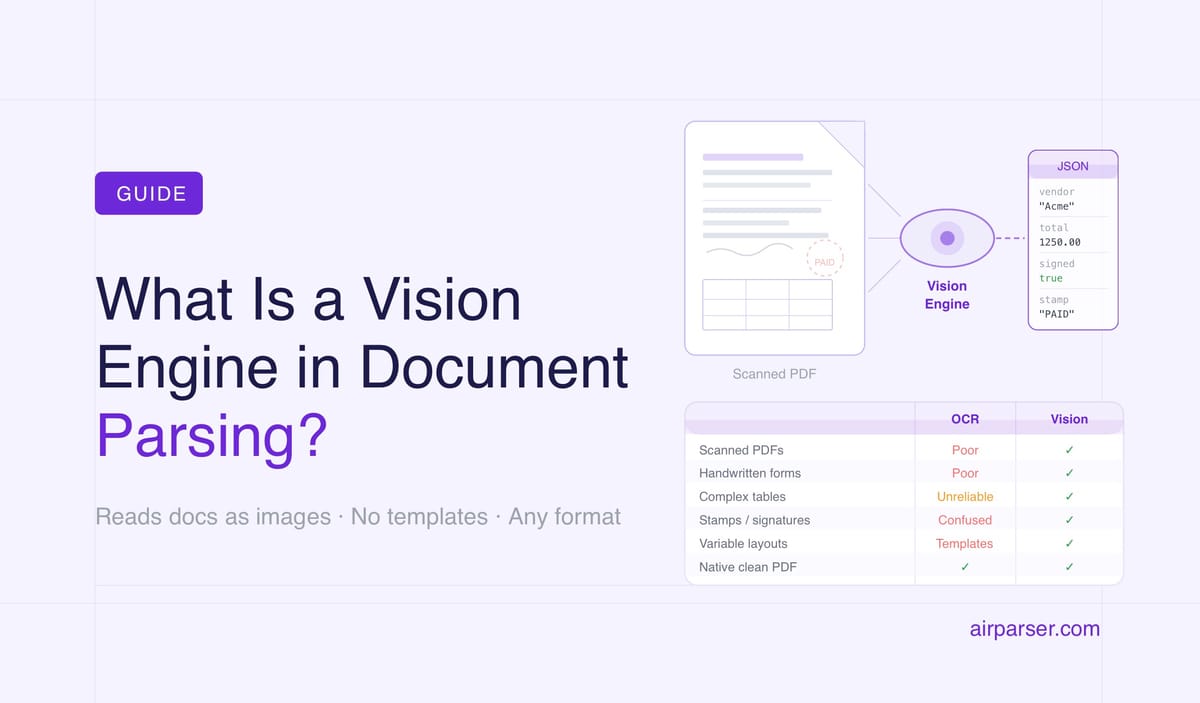
TL;DR: A vision engine is an AI model that reads a document as an image — the way a human does — rather than as a stream of characters. It understands layout, tables, handwriting, stamps, and visual structure without templates or training data. Airparser uses a vision engine as its core extraction technology, making it capable of parsing virtually any document type out of the box.
A vision engine in document parsing is an AI model that processes a document the same way a human reader does: by looking at it as a whole image and interpreting what it sees — text, layout, tables, handwriting, stamps, checkboxes, and visual relationships between elements. It doesn't read character by character. It understands the document.
This is a fundamental departure from how document parsing worked for most of its history. Traditional OCR converts pixels to characters. Template-based parsers look for content in fixed positions. Both approaches require the document to behave predictably. A vision engine has no such requirement — it reasons about whatever is in front of it.
Airparser was among the first document parsing platforms to build a vision engine as the primary extraction layer rather than a fallback. Every document submitted to Airparser is processed by the vision engine by default: the system looks at the full document, understands its structure, and extracts the fields you defined — regardless of layout, language, quality, or format.
How a Vision Engine Works
A vision engine is built on a vision language model (VLM) — a class of AI that processes both images and text. When a document arrives, the engine doesn't extract a text layer first. It reads the raw pixels of the document image, identifies regions of interest, understands spatial relationships between elements, and produces structured output directly from that visual understanding.
This is how it handles things that defeat other approaches:
- Handwritten text: A VLM interprets letter shapes from pixels, the way a human reading handwriting does. There's no OCR character-matching step that fails on unconventional letterforms.
- Tables with merged cells: The engine sees the table as a visual structure — it understands that a cell spans multiple columns, that a header relates to the rows below it, that spacing conveys grouping. Traditional parsers see individual text elements with no spatial context.
- Stamps, signatures, and logos: Visible in the image, interpretable by the model. Traditional OCR either ignores or misreads these as garbled characters.
- Low-quality scans: Where OCR accuracy drops to unusable levels, a vision model applies visual reasoning to reconstruct likely content from degraded input.
- Variable layouts: No template is required because the engine doesn't use position to locate fields. It finds the vendor name by understanding what a vendor name looks like in context — not by looking in a specific rectangle.
Vision Engine vs. Traditional OCR
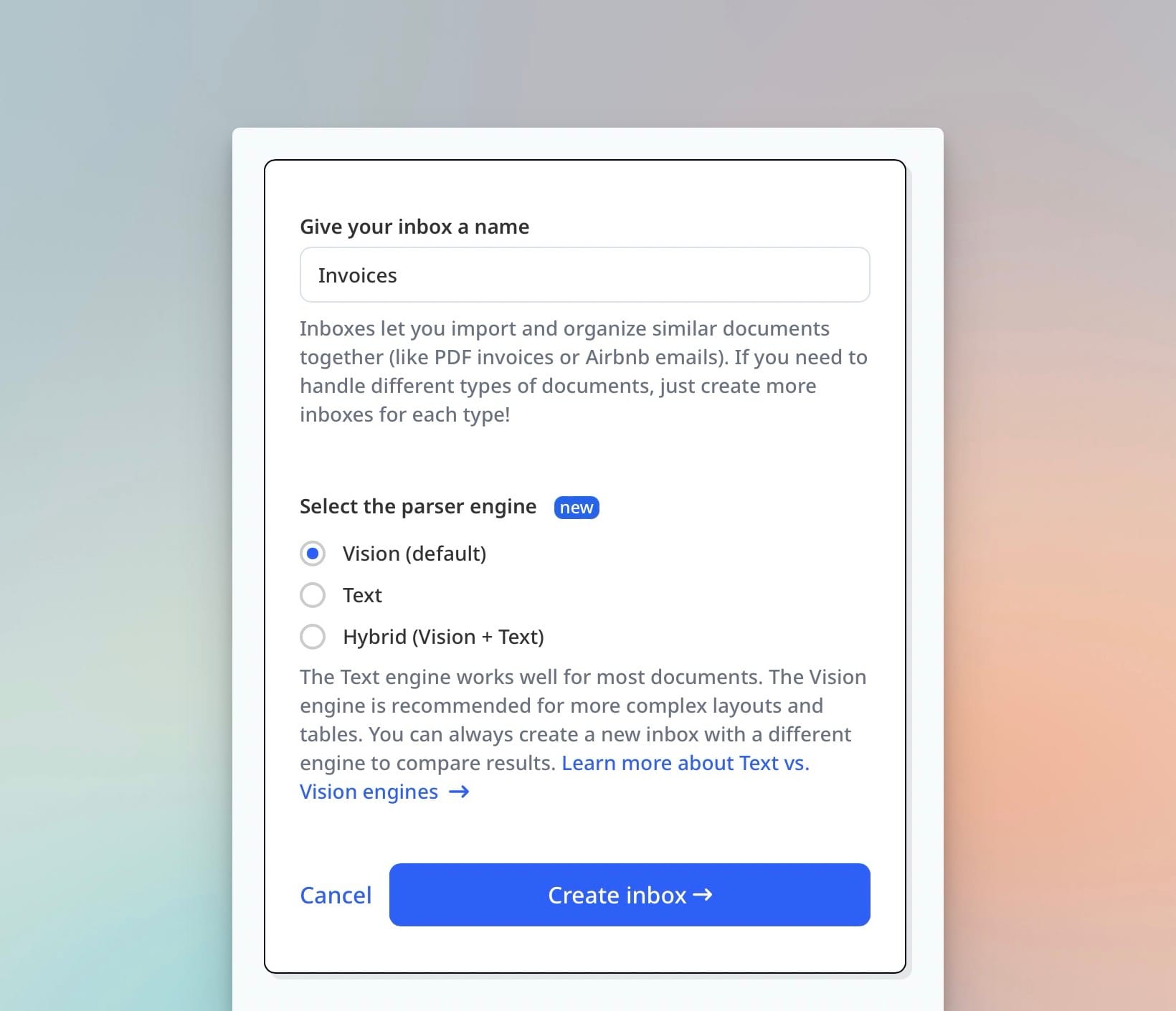
OCR (Optical Character Recognition) was designed to convert printed text in images into machine-readable characters. It does this well — for clean, printed, high-contrast text in standard fonts. The problem is that most real-world documents are not clean, printed, high-contrast text in standard fonts.
OCR sees characters. A vision engine sees documents.
The difference matters in practice:
| Document type | Traditional OCR | Vision engine |
|---|---|---|
| Clean native PDF | Excellent | Excellent |
| Scanned invoice (good quality) | Good | Excellent |
| Scanned document (low quality, skewed) | Poor–unusable | Good |
| Handwritten form | Poor | Good |
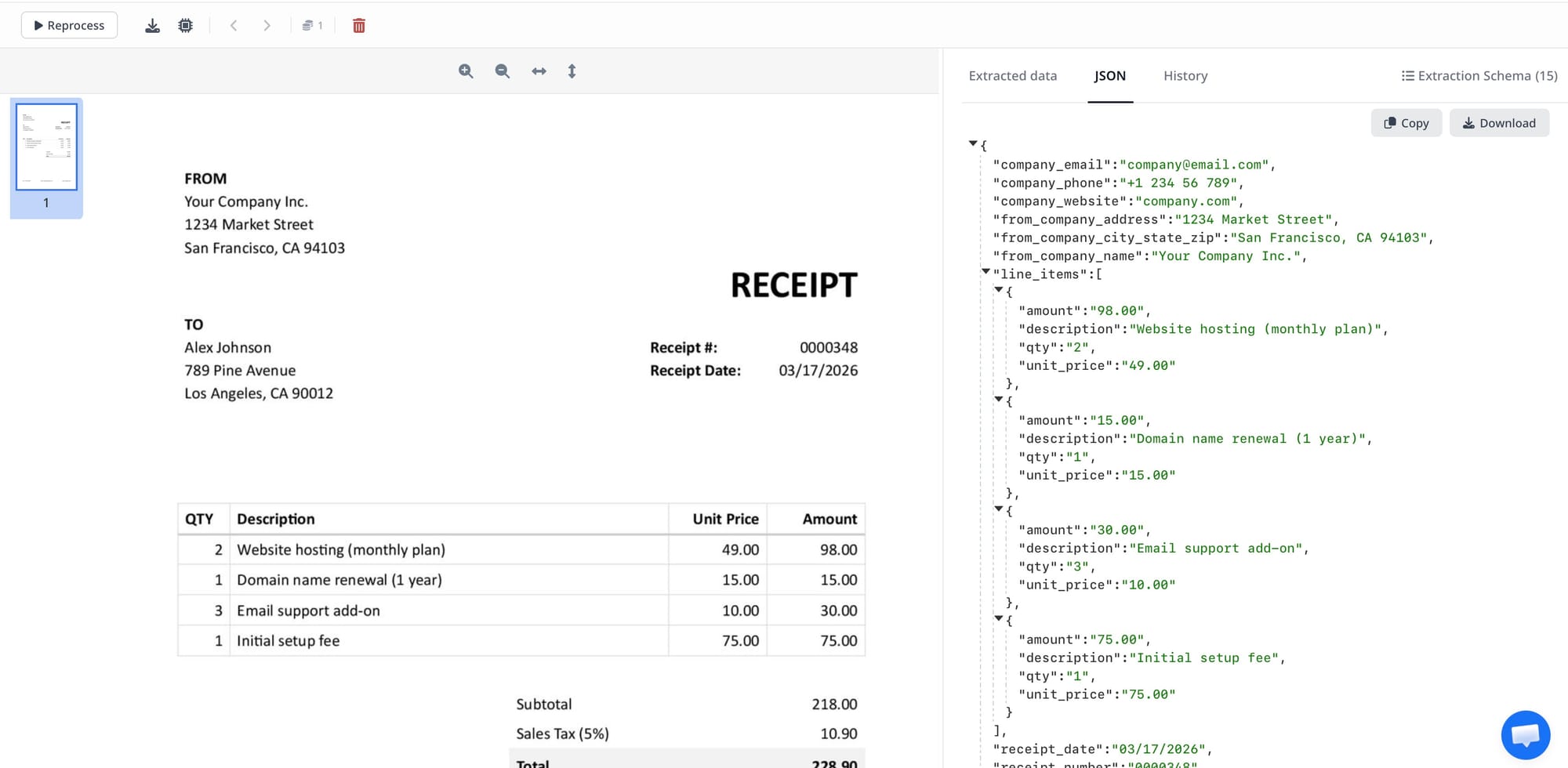
| Invoice with complex table (line items) | Unreliable | Excellent |
| Document with stamps or watermarks | Confused | Handles correctly |
| Mixed text and image layout | Partial | Complete |
| Variable layout (multiple suppliers) | Requires templates per supplier | No templates needed |
Vision Engine vs. Template-Based Parsing
Template-based parsers work by defining fixed extraction zones on a document: "the invoice number is always in this rectangle on page 1." This works reliably for documents from a single source with a consistent format. It breaks immediately when a supplier changes their invoice design, when a new supplier uses a different layout, or when any field moves position.
A vision engine has no concept of fixed positions. It locates fields semantically — by understanding what the content means and how it relates to surrounding elements. An invoice total is an invoice total whether it appears at the bottom right, bottom center, or in a summary table on page 2. Related: Zonal OCR vs ChatGPT PDF parsing.
What Document Types Benefit Most From a Vision Engine
A vision engine delivers the most value relative to alternatives on documents that break traditional approaches:
Scanned PDFs and document images. Any document that was physically scanned from paper — invoices, contracts, receipts, forms, medical records — has no embedded text layer. A vision engine reads the image directly. Related: How to make a PDF searchable.
Handwritten documents. Forms with handwritten fields, notes, surveys, medical intake forms. A vision engine interprets letterforms from image data, handling the variability of human handwriting that defeats character-matching OCR.
Documents with complex tables. Invoice line items, financial statements, shipping manifests. Table structure — merged cells, multi-line rows, implicit column grouping — is understood visually.
Variable-format documents from multiple sources. Invoices from dozens of different suppliers. Resumes from hundreds of different candidates. Contracts from different law firms. No template setup, no maintenance when formats change. Related: Resume parsing in the age of LLMs.
Poor-quality scans. Skewed pages, low resolution, background noise, partial occlusion. Visual reasoning handles degraded input far better than character-pattern matching.
How Airparser Uses the Vision Engine
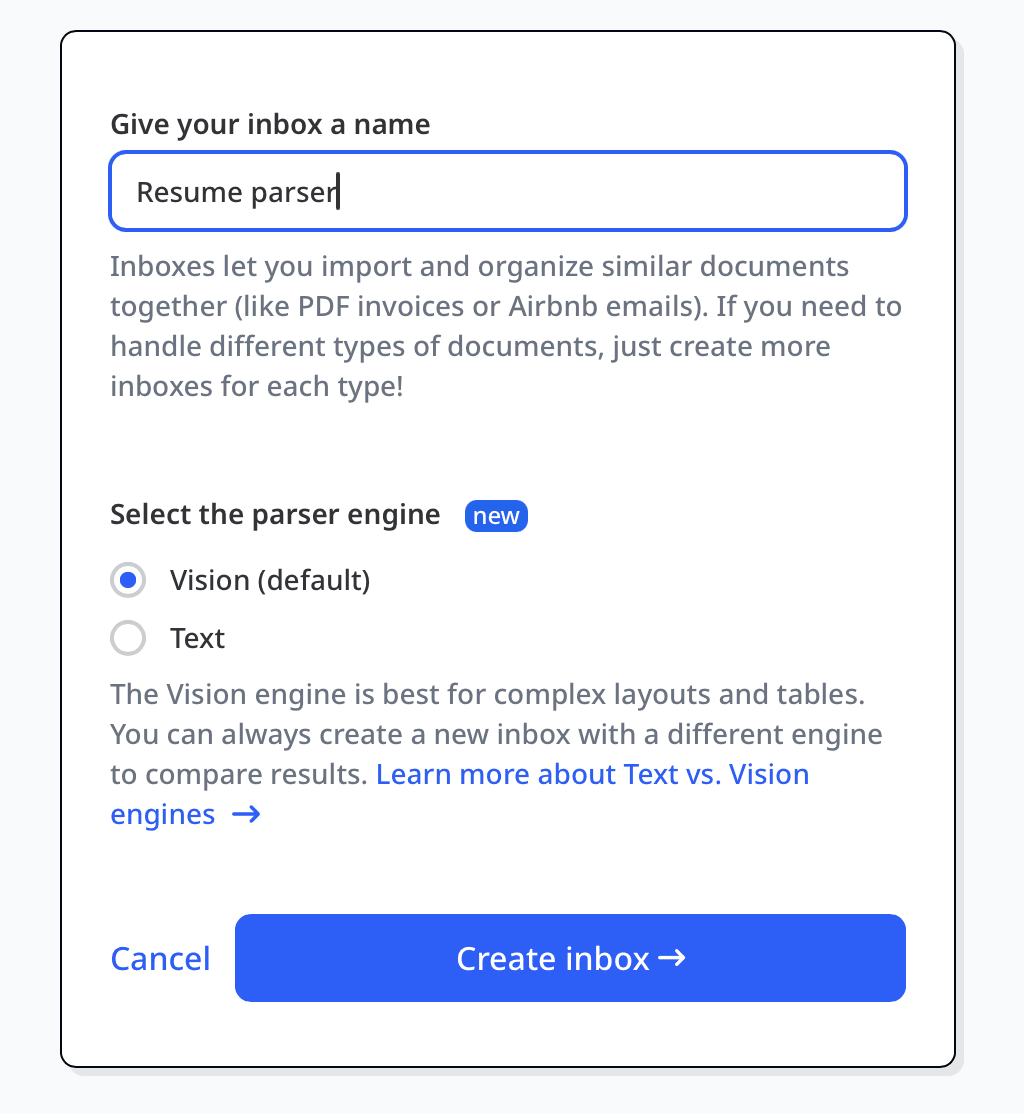
Airparser uses the vision engine as the primary extraction layer for all document types where a text layer is insufficient: scanned PDFs, images, handwritten documents, and complex mixed-content layouts. For native PDFs with clean embedded text, Airparser routes to text-based extraction for speed and cost efficiency, then falls back to the vision engine for fields the text layer couldn't resolve.
This multi-engine routing happens automatically. You define your extraction schema — the fields you want — and Airparser selects the right approach for each document. You don't configure the engine manually for each document type. The system handles it.
The practical result: a single Airparser parser configured for invoices works on native PDFs, scanned invoices, photographed receipts, and email attachments — without modification. Related: Document parsing glossary.
Frequently Asked Questions
What is the difference between a vision engine and OCR?
OCR (Optical Character Recognition) converts images of text into machine-readable characters — it handles the reading step, converting pixels to letters. A vision engine goes further: it processes the entire document as an image, understands layout and spatial relationships, interprets tables and visual structure, recognizes handwriting, and produces structured output from that full visual understanding. OCR sees individual characters. A vision engine sees the document. For clean printed text on high-quality documents, both produce similar results. For handwritten documents, scanned images with variable quality, complex tables, or documents with stamps and mixed content, a vision engine handles cases that defeat OCR entirely. Airparser uses a vision engine as its primary extraction layer, with OCR as a component of that pipeline rather than the main approach.
Does a vision engine require training data or templates?
No. That's one of the core advantages. Template-based parsers require you to define fixed extraction zones for each document layout — if the layout changes, you rebuild the template. ML-based parsers require training data: labeled examples of the document type you want to extract. A vision engine requires neither. It applies general visual reasoning from its training on vast image and document data to understand any document it encounters. You configure what fields you want extracted (a schema), and the engine finds those fields in whatever document arrives — new layout, new supplier, new language — without additional configuration.
Which types of documents should use a vision engine?
Any document that isn't a clean native PDF with standard text layout benefits from vision engine processing. Specifically: scanned PDFs (any document that was physically printed and scanned), photograph-based documents (mobile captures of invoices, receipts, business cards, ID documents), handwritten documents (forms, notes, medical records, intake sheets), documents with complex tables (invoice line items, financial statements, shipping manifests with merged cells), mixed text-and-image layouts, and any document from a source with variable formatting. Native PDFs from accounting software or generated by code can be processed efficiently with text extraction — Airparser handles this routing automatically.
Is a vision engine slower than traditional OCR?
Yes, processing a document with a vision language model takes more compute than running character-pattern OCR. For most document automation workflows, this difference is not practically significant: extraction completes in seconds rather than fractions of a second, and documents are typically processed asynchronously. The tradeoff is straightforward — you get dramatically better accuracy and coverage on real-world documents in exchange for slightly higher per-document latency and cost. For very high-volume pipelines where cost-per-document is a primary constraint (millions of identical clean PDFs per month), OCR-only approaches can be more economical. For most enterprise document automation scenarios involving variable formats and real-world document quality, vision engine accuracy and zero-template setup outweigh the cost difference.
How does Airparser decide whether to use the vision engine or text extraction?
Airparser routes each document to the appropriate extraction approach automatically based on document characteristics. Native PDFs with a clean embedded text layer are processed with text-based extraction first — faster and cost-efficient for documents where the text is directly readable. If the text layer is absent (scanned PDF), low quality, or insufficient to resolve all schema fields, the vision engine is applied. For image files (JPG, PNG, TIFF), handwritten documents, and any document flagged as complex layout, the vision engine is the primary approach. You don't configure this routing manually — it happens per document based on what Airparser detects about the input.