Data Validation in Document Parsing: How to Catch Bad Extractions Before They Reach Your Systems
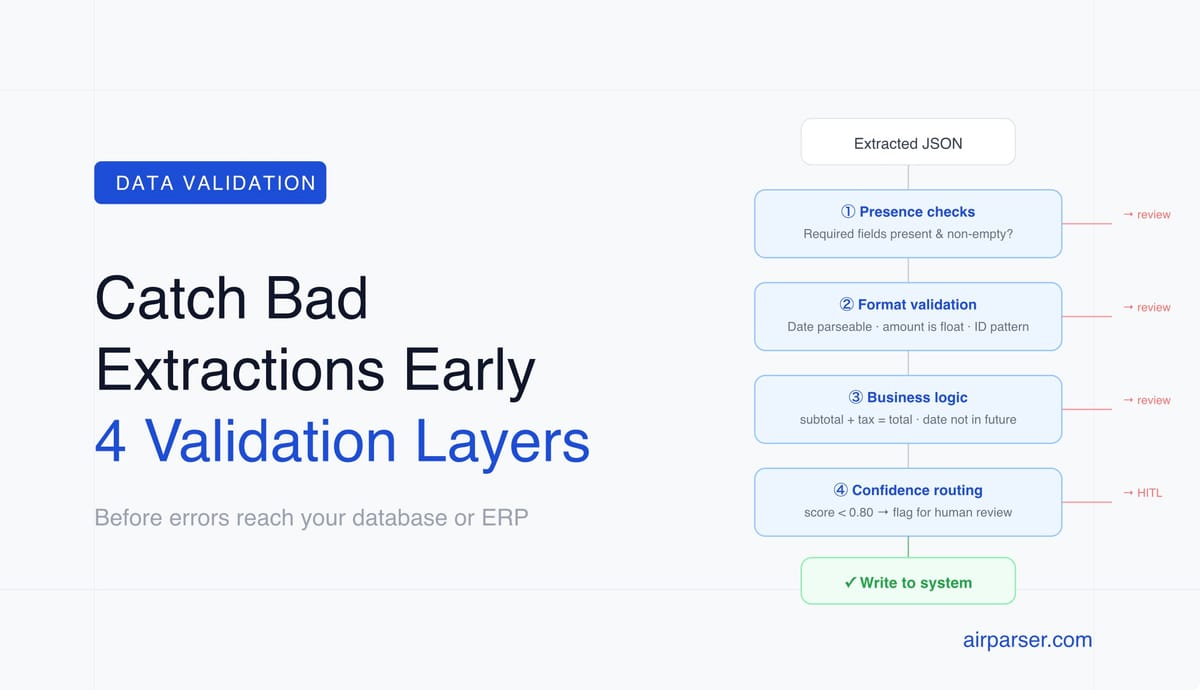
Extraction errors propagate into databases, trigger wrong actions, and cause downstream failures. Four validation layers — presence checks, format validation, business logic, and confidence routing — catch them before they cause damage.

TL;DR: Document extraction errors don't stay in the parser — they propagate into your database, trigger wrong actions, and cause downstream failures that are expensive to trace back to their source. Data validation between extraction and use catches these errors before they cause damage. This article covers what to validate, when to validate it, and how to implement it without building complex infrastructure.
A document parser returns data. What happens to that data next is where most extraction failures become expensive.
An invoice total extracted as the subtotal instead of the final amount doesn't cause a problem in the parser — it causes a problem when the payment run processes the wrong amount three days later. A missing due date doesn't fail the extraction — it fails the payment scheduling job that tried to read a null value. A vendor name with a character encoding error doesn't look wrong in the JSON — it looks wrong when it creates a duplicate vendor record in the ERP that doesn't match the existing entry.
Validation between extraction and downstream use is the step that catches these problems at the source, before they create work in the systems downstream.
What Goes Wrong Without Validation
Extraction errors fall into several categories, each with different downstream impacts:
Wrong field value. The parser extracted something, but it's the wrong thing — the subtotal instead of the total, the invoice date instead of the due date, the first line item's price instead of the sum. The extracted value is plausible (it's a valid number or date), so it passes format checks but is factually incorrect.
Missing required field. A field your downstream system requires is absent from the extraction output. The invoice number is blank. The vendor name came back null. The line items array is empty. Depending on how your system handles nulls, this either fails loudly (database constraint violation) or fails silently (a record created with empty fields that looks normal until someone tries to use it).
Incorrect format. The value is present but in a format your downstream system doesn't expect. A date returned as "17/05/2026" when your database expects "2026-05-17". A currency amount returned as "€1,234.56" when your system expects a float. A phone number with spaces when your CRM expects digits only.
Implausible value. The extracted value is within a valid format range but is logically wrong in context. An invoice date of 1926 (year misread). A total of 0.00. A quantity of -5. These pass format checks but are obviously wrong to any business logic validation.
Cross-field inconsistency. Individual fields look correct but don't add up. Subtotal + tax ≠ total. Line item quantities × unit prices ≠ line totals. Invoice date is after due date. These are undetectable by field-level validation alone — they require checking relationships between fields.
The Four Layers of Validation
The Python snippets below show general validation patterns. If you implement similar logic inside Airparser's built-in post-processing step, adapt it to Airparser's restricted Python environment: the parsed output is available as the data variable, only selected modules are available, arbitrary imports are blocked, while loops and classes are not supported, and the script must return a non-empty JSON object or null. For full Python or Node.js logic, use a webhook handler outside Airparser.
Layer 1: Presence checks
Verify that required fields are present and non-empty before using the data. This is the simplest validation and catches missing field extraction immediately.
REQUIRED_FIELDS = ["vendor_name", "invoice_number", "invoice_date", "total"]

def check_required(data: dict) -> list:
    return [f for f in REQUIRED_FIELDS if not data.get(f)]

missing = check_required(extracted)
if missing:
    flag_for_review(doc_id, f"Missing required fields: {missing}")
Layer 2: Format and type validation
Verify that extracted values are in the expected format. Dates can be parsed as dates. Amounts can be parsed as numbers. Identifiers match expected patterns.
from datetime import datetime
from decimal import Decimal, InvalidOperation

def validate_date(value: str) -> bool:
    for fmt in ["%Y-%m-%d", "%d/%m/%Y", "%m/%d/%Y", "%d %B %Y"]:
        try:
            datetime.strptime(value, fmt)
            return True
        except ValueError:
            continue
    return False

def validate_amount(value) -> bool:
    try:
        Decimal(str(value).replace(",", "").replace("€","").replace("$","").strip())
        return True
    except InvalidOperation:
        return False
Layer 3: Business logic validation
Check that values are plausible in context — not just valid in format but reasonable for the document type.
def validate_invoice_logic(data: dict) -> list:
    warnings = []
    total = data.get("total")
    subtotal = data.get("subtotal")
    tax = data.get("tax")

    # Total should be positive
    if total is not None and float(total) <= 0:
        warnings.append(f"Implausible total: {total}")

    # Subtotal + tax should approximately equal total
    if all([total, subtotal, tax]):
        expected = float(subtotal) + float(tax)
        if abs(expected - float(total)) > 0.02:
            warnings.append(
                f"Total mismatch: {subtotal} + {tax} = {expected}, "
                f"extracted total = {total}"
            )

    # Invoice date should not be in the far future or distant past
    if data.get("invoice_date"):
        # Add date range checks appropriate for your use case

    return warnings
Layer 4: Confidence score routing
Use confidence scores as a pre-validation signal when your parser or API output includes them. Low-confidence extractions are more likely to contain errors and should be reviewed before the layers above are even applied. The example below uses a generic fields_meta shape; adapt it to the actual metadata keys your integration receives.
CONFIDENCE_THRESHOLD = 0.80

def route_by_confidence(extraction_result: dict) -> str:
    fields_meta = extraction_result.get("fields_meta", {})
    low_confidence = [
        f"{field} ({meta['confidence']:.2f})"
        for field, meta in fields_meta.items()
        if meta.get("confidence", 1.0) < CONFIDENCE_THRESHOLD
    ]
    if low_confidence:
        return f"review: low confidence on {', '.join(low_confidence)}"
    return "pass"
Where to Implement Validation
Validation can happen at several points in the pipeline:
In Airparser post-processing. Airparser's post-processing step runs after extraction and before delivery to integrations such as Zapier, Make, and webhooks. It is useful for simple transformations and lightweight checks: normalising date formats, removing currency symbols from amounts, uppercasing country codes, adding derived fields, or returning null to stop a document from being exported. This is not unrestricted Python. Airparser uses a restricted Python environment with selected built-ins and modules such as datetime, dateparser, decimal, re, time, and math; arbitrary imports, while loops, and Python classes are blocked.
In a webhook handler. For more complex validation — external lookups, database checks, API calls, custom review queues, or business logic that needs unrestricted code — a Python or Node.js webhook handler is the right place. The webhook receives Airparser's output, applies validation, routes exceptions to review, and writes clean data to your database or triggers downstream actions. Related: Post-processing Airparser extraction results in Python.
In your automation platform. Zapier, Make, and n8n all support conditional routing and data transformation. A Make scenario can check whether a required field is present and route the document to a review sheet if it's missing. An n8n workflow can apply a Code node to validate and normalise extracted data before writing to a database. These approaches work well for teams without dedicated development resources. Related: Zapier vs Make vs n8n for document automation.
In the target system. Database constraints and application-level validation catch errors that make it through upstream stages. These are a useful last line of defence but not a substitute for earlier validation — a database constraint violation after a failed API call is harder to handle gracefully than a validation check before the call was made.
Building a Validation Checklist for Your Document Type
Every document type has a specific set of validation rules that makes sense for it. Here's a starting template for common types:
Invoices: Required fields present (vendor name, invoice number, date, total); total is positive and non-zero; subtotal + tax ≈ total (within rounding tolerance); invoice date is in a plausible range (not more than 1 year ago, not in the future); due date is after invoice date; line items array is non-empty if line items are in scope.
Resumes: Name and email present; email matches a valid email pattern; years of experience is a non-negative integer; skills is a non-empty array; dates in work history are chronologically consistent.
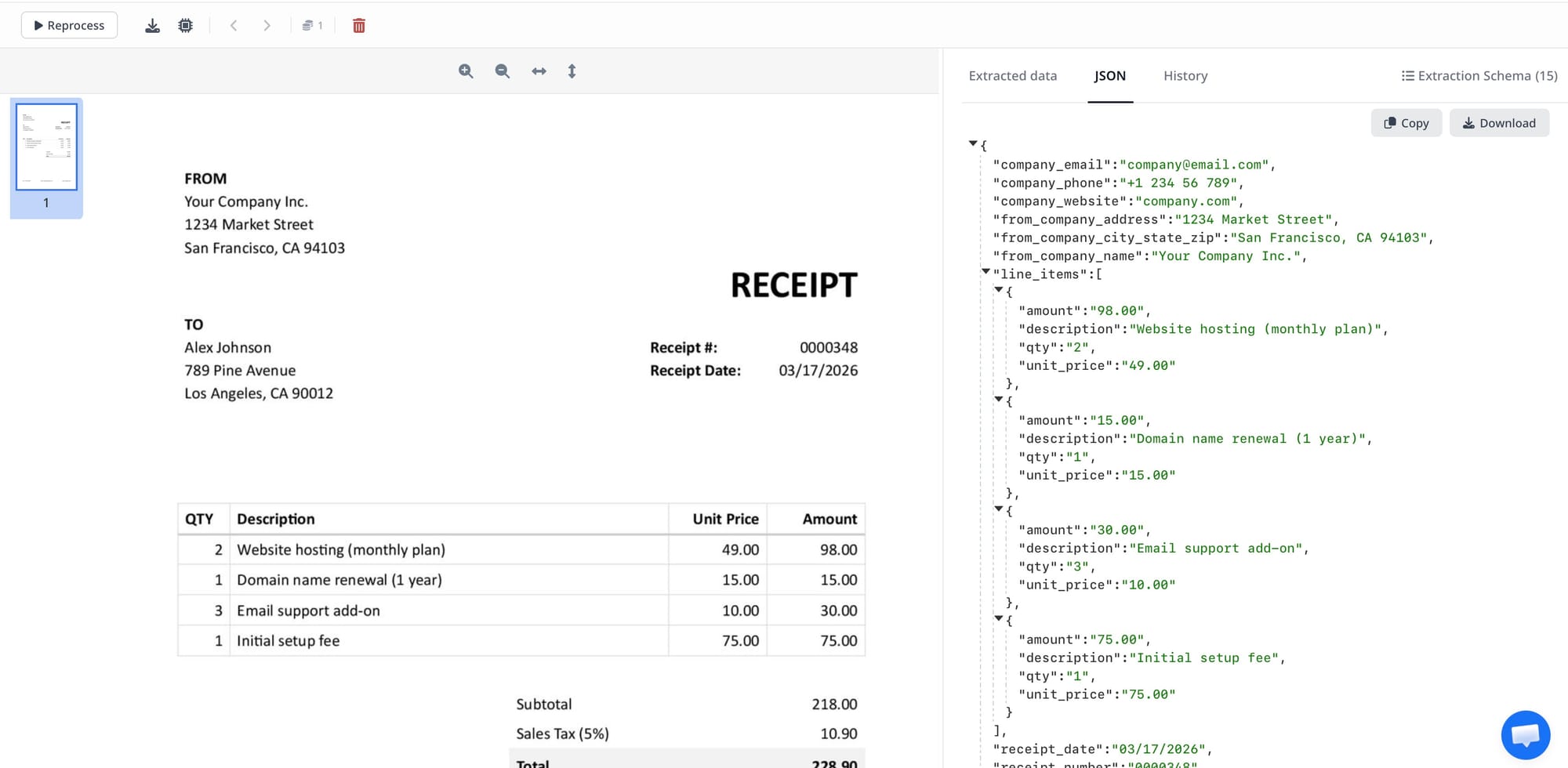
Receipts: Total is positive; date is present and in a plausible range; merchant name is non-empty; items array (if extracted) sums to total within rounding tolerance.
Contracts: Party names present (minimum two); effective date present and parseable; at least one of: term duration, expiration date, or "ongoing" indicator present; governing law field present (for jurisdiction-sensitive workflows).
Frequently Asked Questions
Should validation happen before or after writing to the database?
Before — always for required fields and format checks, and always for high-stakes values like financial amounts. Writing invalid data to a database and then cleaning it is significantly more work than catching it at the boundary. Once a wrong invoice total is in your accounting system, correcting it requires finding the record, understanding what was written versus what was intended, making the correction in the right place, and potentially reverting triggered actions (payment schedules, approval workflows) that used the wrong value. Catching the wrong total before it's written requires routing the document to review and having a human verify the field. The difference in effort is an order of magnitude.
What's the difference between validation and post-processing?
Post-processing transforms extracted data — normalising formats, enriching with external lookups, calculating derived fields. Validation checks extracted data against rules and routes or rejects data that fails. In practice they often happen together: a webhook handler might normalise a date format (post-processing) and then check whether the normalised date is in a plausible range (validation). The distinction matters for architecture: post-processing should always succeed and produce transformed output; validation can fail and should route failures to review queues or error handlers rather than just letting bad data proceed. Both are downstream of extraction and upstream of the destination system.
How do I handle a document where some fields pass validation and others fail?
Route the whole document to review when any critical field fails validation. Don't write partial data to your destination system and leave the failed fields empty — a record with a correct vendor name but a missing invoice number is harder to work with than a document held in a review queue waiting for human verification of the invoice number. For non-critical fields (optional enrichment fields, informational fields not used in downstream processing), failed validation can log a warning without blocking the write. The key is distinguishing which fields are critical to the downstream use case and applying blocking validation only to those, using warning-level validation for the rest.
Can Airparser's own post-processing handle all my validation needs?
For straightforward transformations and lightweight checks, yes — Airparser's in-platform post-processing can handle date normalisation, currency cleaning, derived fields, required-field checks, and simple business rules before export. But it runs in a RestrictedPython environment, so it is not the right place for arbitrary Python packages, network requests, database lookups, Python classes, or while loops. For complex validation that requires external data (looking up a vendor ID in your ERP, checking an invoice number against an existing purchase order in your system), API calls, custom review queues, or multi-step logic, use a separate webhook handler or automation platform. The practical approach: use Airparser post-processing for universal normalisation that applies to every document regardless of destination, and a webhook handler for business-logic validation that depends on your specific systems and rules. Related: Document parsing glossary: confidence score, structured output.
Is validation the same as accuracy testing?
No. Accuracy testing measures how often a parser extracts correct values across a test set of documents with known ground-truth values. It's done during setup and periodically to monitor parser quality. Validation is a production runtime check applied to every document as it's processed. Validation doesn't tell you whether your parser is generally accurate — it catches specific errors on specific documents as they occur. Both matter: accuracy testing helps you understand and improve the parser's overall performance; validation catches the errors that occur even on a well-tuned parser and prevents them from reaching downstream systems. Related: Why AI extracts the wrong data from your documents.