Why AI Extracts the Wrong Data From Your Documents (And How to Fix It)
Wrong extractions almost always come from five specific causes: ambiguous field definitions, wrong engine for the document type, multiple plausible values, poor scan quality, or missing validation. Each has a concrete fix.

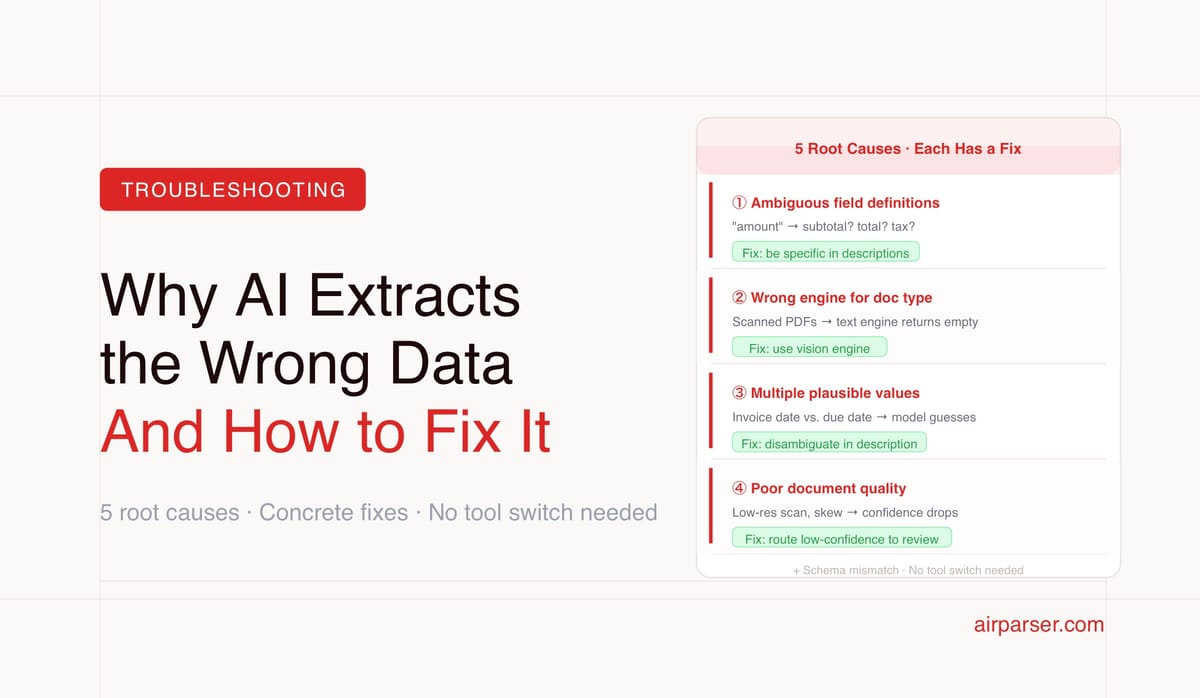
TL;DR: When an AI parser returns wrong, missing, or inconsistent data, the cause is almost always one of five things: ambiguous field definitions, wrong engine for the document type, poor scan quality, a schema that doesn't match what's actually in the document, or output used without validation. Each has a specific fix — none of them require switching tools.
You set up a document parser, it works on your test documents, and then it starts returning wrong data in production. The invoice total comes back as the subtotal. The vendor name is missing on scanned documents. Dates are formatted inconsistently. Line items are returning as a single string instead of an array.
These are the most common problems teams hit after initial setup — and they're almost always fixable without changing tools. The causes are specific, the fixes are concrete, and understanding them makes the difference between a parser that occasionally misfires and one that works reliably at scale.
Problem 1: Ambiguous Field Definitions
The most common cause of wrong extraction is an ambiguous field name or description. LLM-based parsers extract fields by understanding what they mean. If the meaning is ambiguous, the model makes a reasonable guess — which may be the wrong one for your use case.
The clearest example: an invoice field named amount. An invoice has multiple amounts — line item prices, subtotals, tax amounts, the total due. "Amount" could reasonably refer to any of them. When the model guesses wrong and returns the subtotal instead of the total, it's not making an error — it's resolving an ambiguity in the way you described the field.
The fix: Be specific in field descriptions. Instead of amount, use total_amount_due with a description like "The final total the buyer must pay, after all taxes and discounts are applied. This is typically the largest amount on the invoice, labeled Total, Amount Due, or Grand Total." The more precisely you describe what you want, the less ambiguity the model has to resolve.
Field description quality is the single highest-leverage improvement available in any schema-based extraction setup. A field name alone gives the model a word to interpret. A field description gives it a definition to match against. Related: Document parsing glossary: JSON schema.
Problem 2: Wrong Engine for the Document Type
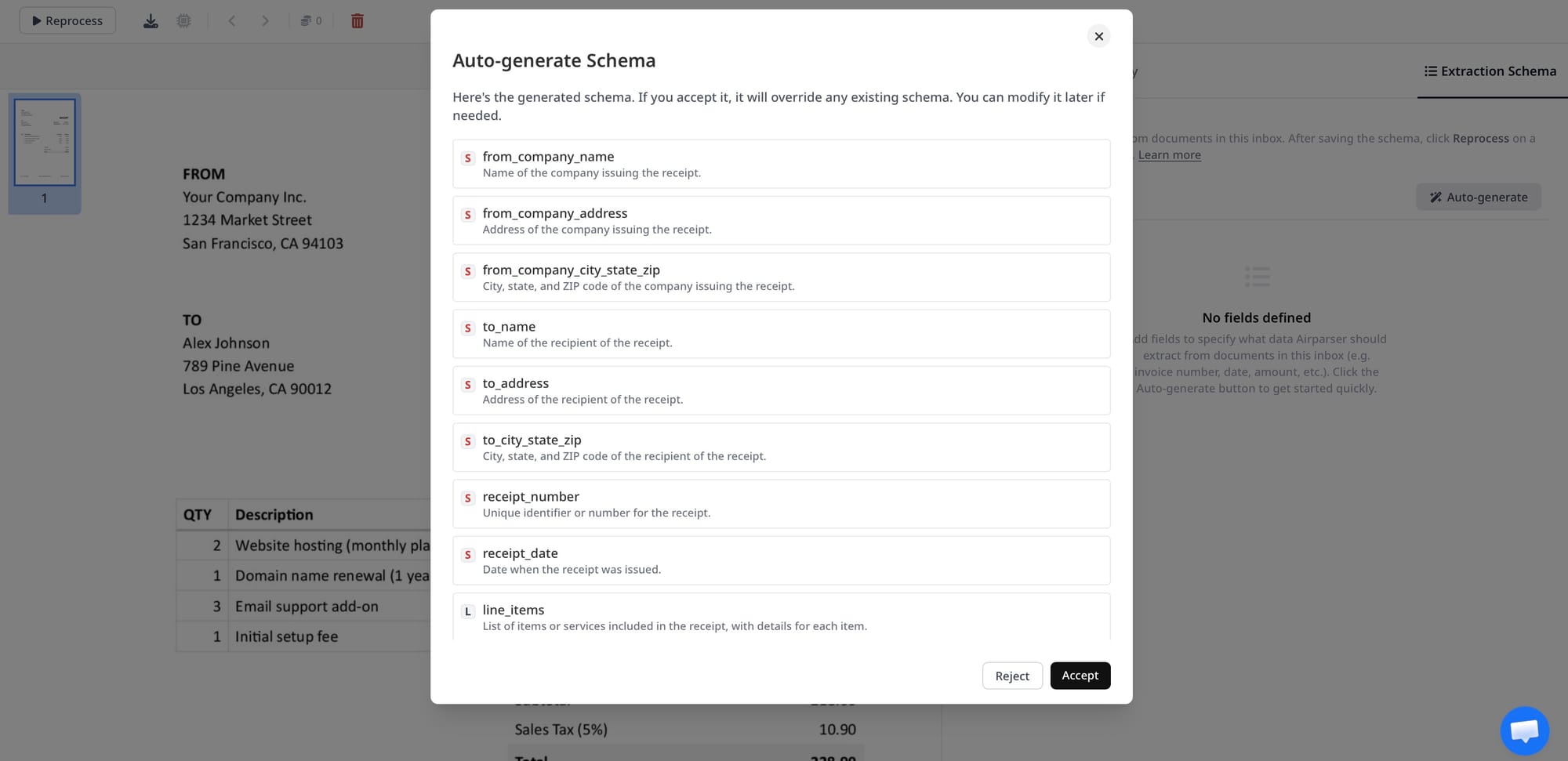
A text-based extraction engine works by reading the text layer embedded in a PDF. Scanned PDFs have no embedded text layer — they're images of documents. If you're processing scanned documents with a text-only extraction approach, there's nothing to extract from, and the parser returns empty or near-empty results.
This shows up as: fields that extract fine from native PDFs (generated by accounting software, exported from systems) but come back empty or wrong from scanned versions of the same document type.
The fix: Use a vision engine for scanned documents, photographed documents, image files, and any document where the text layer is absent or unreliable. In Airparser, engine selection is automatic — the system detects whether a document has a usable text layer and routes accordingly. If you're seeing extraction failures specifically on scanned inputs, verify that vision engine processing is enabled for your parser.
For document workflows where you receive the same document type both as native PDFs (from some suppliers) and as scanned images (from others), a parser that handles both automatically — without requiring you to route documents to different configurations — is essential. Related: Why vision engine AI parses documents that break traditional OCR.
Problem 3: The Document Contains Multiple Plausible Values
Some documents genuinely contain multiple values that could match a field definition. An invoice might show a subtotal, a tax line, a discount, and a total — all of which are "amounts." A contract might have an effective date, a signing date, and an expiration date — all of which are "dates." A resume might list a current employer and several previous employers — all of which are "employers."
When multiple values could match your field, the model extracts one of them — and which one depends on how you've described the field and how the document is structured. If it consistently picks the wrong one, the description isn't distinguishing clearly enough between the plausible options.
The fix: Add disambiguation to the description. For the invoice total: "The final payable amount after all taxes, fees, and discounts. Not the subtotal before tax. Not individual line item amounts. The number labeled Total, Grand Total, or Amount Due at the bottom of the invoice." For the current employer on a resume: "The company where the candidate currently works or most recently worked, listed first in the work experience section. Not previous employers."
For documents with genuinely complex multi-value fields — a list of all invoice line items, all previous employers, all contract parties — use an array field type and describe the complete set you want, not just one item.
Problem 4: Poor Document Quality
Extraction accuracy degrades with document quality, even with vision engine processing. Very low-resolution scans, heavily skewed pages, documents with significant damage or obstruction, and extremely degraded fax outputs push the limits of what visual reasoning can reliably interpret.
The signal for this problem: extraction works well on most documents but fails specifically on a subset that, on closer inspection, are visibly low quality. High-confidence extractions from the same document type look correct; low-confidence ones correspond to the bad scans.
The fix: Airparser returns confidence scores per extraction. Set up a validation step that routes low-confidence results to human review rather than passing them directly to downstream systems. This is the practical approach — automate the clean cases, flag the edge cases, and use the confidence signal to distinguish between them rather than treating all results as equally reliable.
If a specific document source consistently produces low-quality scans, improving the scan quality at source (higher DPI, flatbed vs. handheld scanner) is more effective than trying to compensate in the parser. Related: How to post-process Airparser extraction results in Python.
Problem 5: Schema Mismatch With Document Reality
A schema defines what you expect to find in a document. If the schema doesn't match what's actually in the documents you're processing, extraction will be consistently incomplete or wrong — not because the parser is failing, but because you're asking for fields the document doesn't contain in the way you've described them.
Common mismatches:
- Required fields that are sometimes absent. Not every invoice has a PO number. Not every receipt has a tax line. If your schema marks these as required, you'll get empty or fabricated values when the field is absent. Mark optional fields as optional and handle null values downstream.
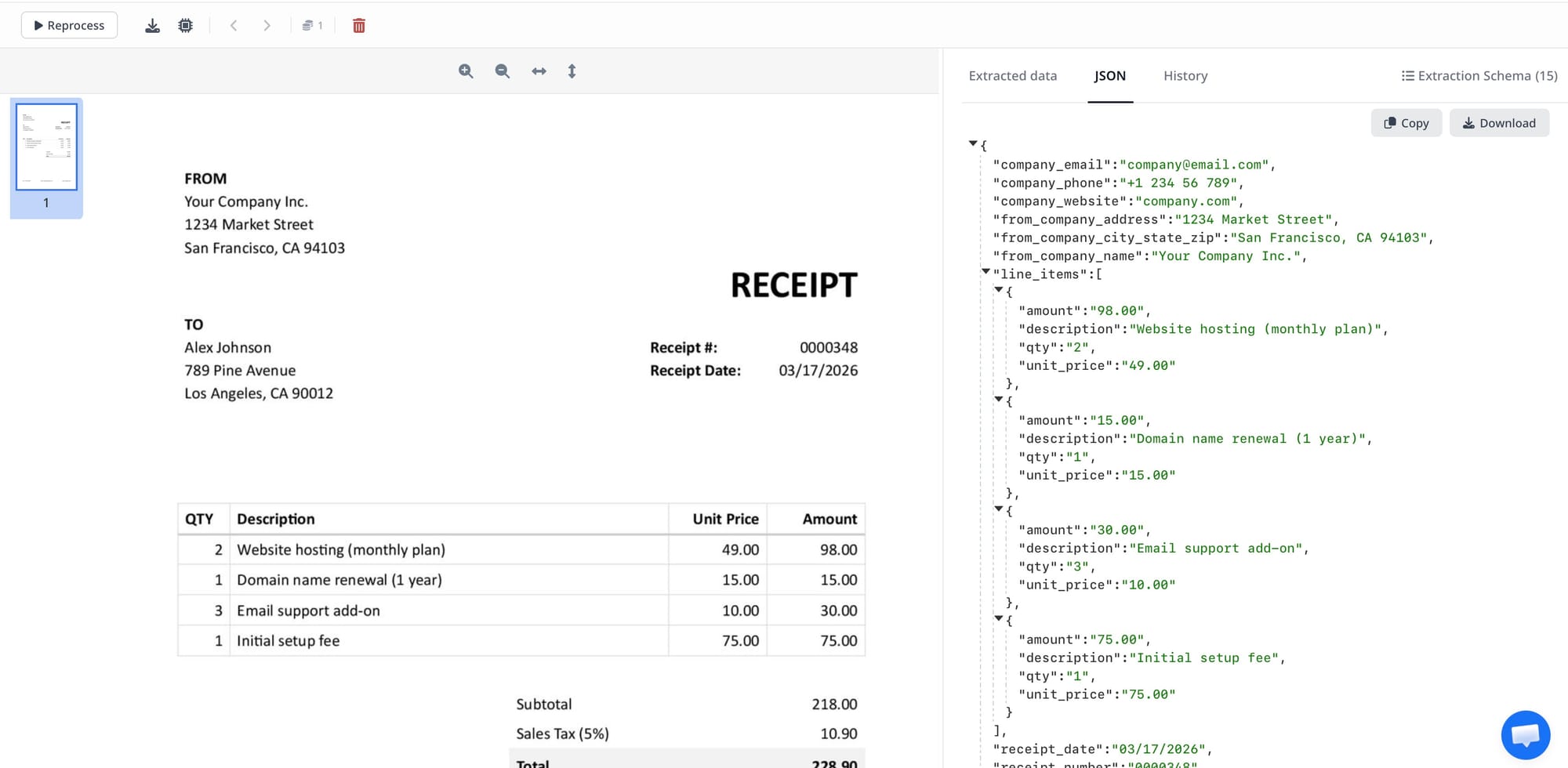
- Line items defined as a single field instead of an array. If you define
line_itemas a text field, you'll get a prose description of the first line item or a concatenated mess of all of them. Define it as an array of objects with sub-fields (description, quantity, unit_price, total). - Date format expectations. Dates arrive in many formats — DD/MM/YYYY, MM-DD-YYYY, "15 May 2026", "May 15, 2026." If your downstream system expects a specific format, apply normalisation in post-processing rather than expecting the parser to output a specific date format by default.
- Nested vs. flat schema for addresses. An address extracted as a single text field is easy to query for display but hard to use for database lookups. An address extracted as separate fields (street, city, postal code, country) is more useful downstream but requires that level of granularity to be visible in the document — which it often isn't in handwritten or informal documents.
The fix: Review your schema against a sample of 20–30 real documents from production, not just the clean samples you tested with during setup. The edge cases that cause problems are usually visible in real-world documents that didn't make it into your test set.
Problem 6: Missing Post-Processing and Validation
Even a well-configured parser with a precise schema produces occasional wrong values. The documents are genuinely ambiguous. A supplier writes "N/A" in a numeric field. A date is in a format the model resolves incorrectly. A total is hand-corrected with pen and the correction is visually ambiguous.
Treating all extraction outputs as correct and passing them directly to production systems is where data quality problems become expensive. The fix is not a perfect parser — it's validation and exception handling downstream of the parser.
At minimum, validate that required fields are present and non-empty before writing to a database. Cross-check calculated fields where possible — if you extract subtotal, tax, and total, verify that subtotal + tax ≈ total. Flag results with low confidence scores for human review. Log the raw extraction output alongside the cleaned values so you can diagnose errors when they surface.
These practices don't require a different parser. They require treating extraction output as data that needs validation, the same way you'd validate any external data input to your system. Related: Post-processing Airparser results in Python: validation, normalisation, and enrichment.
A Diagnostic Checklist
If your extraction is returning wrong or missing data, work through this in order:
- Look at the failing documents. Are they scanned? Handwritten? Low quality? If so — engine and quality issues first.
- Check the failing fields. Are they ambiguous names with no descriptions? Are there multiple plausible values in the document for that field? Improve the descriptions.
- Check the schema against real documents. Is the field sometimes absent? Is it an array in the document but a single value in the schema?
- Check confidence scores. Are the failing extractions low-confidence? If so — add human review routing for low-confidence results rather than trying to fix the parser for documents it flags as uncertain.
- Add post-processing validation. Cross-check calculated fields. Validate required fields before writing downstream.
Frequently Asked Questions
Why does my parser extract correctly in testing but fail in production?
Almost always because your test documents were cleaner, more consistent, or more representative of ideal cases than your production documents. Testing with a handful of well-formatted invoices from known suppliers doesn't expose the full range of variation in real-world document processing: suppliers who use unusual layouts, documents that were scanned rather than generated digitally, invoices with handwritten corrections, documents from international suppliers with different date and number formatting conventions, or edge cases like invoices with no line items (a single service charge with no table). The practical fix is to build a test set specifically from your most problematic production documents — the ones that have failed before — and use those to validate schema improvements and configuration changes.
How do I know if a wrong extraction is a parser problem or a document quality problem?
Look at the source document. Open the specific document that produced the wrong result and check: can a human reading it easily find the correct value? If yes, and the parser returned something different, it's likely an ambiguous field description or a schema configuration issue. If a human looking at the document would also struggle to identify the correct value — the field is ambiguous, illegible, or genuinely absent — the parser is behaving correctly given the input quality, and the right response is to flag that document for human review rather than expecting the parser to produce a reliable result from unreliable source material. Confidence scores are useful here: a low-confidence result from a poor-quality document is the system working correctly.
Can adding more detail to field descriptions really make a significant difference?
Yes — it's consistently the highest-impact configuration change available. A field named date gives the model one word to interpret; it makes a reasonable guess. A field named invoice_date with description "The date the invoice was issued by the vendor, typically found near the top of the document. Not the due date or payment date." gives the model a complete definition to match against. On documents where multiple dates appear — invoice date, due date, service period start date, PO date — the difference between extracting the right date consistently and extracting a random one comes down entirely to how precisely you've described what you want. For complex documents with many similar fields (financial statements, detailed contracts, multi-party agreements), field descriptions are the primary lever for extraction quality.
What should I do when extraction fails on a document that's genuinely hard to read?
Route it to human review using confidence score thresholds rather than letting a low-quality extraction reach your downstream systems. Set a threshold below which extracted documents are flagged — a practical starting point is 0.80 confidence — and build a simple review queue where a human can verify or correct the flagged fields before the data is used. This is not a failure of automation — it's the correct architecture for document workflows that include real-world edge cases. The goal of document automation is not to process 100% of documents without human involvement; it's to automate the 90–95% of cases that are straightforward and handle the rest efficiently. Confidence-based routing achieves this without requiring the parser to be perfect on documents that even humans find ambiguous.
Is wrong extraction more common with certain document types?
Yes. Documents with high layout variability, many similar fields, or frequent presence of optional and edge-case fields produce more extraction errors than simple, consistent documents. Invoices from many different suppliers are harder than invoices from one supplier. Contracts with many dated clauses are harder than invoices with one date. Handwritten forms are harder than machine-generated PDFs. Medical records with a mix of printed and handwritten content are harder than either alone. Understanding where your document mix falls on this complexity spectrum helps set appropriate confidence thresholds and validation rules — high-complexity document types warrant lower confidence thresholds and more aggressive human review routing than simple, consistent ones.