Zapier vs Make vs n8n for Document Automation: Which Platform Fits Your Workflow?
Zapier, Make, and n8n all connect to Airparser natively. The right choice depends on workflow complexity, document volume, team technical level, and data sensitivity. An honest breakdown of all three for document automation use cases.

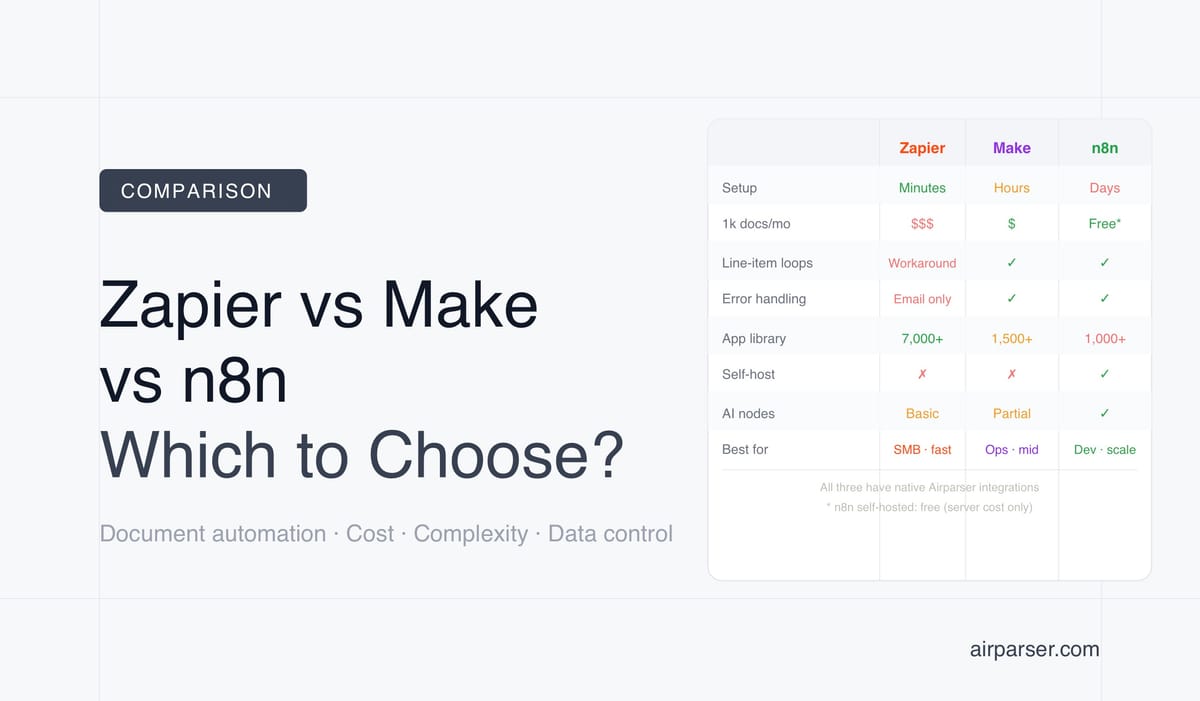
TL;DR: All three platforms — Zapier, Make, and n8n — have native Airparser integrations. Zapier is fastest to set up but gets expensive at volume. Make is the best price-to-power ratio for complex multi-step workflows. n8n is the best choice for developers, high-volume pipelines, and teams that need full data control via self-hosting.
Zapier, Make, and n8n all connect to Airparser natively. The choice between them isn't about which one "works" — it's about which one fits the workflow complexity, document volume, team technical level, and data sensitivity of your specific use case.
A five-step invoice processing workflow that runs 200 times a month looks very different from a high-volume document pipeline processing thousands of files daily with conditional routing, error recovery, and AI enrichment. The right platform for the first use case is probably not the right platform for the second.
This comparison focuses on document automation specifically — not general automation. We look at how each platform handles the patterns that come up repeatedly in document workflows: receiving files from email or storage, triggering on parsed results, iterating over extracted line items, routing on field values, handling parsing failures, and pushing data to downstream apps.
Three Questions That Determine the Right Platform
Before comparing features, answer these questions. They narrow the field quickly.
How technical is the team setting this up? Zapier is the most accessible for non-technical users — a workflow can be running in 20 minutes without understanding automation concepts. Make has a steeper learning curve (the visual canvas and operation model take time to internalize) but is still no-code. n8n requires either a developer or significant learning investment, especially for self-hosted deployments.
What is your monthly document volume? Zapier's task-based pricing scales poorly past a few thousand documents per month. A 5-step workflow running on 500 documents/month uses 2,500 tasks — exceeding the entry Professional plan. Make's operation pricing is roughly 10x more cost-efficient at equivalent complexity. n8n self-hosted is effectively free at any volume (server cost aside).
Can document data leave your infrastructure? Zapier and Make are cloud-only — all document data passes through their servers. For invoices, contracts, resumes, or medical documents containing personal data, this has compliance implications. n8n's self-hosted Community Edition keeps all data in your own infrastructure. Make is EU-based (Prague), which matters for GDPR cloud processing context.
Zapier: Fastest Setup, Widest App Library, Best for Moderate Volume
Zapier is the right choice when speed of setup and breadth of integrations matter more than cost efficiency or workflow complexity. Its 7,000+ app library is the largest of the three by a wide margin — if you need to push parsed document data to an obscure CRM, niche accounting tool, or industry-specific SaaS, Zapier almost certainly has a native connector when Make and n8n don't.
How Airparser connects to Zapier
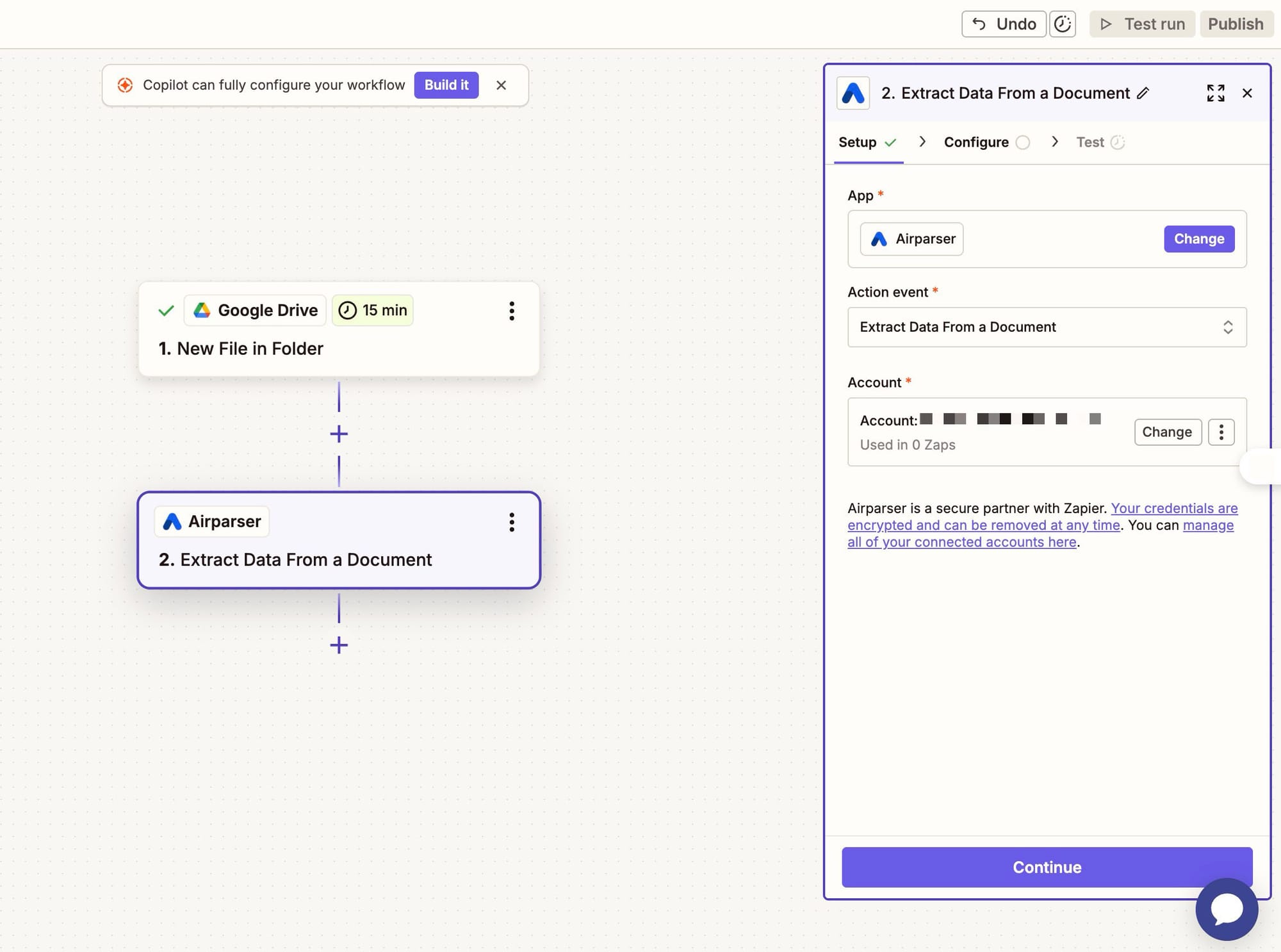
Airparser has a native Zapier app. The trigger is "New Parsed Document" — it fires every time Airparser finishes processing a document, passing all extracted fields as named variables into the Zap. Setup is fully no-code: connect Airparser via API key, select your parser, test with a sample document, then map the extracted fields to any downstream app.
Document automation strengths
- Fastest time to first workflow. A non-technical user can have Airparser → Google Sheets running in under 20 minutes. No learning curve on workflow concepts required.
- Best app coverage. 7,000+ integrations means almost any destination app is available natively — QuickBooks, Salesforce, HubSpot, Notion, Airtable, Slack, and thousands of industry-specific tools.
- Zapier Agents (2026). Zapier's AI agent layer can autonomously act on parsed document data across apps — useful for teams exploring agentic document workflows without building custom agent infrastructure.
- Document automation templates. Pre-built templates for common document workflows: invoice parsing → QuickBooks, email attachments → Google Drive, form submissions → CRM, parsed data → Slack notification.
Document automation weaknesses
- Task pricing punishes volume. Every action step in every Zap run counts as a task. A 5-step Zap running on 500 documents/month = 2,500 tasks — exceeding the Professional plan's 750-task limit. Document automation workflows naturally have many steps, and moderate document volumes quickly reach expensive tiers.
- No looping natively. Processing each row in a parsed line-items table (10 line items × 500 invoices/month = 5,000 loop iterations) requires workarounds using Paths or Formatter steps. Make and n8n handle this natively with iterators.
- Basic error handling. When a parsing result is missing a required field, or a downstream app rejects a record, Zapier's error handling is limited to email notifications. There's no per-step error routing or retry logic. For production document pipelines, silent failures are a real risk.
- All data through Zapier's servers. No self-hosting option. Document data — including invoice amounts, personal information, contract terms — passes through Zapier's infrastructure.
- 15-minute polling minimum on entry plans. Webhook triggers (near-instant) require paid plans. Free-plan workflows wait up to 15 minutes before checking for new parsed documents.
Pricing
Free plan: 100 tasks/month, single-step Zaps only, 15-minute polling. Professional: $29.99/month (750 tasks, multi-step, 2-minute polling). Team: $103.50/month (2,000 tasks, shared workspace). Annual billing saves approximately 33%. Overage tasks billed at 1.25× standard rate.
Best for: Non-technical teams who need fast setup, need to connect to a wide range of apps, and process a manageable document volume (under 500 documents/month on entry plans). Not cost-efficient at high volume.
Make: Best Price-to-Power Ratio for Complex Document Workflows
Make (formerly Integromat) sits between Zapier and n8n in the complexity spectrum. Its visual canvas — a circular flowchart rather than a linear step list — handles conditional branching, iterators, aggregators, and error handlers in a way that Zapier can't match without workarounds. The operations pricing is roughly 10 times more cost-efficient than Zapier at equivalent workflow complexity.
How Airparser connects to Make
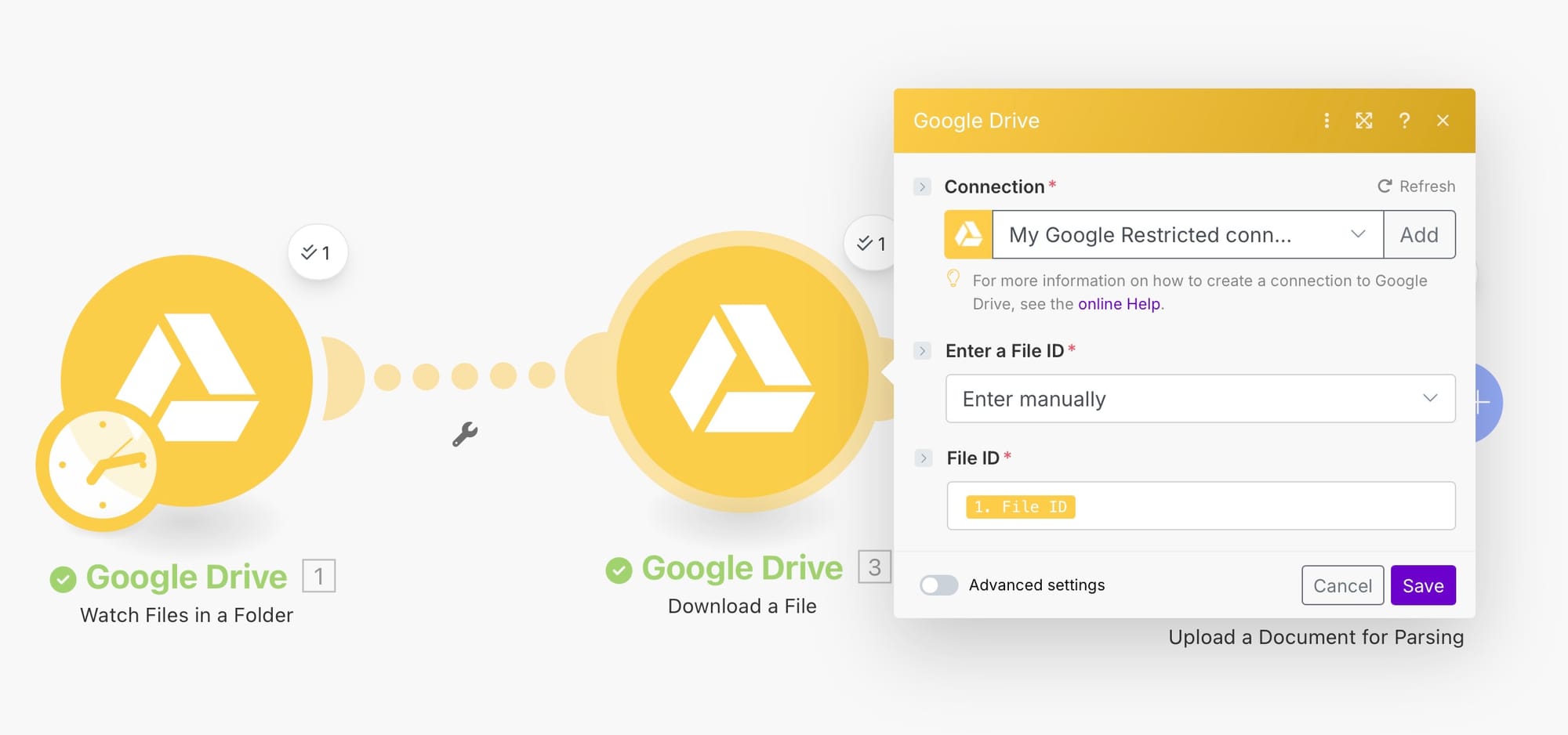
Airparser has a native Make module. The trigger is "Watch Document Parsed" — it fires instantly via webhook on every Airparser parsing event. All extracted fields are available as Make data collection items, which can be passed to any downstream module, filtered, iterated, or transformed using Make's built-in data tools.
Document automation strengths
- Native iterators and aggregators. Processing each line item from a parsed invoice table is a single Iterator module — no hacks or workarounds. Aggregate the results back into a summary with an Aggregator module. This is the most natural platform for document workflows that involve multi-row extracted data.
- Best error handling of the three. Each route in a Make scenario can have a dedicated error handler with retry logic and fallback paths. For production document pipelines — where occasionally a parse fails, a downstream API is rate-limited, or a required field is missing — this prevents silent data loss.
- Rich built-in data transformation. Make's built-in functions handle complex text parsing, date formatting, JSON manipulation, regex extraction, and math operations without extra steps or workarounds. Reshaping Airparser's JSON output before sending to a database is straightforward in Make.
- Detailed execution logs. Every scenario run shows per-module input and output, making it much easier to debug why a specific invoice parsed incorrectly or why a field mapping failed.
- Operations are ~10× cheaper than Zapier. 10,000 operations/month for $10.59 (Core) vs. Zapier's 750 tasks for $29.99. For equivalent workflow complexity, Make is dramatically more cost-efficient.
- EU-based company. Make is headquartered in Prague. For teams with GDPR cloud-processing requirements, EU data residency and a European DPA framework can be relevant.
Document automation weaknesses
- Operation counting surprises teams. Every module execution counts — including filters that stop the flow, data store reads, and each iterator step. A workflow processing 100 parsed invoices with 10 modules each = 1,000 operations for one batch run. Teams often underestimate their operation budget before going to production.
- Steeper learning curve than Zapier. The visual canvas concept and operation model take time to understand. Expect 10–20 hours before a non-technical user is productive with complex scenarios.
- Smaller app library. 1,500+ integrations vs. Zapier's 7,000+. Some less common SaaS tools may not have native Make modules, requiring HTTP Request module workarounds.
- File storage cap. Make stores up to 100 files at a time — workflows processing many attachments need explicit deletion steps to avoid hitting the limit.
- Cloud-only. No self-hosting option. All document data passes through Make's infrastructure.
Pricing
Free plan: 1,000 operations/month, 2 active scenarios, 15-minute minimum interval. Core: $10.59/month (10,000 operations, unlimited scenarios, 5-minute interval). Pro: $18.82/month (10,000 operations, 1-minute interval, priority execution). Teams: $34.12/month (multi-user). Extra 10,000 operations: ~$9/month add-on. Annual billing saves approximately 20%.
Best for: Technical non-developers and ops teams who need more power than Zapier — specifically conditional routing, loop processing, and error handling — at significantly lower cost. The best default choice for mid-complexity document workflows at medium volume.
n8n: Best for Developers, High Volume, and Data Sovereignty
n8n is fundamentally different from Zapier and Make in one key way: it can be self-hosted on your own infrastructure, with no document data leaving your environment. For workflows processing sensitive documents — contracts, invoices with personal data, medical records, financial statements — this removes the third-party data processing concern entirely.
n8n 2.0 (January 2026) also made it the most AI-native of the three: native Mistral OCR integration, LangChain/LLM nodes, vector database connectors, and a multi-agent orchestration framework are all built in. For teams building intelligent document processing pipelines that combine extraction with AI enrichment, classification, or RAG, n8n is the most capable platform.
How Airparser connects to n8n
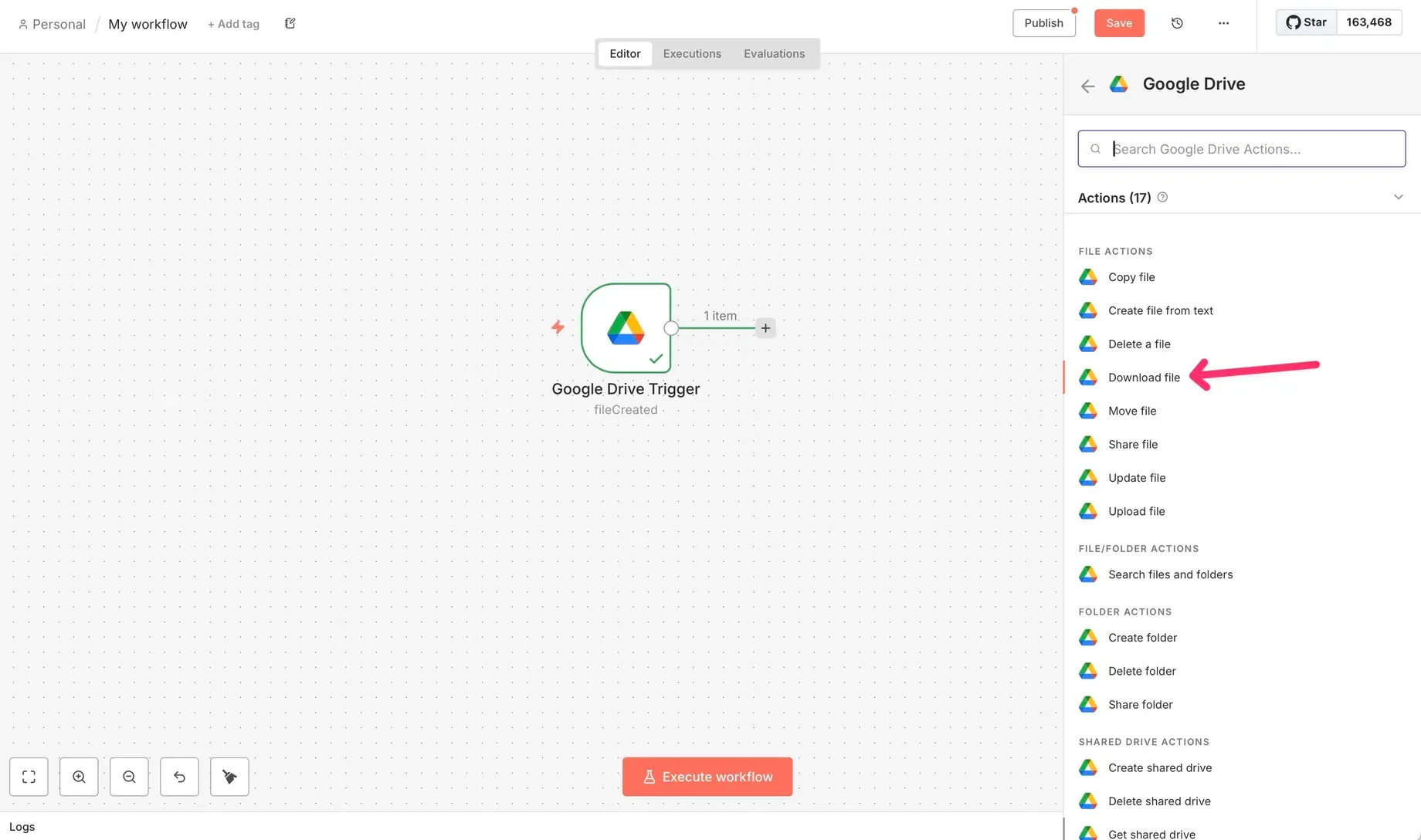
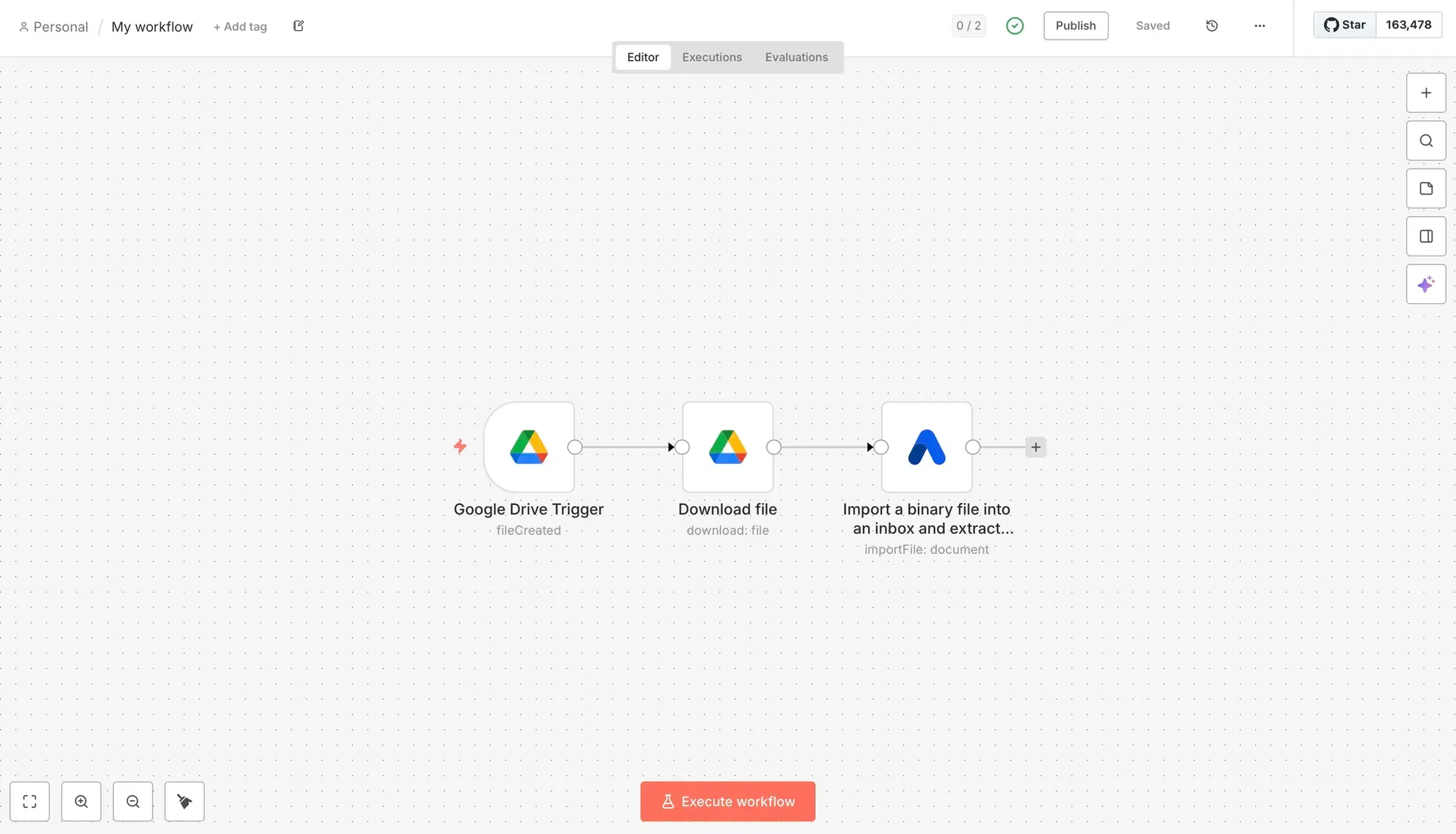
Airparser has a native n8n node. The action is "Import Binary File" — add the Airparser node to your workflow, authenticate with your API key, and configure the parser ID. The alternative pattern (especially for real-time workflows) is to use n8n's Webhook trigger node as the delivery endpoint for Airparser's webhook, receiving parsed JSON immediately on extraction completion — a push model that works without polling.
Document automation strengths
- Self-hosting = full data control. n8n Community Edition is open-source and free to self-host. No document data — invoices, contracts, resumes, medical forms — leaves your infrastructure. Critical for legal, financial, and healthcare document workflows subject to data residency requirements.
- Best for high volume at low cost. Self-hosted n8n has unlimited executions. Cloud n8n charges per execution, not per step — a 10-node workflow running 1,000 times costs the same as a 3-node workflow running 1,000 times. At high document volumes, self-hosted n8n's server cost ($3–$15/month) is dramatically cheaper than Zapier or Make.
- AI-native document processing. n8n 2.0 includes native nodes for Mistral OCR, OpenAI, Anthropic, Google Gemini, vector databases (Qdrant, Pinecone), and LangChain. Building a workflow that combines Airparser field extraction with LLM enrichment (classify the document type, summarize key terms, extract entities not in the schema) is straightforward in n8n without external services.
- Code nodes for arbitrary logic. JavaScript or Python can run directly in Code nodes. Complex field transformations, custom validation logic, multi-step calculations — anything that requires code in Zapier or Make is native in n8n.
- Deepest document automation template library. n8n's community has published the most document-specific templates of any platform: AI invoice processing with Mistral OCR + GPT, PDF RAG with Qdrant, receipt extraction, AP automation with Airtable — all pre-built and customizable.
- Failed and test runs don't count toward limits. Cloud plan limits only count successful production executions — more generous than competitors for iterative development.
Document automation weaknesses
- Self-hosting is non-trivial. Docker deployment requires server management, SSL configuration, queue-mode setup for production reliability, and ongoing security patching. Over 60% of self-hosted deployments reportedly encounter issues in the first month. Without developer support, self-hosting n8n is not realistic for non-technical teams.
- No free cloud tier. n8n removed its free cloud plan in late 2025. Cloud plans start at $24/month for 2,500 executions. For small-volume use cases, this makes cloud n8n less accessible than Make's $10.59 entry tier.
- Smallest native integration library. 400–1,000+ native nodes vs. Make's 1,500+ and Zapier's 7,000+. Less common SaaS tools require building HTTP Request node integrations manually, which takes developer time.
- Steepest learning curve. n8n's node-based model and self-hosting complexity make it the hardest to get started. Non-technical users without developer support will struggle to configure and maintain complex workflows.
Pricing
Self-hosted Community Edition: free, unlimited executions, you manage infrastructure. Cloud Starter: $24/month (2,500 executions, 14-day trial). Cloud Pro: $60/month (10,000 executions). Cloud Business: ~€800/month (40,000 executions, SSO, audit logs). Note: failed and test runs don't count toward execution limits on any cloud plan.
Best for: Engineering-led teams, automation agencies, and organizations with compliance or data sovereignty requirements. The best platform for high-volume document pipelines and AI-native intelligent document processing. Not appropriate for non-technical teams without developer support.
Side-by-Side: Which Platform for Which Scenario
| Scenario | Best platform | Reason |
|---|---|---|
| Non-technical team, simple invoice → spreadsheet workflow | Zapier | Fastest setup, no learning curve |
| Invoice with line items → process each row separately | Make | Native Iterator module handles row-by-row processing |
| Multi-step routing (approved/rejected/review based on field values) | Make | Visual router + per-branch error handling |
| 1,000+ documents/month, cost is a concern | Make or n8n | Make is 10× cheaper than Zapier; self-hosted n8n is cheapest at scale |
| Sensitive documents (contracts, medical records, PII) | n8n (self-hosted) | No third-party cloud processing; full data sovereignty |
| AI enrichment after extraction (classify, summarize, embed) | n8n | Native LLM and vector DB nodes in n8n 2.0 |
| Widest range of downstream apps needed | Zapier | 7,000+ integrations vs Make's 1,500+ and n8n's ~1,000 |
| EU GDPR compliance in a cloud workflow | Make | EU-based company; easier GDPR DPA terms for cloud processing |
| Developer team building production document pipeline | n8n | Code nodes, self-hosting, AI-native, best template library |
How Airparser Works With Each Platform
Airparser has native integrations on all three platforms — no HTTP Request node workarounds needed on any of them. The integration pattern is consistent: Airparser extracts structured JSON from your documents, then delivers results to the automation platform either via webhook push (real-time) or via the platform's trigger polling (interval-based).
For Zapier: use the native "Airparser" app → "New Parsed Document" trigger. For Make: use the native "Airparser" module → "Watch Document Parsed" trigger. For n8n: use the native Airparser node (action: "Import Binary File") or configure an n8n Webhook node as your Airparser delivery URL for real-time push.
In all three cases, all fields from your Airparser extraction schema are available as named variables — invoice total, vendor name, line items array, due date — ready to map directly to any downstream module or app.
For workflows that include AI enrichment steps (classifying document type, flagging anomalies, generating summaries), n8n's native AI nodes make it the most capable option post-extraction. For workflows that need robust error handling when Airparser returns a low-confidence or incomplete result, Make's per-branch error handlers are the cleanest implementation. For the fastest path from "Airparser extracts invoice" to "row appears in Google Sheets," Zapier requires the least setup.
Related: How to parse documents via API and get structured JSON back, Agentic document extraction: what it means and how to build it.
Frequently Asked Questions
Which is cheaper: Zapier, Make, or n8n for document automation?
Make is roughly 10 times more cost-efficient than Zapier at equivalent workflow complexity. The Core plan at $10.59/month provides 10,000 operations, compared to Zapier's Professional plan at $29.99/month for 750 tasks — and Make's operation model gives you significantly more workflow steps per operation budget. At high volume (thousands of documents per month), self-hosted n8n is the cheapest option: Community Edition is free, and your only cost is server infrastructure ($3–$15/month for a basic VPS that handles moderate document volumes). For teams where self-hosting isn't realistic, Make is the most cost-efficient cloud option. Zapier becomes the cheapest only at very low volumes (under 100 documents/month on the free plan) where its time-to-setup advantage justifies the cost.
Can I process each line item from a parsed invoice separately in these platforms?
Yes in all three, but the implementation differs significantly. In Make, use the Iterator module after the Airparser trigger — it loops over each item in the line items array automatically. In n8n, the Split In Batches node or a Loop node handles this. In Zapier, it requires workarounds using Paths and Formatter — there's no native iterator, so multi-row processing is less clean. For document workflows that regularly process line-item tables (invoices, purchase orders, bills of lading), Make or n8n handle this pattern more naturally than Zapier. The ability to iterate over extracted arrays, process each row, and then aggregate results is one of the key workflow patterns where Make's visual canvas outperforms Zapier's linear step model.
Which platform is best for GDPR compliance when processing documents with personal data?
For cloud-only options, Make has an advantage: it's a European company (Prague-based) with EU data residency available, and its GDPR DPA terms align naturally with EU data processing requirements. For complete data control, n8n self-hosted is the only option where personal data in documents never leaves your infrastructure — no third-party cloud processor is involved at the automation layer. Zapier is a US-based cloud service, which means EU personal data processed through Zapier requires standard contractual clauses (SCCs) under GDPR and carries the data transfer complexities of US processing. If your documents contain names, addresses, financial data, or health information about EU residents, the choice of automation platform is part of your compliance posture — not just your technical stack. See also: GDPR-compliant document parsing.
What happens in these platforms when Airparser fails to extract a required field?
Error handling varies significantly. In Make, you can attach a dedicated error handler to any module — if Airparser returns a result with a missing required field, a conditional filter stops that route, and a separate error path can log the failure, send a Slack alert, or queue the document for manual review. This is the most robust implementation. In n8n, the IF node routes on field conditions, and a dedicated error workflow can be triggered for any execution failure. In Zapier, error handling is primarily via email notification — there's no per-step routing on failure, which can lead to silent data gaps in production pipelines. For document automation where data completeness matters — invoice processing, compliance workflows, contract extraction — Make's error handling architecture is meaningfully better than Zapier's for catching and responding to partial extractions.
Do I need a developer to use n8n for document automation?
For cloud-hosted n8n, a developer isn't strictly required — the visual editor is no-code and the pre-built template library covers common document workflows. However, n8n's interface is less intuitive than Zapier or Make, and the learning curve is steeper. For self-hosted n8n, a developer (or someone comfortable managing Docker containers, configuring SSL, and handling server maintenance) is effectively required for initial setup and ongoing reliability. Over 60% of self-hosted deployments reportedly encounter failures in the first month without proper configuration. For engineering-led teams building custom document pipelines, n8n's power justifies the setup investment. For non-technical ops teams without developer support, Make is the better tradeoff — similar power for document workflow complexity, without the operational overhead of self-hosting.
Can I use Airparser with all three platforms on the same plan?
Yes. Airparser's webhook and API work independently of which automation platform you use. You can have Airparser deliver parsed results to a Zapier webhook, a Make webhook, and an n8n webhook simultaneously — or route different parsers to different platforms based on document type. The integration is at the webhook/API level, not at the Airparser plan level. All Airparser plans include webhook delivery and API access, so there's no plan tier restriction on which automation platforms you can connect. The native app/module integrations (Airparser's app on Zapier, module on Make, node on n8n) are maintained by Airparser and available regardless of which platform plan you're on.