How to Extract Data from Packing Slips and Delivery Notes Automatically
Learn how to automatically extract SKUs, quantities, order numbers, and more from packing slips and delivery notes using AI — no templates, no manual entry, any supplier format.

TL;DR
- Packing slips and delivery notes contain the shipment-level, carton-level, and line-item data your receiving team needs to verify every delivery.
- Traditional OCR and template parsers fail when suppliers change their layout — AI extraction works without templates and adapts to any format.
- Airparser's vision engine reads packing slips whether they arrive as PDFs, scanned documents, or photographed paper slips.
- A well-designed schema extracts packing slip number, order number, ship date, SKUs, quantities, and tracking number in one pass.
- Extracted packing slip data feeds directly into three-way matching, inventory updates, and ERP or WMS workflows.
You can extract structured data from packing slips and delivery notes automatically using AI document parsing — no templates to maintain, no manual keying at the receiving dock. An AI parser reads the document, identifies the relevant fields regardless of layout, and returns clean JSON you can send to your warehouse management system, ERP, or spreadsheet in seconds.
Packing slips are one of the most common documents in any procurement or receiving workflow, yet they are almost never digitized systematically. Most operations teams either key the data manually or skip it entirely — creating blind spots in inventory reconciliation and making three-way matching a manual chore. The problem is not that packing slips are difficult to read. The problem is that every supplier prints them differently.
This guide walks through how AI extraction handles that variability, how to set up a packing slip parser in Airparser, and how to connect the output to your downstream purchasing and inventory workflow.
What data does a packing slip contain?
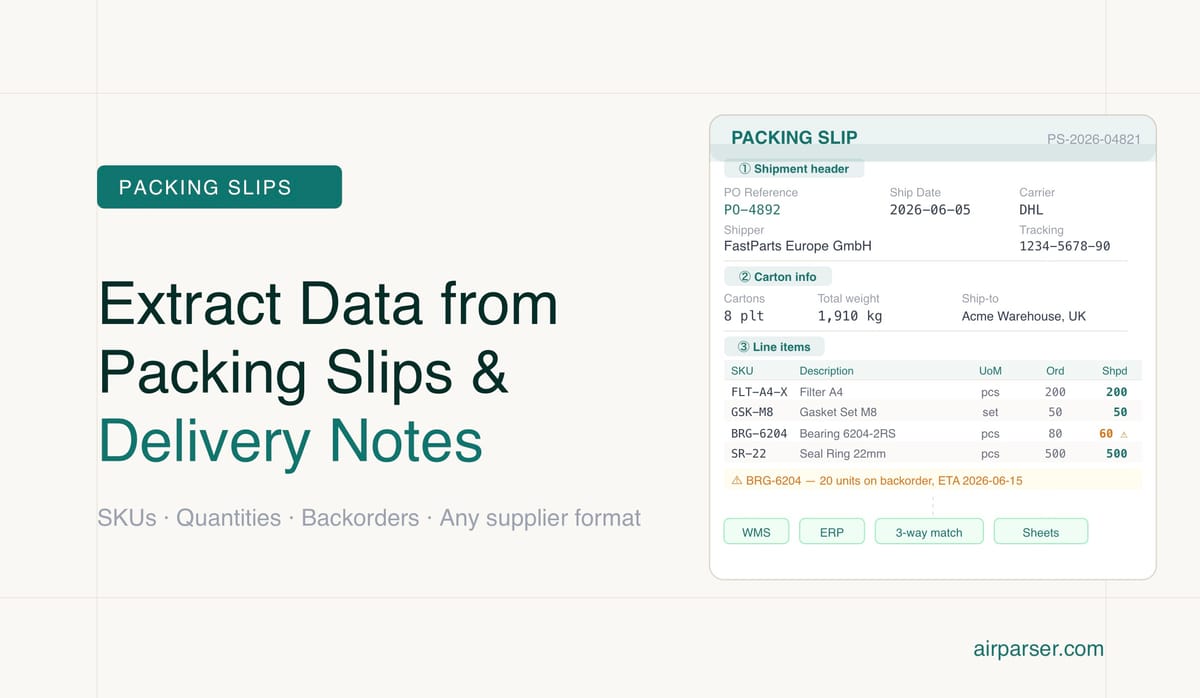
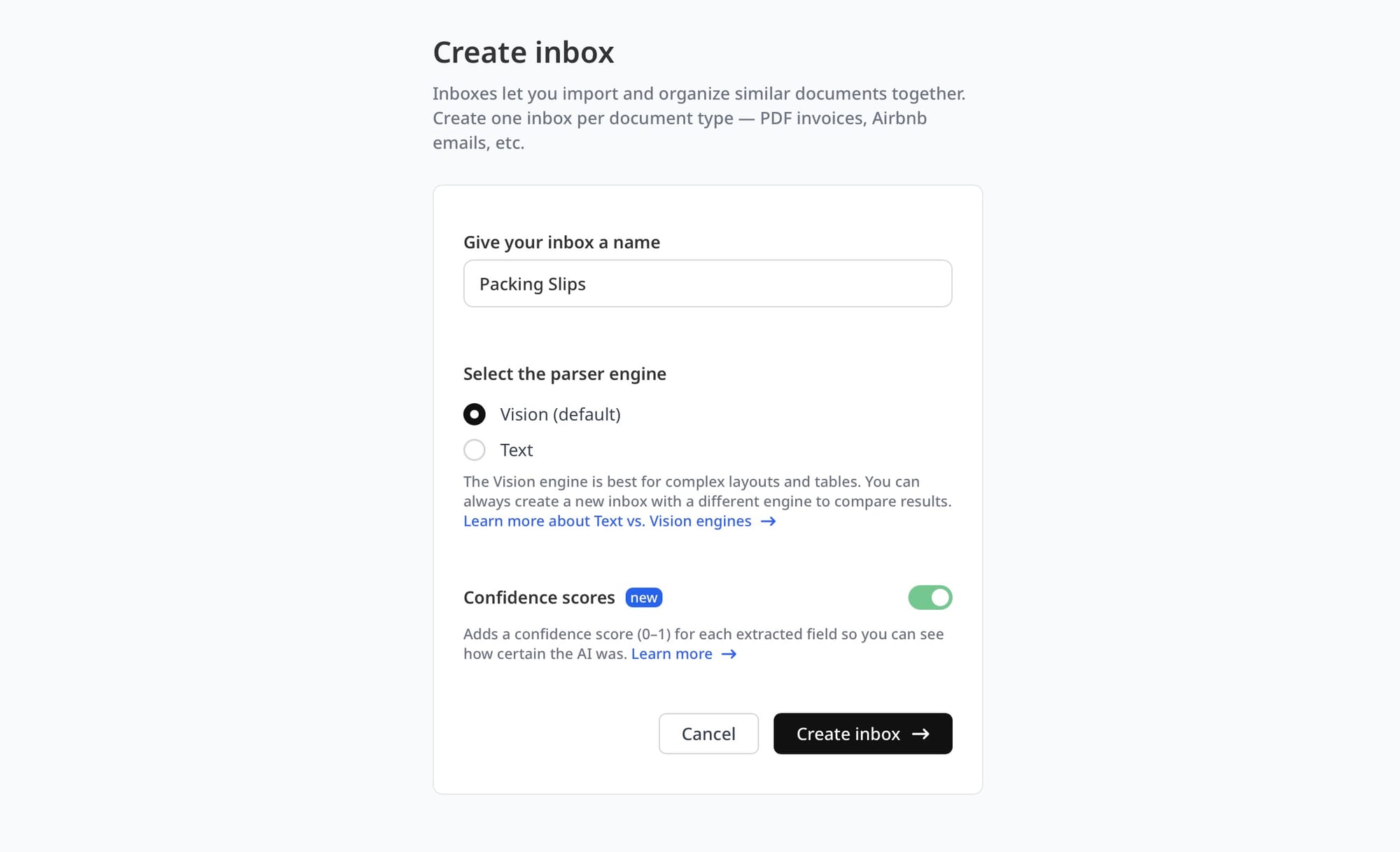
A packing slip — also called a delivery note, despatch note, or goods received note depending on industry — is the document that accompanies a physical shipment. It exists to let the receiving party verify that what arrived matches what was ordered. The data on a packing slip typically sits across three layers:
Shipment-level fields identify the overall delivery: packing slip number, purchase order number, ship date, carrier name, tracking or waybill number, shipper address, and ship-to address. These fields connect the physical delivery to the corresponding purchase order in your system.
Carton-level fields describe the physical packaging: number of cartons or pallets, total weight, and any special handling instructions. Not all suppliers include this layer, but it matters for freight reconciliation and warehouse slotting.
Line-item fields are where the real matching work happens: SKU or part number, product description, quantity ordered, quantity shipped, quantity backordered, unit of measure, lot or batch number, and sometimes serial number. Each line corresponds to one product in the purchase order.
When all three layers are captured correctly, a receiving team can immediately verify the delivery without physically counting every item twice. When extraction fails — or never happens — that verification happens manually, if at all.
Why packing slip formats vary — and why template-based OCR fails
Unlike invoices, which follow relatively predictable patterns because they are legally regulated in many jurisdictions, packing slips are completely unstructured from a format perspective. A packing slip from a consumer goods supplier might look nothing like one from an industrial parts distributor. Both might differ entirely from a domestic supplier's plain-text email attachment.
Common format variations include: tables without borders, bordered tables with merged cells, line items listed as bullet points rather than rows, numeric quantities with or without unit labels, fields that are sometimes present and sometimes absent (backorder quantities, lot numbers), and multi-page slips where the item table spans several pages. International suppliers add currency and language variation on top of that.
Template-based OCR systems handle this by requiring you to define a zone — essentially a fixed screen region — where each field is expected to appear. This works well when every document looks identical. It breaks as soon as a supplier changes their PDF template, adds a new column, or reformats the line-item table. Maintaining a separate template for every supplier is expensive and fragile.
AI extraction takes a different approach. Rather than looking for fields in fixed positions, a vision LLM reads the whole document spatially and semantically — the same way a human would. It understands that "QTY SHIPPED" and "Qty Delivered" and "Shipped Quantity" all refer to the same concept, wherever they appear on the page. That flexibility is why AI parsers handle multi-supplier packing slip workflows without a template library.
How AI extraction works for packing slips
AI document extraction for packing slips works in three stages. First, the document is ingested — whether that is a PDF emailed by a supplier, a scanned image from a flatbed scanner at the receiving dock, or a photo taken with a phone. Second, the AI model reads the document and extracts the field values defined in your schema. Third, the extracted data is returned as structured JSON and forwarded to your downstream systems.
The key difference from traditional OCR is what happens in the second stage. A standard OCR pipeline converts the image to raw text, then applies pattern matching or zone rules to locate values. An AI vision model processes the document layout as a whole — understanding tables, headers, label-value pairs, and nested line items in context. It can handle poor scan quality, rotated documents, handwritten additions, and non-standard layouts that would cause a zone-based OCR system to return empty or incorrect fields.
Airparser uses this approach with two engine options: a text engine for digital PDFs where the underlying text layer is selectable, and a vision engine for scanned documents, photographs, and PDFs rendered from images. For packing slips, which are frequently printed and scanned or photographed at the receiving dock, the vision engine is usually the correct choice. You can learn more about when to choose each in Vision vs Text in LLM Document Parsing.
Step-by-step: setting up packing slip extraction with Airparser
The setup takes about ten minutes for a single supplier and scales easily once you have your first schema working.
Step 1: Create an inbox and choose the vision engine
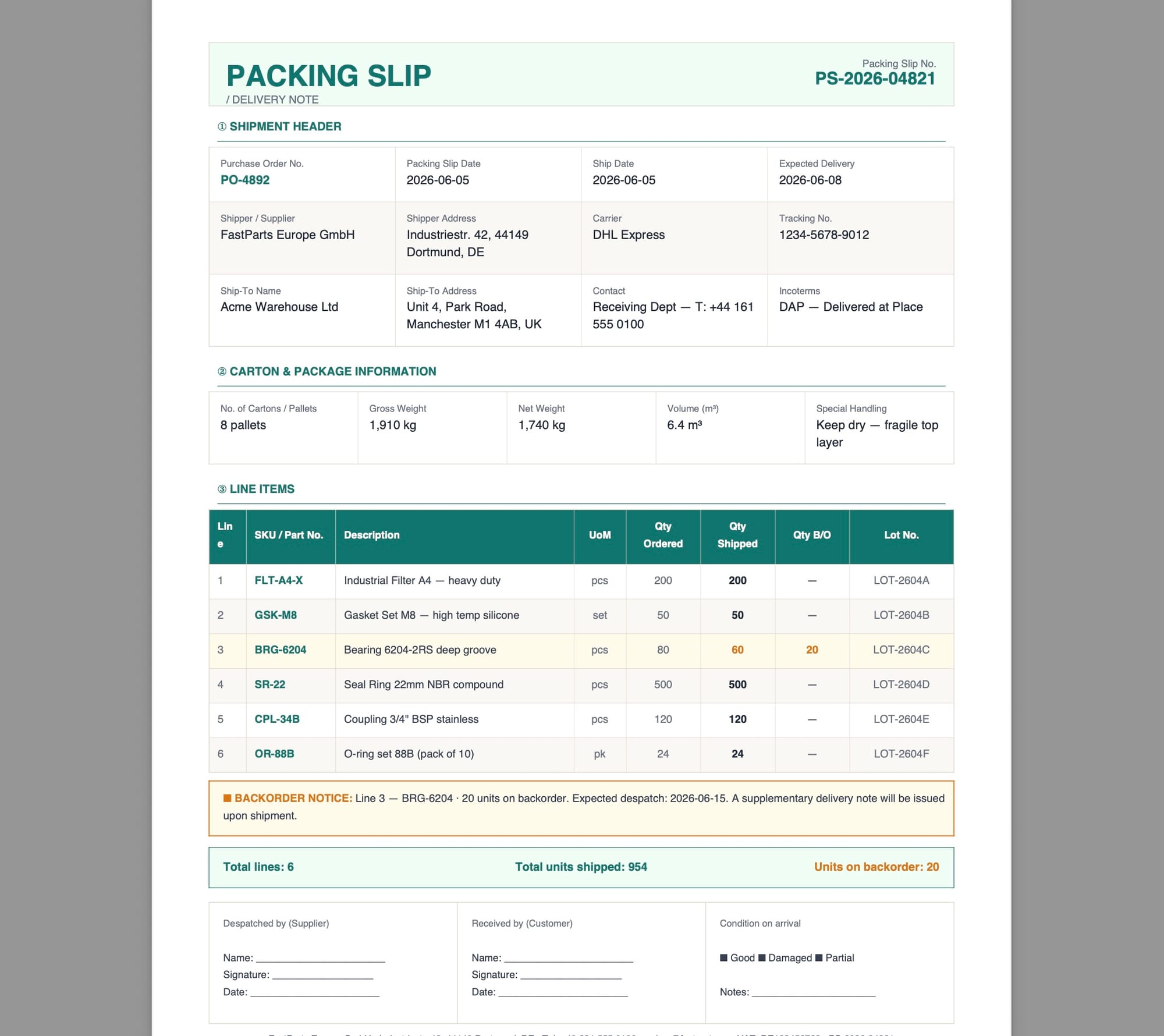
Log in to Airparser and create a new inbox. Give it a name that identifies the supplier or document type — for example "Acme Corp Packing Slips" or "Supplier Receiving Docs." When prompted to choose your engine, select Vision if your packing slips arrive as scans or photographs. If your supplier emails a digital PDF (one where you can select and copy text), the text engine is faster and equally accurate for clean files.
Step 2: Upload a sample packing slip
Upload one or two representative packing slips from your most common supplier. Airparser uses these samples to auto-generate a schema suggestion — a list of fields it detected in the document. You will use this as a starting point and refine it rather than defining every field from scratch.
Step 3: Define your extraction schema
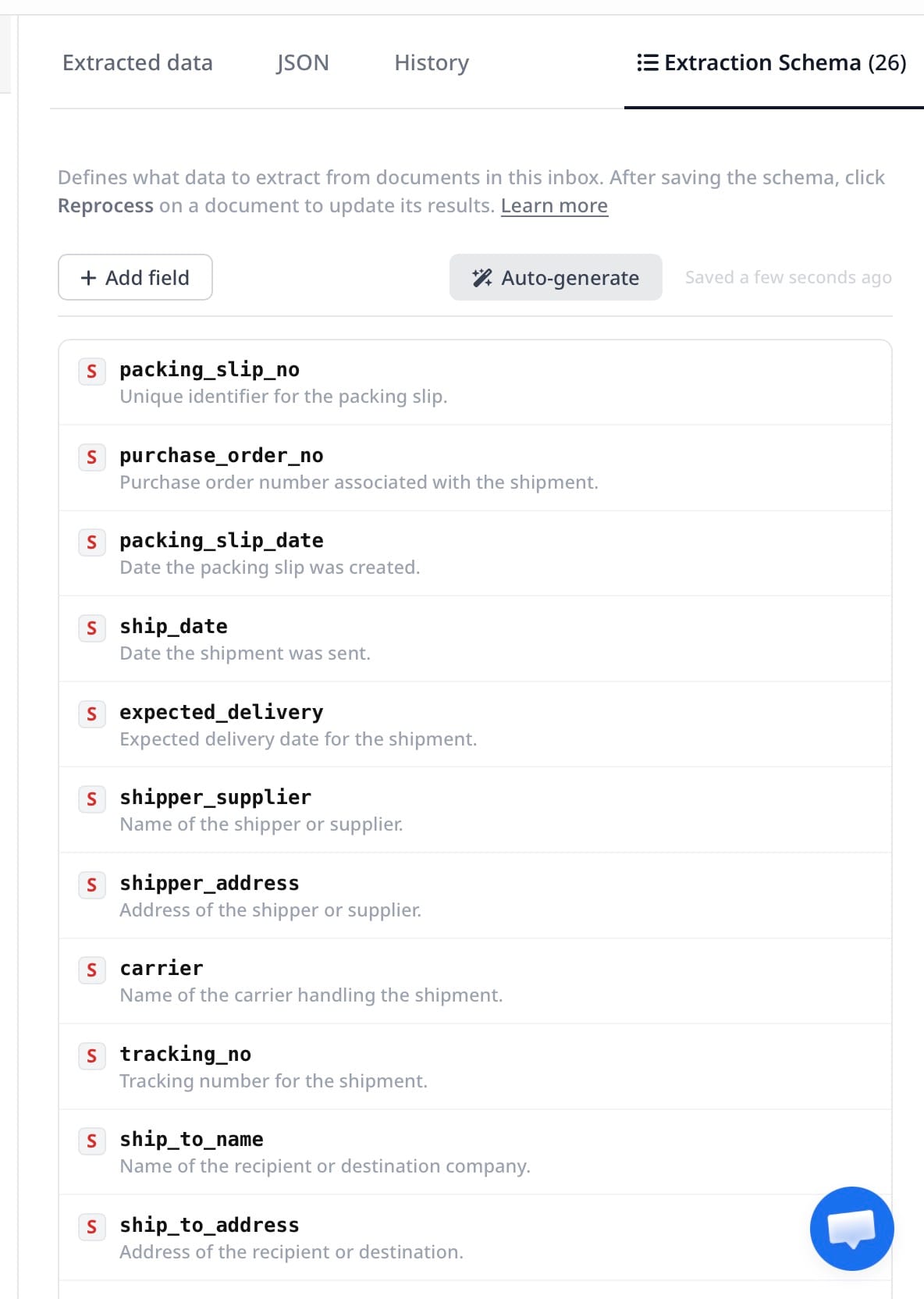
Review the auto-suggested schema and adjust it to match the fields you actually need. At minimum, a packing slip schema should capture: packing slip number, purchase order number, ship date, carrier, tracking number, and an array of line items each with SKU, description, quantity shipped, and unit of measure. Add lot number or serial number fields if your inventory system requires them for traceability.
For line items, define the field as an array type — each element in the array represents one product line from the packing slip. Airparser handles multi-row line-item tables correctly when you structure the schema this way.
Step 4: Route packing slips to your inbox
Once the schema is set, decide how documents will reach the inbox. The three common approaches are:
- Email forwarding: Forward or auto-forward supplier emails that contain packing slip attachments to your Airparser inbox email address. This is the lowest-friction option for slips that arrive by email.
- Manual upload: Upload scanned PDFs or photos from your receiving dock directly through the Airparser interface. Works well for physical paper slips.
- API ingestion: If your receiving software can trigger a webhook or API call when a new document is available, use the Airparser API to push documents programmatically.
Step 5: Export parsed data to your downstream system
After extraction, connect Airparser to wherever the data needs to go. Common destinations for packing slip data include Google Sheets (for teams tracking receipts manually), webhooks (for WMS or ERP systems that accept JSON), Zapier or Make (for no-code automation into Airtable, Notion, or any connected app), and Excel export for batch reconciliation. The integration screen inside Airparser lists all available export options for your inbox.
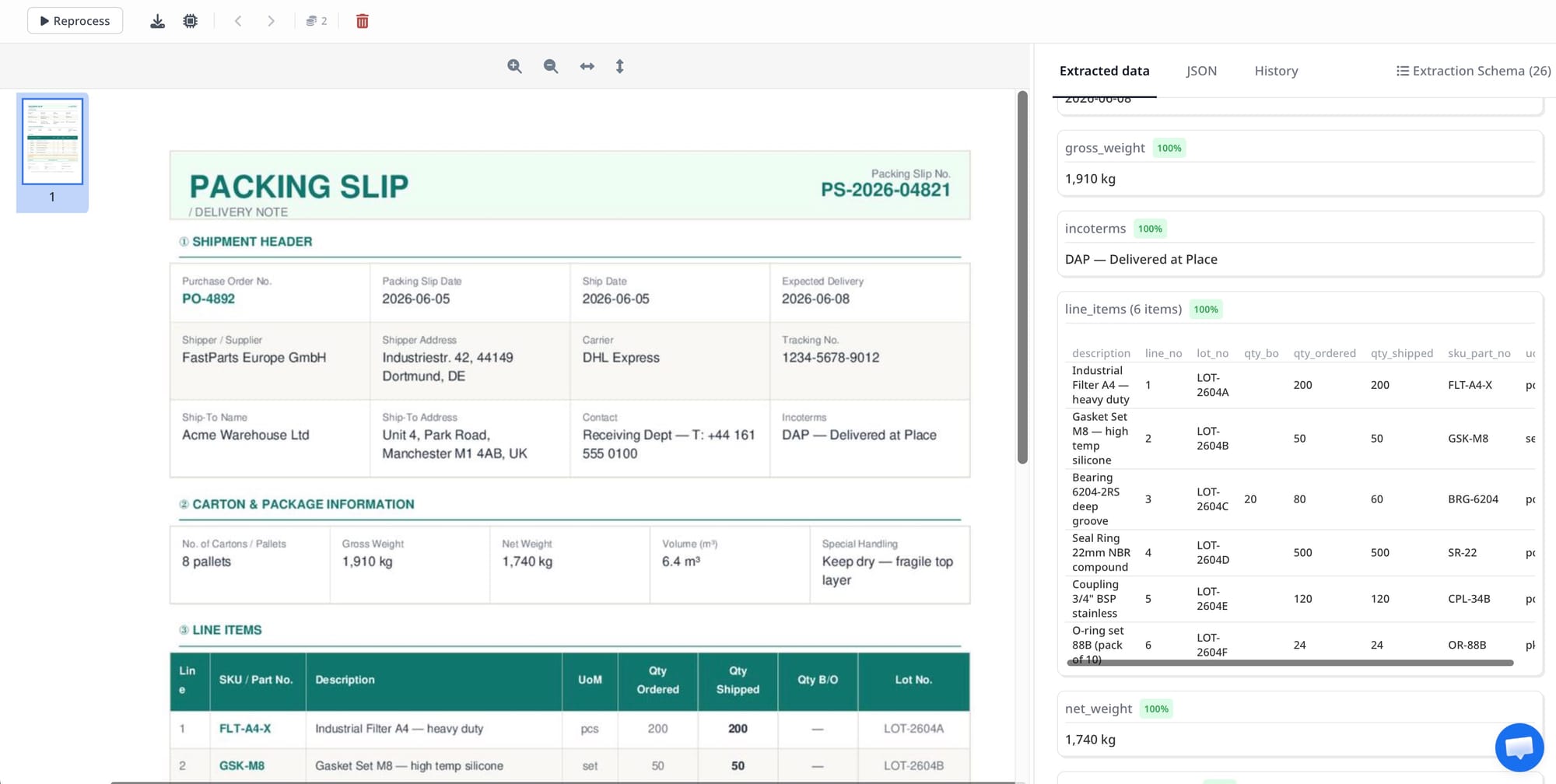
Designing your packing slip extraction schema
Schema design is where most packing slip extraction projects succeed or fail. A schema that is too broad extracts everything but gives you noisy data. One that is too narrow misses fields that matter for reconciliation.
A practical packing slip schema for a procurement or receiving workflow should include the following fields:
| Field | Type | Notes |
|---|---|---|
| packing_slip_number | string | Primary document identifier |
| purchase_order_number | string | Links to your PO system |
| ship_date | date | ISO 8601 format preferred |
| carrier_name | string | FedEx, UPS, DHL, USPS, etc. |
| tracking_number | string | May be absent on some slips |
| shipper_name | string | Supplier identity for audit trail |
| ship_to_address | string | Delivery location verification |
| line_items | array | Each item: sku, description, qty_shipped, qty_backordered, unit_of_measure |
| total_packages | integer | Carton or pallet count |
For operations that need traceability — food, pharmaceuticals, electronics — add lot_number and expiry_date fields to the line-item array. For international shipments, add country_of_origin and harmonized_code at the line-item level.
One schema principle that applies specifically to packing slips: define quantity_backordered as a separate field rather than trying to derive it from the difference between ordered and shipped quantities. Some suppliers print backorder data explicitly; others omit it entirely. Treating it as an independent field — with a null fallback — prevents confusion during reconciliation.
Connecting packing slip data to three-way matching
The most valuable downstream use of extracted packing slip data is three-way matching — the process of verifying that a supplier invoice aligns with both the original purchase order and the actual delivery receipt. Without automated extraction, three-way matching requires someone to manually pull up the PO, the invoice, and the packing slip and compare them line by line. That typically means the match happens days after the delivery, if it happens at all.
With automated packing slip extraction, the receiving record is created the moment the slip is processed — before the invoice arrives. When the supplier's invoice comes in (which you can also extract automatically), you already have structured line-item data from both the PO and the packing slip waiting in your system. The matching comparison becomes a programmatic step rather than a manual one.
Airparser already has a dedicated guide on automating three-way invoice matching with AI. Packing slip extraction is the receiving-side input that makes that workflow complete — without it, you have two of the three documents digitized and one still in a pile on someone's desk.
Common failure modes and how to fix them
Missing line items on multi-page slips. When a packing slip spans two or more pages and the item table continues across pages, some parsers only capture items from the first page. Airparser's vision engine processes the full document, but verify this by uploading a multi-page sample during schema setup and confirming that all line items appear in the output array.
SKU and description mixed up. Some suppliers print SKU and product description in adjacent columns with no clear header. The AI may conflate them if the header text is ambiguous. Fix this by giving your schema fields explicit descriptions — for example, labeling sku as "supplier part number or item code, not the product name" — so the model distinguishes the two correctly.
Quantities read as text instead of numbers. Packing slips sometimes print quantities with commas (1,500 units) or units appended (48 EA, 12 PCS). Set the field type to string and handle the numeric conversion downstream, or configure a post-processing transformation if your ERP requires a clean integer.
Packing slip number confused with order number. Many suppliers print both a packing slip number and a purchase order number with similar formatting. If Airparser conflates them, add a note to the relevant schema fields clarifying the distinction: "This is the supplier's internal shipping document number, not the buyer's PO number."
Poor quality scans with low contrast. If your receiving dock scanner produces low-resolution or high-noise images, run a preprocessing step to increase contrast before ingestion. Alternatively, photograph slips under even lighting — the vision engine tolerates perspective and rotation well, but very low contrast or motion blur will reduce accuracy.
FAQ
What is the difference between a packing slip and a delivery note?
The terms are used interchangeably in most industries, though regional conventions differ. In North America, "packing slip" is the standard term for the document that accompanies an outbound shipment listing the items included in the package. In the United Kingdom and Europe, "delivery note" or "despatch note" is more common. Some industries — particularly freight and logistics — use "goods received note" (GRN) to refer to the same document once it has been verified at the destination. For document parsing purposes, these are functionally identical: all contain shipment-level identifiers, carrier information, and a line-item table listing what was shipped. An AI parser with a well-designed schema handles all of these naming conventions without requiring separate templates.
Can Airparser handle packing slips from many different suppliers in a single workflow?
Yes. Because Airparser uses AI extraction rather than fixed templates, it adapts to layout variations without requiring you to create and maintain a separate template for each supplier. A single inbox with a well-designed schema typically handles packing slips from multiple suppliers with different formatting — as long as the underlying data fields (SKU, quantity, order number, etc.) are present in the document, the model will find them regardless of where they appear on the page or what label the supplier uses. For workflows with hundreds of suppliers, this is a significant operational advantage over traditional zone-based OCR systems that require per-supplier template maintenance.
What happens when a packing slip has backordered items — does the parser capture partial shipments?
Partial shipments are common, and Airparser handles them correctly when your schema includes both a quantity_shipped and a quantity_backordered field at the line-item level. Some suppliers explicitly print backorder quantities on the slip; others only print what was actually shipped. In the latter case, the backorder field returns null or zero, which you interpret in your downstream system as "no backorder indicated." The important thing is to define both fields in your schema rather than inferring backorder status from arithmetic, since some slips omit the ordered quantity entirely and only show shipped quantities.
How do I handle packing slips that arrive as photos taken with a phone camera?
This is exactly the use case Airparser's vision engine is designed for. Photos taken with a phone — including those taken at an angle, under uneven warehouse lighting, or with minor blur — are processed using the same vision model that handles clean PDF scans. The main practical tips for good results: ensure the full document is in frame and readable, avoid extreme shadows or glare washing out columns, and shoot in reasonable lighting (a phone flashlight aimed at the document helps in dark receiving areas). Airparser accepts JPEG, PNG, and WebP image uploads in addition to PDF, so you can build a mobile receiving workflow without converting files first.
Can extracted packing slip data trigger inventory updates automatically?
Yes, through Airparser's webhook and integration options. When a packing slip is parsed, the structured JSON output — including all line items with SKUs and quantities — can be sent to a webhook endpoint in real time. If your WMS or ERP system exposes a REST API for inventory receipts, you can write a small integration that listens for Airparser webhooks and posts each confirmed receipt directly to your inventory system. Teams without a custom API can use Zapier or Make to route packing slip data into Airtable, Google Sheets, or any of the 5,000+ apps those platforms support. The line-item array format Airparser returns maps naturally to a "received inventory" table structure, making this kind of real-time update straightforward to configure without custom code.
Is it possible to validate extracted packing slip data against the original purchase order automatically?
Validation against the PO is not built into Airparser's extraction step — Airparser's job is to extract structured data from the packing slip document accurately. The comparison logic (does the quantity shipped match the quantity ordered on the PO?) happens downstream in your workflow. The standard approach is to extract both the packing slip and the purchase order using Airparser, store both as structured records keyed by the PO number, and then apply matching logic in your ERP, in a spreadsheet formula, or in a Zapier or Make automation step. Airparser's guide on three-way invoice matching covers the full matching workflow in detail.
Packing slips are one of the last paper documents still processed manually in many procurement and receiving workflows. Automating their extraction removes a bottleneck that sits directly upstream of inventory accuracy, three-way matching, and supplier payment. If you want to see how the workflow looks with your own documents, you can set up an Airparser inbox and run a few packing slips through it in under fifteen minutes.