How to Automate Three-Way Invoice Matching with AI
Three-way matching compares a purchase order, goods receipt, and supplier invoice to ensure you pay only for what was ordered and delivered. Here's how to automate it with AI extraction and no per-vendor templates.

TL;DR
- Three-way matching compares a supplier invoice, purchase order, and goods receipt to verify you pay only for what was ordered and delivered at the agreed price.
- Manual matching costs roughly $18 per invoice and takes an average of 10 days — AI-powered automation brings that to $3 and same-day processing.
- With Airparser, you set up three separate inboxes (one per document type), extract structured data from each, then match vendor, PO number, quantities, and line-item prices in a spreadsheet or automation platform.
- Discrepancy tolerance rules (typically 2–5% on price) let minor rounding pass automatically while routing real exceptions to a reviewer.
Three-way invoice matching is the accounts-payable control that prevents companies from paying for goods they never received or prices they never agreed to. To automate it with AI, you extract structured data from each of the three documents — purchase order, goods receipt note, and supplier invoice — then compare the key fields programmatically and flag any discrepancies above your tolerance threshold.
Before AI extraction, this required either expensive ERP modules, manual data entry, or fragile template-based OCR that broke every time a supplier changed their invoice layout. Modern AI parsers eliminate the template problem entirely: they read each document semantically, identify fields by meaning rather than position, and return clean structured JSON that downstream matching logic can consume.
This guide explains what three-way matching is, where the manual process breaks down, and how to build a practical automated matching workflow using Airparser — including how to handle the exceptions that every real AP team encounters.
What Three-Way Invoice Matching Actually Checks
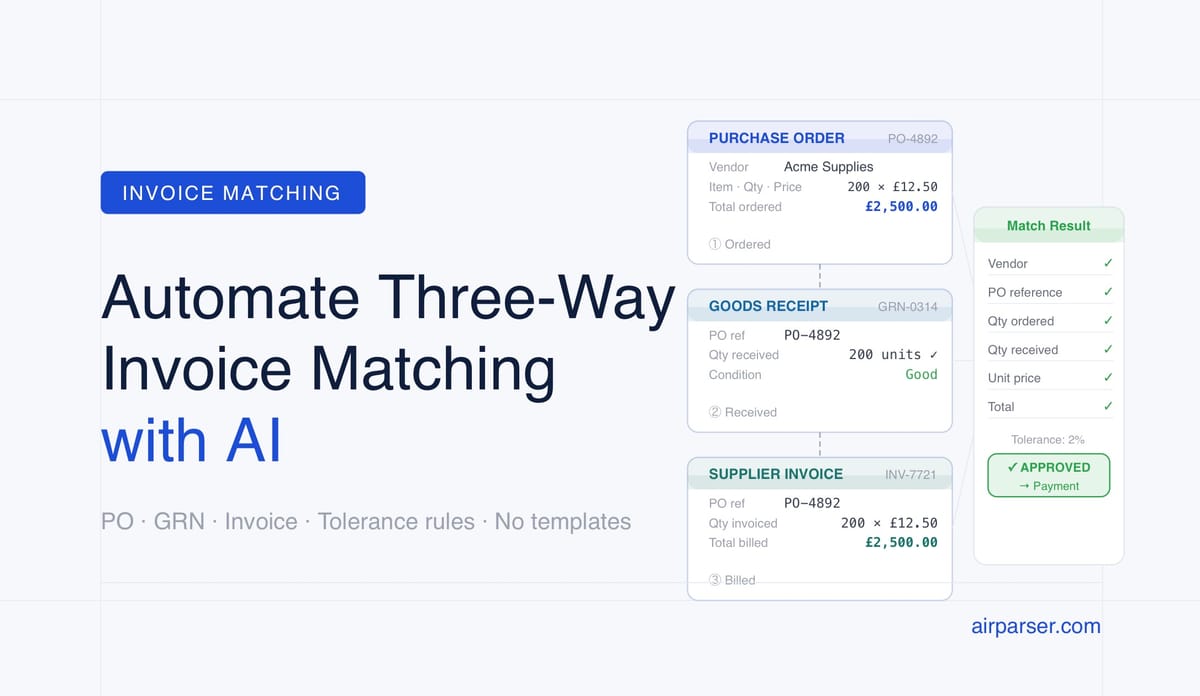
Three-way matching compares three documents that should tell the same story about a single procurement event.
The purchase order (PO) is the authorised commitment your company made to a supplier: what to buy, at what unit price, in what quantity, and under what payment terms. The goods receipt note (GRN) — sometimes called a receiving report — records what was actually delivered to your warehouse or office. The supplier invoice is the vendor's request for payment.
The match checks three things across all three documents:
- Quantity: Did the supplier invoice for the same quantity that was received on the GRN, and that was originally ordered on the PO?
- Price: Does the unit price on the invoice match the price agreed on the PO? Most AP policies accept a small tolerance — typically 1–5% — to allow for rounding or minor freight variations.
- Vendor and PO reference: Does the invoice reference the correct PO number, and does it come from the vendor named on that PO?
When all three match within tolerance, the invoice goes straight to payment. When there is a discrepancy, the invoice is held and an exception is created for a human reviewer to resolve.
Two-way matching (PO + invoice, no GRN) is faster to implement but misses the scenario where an invoice is correct on paper but goods were partially or never delivered. Four-way matching adds a quality inspection record as a fourth document. Three-way is the most common standard in procurement-intensive industries: manufacturing, logistics, construction, and retail.
Why Manual Three-Way Matching Breaks Down at Scale
The manual version of this process — printing or downloading PDFs, reading values off the page, typing them into a spreadsheet, and comparing rows — is workable at low invoice volumes. It stops working reliably once a finance team is processing more than a few dozen invoices per day.
The problems compound with volume:
Data entry errors. A human reading "10,000" on an invoice and typing "1,000" will create a false exception that wastes time to investigate and resolve. OCR-based data extraction reduces keying errors, but template-based OCR introduces its own failure mode: templates break when vendors change their invoice format, add a new field, or switch from PDF to image attachments.
Processing time. Industry benchmarks put manual invoice processing at 10–15 business days from receipt to payment. That creates cash-flow pressure from early-payment discount deadlines (typically 2/10 net 30 — a 2% discount if paid within 10 days) and strains supplier relationships when payment is routinely late.
Duplicate payment risk. Without automated deduplication, the same invoice can be received twice — once by email, once by post — and processed twice. Finance teams that process invoices manually typically discover duplicates only during reconciliation, after payment has already gone out.
Exception backlog. When exceptions pile up because matching is slow, AP staff spend most of their time chasing approvers and resolving holds rather than processing clean invoices. The exception rate in many manual AP environments is 20–30% of all invoices.
How AI Extraction Makes Automated Matching Practical
The core technical problem with automating three-way matching is getting structured, comparable data out of documents that were not designed to be machine-readable. Purchase orders come in different ERP formats. Goods receipts may be scanned paper forms. Supplier invoices arrive in dozens of PDF layouts, image files, and occasionally HTML emails.
Template-based OCR requires a separate template for each vendor layout, which means ongoing maintenance whenever a supplier changes their format. AI extraction solves this by reading documents semantically — it identifies "invoice number," "PO reference," "line item quantity," and "unit price" based on their meaning and context on the page, not their pixel position.
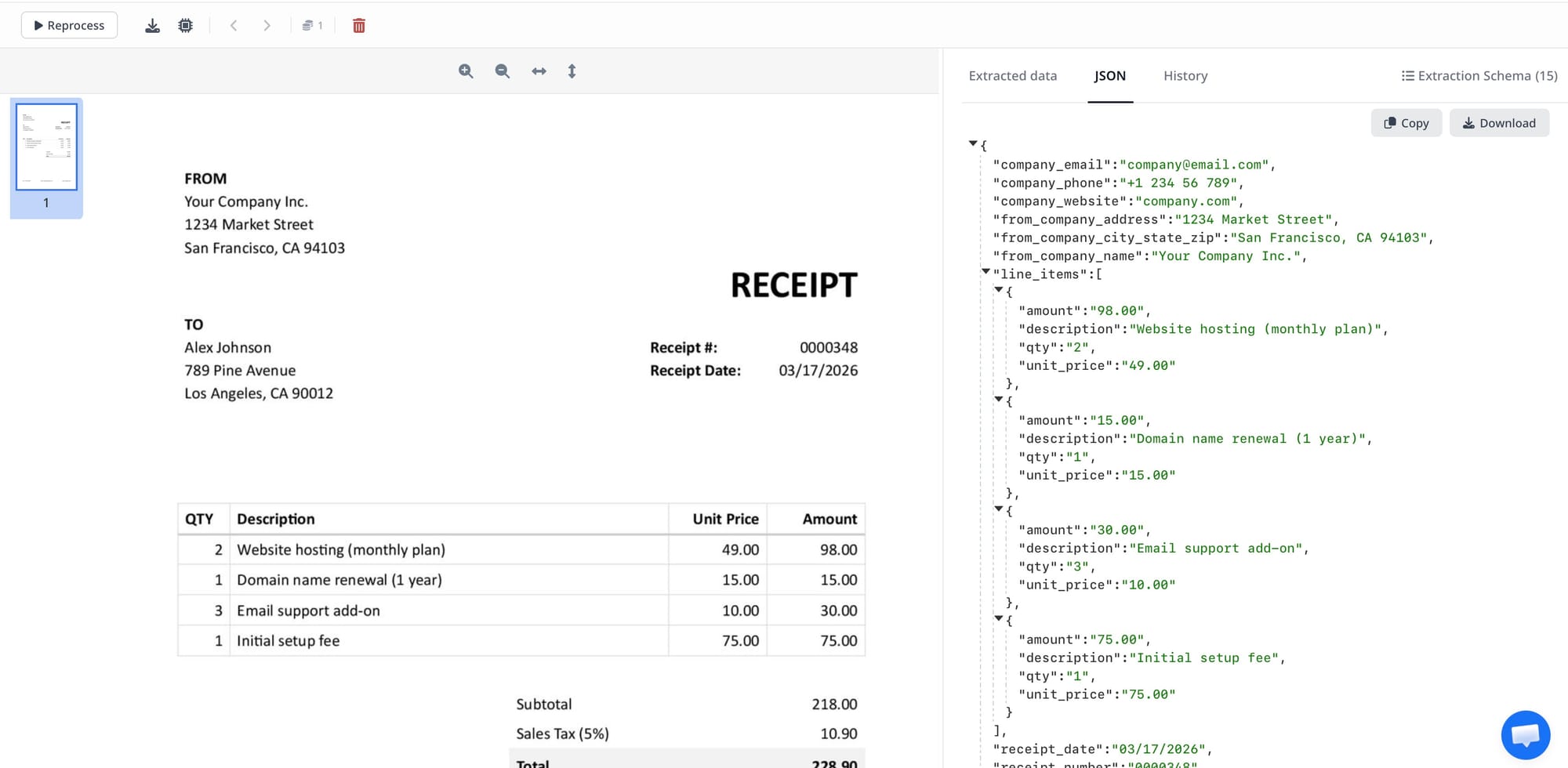
Airparser uses a vision LLM engine for scanned or image-based documents and a text LLM engine for digital PDFs, automatically selecting the right approach based on document type. The extraction schema you define once — vendor name, PO number, line items with quantity and unit price, invoice total, invoice date — works across every vendor's invoice format without manual template maintenance.
The result is structured JSON output per document that downstream matching logic can compare directly. No copy-paste. No OCR template updates. No per-vendor setup work.
Step-by-Step: Building an Automated Three-Way Matching Workflow
This section walks through a practical setup using Airparser for extraction and either Google Sheets or a lightweight Python script for the matching logic.
Step 1: Create three Airparser inboxes — one per document type
Separation by document type keeps extraction schemas clean and enables routing by document type upstream (your ERP or email rules send POs to one inbox, GRNs to another, supplier invoices to a third).
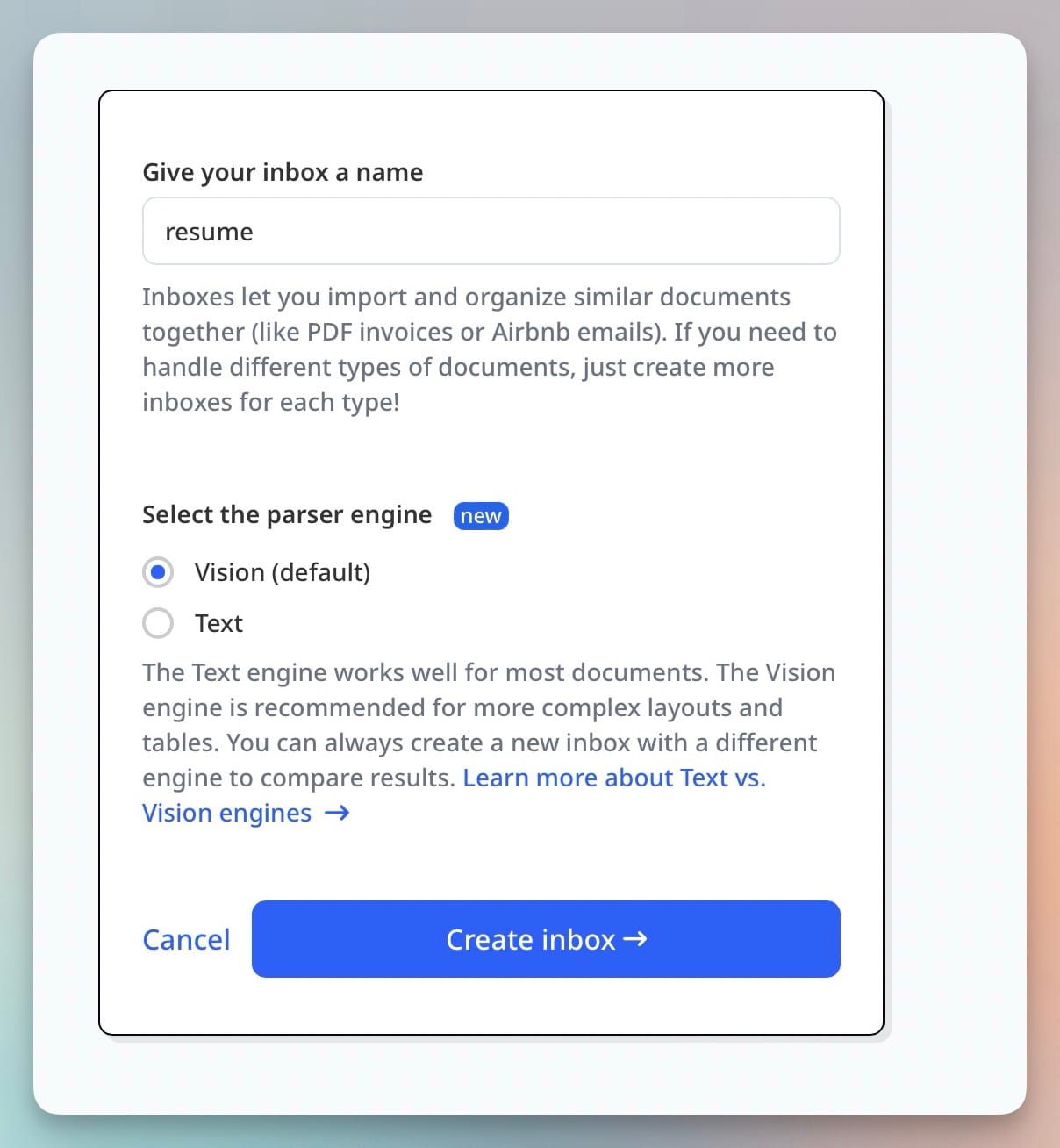
For each inbox, choose:
- Text engine for digital PDFs (most ERP-generated POs and invoices)
- Vision engine for scanned documents or image attachments (common for paper GRNs and handwritten delivery notes)
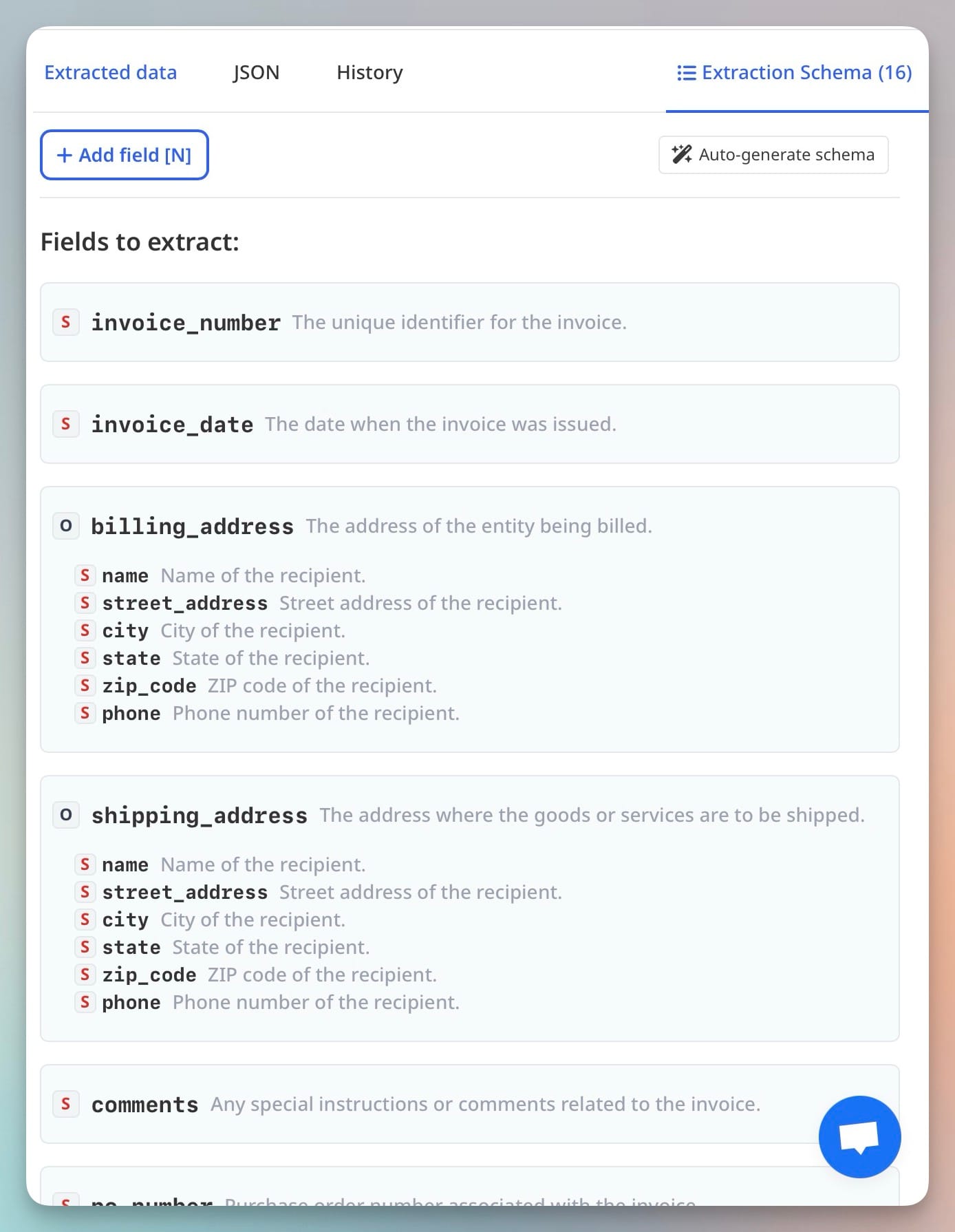
Step 2: Define extraction schemas for each document type
The schema tells Airparser which fields to extract. Keep field names consistent across all three schemas — this makes the downstream matching logic straightforward.
Purchase order schema fields:
- po_number (text)
- vendor_name (text)
- vendor_id (text, if your POs include a vendor code)
- order_date (date)
- line_items (list): item_code, description, quantity_ordered, unit_price
- total_amount (number)
- payment_terms (text)
Goods receipt note schema fields:
- grn_number (text)
- po_reference (text — this should match po_number)
- vendor_name (text)
- receipt_date (date)
- line_items (list): item_code, description, quantity_received, condition_note
Supplier invoice schema fields:
- invoice_number (text)
- po_reference (text — this should match po_number)
- vendor_name (text)
- invoice_date (date)
- due_date (date)
- line_items (list): item_code, description, quantity_invoiced, unit_price, line_total
- invoice_total (number)
- tax_amount (number)
Step 3: Route documents into the right inbox
The simplest routing approach is dedicated email addresses per document type: one for POs, one for GRNs, one for invoices. Your ERP or document management system sends exports to those addresses automatically. Suppliers who email invoices directly can be redirected to the invoice inbox address.
For more complex routing — where you receive mixed documents in a single email thread — use Airparser's Zapier or Make integration to inspect the subject line or attachment name and route to the appropriate inbox before parsing.
Step 4: Configure webhook output and collect parsed results
Set up a webhook in each Airparser inbox to push parsed results to a Google Sheet or a receiving endpoint. Structure the Sheet with one tab per document type: POs, GRNs, and Invoices.
If your volume is high or you need line-level matching, a lightweight webhook receiver in Python or Node.js is more reliable than a spreadsheet. The webhook payload from Airparser includes all extracted fields as a structured JSON object, so your receiver can insert each document into a database and trigger matching logic immediately on arrival.
Step 5: Implement matching logic with tolerance rules
The matching logic compares extracted fields across the three document records that share the same PO number. A minimal implementation in a Google Sheets formula or Python script checks:
- PO reference match: invoice.po_reference == grn.po_reference == po.po_number
- Vendor match: invoice.vendor_name == po.vendor_name (exact or fuzzy match)
- Quantity match per line: |invoice.quantity_invoiced − grn.quantity_received| ≤ tolerance_qty
- Price match per line: |(invoice.unit_price − po.unit_price) / po.unit_price| ≤ 0.02 (i.e., within 2%)
- Total check: invoice.invoice_total == sum of (invoice.unit_price × invoice.quantity_invoiced) per line ± rounding
When all checks pass, the invoice is marked "approved for payment" automatically. When any check fails, the invoice is flagged with the specific discrepancy reason and routed to an AP reviewer.
Standard tolerance thresholds in AP practice: 1–2% on price for manufacturing and logistics, 5% or a fixed dollar amount (e.g., $5 per line) for smaller businesses. Your finance policy determines the right threshold — tighter tolerances increase exception volume, looser tolerances increase fraud and error risk.
Common Discrepancy Types and How to Handle Each
Not all exceptions are equal. A well-designed workflow distinguishes between discrepancy types and handles each differently.
Quantity shortage. The supplier invoiced for 100 units, but only 95 were received on the GRN. This is the most common type. The correct response is to pay for 95 units and raise a short-delivery claim with the supplier for the remaining 5. In automated workflows, set the quantity check to compare invoice quantity against GRN quantity (not PO quantity) — it is the GRN that records what actually arrived.
Price variance above tolerance. The invoice unit price differs from the PO unit price by more than your threshold. Common causes: the supplier applied a price increase that was not reflected in the PO, a discount negotiated after PO issuance was not communicated to the invoicing team, or a data entry error. Route to the buyer who issued the PO, not the AP team — only the buyer can confirm whether the price was agreed.
Missing PO reference. Some suppliers do not include a PO number on their invoices. This makes automated matching impossible without a human lookup step. The cleanest resolution is a supplier-communication policy requiring PO numbers on all invoices, reinforced by a bounce-back for invoices received without one.
Partial deliveries across multiple GRNs. A PO for 1,000 units delivered in three shipments produces three GRNs. The matching logic must aggregate GRN quantities before comparing to the invoice total. Build this aggregation into your matching step — sum all GRN quantities per item code per PO number before running the comparison.
Tax and freight line items. Supplier invoices often include tax and freight charges not itemised in the original PO. Define a tolerance for "additional charges" separately (e.g., freight up to 3% of invoice total passes automatically, anything above goes to review) rather than flagging every invoice with freight as a price discrepancy.
When Human Review Is Still Required
Automation handles the straightforward cases. Some situations genuinely require human judgment.
Invoices for services — consulting, software subscriptions, maintenance contracts — often do not have a goods receipt at all. Three-way matching assumes physical goods delivery. For service invoices, a two-way match (PO + invoice) with an explicit approval by the service owner is more appropriate than forcing a GRN into the workflow.
Disputed invoices — where the supplier claims delivery that your GRN does not record — require human coordination with the supplier and the warehouse team. An automated system can flag the discrepancy and create a dispute record, but resolving it requires conversation.
First invoices from new vendors without an established PO should always go through manual review on the first occurrence, regardless of whether they technically match. Fraud risk is highest with new vendor relationships.
For workflows where compliance demands human sign-off — regulated industries, government contractors, high-value purchases above a threshold — configure your matching system to route all invoices above a dollar threshold to a mandatory approval step, even when the automated match passes cleanly.
Integrating the Output with Your ERP or Accounting Software
Once invoices pass the three-way match, the payment step needs to happen in your accounting system or ERP — QuickBooks, Xero, SAP, NetSuite, or similar. Airparser does not handle payment, but it handles the extraction step that feeds clean, structured data into those systems.
The integration path depends on your accounting tool:
- Google Sheets users: Airparser has a native Google Sheets integration. Send parsed invoice data directly to a Sheets tab, use Apps Script for the matching logic, and connect Sheets to your accounting tool via Zapier or Make.
- Zapier/Make users: Use the Airparser trigger ("New Parsed Document") to start a multi-step Zap or Scenario that runs matching logic and creates a bill or invoice record in QuickBooks, Xero, or your ERP.
- API users: Airparser's webhook delivers structured JSON. A receiving server can run matching logic, query your PO and GRN database, and POST an approved bill to your accounting system API in the same serverless function.
See the guide on automating AP data entry from supplier invoices for a detailed walkthrough of the extraction-to-accounting-system step. For API-based workflows, see how to parse documents via API and get structured JSON back.
FAQ: Three-Way Invoice Matching Automation
What is the difference between two-way and three-way invoice matching?
Two-way matching compares only the supplier invoice against the purchase order — it checks that the vendor, quantity, and price on the invoice match what was ordered. Three-way matching adds a third document: the goods receipt note (GRN) or receiving report, which records what was actually delivered. The practical difference is that two-way matching can approve payment for goods that were ordered and invoiced correctly but never actually arrived. Three-way matching catches this scenario. For physical goods procurement, three-way matching is the standard control because it closes the loop between what was promised (PO), what was received (GRN), and what is being billed (invoice). Two-way matching is commonly used for service invoices, subscriptions, and purchases where there is no physical delivery to record.
What is a reasonable price tolerance for three-way matching?
Most AP policies set price tolerances between 1% and 5%, depending on industry and purchase type. Manufacturing companies with high-volume, low-margin procurement typically use tight tolerances: 1–2% or a fixed dollar amount per line (e.g., $2 per unit, whichever is lower). Smaller businesses and service-sector companies often use 5% or a flat dollar threshold (e.g., variances under $10 per line pass automatically). The right number for your business depends on your average invoice size, supplier reliability, and fraud risk appetite. A 2% tolerance on a $50,000 invoice allows a $1,000 discrepancy to pass without review — that may be appropriate for a trusted long-term supplier but too loose for a new relationship. Review exception rates after the first month: if exceptions are above 15% of all invoices, your tolerance is too tight; if exceptions are below 2%, your tolerance may be too loose.
Can Airparser extract line items from invoices for three-way matching?
Yes. Airparser supports list-type fields in its extraction schema, which extract each line item from an invoice as a separate structured object — capturing item code, description, quantity, unit price, and line total individually. This is exactly the structure needed for line-level three-way matching, where you compare quantity and price per item across the PO, GRN, and invoice. Airparser's AI extraction works across vendor invoice formats without per-vendor template setup, so adding a new supplier to your matching workflow does not require any schema changes. See the guide on extracting invoice line items from PDFs automatically for more detail on schema design for line-item extraction.
How do I handle invoices that arrive before the goods receipt note?
This is a timing problem, not an extraction problem. The cleanest approach is to hold invoices in a "pending GRN" state and run the match when the GRN arrives. In a spreadsheet-based workflow, this means the invoice row waits in an unmatched state until the GRN data appears. In an automated workflow, set a scheduled job to re-run matching every few hours against all pending invoices — when the GRN arrives and is parsed by Airparser, the next matching run picks it up. If GRNs are consistently delayed beyond a few days, flag the invoice for expediting: follow up with the receiving team to confirm delivery status before the payment due date. A parallel path is to allow "three-way match with GRN due" as a provisional approval for trusted suppliers with long-term contracts, subject to retrospective GRN reconciliation.
What happens to invoices that fail the three-way match?
Failed matches should create an exception record that specifies the discrepancy type (quantity shortage, price variance, missing PO reference, etc.) and routes to the right person. Price discrepancies go to the buyer who issued the PO — they know whether the price was agreed separately. Quantity discrepancies go to the receiving warehouse team — they can confirm what was delivered. Missing PO references go back to the supplier with a request to resubmit. The exception record should track: discrepancy type, discrepancy amount, assigned reviewer, date assigned, and resolution status. Most AP automation tools (including Airparser-based workflows via Zapier or Make) can create these records in a project management tool, a Slack channel, or a dedicated exceptions spreadsheet. The goal is to make the exception visible immediately and assign it to the person who can actually resolve it, rather than leaving it in an inbox.
Is three-way matching required by law or just best practice?
Three-way matching is an internal control best practice, not a legal requirement in most jurisdictions. However, regulated industries and public sector procurement often require documented evidence that controls are in place — three-way matching records serve as that audit trail. For companies subject to SOX compliance (US public companies), documented AP controls including invoice approval processes are required, and three-way matching is one of the most common controls auditors expect to see. For government contractors, some contract types require formal three-way matching documentation. For private businesses, the business case is straightforward without any regulatory requirement: three-way matching prevents overpayments, duplicate payments, and fraud — and the cost of not doing it is typically far higher than the cost of implementing it.
Try Three-Way Matching with Airparser
If you process more than a few dozen invoices per month, the extraction step is where automation delivers the most immediate value. Airparser handles any invoice format without per-vendor template setup — upload a sample invoice, define your schema fields, and extraction runs automatically on every new document.
Start with a free Airparser account, create your three inboxes, and test extraction on a batch of real invoices from your most common suppliers. The matching logic can start in a Google Sheet and evolve into a more sophisticated webhook-based workflow as volume grows.