What is Intelligent Document Processing (IDP)? A Complete Guide
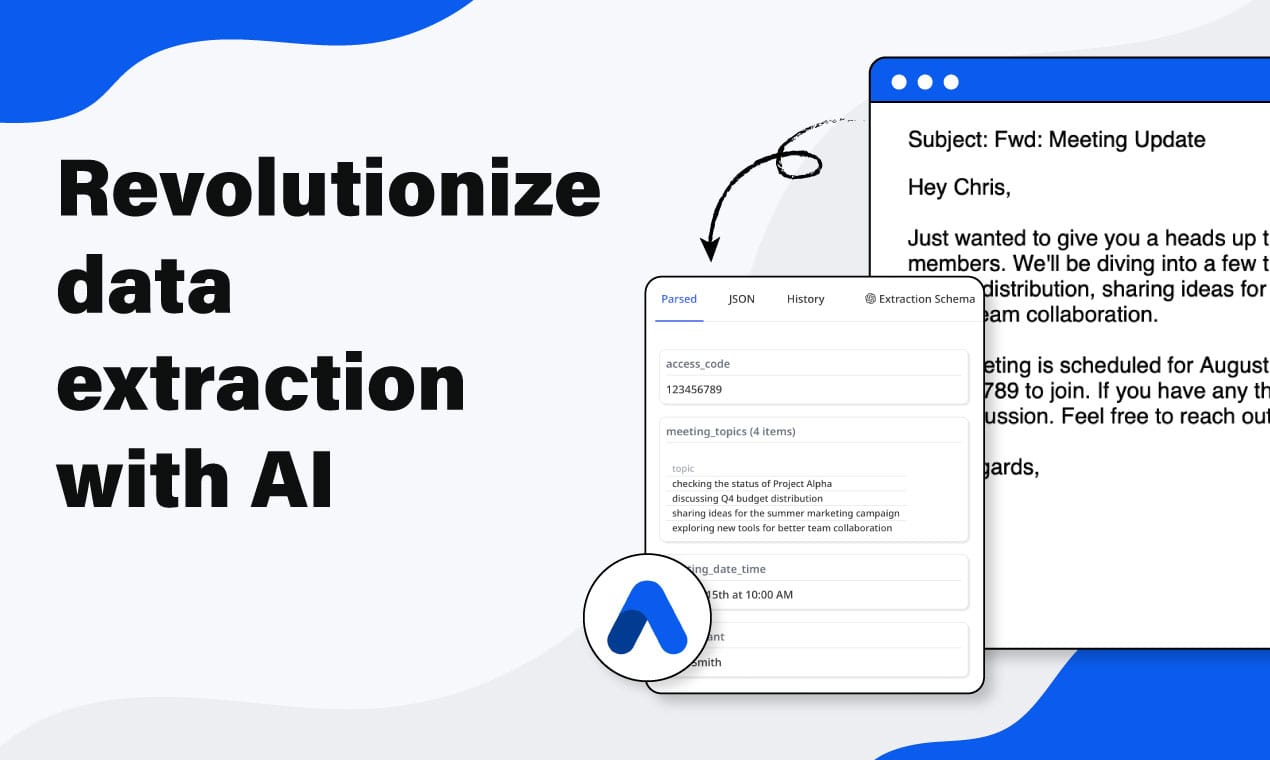
Intelligent document processing (IDP) combines OCR, machine learning, and NLP to automatically extract, validate, and route structured data from invoices, contracts, resumes, and other unstructured documents — without templates.

TL;DR:
- Intelligent document processing (IDP) is AI-powered software that automatically ingests, classifies, extracts, validates, and routes data from unstructured documents — invoices, contracts, resumes, and more.
- IDP goes well beyond OCR: OCR reads characters, IDP understands field meaning, validates results, and delivers structured data your systems can act on.
- Modern IDP platforms replace brittle rule templates with schema-driven or prompt-free AI extraction that generalizes across new document layouts without retraining.
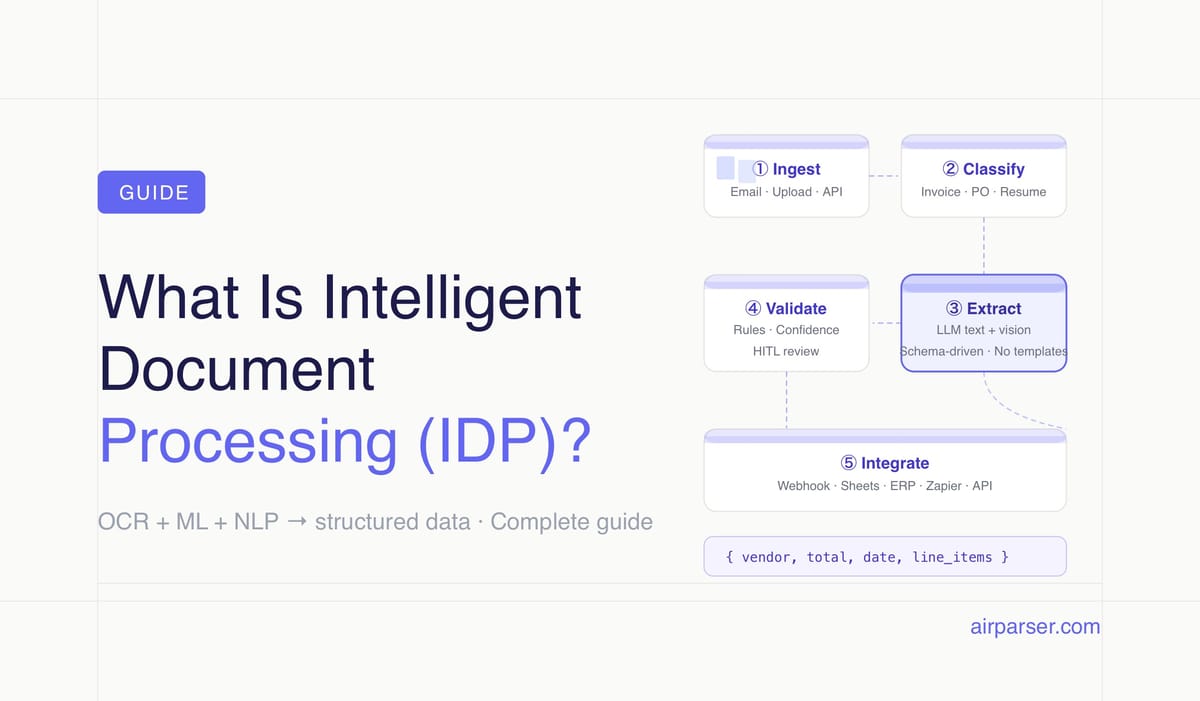
- The five stages of every IDP workflow are: ingestion → classification → extraction → validation → integration.
- Finance and accounting teams are the largest adopters (roughly 45% of the IDP market), but logistics, HR, legal, and healthcare use cases are growing fast.
Intelligent document processing (IDP) is AI-powered software that converts unstructured documents — scanned invoices, emailed contracts, uploaded resumes, image-only PDFs — into clean structured data your business systems can use. It combines optical character recognition, machine learning, and natural language processing into a single pipeline that ingests documents, identifies what they contain, pulls out the right fields, validates the result, and routes the output to downstream applications.
The term covers a wide spectrum of products, from enterprise IDP platforms used by banks and insurance companies to process millions of documents a month, to lightweight AI parsers that give a five-person ops team the same extraction capability without dedicated infrastructure teams. What they share is the core capability: replacing manual data entry with automated, schema-driven extraction that adapts to new document layouts.
This guide explains what IDP is, how it differs from older OCR-only approaches, what the five stages of an IDP workflow look like, which industries use it most, and what to look for when evaluating an IDP platform for your team.
How IDP Differs from OCR and Traditional Document Capture
The most important distinction in this space is between OCR and IDP — and the distinction is not about reading accuracy, it is about what happens after the text is read.
Traditional OCR converts an image or scanned page into machine-readable characters. It does not understand what those characters mean. Given an invoice image, OCR gives you a wall of text: "Acme Supplies Ltd", "INV-2026-00441", "€2,808.00". It cannot tell you which of those strings is the vendor name and which is the invoice total. That interpretation step required either manual data entry or fragile positional templates — rules that mapped specific zones of the page to specific fields, and broke every time a supplier changed their invoice layout.
Traditional template-based capture was the first generation of automation on top of OCR. You trained the system on a specific document format, drew zones for each field, and the system extracted those zones. It worked for high-volume, low-variance documents processed by enterprises with dedicated document engineering teams. It failed on anything outside the trained templates — and most real document workflows have hundreds of supplier, vendor, or applicant variations.
Modern IDP replaces positional templates with semantic understanding. Instead of "the total is always in the bottom-right zone," the system understands "the total is the field labeled invoice total or total amount, regardless of where it appears on the page." LLM-based extraction generalizes across layouts because it reads field meaning, not field position. The result is extraction that works on a new supplier invoice the first time you see it — no template creation, no zone drawing, no retraining.
The practical difference: traditional OCR systems achieve roughly 85–90% field-level accuracy on clean, well-structured documents and degrade quickly on anything else. Modern IDP platforms with multi-engine fallback (text LLM for digital PDFs, vision LLM for scanned or image-based documents) consistently reach 95–99% accuracy across varied document types and layouts.
The Five Components of a Modern IDP System
Every IDP platform — enterprise-scale or lightweight — is built from the same five functional components. Understanding them helps you evaluate what a given solution actually does versus what it delegates to you.
1. Document capture and ingestion. How documents enter the system: email attachments, direct file uploads, cloud storage triggers (Google Drive, SharePoint, Dropbox), API submissions, or fax-to-email. Good IDP platforms accept multiple ingestion channels natively so documents flow in automatically rather than requiring a separate upstream step to collect and route them.
2. Document classification. What type of document is this? An invoice, a purchase order, a resume, a contract, or an ID card? Classification determines which extraction schema applies. In template-based systems, classification was a manual routing step. In modern IDP, an ML model or LLM identifies the document type automatically, even for mixed document batches where a single email might contain multiple attachment types.
3. Data extraction. The core intelligence layer: identifying and pulling out the specific fields defined in your extraction schema — vendor name, invoice date, total amount, line items, candidate name, contract terms, and so on. Modern extraction uses LLMs (text-based for digital PDFs, vision-based for scanned documents and images) rather than positional templates. The extraction engine reads field meaning from context, not from coordinates.
4. Validation and quality assurance. Checking that what was extracted is correct and complete. Validation includes: confirming required fields are present, verifying cross-field arithmetic (do the line items sum to the stated total?), applying business rules (is the invoice date within the expected range?), flagging low-confidence extractions for human review, and running schema-defined constraints such as regex patterns or enum checks. Human-in-the-loop review is part of this layer for compliance-sensitive workflows.
5. Integration and delivery. Routing the validated structured data to downstream systems: webhook endpoints, REST APIs, spreadsheets, databases, ERP systems, CRMs, or automation platforms like Zapier, Make, and n8n. This is where extraction becomes business value — the data reaches the system that needs to act on it, without manual copy-paste or re-entry.
How IDP Works: A Step-by-Step Walkthrough
Here is what happens to a supplier invoice from the moment it arrives in an email attachment to the moment its data lands in your accounting system.
Step 1 — Ingestion. A supplier emails an invoice to your Airparser inbox address (or uploads it directly, or a Zapier trigger moves it from an email label). The document enters the IDP pipeline automatically — no manual intervention at this stage.
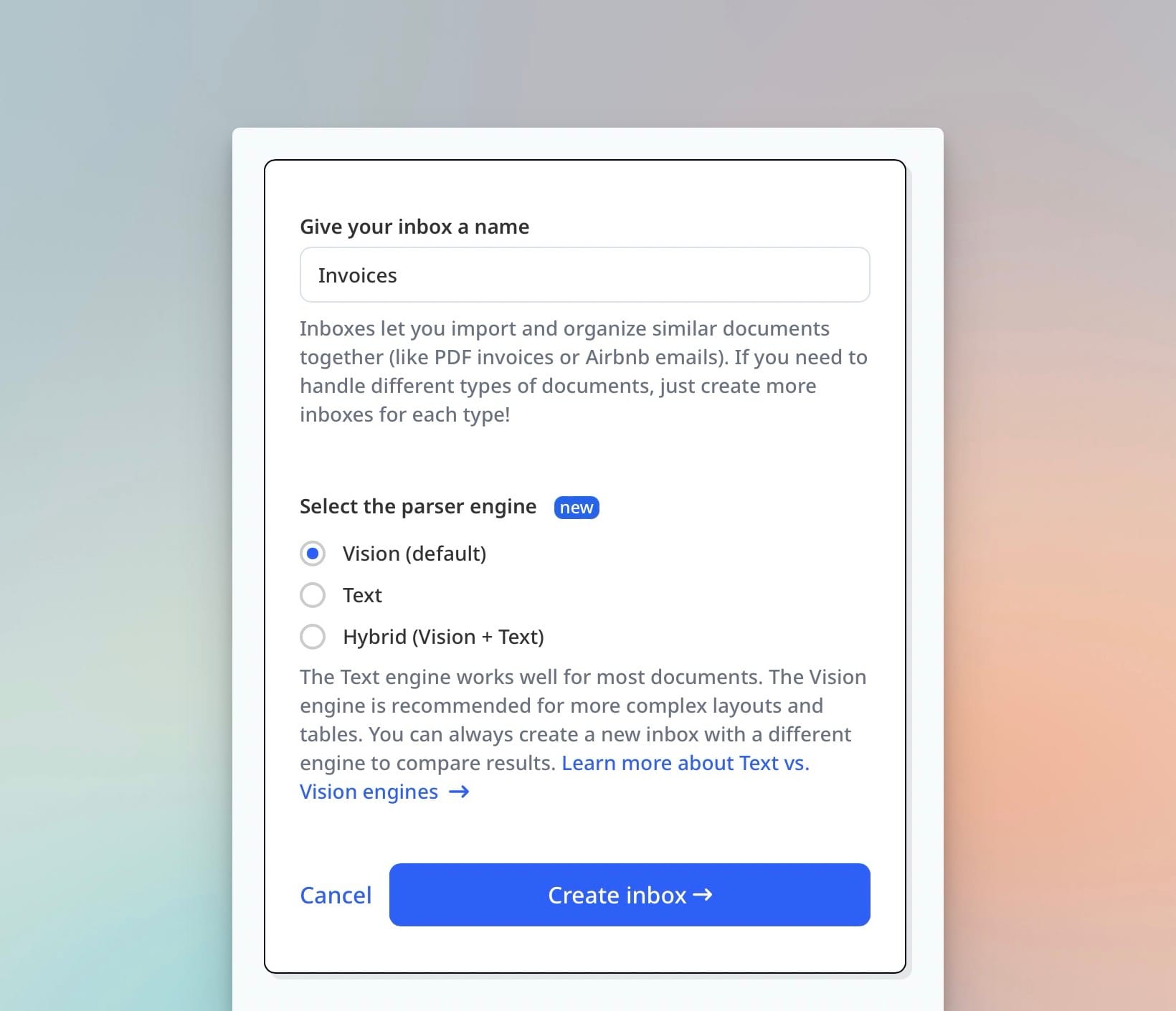
Step 2 — Engine selection and extraction. The platform identifies what kind of document this is and which extraction engine to apply. For a digital PDF invoice, a text LLM reads the content directly and extracts fields according to the schema. For a scanned invoice or a photograph of a paper form, a vision LLM reads the page image. Airparser lets you configure this per inbox — text engine for digital documents, vision engine for scanned or image-heavy files.
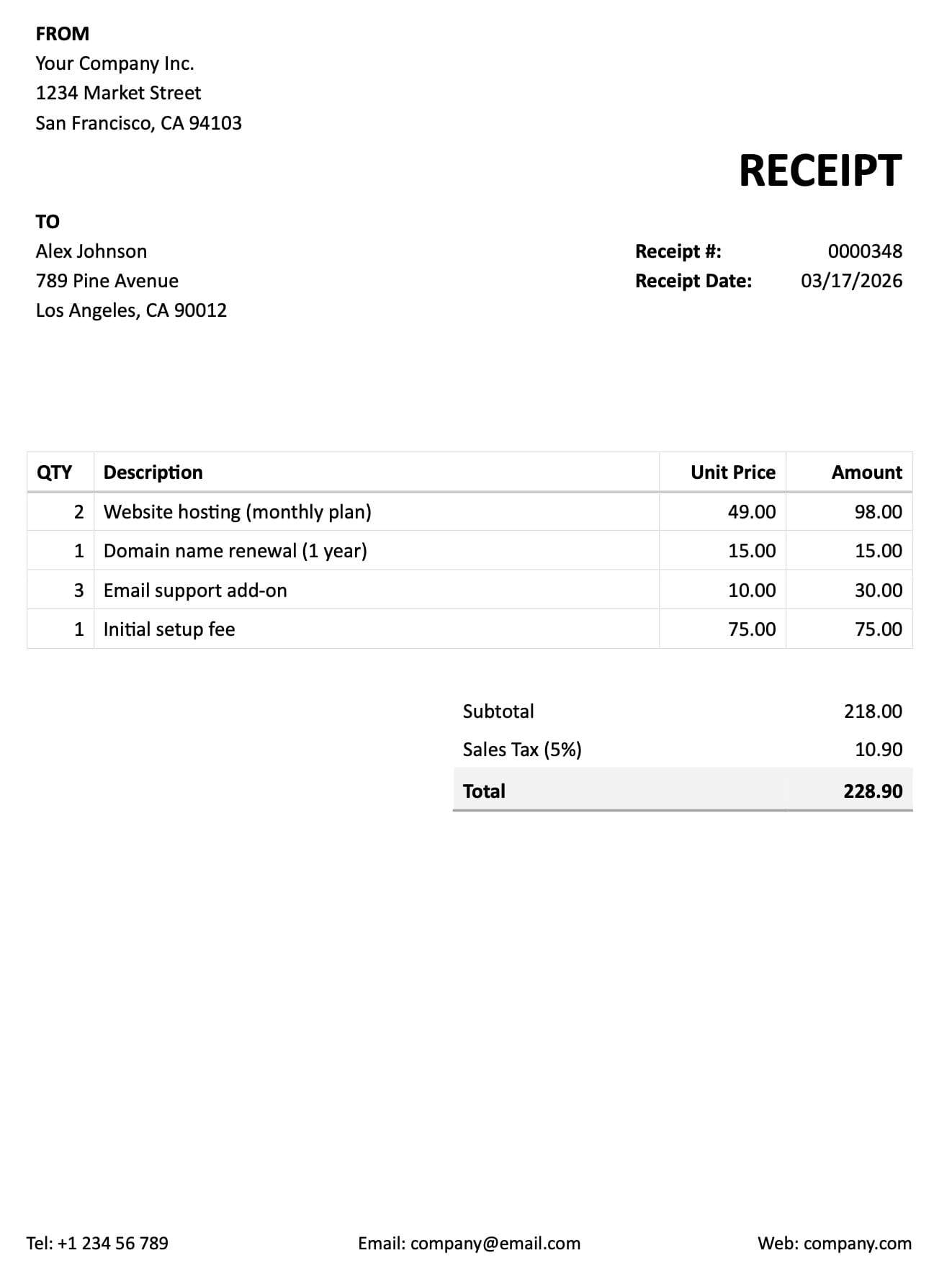
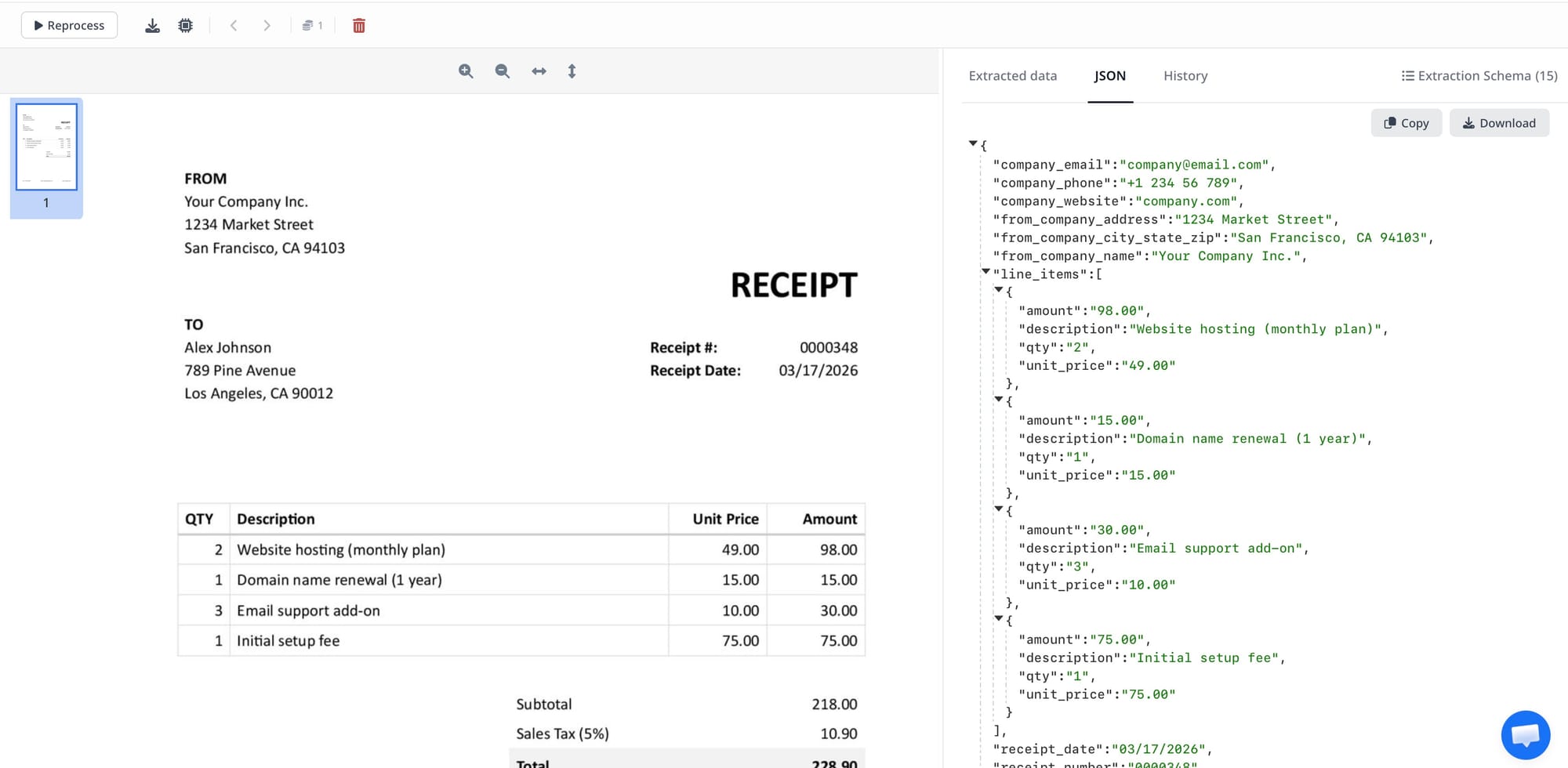
Step 3 — Schema-driven field extraction. The extraction engine reads the document against your defined schema — a list of fields you care about, their types, and any hints about where to find them. The result is a structured JSON object: vendor name, invoice number, due date, subtotal, tax, total, and a line items array. No zone coordinates, no template maintenance, no retraining when a new supplier sends a different invoice layout.
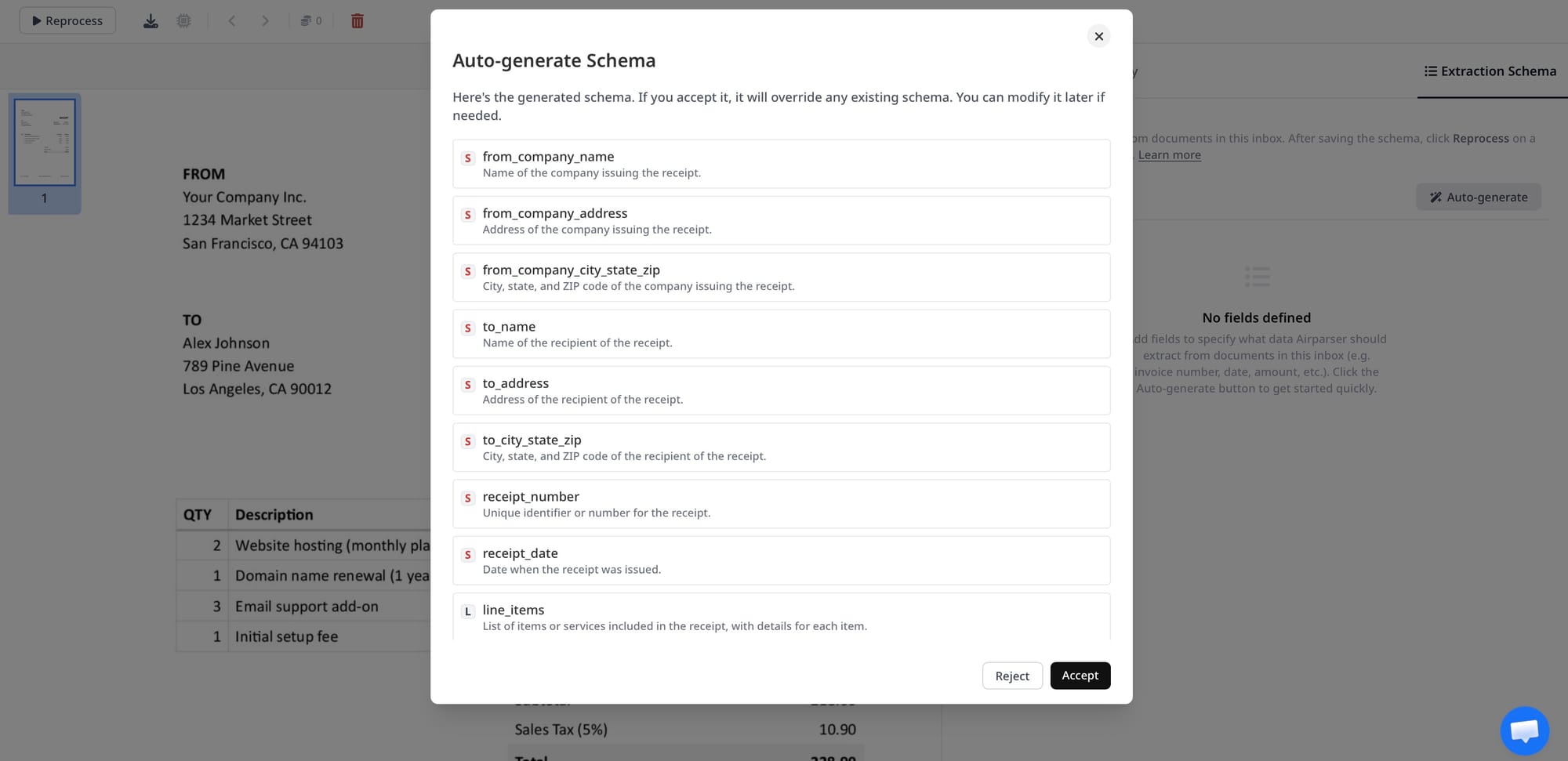
Step 4 — Validation. The platform checks completeness (are required fields present?) and consistency (does the line-item subtotal match the stated total?). Fields that fail validation or fall below a confidence threshold are flagged. Depending on your workflow, flagged documents route to a human reviewer or are held in a review queue.
Step 5 — Integration. Validated structured data is delivered to downstream systems via webhook, API, or native integration. The invoice record lands in your accounting software, the resume fields populate your ATS, the contract terms get indexed in your contract management system — automatically, without re-entry.
Who Uses IDP and for Which Documents?
Finance and accounting teams are the largest IDP adopters — roughly 45% of IDP market revenue flows through finance-focused deployments, according to 2026 market research. Invoice processing is the most common use case: converting supplier invoices into structured AP records is high-volume, high-stakes, and error-prone when done manually. Related workflows include purchase order matching, expense report extraction, and remittance advice processing.
Beyond finance, IDP sees heavy use in five other domains:
HR and recruiting. Resume and CV parsing converts unstructured candidate documents into structured applicant records — skills, experience, education, contact details — that populate ATS fields automatically. IDP shortens the time from application submission to first review by eliminating manual data entry at scale.
Logistics and supply chain. Bills of lading, shipping manifests, customs declarations, and delivery notes are high-volume, high-variation documents where manual processing creates operational bottlenecks. IDP extracts shipment numbers, cargo descriptions, weights, and delivery terms into logistics management systems in real time.
Legal and contracts. Contract review teams use IDP to extract key terms, obligations, renewal dates, and counterparty names from executed agreements. Classification sorts contracts by type; extraction pulls the fields that matter for a contract register or obligation tracking system.
Healthcare. Patient intake forms, insurance claims, lab reports, and referral letters contain structured information that must move between systems accurately. IDP reduces transcription errors and speeds administrative processing, though healthcare deployments require careful attention to data retention and HIPAA compliance requirements.
Real estate and banking. Mortgage applications, property disclosures, KYC identity documents, and bank statements are document-intensive workflows where IDP replaces manual review queues. KYC document verification in particular benefits from IDP's ability to handle the variation in identity documents across jurisdictions and document types.
Template-Based vs Schema-Driven IDP: A Key Distinction
Not all IDP platforms work the same way under the hood. The architectural distinction that matters most for buying decisions in 2026 is template-based versus schema-driven extraction.
Template-based IDP platforms require you to train the system on each new document layout: draw zones for each field, label them, and submit enough sample documents for the ML model to learn the pattern. This approach works well for high-volume, stable document types — the same invoice format from the same ERP vendor, processed thousands of times a month. It fails when document variety is high: a mid-size company receiving invoices from 200 suppliers in 200 different formats needs to maintain 200 templates, with ongoing maintenance every time a supplier updates their invoice design.
Schema-driven IDP — the approach used by modern LLM-based parsers — replaces layout templates with field descriptions. You define what you want to extract ("the total amount due, including taxes") and the LLM finds it regardless of where on the page it appears. The same schema works across all your supplier invoice formats without modification. New document types require a new schema definition, not a new training run on document images. This is the architecture that makes IDP practical for organizations with high document variety and limited document engineering resources.
The tradeoff is that schema-driven extraction requires well-written field descriptions to achieve consistent results, and very complex table structures (such as multi-page invoice line items with merged cells) sometimes still benefit from vision-model handling. The best modern IDP platforms let you configure the extraction engine per document type rather than forcing a single approach.
What to Look for When Evaluating an IDP Platform
The IDP market includes products ranging from enterprise platforms costing hundreds of thousands of dollars to API-first tools priced for small teams. The right evaluation criteria depend on your document volume, technical resources, and integration requirements, but these questions apply across the board.
Does it handle your document types without templates? If you have high document variety, template-based systems will consume your team's time indefinitely. Look for schema-driven or zero-shot extraction that works on new document layouts on the first attempt.
Does it offer multi-engine fallback? A single extraction engine cannot handle the full range of document quality you'll encounter in production: clean digital PDFs, scanned paper forms, photographs taken with phones, handwritten notes. Platforms with both text LLM and vision LLM engines — and the ability to route document types to the appropriate engine — are more reliable across the full document mix.
What does validation look like? Can you define business rules, cross-field checks, and required-field constraints? Does the platform provide a confidence score per field? Where do low-confidence documents go — email notification, a review queue in the platform, or a webhook flag to your own system?
How does data leave the system? IDP extracts data; the value is in what happens next. Evaluate the integration layer: native webhooks, API, Zapier/Make/n8n native connectors, direct database push, or spreadsheet export. The extraction step is only useful if the data reliably reaches the downstream system that needs it.
What are the data residency and compliance characteristics? Documents often contain personally identifiable information, financial data, or protected health information. Understand where documents are stored, how long they are retained, whether data is used to train models, and whether the platform provides a GDPR-compliant DPA. For regulated industries, compliance is not optional.
Can you add custom processing logic? Extraction produces raw field values; production workflows often need transformation: normalize date formats, convert currency strings to decimals, look up vendor IDs in an internal database, validate that line items sum correctly. Some platforms provide this as a built-in transformation step; others expose it through webhook payloads to your own code.
How Airparser Works as an IDP Platform
Airparser is a schema-driven IDP platform designed for teams that need extraction to work across high-variety documents without template maintenance or custom ML infrastructure. It covers all five IDP stages in a single no-code workflow, with API and webhook access for teams that want programmatic control.
The workflow: create an inbox, choose a text or vision engine based on your document type, send documents via email or upload (or through Zapier, Make, n8n, or the API), define an extraction schema manually or let the AI suggest one from a sample document, and configure where extracted data should go — Google Sheets, a webhook endpoint, a CSV export, or a connected automation platform.
Airparser's multi-engine architecture addresses the reliability gap that is the most common reason teams outgrow single-engine IDP tools. The text LLM handles digital PDFs and typed documents efficiently; the vision LLM handles scanned documents, image files, and documents where visual layout carries meaning (tables with merged cells, handwritten annotations, forms with checkboxes). Teams processing a mixed document stream — some digital, some scanned — configure each inbox for the appropriate engine rather than accepting one-size-fits-all extraction quality.
For developers, Airparser supports Python post-processing code that runs after extraction and before delivery: normalize extracted field values, compute derived fields, validate cross-field arithmetic, or filter line items. This keeps business logic close to the extraction step rather than requiring a separate downstream service for every custom transformation. Airparser also includes GDPR-compliant data handling with configurable retention policies, AES-256 encryption, and a commitment to never using your documents for model training.
Related: Vision vs. text engine: choosing the right extraction approach for your documents, Traditional OCR vs. LLM parsing: an honest comparison, Build vs. buy for document parsing: when DIY with an LLM makes sense.
Frequently Asked Questions
What is the difference between IDP and OCR?
OCR (Optical Character Recognition) converts an image of text into machine-readable characters. It tells you what letters and words are on the page. IDP (Intelligent Document Processing) takes OCR as an input — or directly reads digital PDFs — and adds the intelligence layer that OCR lacks: it identifies which extracted text belongs to which field (vendor name vs. invoice number vs. total), validates the result against business rules, flags anomalies, and delivers clean structured data to downstream systems. In practical terms: OCR gives you a wall of text; IDP gives you a JSON object with named, typed fields your database can consume directly. The difference matters most when you're processing high-variety documents — multiple supplier formats, mixed document types in the same email batch, or scanned forms from different sources. OCR accuracy alone doesn't solve the problem of knowing what the extracted text means in context. IDP adds that semantic layer and connects extraction to action.
Which industries use intelligent document processing the most?
Finance and accounting teams account for roughly 45% of IDP market revenue in 2026, primarily for invoice processing, purchase order matching, expense management, and bank statement extraction. The ROI is clear and measurable: replacing manual AP data entry with IDP reduces processing cost per invoice from $15–25 to $2–5 and cuts processing time from days to hours. Logistics and supply chain is the second-largest vertical — bills of lading, customs declarations, and delivery notes are high-volume, time-sensitive documents where extraction errors cause real operational disruption. Healthcare, legal services, and HR/recruiting round out the top five. Healthcare uses IDP for patient intake forms, insurance claims, and referral documents. Legal teams use it for contract review and obligation extraction. HR departments use it for resume parsing and onboarding document processing. Government agencies are also significant IDP adopters, using it for permit applications, tax filings, and benefit claims — document-heavy workflows where staffing costs and accuracy requirements both make automation compelling.
How accurate is intelligent document processing?
Modern IDP platforms achieve 95–99% field-level accuracy on well-structured document types (standard invoice formats, printed forms, digital PDFs), compared to roughly 85–90% for traditional OCR-only extraction. The accuracy gap between IDP and OCR widens on lower-quality inputs: scanned documents with skew or noise, photographed documents taken with phones, handwritten fields, or unusual layouts. For these cases, vision LLM extraction — which reads the document image as a whole rather than relying on OCR text quality — maintains accuracy that OCR-based systems cannot match. Accuracy also depends heavily on schema design: well-written field descriptions that disambiguate similar fields (invoice date vs. due date vs. document date) consistently outperform vague or minimal field names. The most reliable production IDP deployments combine multi-engine extraction (text LLM for clean digital documents, vision LLM for scanned or complex layouts) with cross-field validation rules that catch the cases where the extraction model returned a plausible but incorrect value.
Does IDP require document templates?
Legacy IDP platforms do require templates: you train the system on each document layout by labeling zones on sample documents. Modern LLM-based IDP platforms do not. Schema-driven extraction works by describing what you want to extract semantically — "the total amount including all taxes and fees" — and the LLM locates and extracts the correct value regardless of where it appears on the page or what the surrounding text looks like. This is the most significant architectural shift in IDP in recent years. Template-free extraction means you can process invoices from 200 different suppliers without maintaining 200 templates, parse resumes from candidates who all use different CV formats, and handle new document types by writing a schema definition rather than running a training pipeline. The practical implication for evaluation: ask whether a platform requires template creation for new document types. If the answer is yes, budget for the ongoing maintenance burden that comes with every new supplier, form version, or document layout change. For organizations with high document variety, the maintenance cost of template-based systems consistently exceeds expectations.
How does IDP integrate with downstream systems?
Modern IDP platforms integrate with downstream systems through four main patterns. The most common is webhook delivery: when extraction completes, the platform POSTs the structured JSON payload to a URL you specify — your own backend service, an automation platform endpoint, or a no-code integration. The webhook approach enables real-time processing: data arrives in the destination system within seconds of extraction completing. The second pattern is native automation platform connectors: Zapier, Make, and n8n all have native Airparser triggers that pass extracted fields directly into your workflow without writing a webhook handler. The third is direct export: CSV, Excel, or Google Sheets export for teams that prefer spreadsheet-based workflows. The fourth is API pull: your own system periodically calls the IDP API to retrieve processed documents. For production deployments at volume, webhooks or native automation connectors are the most reliable integration pattern — they push data to you in real time rather than requiring polling logic. Teams with Python environments often add a thin webhook handler that receives the IDP payload, applies custom normalization, and writes to a database or downstream API.
Is IDP the same as RPA?
IDP and RPA (Robotic Process Automation) are complementary but distinct. RPA automates repetitive UI-level tasks: clicking buttons, filling form fields, navigating application screens, copying data between systems. It works by mimicking human interactions with existing software interfaces. IDP automates the extraction step: converting unstructured document content into structured data that a system can then act on. The distinction matters in practice: RPA can automate moving data between systems, but it cannot read an invoice image and understand what the numbers mean. IDP can extract structured data from documents, but it does not automatically know what to do with that data next. The most effective document automation workflows combine both: IDP extracts data from documents, then RPA or a workflow automation platform (Zapier, Make, n8n) routes that structured data to downstream applications. Increasingly, IDP platforms provide native integration connectors that replace the RPA layer for many common delivery patterns — webhook to an API, direct push to Google Sheets, trigger in an automation platform — making a separate RPA deployment unnecessary for straightforward extraction-to-integration workflows.
What is human-in-the-loop in IDP?
Human-in-the-loop (HITL) in IDP refers to a review step where a human verifies or corrects extracted data before it proceeds downstream. HITL is triggered when the extraction engine's confidence falls below a threshold, when required fields are missing, or when cross-field validation detects an inconsistency (line items don't sum to the stated total, date is outside the expected range). In practice, HITL serves two functions. First, it catches errors before they reach production systems — a miscategorized invoice amount or a wrong contract renewal date can have real financial or operational consequences, and a review queue containing only the uncertain 2–5% of documents is far cheaper to review than doing all documents manually. Second, corrections feed back into schema improvement: if a specific field consistently fails validation, that is a signal the schema description needs refinement or the extraction engine for that document type needs adjustment. Well-implemented HITL makes IDP systems more accurate over time rather than maintaining a fixed error rate indefinitely.
How does IDP handle handwritten documents and poor-quality scans?
Handwritten documents and low-quality scans are where the gap between OCR-only tools and modern IDP platforms is largest. Traditional OCR character recognition degrades significantly on handwriting — accuracy can fall below 70% on typical handwritten forms, and errors compound when you need specific field values rather than raw transcription. Vision LLMs handle handwriting more reliably because they read the page holistically rather than character by character, interpreting words in context and resolving ambiguities that character-recognition models miss. For poor-quality scans (skew, noise, low resolution), modern IDP platforms apply pre-processing steps — deskew, denoise, contrast enhancement — before extraction to improve the input quality the extraction model receives. The practical limitation: heavily degraded handwriting (faded pencil on low-contrast paper, cursive with unusual letterforms) still benefits from a human review step. Designing your IDP workflow with confidence scoring and a HITL review queue for low-confidence extractions is the right approach for document types where input quality is variable.