Best Document Automation Tools for Logistics and Freight Teams in 2026
Compare 7 AI document automation tools for logistics and freight teams — covering bills of lading, packing slips, shipping labels, and freight invoices. Find the right fit for your operation.

TL;DR
- The best document automation tools for logistics handle BOLs, packing slips, shipping labels, delivery notes, and freight invoices — with no template for every carrier format.
- AI-based tools (Airparser, Mindee, Veryfi, Klippa) outperform template OCR when carrier formats vary or documents include handwriting.
- Email ingestion is the most practical intake method for logistics teams that receive documents as carrier email attachments.
- Airparser and Klippa support the widest logistics document coverage with no-template AI extraction and native email handling.
- Check ERP/TMS integration before committing — export flexibility determines whether extracted data is actually useful.
The best document automation tools for logistics and freight teams extract structured data from bills of lading, packing slips, shipping labels, delivery notes, and freight invoices automatically — without requiring a separate template for each carrier format. For logistics operations, that last part matters most: your carriers, suppliers, and brokers all use different document layouts, and any tool that requires template maintenance per format will cost you more in upkeep than it saves in manual entry.
This guide compares seven tools across the criteria that actually matter for freight operations: document type coverage, AI versus template extraction, email ingestion capability, handwriting support, and integration with TMS, ERP, and warehouse systems. The goal is to help operations managers and freight coordinators find the right fit for their document volume and workflow — not to rank tools by marketing claims.
A typical logistics operation might receive a carrier BOL, a handwritten proof of delivery, a supplier packing list, and a freight invoice for a single shipment — all arriving via different channels within a few hours. Extracting that data manually is slow and introduces errors into every downstream system. The tools below automate that process from document receipt to structured data output.
What Logistics Document Automation Actually Needs to Handle
Most document automation tools are designed for a single document type — usually invoices. Logistics operations are harder: the document mix is wider, formats vary by carrier and country, and some documents still involve handwriting. Before evaluating any tool, it helps to be precise about what your team actually processes.
Common logistics document types:
- Bills of lading (BOL) — carrier-issued transport contracts listing shipper, consignee, cargo description, weight, and tracking number. Every carrier uses a different layout, and many are still partially completed by hand by drivers.
- Packing slips — supplier-issued documents listing items, quantities, SKUs, and weight per shipment. Format varies by supplier.
- Shipping labels — carrier labels containing tracking barcodes, delivery addresses, and service codes.
- Delivery notes and proof of delivery (POD) — receiver-signed documents confirming arrival, often scanned or photographed on-site.
- Freight invoices — carrier billing documents with base charges, fuel surcharges, and accessorial fees, requiring line-item extraction for freight audit.
- Customs documents and commercial invoices — required for cross-border shipments, containing HS codes, declared value, country of origin, and harmonized tariff classifications.
The core technical challenge is format variability. A BOL from FedEx Freight looks nothing like one from Old Dominion, XPO, or a regional LTL carrier. Template-based OCR systems require a new template per layout — which is unmanageable when you work with dozens of carriers. AI-based tools use vision models or large language models to understand document structure without templates, adapting automatically to new formats. That distinction drives most of the tool selection decision.
The 7 Best Document Automation Tools for Logistics and Freight Teams in 2026
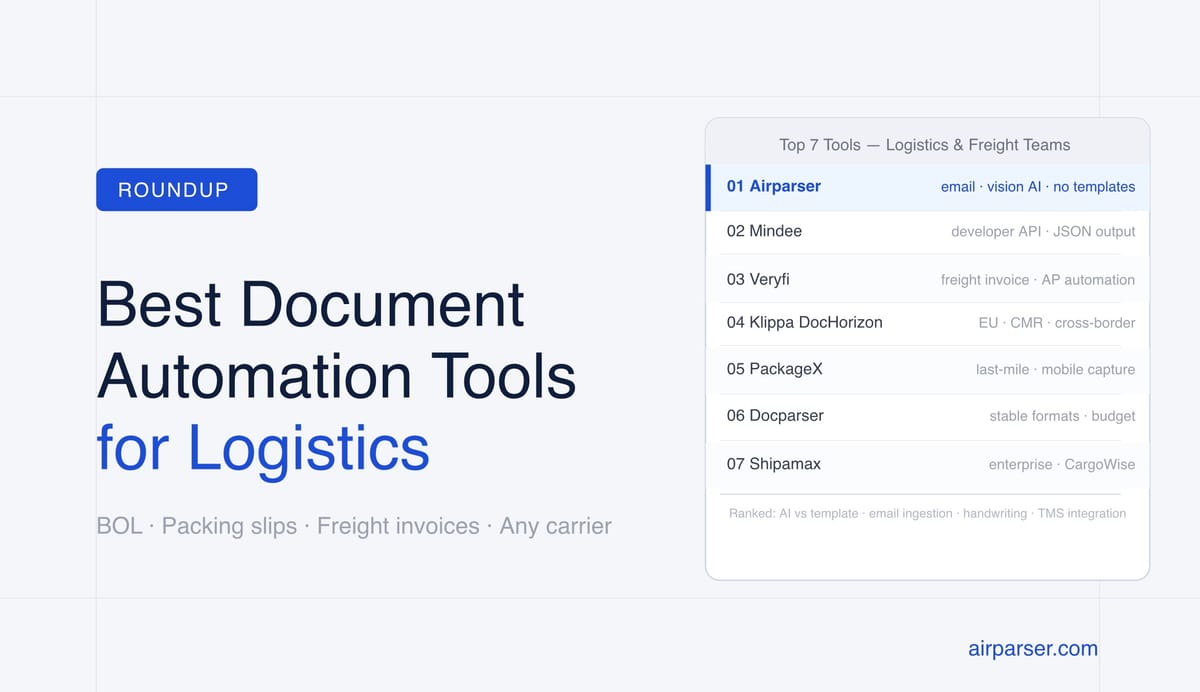
1. Airparser — Best for Teams Receiving Documents by Email
Airparser uses a vision AI engine and a large language model text engine to extract structured data from any logistics document without templates. You create an inbox, choose the parsing engine, define your extraction fields, and all future documents routed to that inbox are parsed automatically — regardless of carrier format.
The email model fits logistics operations well. Carriers, suppliers, and brokers typically send BOLs, packing lists, and freight invoices as email attachments. Airparser gives each inbox a dedicated email address. You can forward carrier emails to it directly, or set up an auto-forward rule from your existing mailbox. Documents start being extracted immediately, without any developer effort.
The vision engine specifically handles scanned documents and handwritten BOLs — a common pain point for LTL and regional freight operations where drivers complete forms by hand. For digital PDFs with intact text layers, the text engine delivers faster processing with high accuracy.
Logistics documents supported: BOLs, packing slips, shipping labels, delivery notes, freight invoices, customs documents, and any other logistics PDF or image file.
Ingestion methods: Email forwarding, manual upload, API, Zapier, Make, n8n.
Export options: Google Sheets, CSV, Excel, webhooks, REST API, Zapier, Make, n8n.
Best for: Logistics coordinators, 3PLs, and freight brokers who receive documents from multiple carriers via email and need data in a spreadsheet, TMS, or ERP without manual entry.
2. Mindee — Best for Developer-Led Logistics Pipelines
Mindee is an API-first document parsing platform with pre-built extraction models for several logistics document types. Their BOL and freight invoice models return structured JSON with field-level confidence scores, which allows automated pipelines to route low-confidence extractions to a human review queue rather than silently failing.
Mindee's developer-first design makes it a strong choice for logistics technology teams building document processing into a TMS or WMS integration. The SDK covers Python, Node.js, Ruby, and Java. For document types without a pre-built model, Mindee allows custom model training on a sample document set.
Logistics documents supported: BOLs, freight invoices, shipping manifests. Custom models cover specialized document types.
Ingestion methods: REST API, SDK.
Export options: Structured JSON via API response.
Best for: Logistics tech teams building automated document pipelines as part of a custom TMS or WMS integration.
3. Veryfi — Best for Freight Invoice and AP Automation
Veryfi offers pre-trained OCR and AI models focused on financial documents in logistics: freight invoices, receipts, and expense documents. Their REST API is fast and well-documented, making it practical for AP teams that process high volumes of carrier invoices. Line-item extraction for freight invoices is a particular strength — Veryfi handles base charges, fuel surcharges, and accessorial fees as separate structured fields.
For BOL extraction, Veryfi supports custom model paths, but their pre-built strength is in the invoice and financial document category. Teams looking for broad logistics document coverage across BOLs, packing slips, and delivery notes will get more out of a platform with pre-built models for those types.
Logistics documents supported: Freight invoices, carrier receipts, expense documents. BOLs via custom model.
Ingestion methods: REST API, mobile SDK.
Best for: AP teams and freight audit operations processing high volumes of carrier invoices via API.
4. Klippa DocHorizon — Best for European and Cross-Border Logistics
Klippa DocHorizon covers 15+ logistics document types including bills of lading, CMR consignment notes (the European standard transport document), customs declarations, and delivery notes. Multi-language support covers German, French, Dutch, Spanish, Italian, and other European languages — which matters when freight moves across EU borders with documents issued in the local language of the carrier.
Klippa also supports email ingestion and has native GDPR compliance tooling, making it appropriate for European operations with data residency and privacy requirements. Their confidence scoring model is similar to Mindee's, with low-confidence extractions flagged for review.
Logistics documents supported: BOLs, CMR consignment notes, customs declarations, freight invoices, packing lists, delivery notes.
Ingestion methods: API, email, direct upload.
Best for: European freight forwarders, customs brokers, and 3PLs operating across multiple EU countries with multilingual document sets.
5. PackageX — Best for Last-Mile and Warehouse Document Capture
PackageX is a logistics data infrastructure platform built around mobile-first document capture. Their system is designed for warehouse staff and delivery drivers who photograph documents on-site with a phone rather than scanning them in an office. PackageX combines OCR with logistics-specific data models that understand carrier terminology, barcode formats, and field layouts across major carriers.
The platform covers shipping labels, BOLs, packing slips, and delivery receipts. It is less suited for operations that receive documents primarily by email, but strong for warehouses and last-mile carriers where documents are captured at the point of receipt.
Logistics documents supported: Shipping labels, BOLs, packing slips, delivery receipts.
Ingestion methods: API, mobile camera capture, direct upload.
Best for: Warehouses, last-mile carriers, and parcel-intensive operations where documents are captured in the field rather than received by email.
6. Docparser — Best for Standardized, High-Volume Carrier Formats
Docparser uses a template-based extraction approach with configurable zonal OCR rules. For logistics teams working with a small, stable set of carrier formats, this model can deliver reliable extraction at lower cost than AI-based tools. The tradeoff is template maintenance: every new carrier format requires a new template, and handwritten content is not supported.
This makes Docparser a reasonable budget option for operations that have standardized their carrier relationships and have developer or operations resources to set up and maintain extraction rules. It is less practical for teams dealing with frequent new carrier onboarding or mixed document quality.
Logistics documents supported: Any document type, with template setup required per format.
Ingestion methods: Email, API, Zapier, direct upload.
Best for: Small logistics teams with a limited, stable set of carrier formats who want predictable extraction at a lower price point.
7. Shipamax (WiseTech Global) — Best for Enterprise Freight Forwarders
Shipamax, now part of WiseTech Global, is purpose-built for enterprise freight forwarding operations. The platform automates email-to-TMS data capture for BOLs, freight invoices, and cargo documents at high volume. Native integration with CargoWise and other WiseTech products means that for large forwarding operations already in the WiseTech ecosystem, Shipamax is the lowest-friction extension for document automation.
Shipamax is not a self-serve product — it requires an enterprise sales engagement and is priced for operations processing thousands of documents per day. It is not appropriate for small 3PLs or freight teams looking for a quick setup.
Logistics documents supported: BOLs, freight invoices, cargo documents, consolidation manifests.
Ingestion methods: Email.
Best for: Large freight forwarders and 3PLs processing high document volumes with an existing enterprise TMS in the WiseTech ecosystem.
Comparison at a Glance
| Tool | Extraction Approach | Email Ingestion | Handwriting Support | No-Template Setup | Best For |
|---|---|---|---|---|---|
| Airparser | Vision AI + LLM | Yes | Yes (vision engine) | Yes | Any-format logistics docs via email |
| Mindee | AI / Pre-trained models | No (API only) | Limited | Yes (pre-built types) | Developer-led pipelines |
| Veryfi | AI / Pre-trained models | No (API only) | Limited | Yes (for invoice types) | Freight invoice AP automation |
| Klippa | AI / Pre-trained models | Yes | Limited | Yes (15+ types) | European cross-border logistics |
| PackageX | AI + logistics data models | No (API/mobile) | Limited | Yes | Last-mile / warehouse capture |
| Docparser | Template OCR / Zonal rules | Yes | No | No | Standardized, consistent formats |
| Shipamax | AI / Enterprise | Yes | Limited | Yes | Enterprise freight forwarders |
How to Evaluate These Tools for Your Logistics Operation
The right tool depends on four variables specific to your operation. Check each one before committing to a platform.
Template vs. AI extraction. Template-based tools work when you have a small number of carrier formats that rarely change. AI-based tools work better when format variability is high — the default for most operations with multiple carriers. If you would need to maintain 30+ templates, a no-template AI approach is almost always more cost-effective over time, even if the per-document price is slightly higher.
How documents actually arrive. Most logistics teams receive documents as email attachments from carriers. A tool that only accepts documents via API requires a middleware layer to receive, parse, and route those emails — adding complexity and a potential failure point. Email-native tools (Airparser, Klippa, Docparser, Shipamax) eliminate that step. If your documents arrive via API or file upload from a TMS, this factor matters less.
Handwriting and scan quality. BOLs completed by drivers, signed proof of delivery receipts, and handwritten delivery notes are common in LTL and regional freight. If your operation regularly handles these document types, verify handwriting support before buying. Tools that use vision AI (Airparser) handle these cases well; template-based OCR and most API-only tools do not.
Downstream integration. Extracted data is only useful once it reaches your systems. Prioritize tools that output to your TMS, ERP, or WMS natively — or verify that a Zapier, Make, or webhook integration covers the gap. Structured JSON output gives you more flexibility for downstream routing than flat CSV.
How Airparser Handles Logistics Documents End to End
For logistics teams that want to start automating without developer resources, Airparser's setup takes under ten minutes:
- Create an inbox. Each inbox gets a dedicated email address. Name it for the document type — "BOL Inbox," "Carrier Invoices," or "Packing Lists."
- Choose your engine. Use the vision engine for scanned documents, photographed BOLs, and anything handwritten. Use the text engine for digital PDFs where the text layer is intact — it's faster and equally accurate on clean digital files.
- Upload a sample document. Airparser reads the sample and suggests an extraction schema. Review and adjust the fields — add BOL number, carrier name, shipment origin, destination, consignee, and line items as needed.
- Route your documents. Set up a forwarding rule in your email client to forward carrier emails to the inbox address. New documents extract automatically as they arrive, without any manual steps.
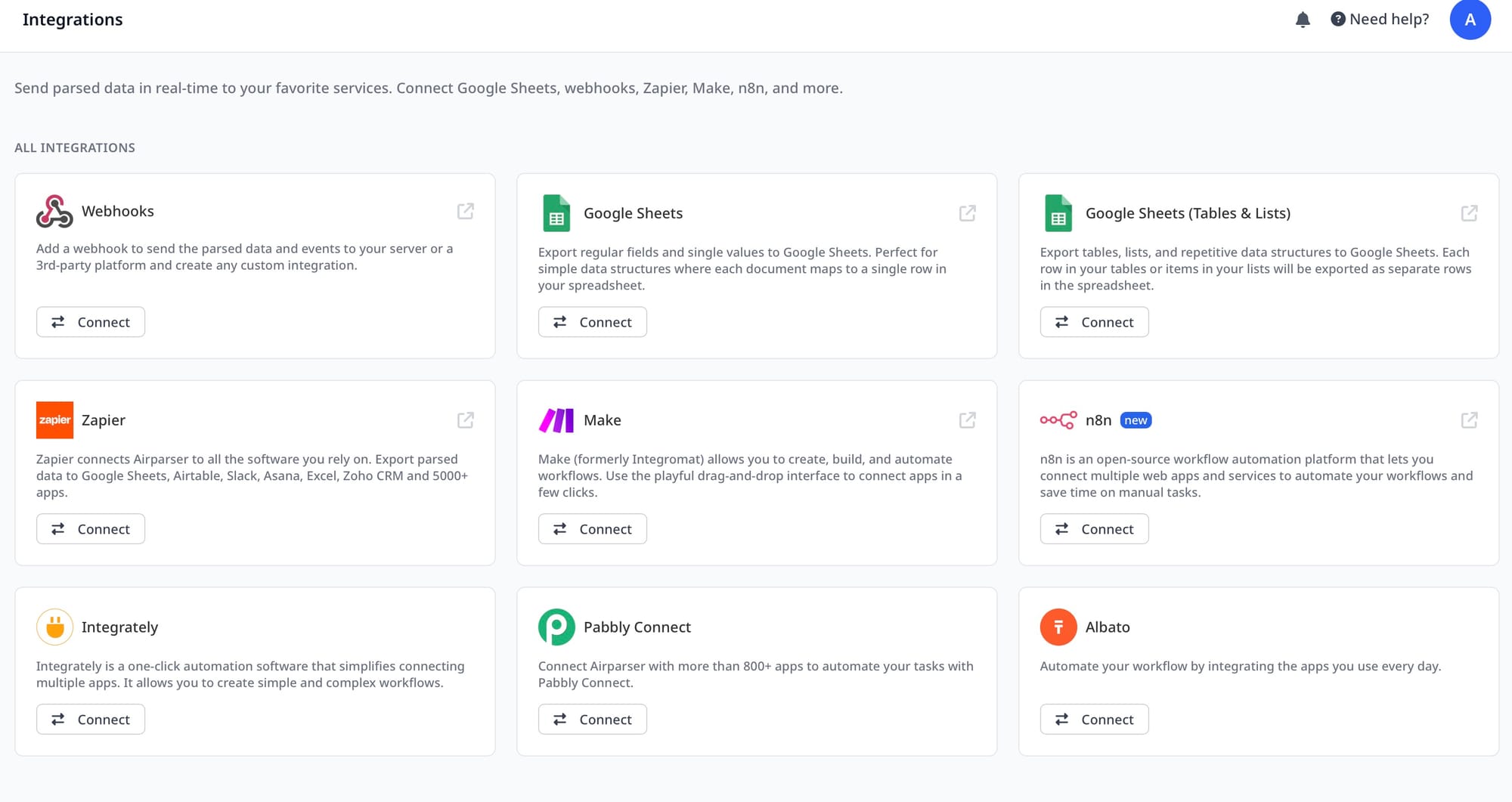
- Export to your systems. Connect to Google Sheets for live reporting, use webhooks to push data to your TMS or ERP, or pull results via the REST API. Zapier and Make integrations handle conditional routing if you need to split by carrier or document type.
For teams dealing with multiple document types — BOLs from carriers, packing slips from suppliers, and freight invoices for AP — the recommended approach is one inbox per document type, each with its own schema. This keeps extraction schemas focused and avoids field conflicts across document layouts.
For deeper guides on specific document types handled by Airparser, see:
- How to parse bills of lading automatically
- How to extract data from packing slips and delivery notes automatically
- How to extract data from shipping labels automatically
Frequently Asked Questions
What types of logistics documents can AI document automation tools extract data from?
Modern AI document automation tools can extract structured data from bills of lading, packing slips, shipping labels, delivery notes, proof of delivery receipts, freight invoices, and customs documents including commercial invoices and packing declarations. The best tools handle all of these without requiring a separate template per carrier or supplier format. Bills of lading are the most demanding type because every carrier uses a different layout — some carriers have dozens of regional format variations — and many are still partially handwritten by drivers. AI-based tools that use vision models handle this variability by understanding document structure from context rather than matching pre-defined field positions. Template-based OCR tools struggle when carrier format variability is high or when handwriting is present. If your operation involves multiple carriers, an AI-first tool that requires no template setup is almost always the better long-term investment.
Do I need to set up templates for every carrier format when using document automation?
With AI-based document automation tools — including Airparser, Mindee, Klippa, and Veryfi — you do not need a separate template for each carrier format. These tools use large language models or vision AI to understand what a field means from context, rather than from a fixed position on the page. That means a BOL from FedEx Freight and a BOL from a regional LTL carrier can both be processed by the same inbox with the same extraction schema, without any reconfiguration. Template-based tools like Docparser take the opposite approach: you define extraction zones on the page, and those rules apply to documents that match that specific layout. This works predictably for standardized formats but breaks whenever a carrier updates their template or when you onboard a new carrier with a different design. For operations with more than five to ten carrier relationships, the template maintenance cost of rule-based tools typically exceeds the cost difference versus AI-based alternatives.
How do logistics teams get documents into an AI parsing tool automatically?
The most practical intake method for logistics teams is email forwarding. Most carriers, suppliers, and brokers send BOLs, packing lists, and freight invoices as email attachments. Tools like Airparser give each inbox a dedicated email address — you either forward individual emails manually or set up an auto-forward rule in your existing email client to route all carrier emails automatically. Once the rule is in place, documents are extracted as they arrive without any manual steps. For teams that receive documents in other ways — uploaded to a shared drive, accessed via a carrier portal API, or generated by an internal TMS — API and webhook ingestion are the relevant intake methods. Some tools also support direct upload for ad hoc processing. The key variable is whether your documents arrive via email or through a programmatic channel, since that largely determines which ingestion model will eliminate the most manual handling.
Can document automation tools handle handwritten bills of lading and delivery receipts?
AI vision-based tools can handle handwritten bills of lading and proof of delivery receipts — but not all document automation tools have this capability. Template-based OCR systems and most text-only parsers cannot process handwriting reliably, because they rely on machine-readable text layers or fixed field positions rather than visual document understanding. AI tools that use vision models — including Airparser's vision engine — process documents the way a human would: by looking at the page as an image and inferring what each region contains. This allows them to handle partially handwritten BOLs, signed delivery receipts, and scanned forms with handwritten annotations. For logistics operations involving LTL freight, regional carriers, or any context where drivers complete documents by hand, handwriting support should be a non-negotiable evaluation criterion. The failure mode of sending a handwritten BOL through a text-only parser is silent data loss — the tool processes it without error but returns empty or incorrect fields.
How do I connect parsed logistics document data to my TMS or ERP?
The most flexible integration path is webhooks. Most AI document automation tools, including Airparser, can push extracted data to a webhook URL the moment extraction completes. Your TMS or ERP needs to expose a webhook receiver endpoint — many modern systems do — or you can use a middleware platform like Zapier, Make, or n8n to route and transform the data before it reaches your system. For ERPs that accept structured file imports (CSV, Excel, or JSON), you can configure an export to a shared folder or Google Sheets as an intermediary step. For teams without developer resources, the Zapier and Make integrations provided by Airparser offer a visual, no-code way to build routing logic — for example, sending packing slip data to one Sheets tab, BOL data to another, and freight invoice data directly to an AP system. For developer teams, the REST API gives you direct access to extraction results in structured JSON, with the ability to pull document results on demand or set up event-driven push via webhooks. Check your TMS vendor's integration documentation before selecting a tool — some TMS platforms have native Airparser or Zapier integrations already, which simplifies setup significantly.
What is the difference between OCR and AI document parsing for logistics, and which is better?
Traditional OCR converts scanned images to machine-readable text, but it does not understand document structure. It can tell you that the characters "BOL#" and "394821" appear on a page, but it cannot reliably determine that 394821 is the BOL number and should be mapped to the correct field in your TMS. Zonal OCR systems try to solve this by defining fixed extraction zones on the page, but this requires a separate template per layout — which breaks when carrier formats change. AI document parsing adds a semantic understanding layer on top of text extraction. Large language models can infer that a field labeled "Shipper Reference," "Origin Reference," or "Client PO #" all represent the same concept in different carrier formats — and map them consistently without a template update. Vision AI goes further, reading documents as images and understanding layout, tables, and handwriting that pure OCR cannot capture. For logistics operations with multiple carriers, varied document quality, and any handwritten content, AI parsing is materially better than template OCR. The cost per document is slightly higher, but the template maintenance overhead for rule-based tools is a hidden cost that compounds as you add carriers.