How to Extract Data from CMS-1500 Medical Claims Forms Automatically
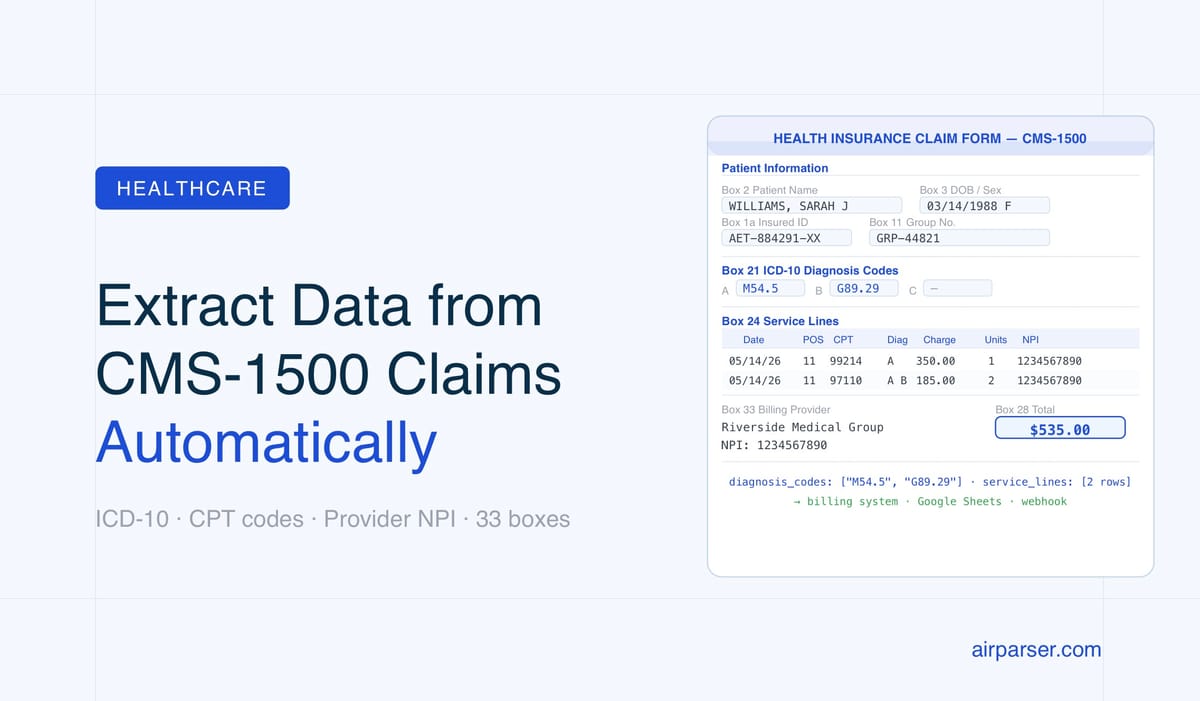
CMS-1500 medical claims forms have 33 structured boxes — patient data, ICD-10 codes, CPT procedure codes, and provider NPIs. Here’s how AI parsing extracts every field automatically and routes data to your billing system.

TL;DR
- CMS-1500 (HCFA) forms have 33 structured boxes — patient data, ICD-10 diagnosis codes, CPT procedure codes, and provider NPIs.
- Traditional OCR fails on faxed and low-resolution CMS-1500 scans. Vision-based AI parsing reads the form's visual layout directly.
- In Airparser, create an inbox with the Vision engine, upload a sample form, and define an extraction schema with patient info, diagnosis codes (as an array), service lines (as an array of objects), and billing provider details.
- Extracted data routes to Google Sheets, your practice management system, or any billing platform via webhook.
The fastest way to extract data from CMS-1500 medical claims forms is to use a vision-based AI parser that reads the form's standardized grid layout. Airparser's Vision engine recognizes the CMS-1500 box structure, extracts each field by position and label, and returns clean JSON — patient information, diagnosis codes, procedure codes, rendering provider NPI — ready for your billing system or practice management software.
CMS-1500 is the universal claim form for professional medical services in the United States. Every physician, therapist, and outpatient provider submits it to Medicare, Medicaid, and commercial insurers. Despite being a standardized government form, it arrives in billing departments as faxed scans, email attachments, or printed-then-scanned PDFs — all slightly different in quality, alignment, and fill style. Manual data entry takes 3–7 minutes per claim. AI extraction takes under 10 seconds.
This guide covers how CMS-1500 data extraction works in practice, which fields to target, why the Vision engine outperforms traditional OCR on this form, and how to set up a working extraction schema in Airparser from scratch.
What Is the CMS-1500 Form and Why Does It Matter for Billing Automation?
The CMS-1500 form — also called the HCFA-1500 after the Health Care Financing Administration that originally created it — is the standard paper claim format for professional healthcare services in the US. It is used by physicians, nurse practitioners, physical therapists, mental health providers, medical equipment suppliers, and any other non-institutional healthcare provider billing Medicare, Medicaid, or most commercial insurers.
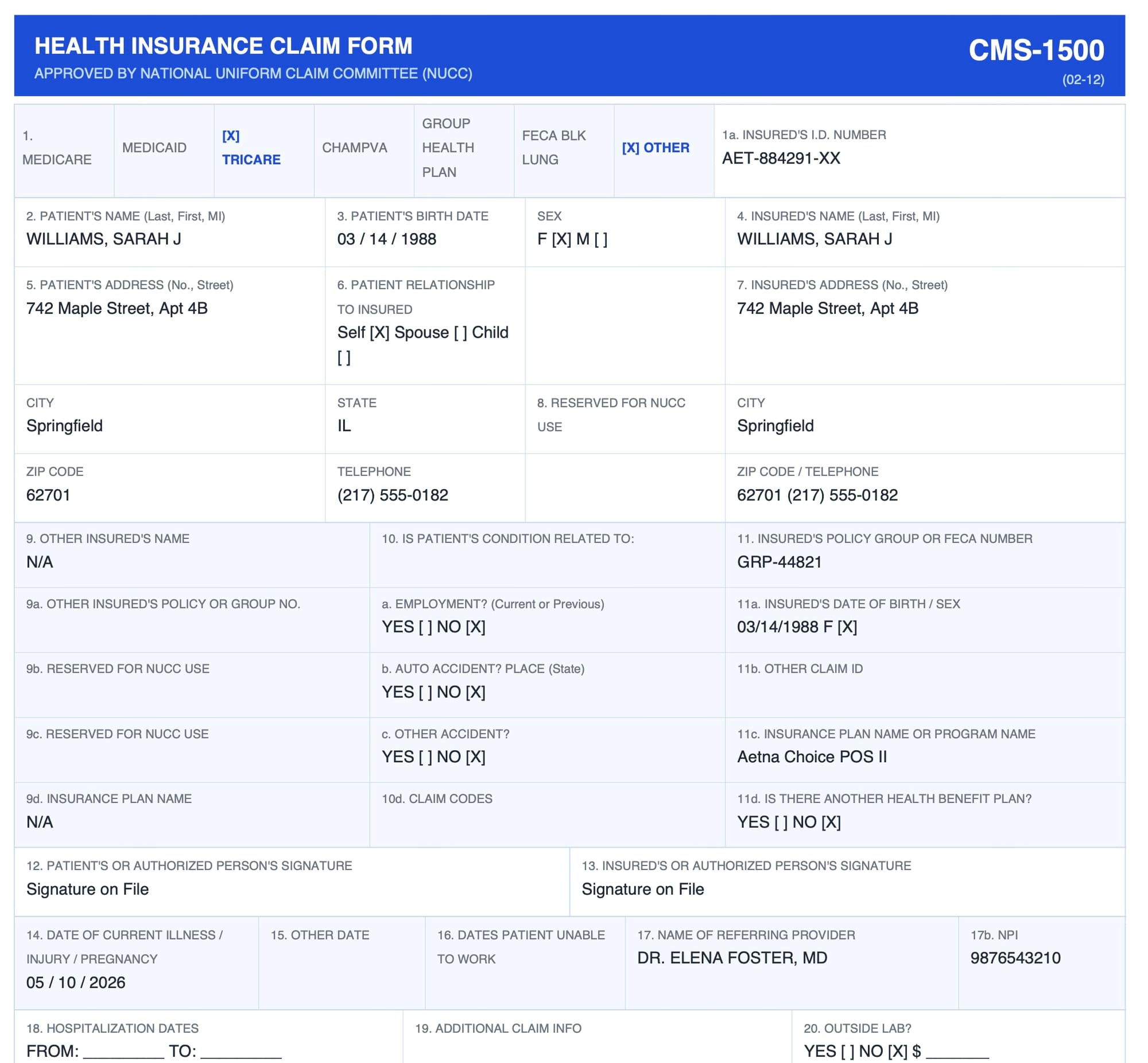
The form contains 33 numbered boxes (some with subfields), capturing:
- Patient and insurance identification (Boxes 1–13): patient name, date of birth, insured ID number, insurance plan name, relationship to insured
- Clinical condition information (Boxes 14–23): onset date, referring provider NPI, prior authorization number
- Diagnosis codes (Box 21): up to 12 ICD-10 codes identifying the conditions being treated
- Service lines (Box 24): a table with up to 6 rows, each capturing date of service, place of service code, CPT/HCPCS procedure code, modifier, diagnosis pointer, charge amount, units, and rendering provider NPI
- Billing provider information (Boxes 25–33): Tax ID, billing provider name, address, and NPI
Hospital inpatient and outpatient facility claims use the UB-04 form. CMS-1500 is specifically for professional services billed by individual providers or group practices.
CMS-1500 forms are difficult to automate with traditional tools because they are both highly structured in design and highly variable in practice — handwritten entries, faxed scans, low-resolution photocopies, and multi-page claim packets all require the parser to understand visual context rather than fixed coordinates. This is the exact problem vision-based AI parsing solves.
Why Traditional OCR Fails on CMS-1500 Forms
Traditional OCR extracts text by recognizing individual characters and then relies on fixed coordinate zones to assign text to form fields. On a clean, digitally generated PDF, this works adequately. On a faxed CMS-1500 or a document scanned at 150 DPI from a stack of paper, it breaks down in predictable ways:
- Grid misalignment: The CMS-1500 grid shifts slightly depending on the printer, fax machine, or scanner. Zonal OCR expects each box at a fixed pixel coordinate. A 2mm shift moves an entire row of fields out of position.
- Handwritten entries: Many practices hand-fill certain boxes — diagnosis codes, modifier fields, provider signatures — even on otherwise typed forms. Traditional OCR character recognition degrades significantly on handwriting.
- Fax compression artifacts: Fax compression introduces noise, smearing, and fine-line degradation that confuses both character recognition and zone detection.
- Grid line bleeding: The CMS-1500 box borders sometimes merge with adjacent text in low-contrast scans, causing OCR to combine fields that should remain separate.
Vision engine AI avoids these problems by reading the page as an image rather than as a character stream. Instead of relying on fixed coordinates, it interprets the visual structure — box labels, column headers, table layouts, relative positions — and extracts fields based on their visual context. A slightly shifted form still has the same visual structure. A handwritten CPT code in Box 24D still reads as a procedure code because it appears in the correct visual position within a service line row.
Key CMS-1500 Fields to Extract and How to Model Them
Before building your extraction schema, identify which boxes matter for your workflow. Not all 33 boxes are relevant to every billing process. Here are the fields most commonly extracted for downstream billing and practice management:
Patient and Insurance Information (Boxes 1–13)
- Box 2 — Patient name (last, first, middle initial)
- Box 3 — Patient date of birth and sex
- Box 5 — Patient address: street, city, state, ZIP, phone
- Box 1a — Insured's ID number (the member or policy number for primary insurance)
- Box 4 — Insured's name
- Box 6 — Patient's relationship to insured: self, spouse, child, other
- Box 11 — Insured's policy group number
Diagnosis Codes (Box 21)
Box 21 holds up to 12 ICD-10 diagnosis codes labeled 21A through 21L. Each code represents a condition justifying the services billed. Define this as an array field called diagnosis_codes so each code becomes a separate element. Storing them as a comma-separated string in a single field makes downstream processing — especially linking codes to specific service lines via the Box 24E diagnosis pointer — unnecessarily complex.
Service Lines (Box 24)
Box 24 is a structured table with up to 6 service line rows. Each row contains:
- 24A — Date(s) of service (from/to)
- 24B — Place of service code
- 24D — CPT or HCPCS procedure code
- 24D modifier — Up to 4 modifiers per line
- 24E — Diagnosis pointer (which Box 21 letter applies to this service)
- 24F — Charge amount for this line
- 24G — Units or days
- 24J — Rendering provider NPI
Define service_lines as an array of objects, with each object containing the fields above. This handles claims with 1 service line and claims with 6 service lines using the same schema.
Billing Provider Information (Boxes 25–33)
- Box 25 — Federal Tax ID (EIN or SSN of the billing entity)
- Box 33 — Billing provider name, address, and NPI
- Box 32 — Service facility location, if different from billing address
- Box 23 — Prior authorization number (when applicable)
Step-by-Step: Setting Up CMS-1500 Extraction in Airparser
Setting up a CMS-1500 extraction workflow in Airparser takes under 15 minutes. Here is the complete process:
Step 1: Create a New Inbox and Choose the Vision Engine
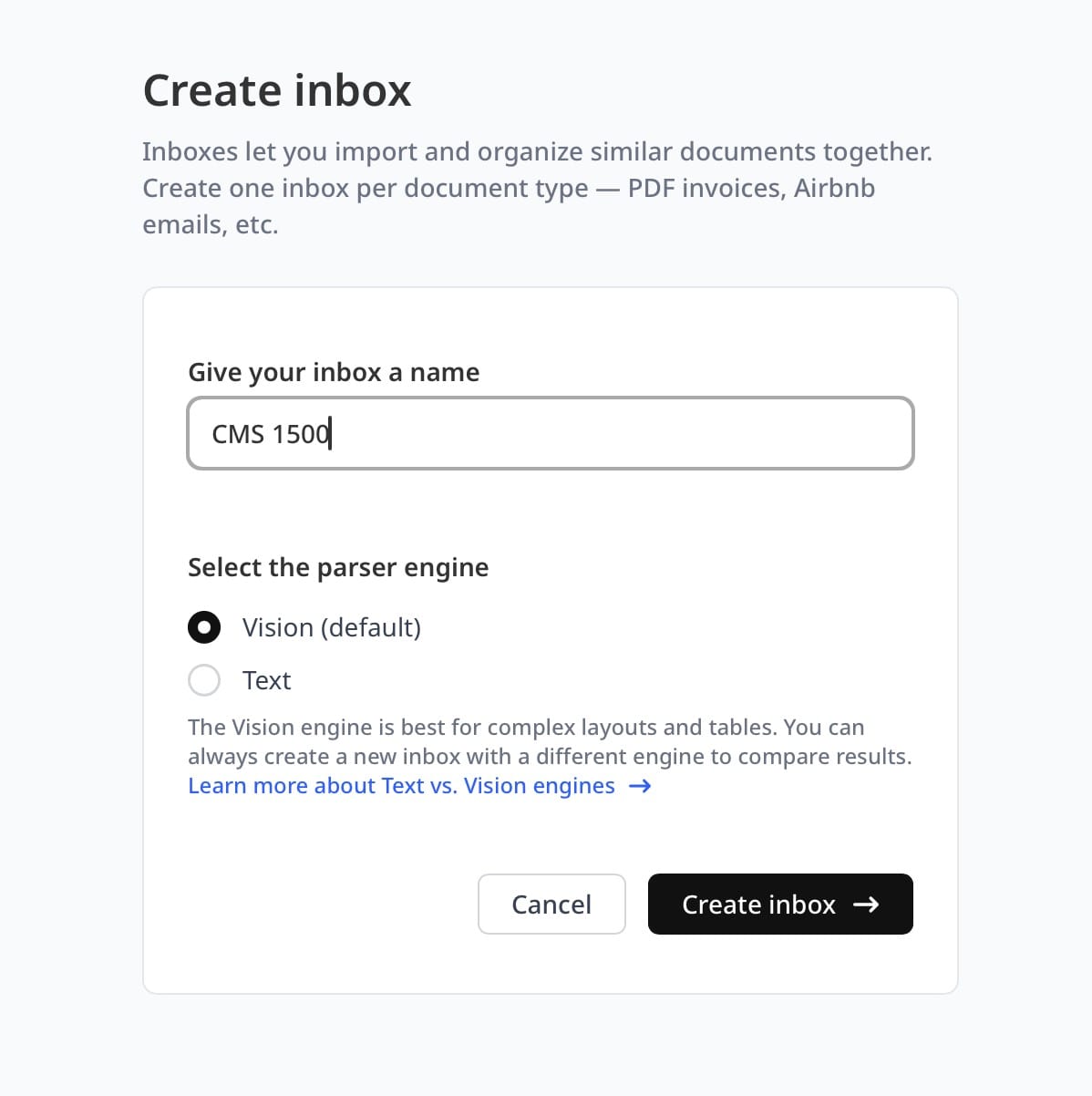
In your Airparser dashboard, create a new inbox. When prompted to select a parsing engine, choose Vision. The Vision engine reads document pages as images and understands the visual structure of forms — essential for CMS-1500 documents that arrive as faxed scans or photographed paper.
Name the inbox something descriptive like "CMS-1500 Claims" so it is easy to identify when routing documents from email or an automation platform.
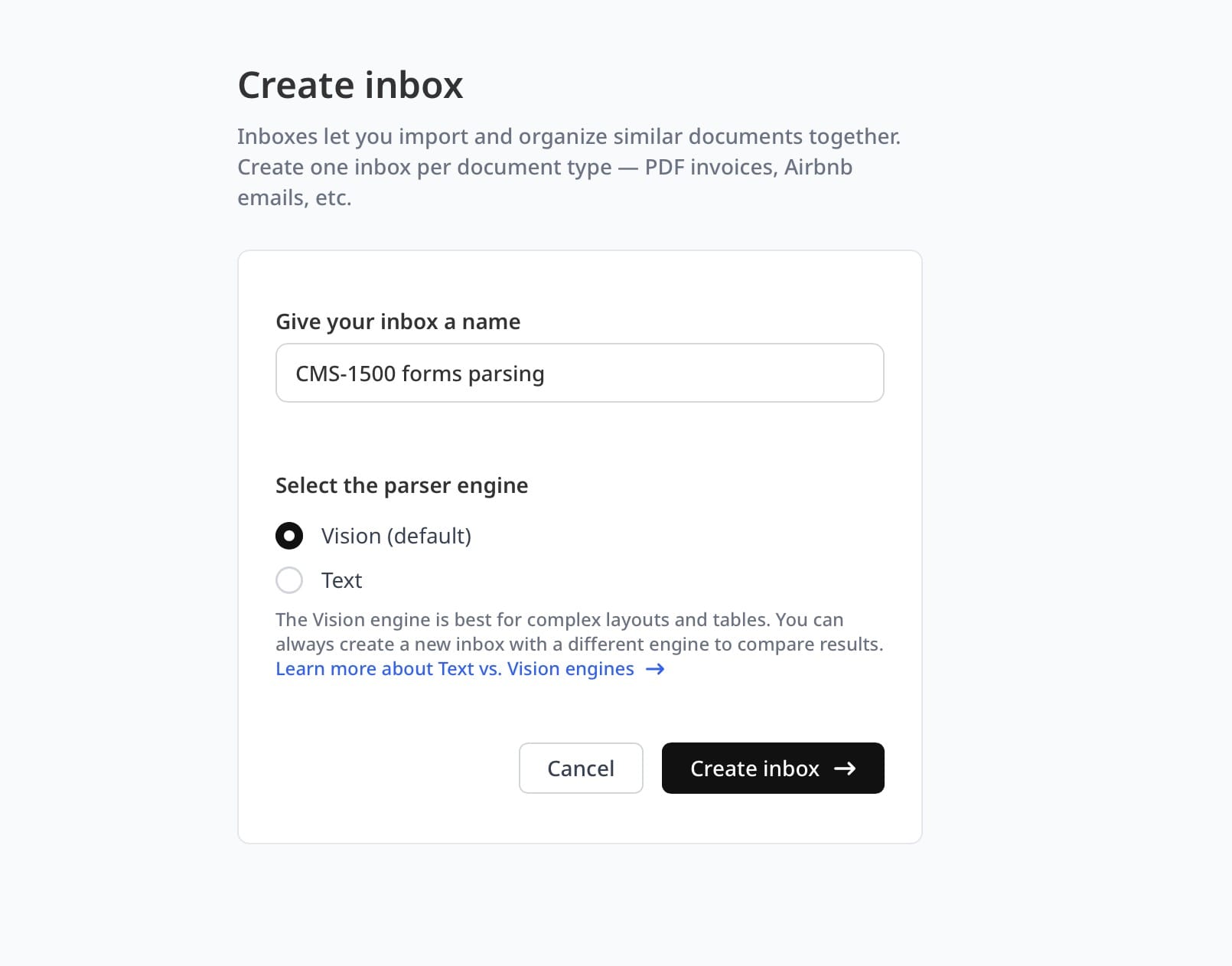
Step 2: Upload a Sample CMS-1500 Form
Upload one or two representative samples — ideally matching the quality and format you will process in production. If forms arrive as email attachments, forward a sample to the inbox email address. Airparser analyzes the sample and can auto-generate a suggested extraction schema based on what it finds. Use that as a starting point or build the schema manually for full control over field naming.
Step 3: Define Your Extraction Schema
Your schema is the list of fields Airparser extracts from every form entering this inbox. A production-ready CMS-1500 schema looks like this:
patient_name             → text
patient_dob              → date
patient_sex              → text
insured_id               → text
insured_name             → text
relationship_to_insured  → text
diagnosis_codes          → array of text  (up to 12 ICD-10 codes from Box 21)
service_lines            → array of objects:
    date_of_service      → date
    place_of_service     → text
    cpt_code             → text
    modifiers            → text
    diagnosis_pointer    → text
    charge_amount        → number
    units                → number
    rendering_npi        → text
billing_provider_name    → text
billing_provider_npi     → text
federal_tax_id           → text
total_charge             → number
prior_auth_number        → text  (optional)
For fields that may be absent on some forms — like prior authorization number — Airparser returns null rather than failing the extraction. One schema handles all your form variants.
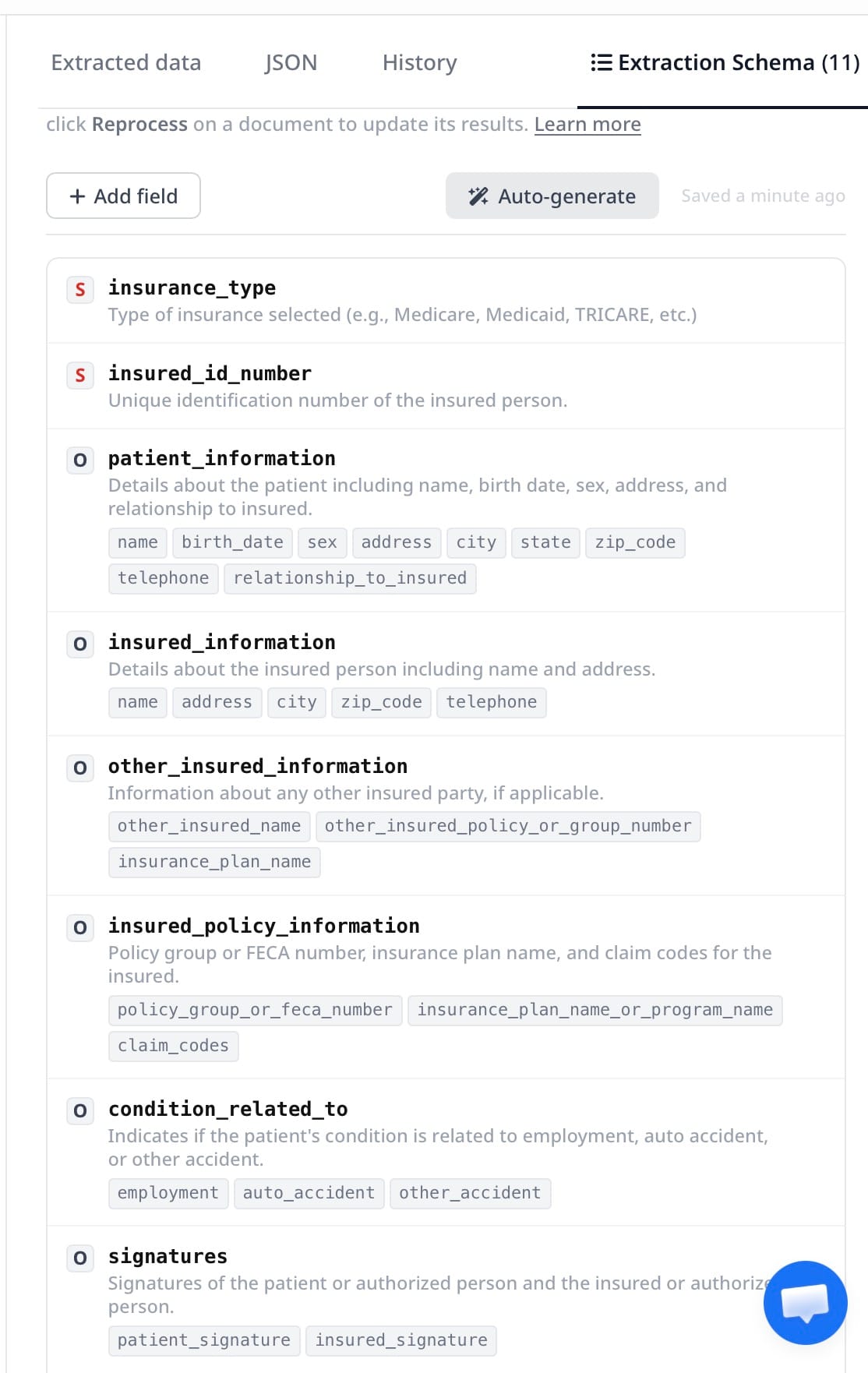
Step 4: Process Claims at Scale
Once the schema is set, every subsequent form sent to the inbox is parsed automatically. You can send claims via:
- Email forwarding: forward claim PDFs as attachments to your inbox address, or set up an email forwarding rule so incoming fax-to-email messages route automatically
- API upload: POST files directly to Airparser's API from your billing or EMR system
- Zapier or Make: trigger Airparser automatically when a file appears in a shared folder, email account, or cloud storage location
Step 5: Export Extracted Data Downstream
Airparser returns extracted CMS-1500 data as structured JSON. From there, you can:
- Push to Google Sheets for a billing review tracker
- Send to a webhook that writes directly into your practice management system
- Export as CSV for batch upload to insurance portals
- Route via Zapier or Make into any connected business tool
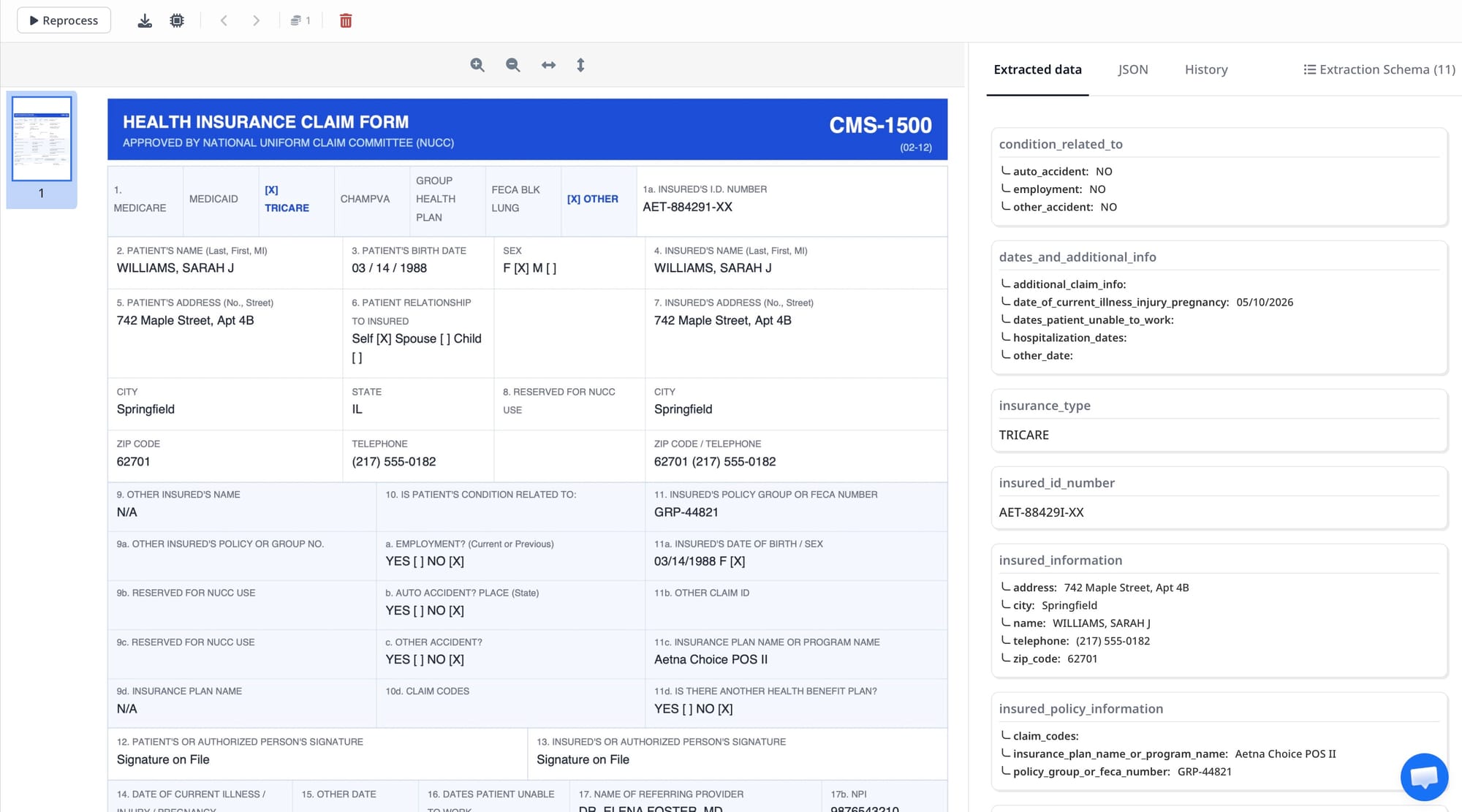
Common CMS-1500 Extraction Challenges and How to Handle Them
Real-world CMS-1500 processing surfaces several recurring issues. Here is how to address the most common ones:
Handwritten entries mixed with typed text
Some practices hand-fill certain boxes even on otherwise typed forms — diagnosis codes, modifier fields, and signature boxes are frequently handwritten. The Vision engine handles mixed handwritten-and-typed forms better than any OCR-based approach because it reads the page visually rather than character-by-character. For very low-quality handwriting, confidence scores in the extraction result flag uncertain fields for human review rather than passing through bad data silently.
Multiple diagnosis codes in Box 21
Box 21 contains up to 12 ICD-10 codes (21A through 21L). Defining diagnosis_codes as an array field type in Airparser ensures each code is returned as a separate element rather than a single concatenated string. This matters downstream when you need to cross-reference the diagnosis pointer in Box 24E — which links each service line to the specific diagnosis codes that justify it.
Variable numbers of service lines in Box 24
Some claims have one service line; complex visits may have six. Defining service_lines as an array of objects handles this automatically. Claims with fewer rows return shorter arrays — no conditional logic needed in your processing code, and no separate schema required for simple vs. complex claims.
Faxed claim packets with cover pages
Claims often arrive as multi-page faxes including a cover sheet before the actual CMS-1500 form. Airparser identifies and extracts from the relevant page rather than the entire document, so cover pages and trailing pages are ignored. If your packets mix UB-04 forms with CMS-1500 forms, use separate inboxes with separate schemas for each form type — the two forms have different layouts and different field sets.
Secondary insurance fields
Boxes 9 and 11 capture secondary insurance information. If your workflow requires secondary payer data, add those fields explicitly to your schema: secondary_insured_name, secondary_policy_group, secondary_insurance_plan. Airparser extracts secondary insurance data from the same form pass — no separate document or second submission needed.
How CMS-1500 Extraction Fits Into a Revenue Cycle Workflow
Extracting CMS-1500 data is one step in the revenue cycle. Here is how Airparser fits into a typical small-to-mid-size practice billing workflow:
- Claims received: faxed or emailed CMS-1500 forms are forwarded to an Airparser inbox automatically
- Data extracted: patient info, diagnosis codes, service lines, and provider details are pulled into JSON in under 10 seconds
- Validation: structured data is checked against known value patterns — valid NPI format, ICD-10 code structure, required field presence — using a webhook receiver or a simple filter in Zapier or Make
- Routing: validated claims are pushed to the practice management system or billing platform via API or webhook
- Exceptions flagged: claims with low-confidence extractions or missing required fields route to a review queue instead of passing through automatically
- Payment tracking: when payers process the claim, they return an EOB (Explanation of Benefits) document that can be parsed separately — see the guide on automating EOB data extraction for the remittance side of the same workflow
This workflow replaces the manual data entry step entirely. Staff who previously spent 3–7 minutes per claim entering data into a practice management system can instead focus on reviewing flagged exceptions and following up on unpaid claims.
For broader context on how AI extraction is changing healthcare operations, see the overview of automated document extraction for healthcare.
Frequently Asked Questions
What is the CMS-1500 form used for?
The CMS-1500 form is the standard claim submission form for professional medical services in the United States. It is used by physicians, therapists, suppliers, and other non-institutional healthcare providers to bill Medicare, Medicaid, and private insurers for services rendered. The form's 33 numbered boxes capture patient identity, insurance coverage, clinical diagnosis codes, procedure codes, charges, and provider identification numbers. It is distinct from the UB-04 form, which handles institutional claims from hospitals and skilled nursing facilities. CMS-1500 covers professional claims only. Every such claim submitted in the US uses either the paper CMS-1500 form or its electronic equivalent, the 837P transaction set. The two formats carry identical data — extracting from the paper or scanned form is therefore a direct path to the same structured data that the 837P would deliver electronically.
Can AI extract handwritten data from CMS-1500 forms?
Yes, but with nuance. Vision-based AI parsers like Airparser read handwritten text on CMS-1500 forms significantly more reliably than traditional OCR tools. Traditional OCR character recognition is trained primarily on printed fonts and degrades quickly on handwriting. Vision models interpret handwriting in context: a number written in the charge amount column of Box 24F is interpreted as a dollar value regardless of handwriting style, because the model reads positional and visual context alongside the character shapes. Accuracy depends on handwriting legibility. Clear block printing extracts with high confidence. Dense cursive or very cramped handwriting in narrow boxes produces lower-confidence extractions. Airparser's confidence scores allow you to flag uncertain fields for manual review rather than silently passing through bad data — a practical approach when partial automation delivers more value than none.
How do I handle the Box 24 service line table in my extraction schema?
Box 24 is a structured table with up to 6 rows, each representing a separate service or procedure. The correct model in Airparser is to define a service_lines field as an array of objects, where each object contains the fields from one table row: date of service, place of service code, CPT or HCPCS procedure code, modifiers, diagnosis pointer, charge amount, units, and rendering provider NPI. This approach handles single-service claims and complex multi-service claims with the same schema and no conditional logic. Defining service lines as flat fields — service_line_1_cpt, service_line_2_cpt, and so on — creates schema maintenance problems and makes downstream processing unnecessarily complex. The array approach also makes it straightforward to sum line-item charges for reconciliation against the Box 28 total charge field.
What is the difference between the CMS-1500 and the EOB, and can I parse both?
The CMS-1500 is the claim you submit to an insurance company requesting payment for services rendered. The EOB (Explanation of Benefits) or ERA (Electronic Remittance Advice) is what the insurance company sends back after processing the claim, showing what was paid, what was denied, and the reason codes for any adjustments. They are complementary documents in the same billing cycle. CMS-1500 extraction automates claim data entry on the submission side. EOB extraction automates payment posting on the remittance side. Airparser handles both. You set up separate inboxes — one for incoming CMS-1500 forms, one for incoming EOBs — each with its own extraction schema appropriate to the document type. See the guide on automating EOB data extraction for the remittance workflow.
Why does the Vision engine work better than OCR for CMS-1500 forms?
Traditional OCR extracts characters and then uses fixed coordinate zones to map text to form fields. This works on clean, digitally generated PDFs but breaks down on faxed scans where the form shifts slightly from expected coordinates, low-resolution scans with grid line artifacts, and partially handwritten forms where character recognition accuracy drops. The Vision engine reads the page as an image and interprets the visual structure — box positions, column headers, table layouts — rather than relying on fixed pixel coordinates. A CMS-1500 scanned at 150 DPI with a few millimeters of grid shift still has the same visual structure. The Vision engine identifies Box 21 by its visual label and position relative to the rest of the form, not by a hardcoded pixel region. The practical result is far higher extraction accuracy on real-world claims in production. For a deeper explanation of how Vision engine parsing works, see the article on what a Vision engine does in document parsing.
Can I use Airparser for CMS-1500 forms received as email attachments?
Yes. Email attachment intake is one of the most common patterns for medical billing offices. Airparser provides each inbox with a dedicated email address. You forward incoming claim emails — or configure an email forwarding rule so that fax-to-email messages are automatically routed — to that address. Airparser detects PDF and image attachments, extracts the CMS-1500 data using your schema, and makes the result available immediately via webhook or export. The email body is ignored; only the attachment is processed. This means you do not need to change how you receive claims or restructure your email setup. A forwarding rule to the inbox address is all that is required to connect your existing email workflow to automated extraction.
How do I validate CMS-1500 data after extraction to catch errors before submitting claims?
Validation after extraction is straightforward because Airparser returns structured JSON with typed fields. Common validation checks for CMS-1500 data include: NPI format (10-digit numeric), ICD-10 code format (letter followed by two digits, optionally followed by a decimal point and additional characters), CPT code format (5-character numeric or alphanumeric), date field completeness (all service lines must have a date of service), and required field presence (patient name, insured ID, at least one service line, billing provider NPI). These checks can be implemented in a lightweight webhook receiver in Python or any server-side language, or handled inside a Zapier or Make workflow using filter and formatter steps. Claims that fail validation route to a review queue rather than being submitted, catching data issues before they become rejected claims that must be reworked at significant cost and delay.
Key Takeaways
CMS-1500 forms are highly standardized in layout but arrive in formats that consistently break traditional OCR: faxed scans, low-resolution photocopies, and partially handwritten documents. Vision-based AI extraction — available through Airparser's Vision engine — reads the visual layout of the form directly, making it the right approach for production medical billing workflows where document quality is variable.
The two most important decisions in your extraction schema are modeling diagnosis codes as an array (up to 12 ICD-10 codes from Box 21) and service lines as an array of objects (up to 6 rows from Box 24). These two choices handle the variable-length sections of the CMS-1500 form cleanly and make downstream processing — validation, routing, posting to billing software — predictable and straightforward.
If you process CMS-1500 forms regularly and want to eliminate manual data entry from your claims workflow, try Airparser with a sample form to see how the Vision engine handles your specific document quality and form variants.