AI Email Signature Parser
Automatically extract contact information, company details, and professional data from email signatures with 99% accuracy using advanced AI technology.
Why Email Signatures Are a Hidden Goldmine for Leads
Inboxes are full of hidden leads — and most teams ignore them. Every day, you receive emails from prospects, customers, candidates, partners, and vendors. While some of these contacts fill out a form or include details in the email body, many quietly sign off with a rich email signature that includes their full name, title, phone number, company, and even LinkedIn or website links.
The problem? Manually copying this data into a spreadsheet or CRM is slow, repetitive, and error-prone.
Email signatures often include:
- Full name
- Job title
- Company name
- Phone number
- Email address
- LinkedIn or social profile links
- Website or landing page
This makes signatures an excellent source of lead data, especially in inbound emails from demo requests, support tickets, cold email responses, and referral messages. Rather than relying solely on form submissions, you can capture real contact data from natural conversations — and build lead lists effortlessly.
How Airparser Extracts Data from Email Signatures
Airparser is an AI-powered document parsing tool that can handle everything from PDF invoices to image-based forms — and yes, email signatures too.
When you forward an email into Airparser, it:
- Parses the email body (including the signature block)
- Uses AI to detect relevant contact fields
- Extracts and structures the data into a format you can use
- Sends it to Google Sheets, Zapier, Make, your CRM, or anywhere else
The best part? You don't need to write any prompts, regex rules, or templates. Just give Airparser a sample and define the fields you want.
Transform Your Contact Management
Complete Email Signature Data Extraction
Extract Every Detail
Personal Information
Full name, job title, department, professional designation
Company Details
Company name, industry, company size, website
Contact Information
Email, phone, mobile, fax, office address
Online Presence
Website, LinkedIn, Twitter, Facebook, other social media
Visual Elements
Company logos, profile pictures, banner images
Sample Extracted Data:
{
  "name": "Sarah Johnson",
  "job_title": "Marketing Director",
  "department": "Marketing",
  "company": {
    "name": "Tech Solutions Inc.",
    "website": "www.techsolutions.com"
  },
  "contact": {
    "email": "[email protected]",
    "phone": "+1 (555) 123-4567",
    "mobile": "+1 (555) 987-6543"
  },
  "address": {
    "street": "123 Business St",
    "city": "San Francisco",
    "state": "CA",
    "zip": "94102"
  },
  "social": {
    "linkedin": "linkedin.com/in/sarahjohnson",
    "twitter": "@sarahjohnson"
  }
}
Step-by-Step: How to Extract Lead Data from Email Signatures
Step 1: Create a New Inbox in Airparser
In Airparser, each parser is called an Inbox. When you create a new Inbox, you'll receive a unique email address like: <your-inbox-name>@in.airparser.com. You can forward emails to this address manually, via filters (e.g. Gmail rules), or programmatically via Zapier/Make.
Step 2: Send a Sample Email with a Signature
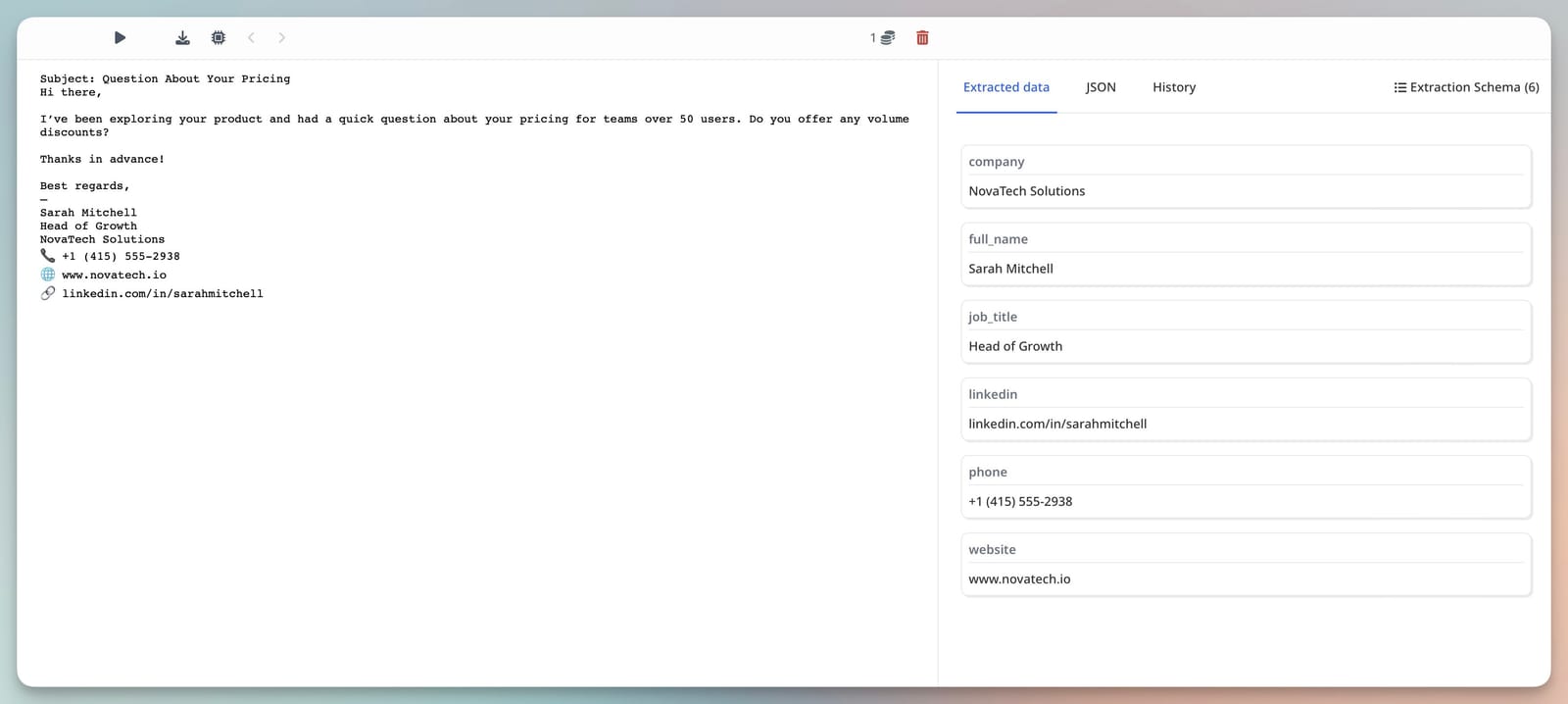
To train the parser, you need a sample. Send or forward an email that contains a signature block — it can be one from your inbox or a test email you create. This sample will help Airparser learn the structure of the data you want to extract.
Step 3: Add or Auto-Generate Fields
You can define the fields you want to extract manually, or let Airparser suggest them based on the sample. Common signature fields include:
- • Full Name
- • Job Title
- • Company
- • Phone
- • Website
Airparser's AI will analyze the signature block, match values to your fields, and let you review the results. You can fine-tune the schema as needed — the system improves with feedback.
Step 4: Automate Incoming Email Parsing
Once your Inbox is set up, you can send new emails to it automatically: Use Gmail filters to forward certain replies or labels, set up Zapier or Make to send emails that match certain conditions, or forward contact or sales emails from tools like Typeform, Calendly, Intercom, etc. Airparser will extract contact data from each email and return structured results in real time.
Step 5: Export Parsed Contacts to Your CRM or Spreadsheet
Parsed contact data can be exported to Google Sheets, Excel or CSV files, Airtable, Notion, or HubSpot, Zapier or Make for workflow automation, or webhooks or API endpoints for custom integrations. This allows you to build lead lists, enrich CRMs, trigger follow-ups, or notify team members — all from email signature data.
Real-World Use Cases
Sales & Business Development
- • Capture contact info from inbound demo requests
- • Automatically add decision-makers to your CRM
- • Trigger personalized sequences based on job title
Marketing
- • Enrich your database with verified contacts
- • Segment leads by role or company type
- • Push contacts into lead nurturing workflows
Support & Customer Success
- • Identify high-value users in support conversations
- • Route leads to sales if they mention purchasing interest
- • Spot upsell opportunities from account managers' emails
Recruiting
- • Parse candidate contact details from inbound emails
- • Automatically log referrals into your ATS
- • Keep a searchable archive of external talent outreach
Why Not Just Use a Chrome Extension?
Email signature scrapers and Chrome extensions do exist — but they come with trade-offs:
| Tool Type | Downsides |
|---|---|
| Chrome extensions | Only work in Gmail/Outlook, often manual, not scalable |
| Regex scrapers | Fragile with layout changes, no AI fallback |
| Prompt-based LLMs | Require technical setup, brittle, not user-friendly |
Airparser combines the flexibility of AI with the simplicity of a schema-based UI. It handles messy signatures, layout variations, and even multiple signatures in a single thread — and integrates with your stack automatically.
Frequently Asked Questions
How accurate is the email signature parsing?
Our AI-powered email signature parser achieves 99% accuracy on most signature formats. The system continuously learns and improves, handling even complex, multi-line signatures with various layouts.
What email signature formats do you support?
We support all email signature formats - plain text, HTML, rich text, images, and complex layouts. Our AI adapts to any signature structure automatically.
Can I process signatures from multiple email accounts?
Yes! You can connect multiple email accounts or forward emails from any account to your parser. Process signatures from Gmail, Outlook, and any email provider.
