Export Parsed Data to Excel
Extract data from PDFs, emails, and documents, then download as Excel spreadsheets (XLSX). One-click export with all your parsed data organized and ready to analyze.
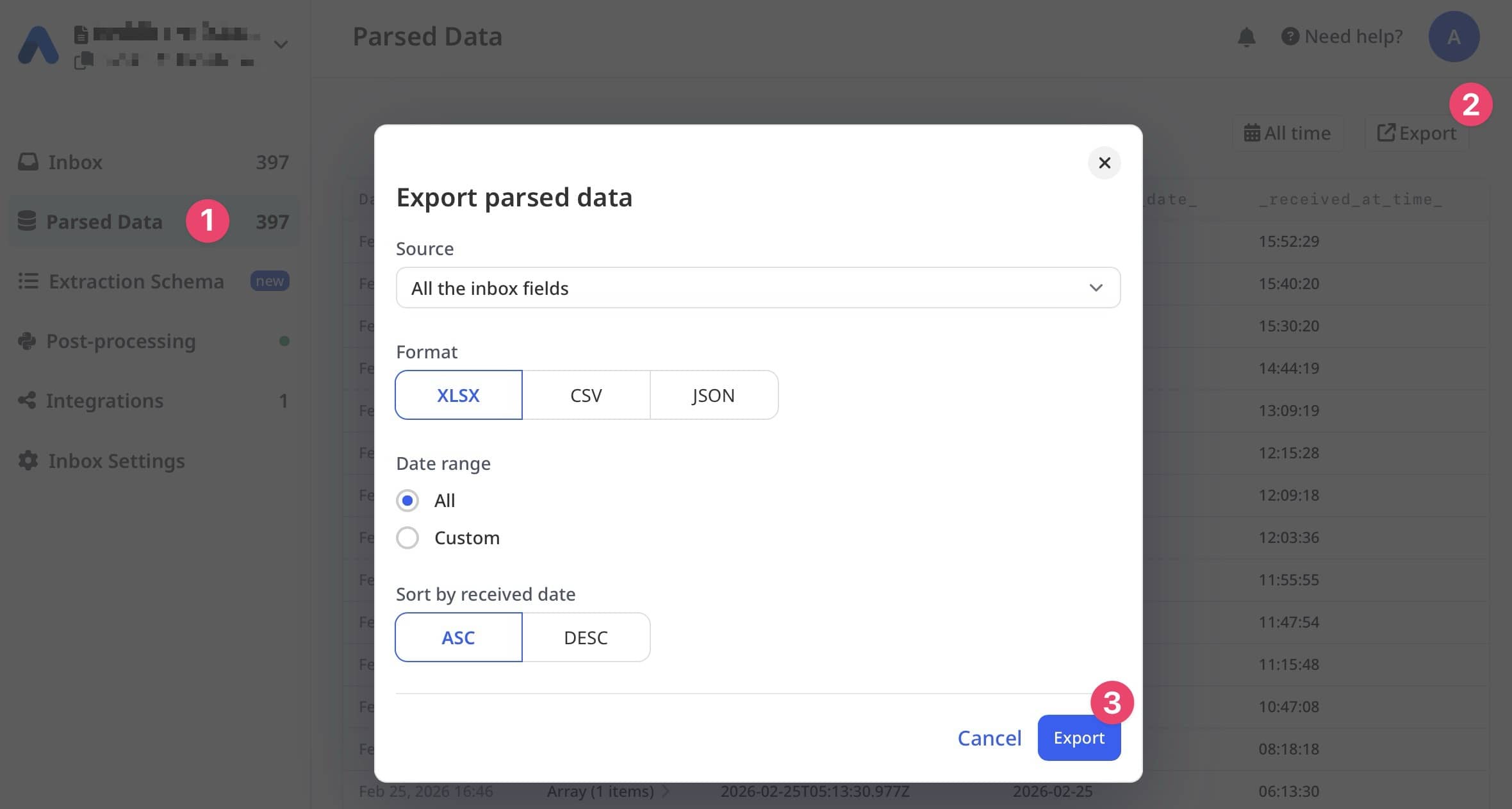

From Documents to Excel, Instantly
Airparser's Excel export feature lets you download all your parsed data as XLSX files with one click. Perfect for reporting, data analysis, sharing with clients, or archiving records.
After Airparser extracts structured data from your documents, simply click the Export button, select XLSX format, and download a perfectly formatted Excel spreadsheet with all your data organized in columns and rows.
Works with Microsoft Excel, Office 365, Google Sheets, LibreOffice, and any spreadsheet software that supports XLSX format.
Documents (PDF, Email, Image)
Airparser AI Extraction
Download Excel File (.xlsx)
Fast, Clean, Ready to Use
Popular Use Cases
Monthly Reports
Export parsed invoices, expenses, or sales data to create monthly reports in Excel with charts and pivot tables.
Client Deliverables
Share extracted data with clients or partners as professional Excel files they can open and analyze.
Data Archiving
Keep permanent offline records of parsed data in Excel format for compliance and historical reference.
Financial Analysis
Import parsed financial data into Excel for custom calculations, forecasting, and budget analysis.
Backup & Recovery
Create backup copies of your parsed data in a universal format that works anywhere, anytime.
System Migration
Export to Excel for easy data migration and import into ERP, CRM, or accounting software.
How It Works
1. View Parsed Data
Navigate to the Parsed Data page in Airparser to see all your extracted documents.
2. Choose XLSX Format
Click the Export button and select XLSX format from the available options (XLSX, CSV, JSON).
3. Download & Open
Click Export to download your XLSX file. Open it in Excel, Google Sheets, or any spreadsheet software.
Export Options
XLSX
Microsoft Excel format with full formatting support, formulas, and multi-sheet capability.
CSV
Simple comma-separated values format. Best for importing into databases or legacy systems.
JSON
Structured data format for developers and custom integrations. API-friendly.
Excel Export Features
Organized Columns
Each extracted field becomes a column with clear headers. Data is structured and ready for analysis.
Table Data Support
Extracted tables with repeating rows (like invoice line items) are properly formatted in Excel.
Offline & Private
Downloaded files are yours to keep. No cloud dependency, perfect for sensitive data and offline work.
Date Range Selection
Export all data or select a custom date range to download only the documents you need.
Sorted by Date
Choose ascending or descending order by received date for chronological organization.
Universal Compatibility
XLSX files work with Excel (Windows/Mac), Office 365, Google Sheets, LibreOffice, and Numbers.
Example: Monthly Invoice Report
Forward invoice emails to Airparser throughout the month
Vendor, amount, invoice number, date, line items extracted from each invoice
Click Export → Select XLSX → Choose date range (this month) → Download
Open in Excel, add pivot tables, create charts, calculate totals
Professional monthly report without manual data entry
Why Export to Excel?
Offline Access
Work with your data anywhere, even without internet connection. No dependency on cloud services.
Advanced Analysis
Use Excel's powerful features like pivot tables, VLOOKUP, conditional formatting, and custom formulas.
Easy Sharing
Send files via email, save to shared drives, or upload to any platform. Everyone can open XLSX files.
Data Privacy
Keep sensitive data on your device. No third-party integrations or cloud storage required.
Archival & Compliance
Create permanent records in a standard format for audit trails and regulatory compliance.
Frequently Asked Questions
What version of Excel do I need?
XLSX files work with Microsoft Excel 2007 and newer (Windows/Mac), Office 365, Google Sheets, LibreOffice Calc, and Apple Numbers. No special version required.
Can I export data from multiple parsers?
Currently, exports are per parser inbox. You can export data from each parser separately, then combine the Excel files if needed.
Is there a limit to how much data I can export?
No export limits! You can export all your parsed data regardless of volume. Large exports may take a few extra seconds to generate.
How are table fields handled in Excel?
Repeating table data (like invoice line items) are exported with each row showing all the extracted fields. Table columns are clearly labeled in the Excel file.
Can I schedule automatic exports?
Manual export is available in-app. For automated exports, you can use our Zapier, Make, or n8n integrations to schedule data exports to Google Sheets or other destinations.
What's the difference between XLSX and CSV export?
XLSX supports formatting, formulas, and multiple sheets. CSV is a simple text format good for importing into databases. Use XLSX for analysis in Excel, CSV for system imports.
Can I edit the data before exporting?
You can view and verify parsed data in Airparser before exporting. Once exported to Excel, you can edit, format, and analyze the data however you like.
Is Excel export available on all plans?
Yes! Excel export (XLSX, CSV, JSON) is available on all Airparser plans including the free trial. No premium features required.
Start Extracting Data to Excel Today
Parse documents with AI and export to Excel with one click. Free trial, no credit card required.
