AI Lead Capture Email Parser
Automatically extract lead information, contact details, and inquiry data from emails with 99% accuracy using advanced AI technology.
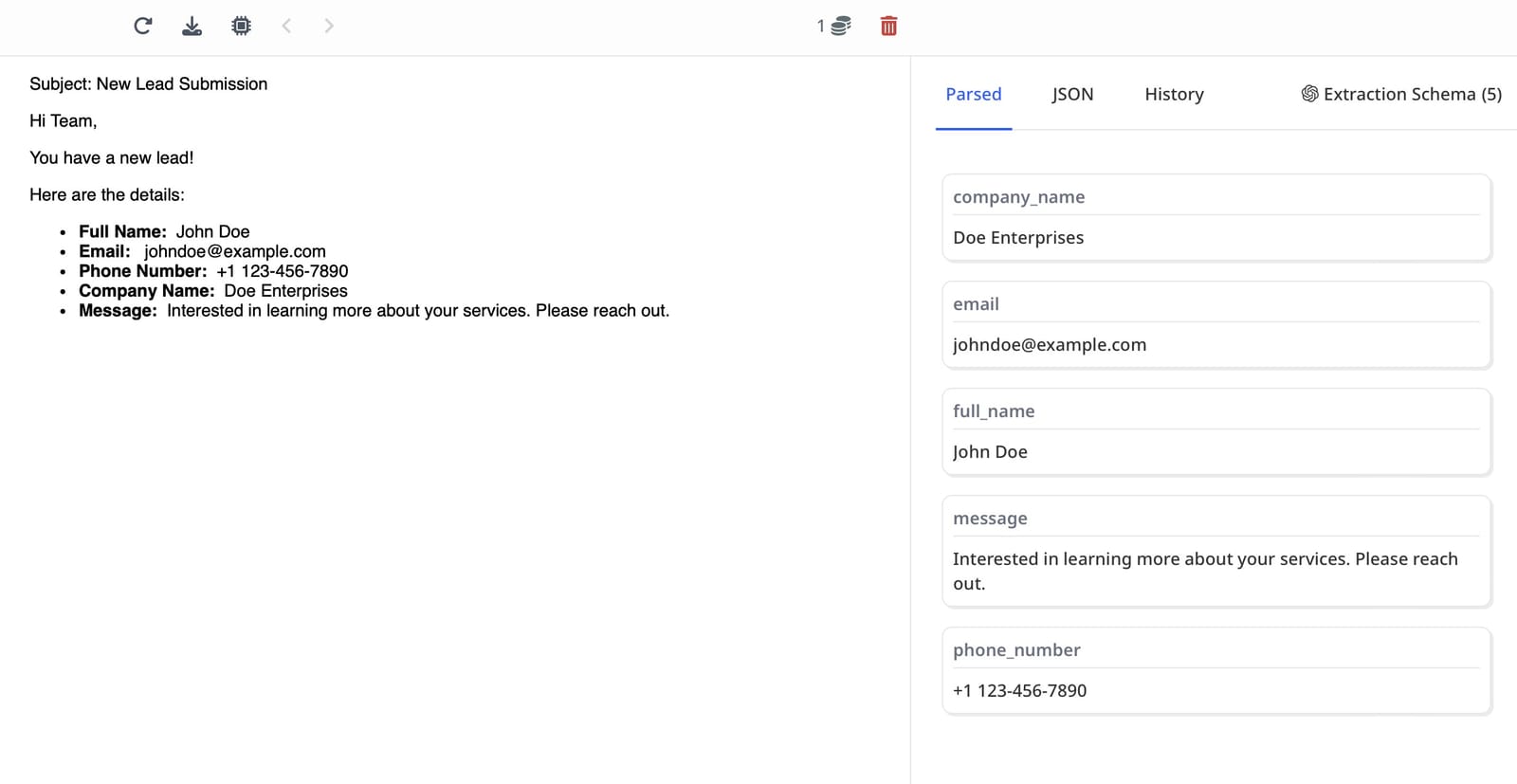
Why Automate Lead Data Extraction?
Managing leads is crucial for any business. Extracting data from emails and forms manually can take a lot of time and lead to errors.
Manual data entry has limitations:
- It's time-consuming
- Errors can happen
- It slows down follow-ups with leads
Automation solves these problems. By using Airparser, you can extract lead data quickly and send it directly to your CRM. This ensures your sales team has up-to-date information to act on.
What is Airparser?
Airparser is an advanced LLM-powered document parser. It can extract data from almost any document, including emails, PDFs, and even handwritten notes. No matter the format or layout, Airparser handles it seamlessly. For example, it can parse invoices from multiple vendors, each with a different design.
Key Features of Airparser:
- Custom Extraction Schema: Define the fields you need, and Airparser extracts the data.
- Supports All Formats: Emails, PDFs, forms, and more.
- Integration Options: Export data to 6,000+ apps via Zapier and Make.
- Advanced Tools: Use APIs and webhooks for custom workflows.
- Inbox for Documents: Forward documents to Airparser, and it does the rest.
Airparser's custom AI technology uses LLM and vision models to process lead emails like a sales professional would, automatically identifying and extracting key information such as:
- Contact name and email address
- Phone numbers and company information
- Inquiry type and message content
- Budget and project requirements
- Timeline and urgency indicators
- Source and referral information
Transform Your Lead Capture Process
Complete Lead Data Extraction
Extract Every Lead Detail
Contact Information
Name, email, phone, company, job title, LinkedIn profile
Company Details
Company name, industry, size, website, location
Inquiry Information
Message content, inquiry type, product interest, questions
Budget & Requirements
Budget range, project scope, timeline, urgency
Lead Scoring Data
Lead source, referral info, engagement level, priority
Sample Extracted Data:
{
  "contact": {
    "name": "Sarah Johnson",
    "email": "[email protected]",
    "phone": "+1 (555) 123-4567",
    "company": "Tech Solutions Inc.",
    "job_title": "Marketing Director",
    "linkedin": "linkedin.com/in/sarahjohnson"
  },
  "inquiry": {
    "type": "Product Inquiry",
    "message": "Interested in learning more about your document parsing solution",
    "budget": "$10,000 - $25,000",
    "timeline": "Within 30 days",
    "urgency": "High"
  },
  "source": {
    "referral_source": "Website contact form",
    "campaign": "Q1 Marketing Campaign",
    "landing_page": "www.example.com/pricing"
  }
}
How Airparser Works
Airparser uses AI to analyze and extract key data points. Here's how it works:
- Set Up a Schema: List the fields you want to extract, like name, email, or phone number.
- Forward Documents: Send emails or forms to your Airparser inbox.
- Automate: Use Zapier or Make to connect Airparser to your CRM.
Airparser can handle complex layouts, including handwritten notes and tables.
Connecting Airparser to Your CRM
Exporting data to your CRM is easy with Zapier or Make. Here's a quick step-by-step process.
Step 1: Configure Airparser
Set up a parsing schema to extract lead data. You can include fields like:
- • Full Name
- • Email Address
- • Company Name
- • Phone Number
Step 2: Set Up Automation
Use Zapier or Make to create a workflow. For example:
- • Trigger: A new email or document arrives in Airparser.
- • Action: Send the extracted data to your CRM, such as Pipedrive or HubSpot.
Step 3: Test and Deploy
Run tests to ensure data flows smoothly. Once it works, your process is automated.
Benefits of Using Airparser for Lead Management
Time Savings
Focus on selling instead of data entry. Automate the entire lead capture process.
Accuracy
Reduce errors with AI-driven extraction. Get clean, structured data every time.
Flexibility
Adapt Airparser for any business need. Works with emails, forms, PDFs, and more.
Integration
Connect with tools you already use, like CRMs and project management platforms.
Who Should Use Airparser?
Sales Teams
Quickly access lead data and close deals faster. Automatically add leads to your CRM.
Marketing Teams
Manage form submissions and campaign leads efficiently. Never miss a lead.
Small Businesses
Automate workflows and save time. Focus on growing your business instead of data entry.
If you work with forms, emails, or documents regularly, Airparser can simplify your processes.
Integrate with Your Sales Workflow
Connect your lead capture parser with the tools you already use for seamless automation.
 HubSpot
 Google Sheets
 Slack
Slack Webhooks
 Google Drive
 QuickBooks
Frequently Asked Questions
How accurate is the lead capture parsing?
Our AI-powered lead capture parser achieves 99% accuracy on most email formats. The system continuously learns and improves, handling even complex, unstructured emails with human-like understanding.
What email formats do you support?
We support all email formats - Gmail, Outlook, custom email servers, contact form submissions, and forwarded emails. Our AI adapts to any email structure automatically.
How does it integrate with my CRM?
Airparser integrates with most CRM systems via API, webhooks, or through Zapier and Make.com for 7000+ app connections including HubSpot, Salesforce, and Pipedrive.
Is there a free trial available?
Yes! We offer a free trial that lets you test all features and process lead emails without limitations. Upgrade only when you need more capacity or advanced features.
