Certificate of Insurance (COI) Data Extraction with AI
Read insured, holder, policy numbers, coverage types, limits and expiry dates from COIs, PDF or scan, and track compliance.
Contractors and vendors send certificates of insurance as PDFs, and someone has to check the policies, limits and expiry dates by hand. Airparser reads each certificate and returns the coverages as a list, so you can check compliance and spot expiring policies without retyping.
A real example
We made up this document and ran it through Airparser with the fields listed below. The table shows exactly what Airparser returned.
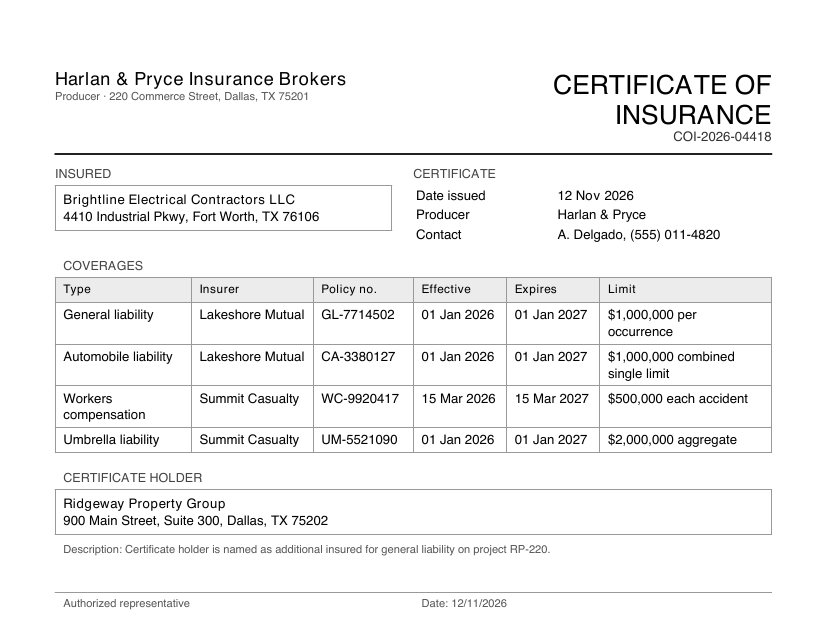
Extracted data
| additional_insured_note | Certificate holder is named as additional insured for general liability on project RP-220. |
| certificate_holder | Ridgeway Property Group |
| certificate_holder_address | 900 Main Street, Suite 300, Dallas, TX 75202 |
| certificate_number | COI-2026-04418 |
| date_issued | 2026-11-12 |
| insured_address | 4410 Industrial Pkwy, Fort Worth, TX 76106 |
| insured_name | Brightline Electrical Contractors LLC |
| producer | Harlan & Pryce Insurance Brokers |
coverages
| coverage_type | effective_date | expiry_date | insurer | limit | policy_number |
|---|---|---|---|---|---|
| General liability | 2026-01-01 | 2027-01-01 | Lakeshore Mutual | $1,000,000 per occurrence | GL-7714502 |
| Automobile liability | 2026-01-01 | 2027-01-01 | Lakeshore Mutual | $1,000,000 combined single limit | CA-3380127 |
| Workers compensation | 2026-03-15 | 2027-03-15 | Summit Casualty | $500,000 each accident | WC-9920417 |
| Umbrella liability | 2026-01-01 | 2027-01-01 | Summit Casualty | $2,000,000 aggregate | UM-5521090 |
One made-up document and one run, not a benchmark. Results on your own documents will vary, so test with your files during the free trial.
Fields you can extract
These are the fields used in the example. You can add, remove or rename fields to fit your own process.
What you can automate
Vendor compliance
Check that every vendor carries the required coverage and limits.
Expiry tracking
Send policy expiry dates to a sheet or tracker and get a reminder before they lapse.
Onboarding
Fill in subcontractor records from the certificate instead of typing them.
How it works
Create an inbox and define the fields
List the fields you need or let Airparser suggest them from a sample document.
Send your documents
Upload files, forward emails with attachments to the inbox address, or send them through the API or an automation.
Airparser extracts the data
An AI model reads each document and returns the fields as structured data. You can review the result next to the original.
Export or send it on
Download Excel, CSV or JSON, or send the data to Google Sheets, a webhook, Zapier, Make, n8n or your own system.
Where the data can go
Frequently asked questions
Does it handle certificates with several policies?
Yes. Each coverage is returned as a row in a list with type, insurer, policy number, dates and limit.
Does it check whether the coverage is sufficient?
Airparser extracts the data. You can compare it with your requirements in a sheet or automation.
Do I need to build a template for each layout?
No. Airparser uses AI instead of fixed templates, so you describe the fields once and the same inbox can read documents with different layouts. Test it on your own files during the free trial.
Can I check the data before it is sent on?
Yes. Every parsed result can be opened next to the original document, and you can hold results for human review before they are exported or sent to other systems.
Can I try it for free?
Yes. Airparser has a free trial with no credit card, so you can run your own documents before you decide.
More documents
Try it on your own documents
Start free, upload a few files and see the extracted data.
