Insurance Claim Data Extraction with AI
Extract claim and policy numbers, loss details and claimed amounts from claim forms and send them to your claims system.
Claim forms and first-notice-of-loss documents arrive as PDFs, scans and emails with the same kinds of details every time. Airparser extracts the claim and policy numbers, loss details and amounts, so intake teams can skip retyping.
A real example
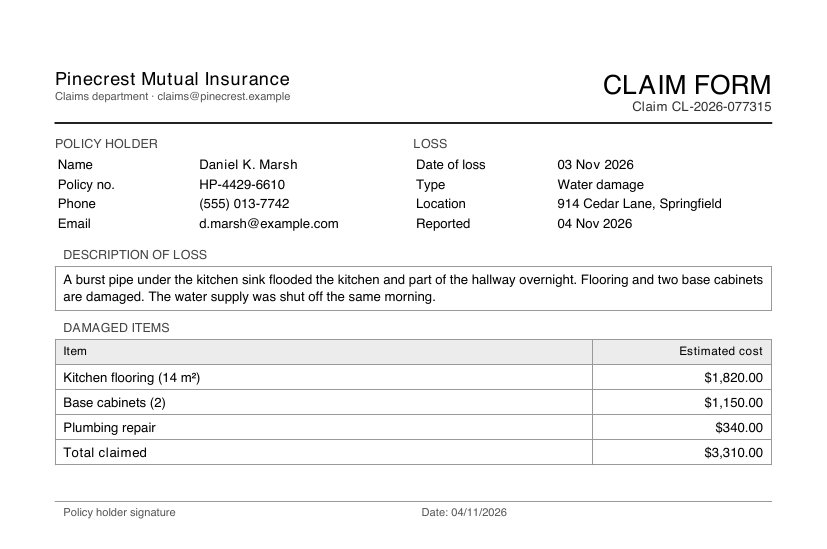
We made up this document and ran it through Airparser with the fields listed below. The table shows exactly what Airparser returned.
Extracted data
| claim_number | CL-2026-077315 |
| currency | USD |
| date_of_loss | 2026-11-03 |
| date_reported | 2026-11-04 |
| [email protected] | |
| loss_description | A burst pipe under the kitchen sink flooded the kitchen and part of the hallway overnight. Flooring and two base cabinets are damaged. The water supply was shut off the same morning. |
| loss_location | 914 Cedar Lane, Springfield |
| loss_type | Water damage |
| phone | (555) 013-7742 |
| policy_number | HP-4429-6610 |
| policyholder_name | Daniel K. Marsh |
| total_claimed | 3310 |
damaged_items
| estimated_cost | item |
|---|---|
| 1820 | Kitchen flooring (14 m²) |
| 1150 | Base cabinets (2) |
| 340 | Plumbing repair |
One made-up document and one run, not a benchmark. Results on your own documents will vary, so test with your files during the free trial.
Fields you can extract
These are the fields used in the example. You can add, remove or rename fields to fit your own process.
What you can automate
Claims intake
Create a claim record from the form with the key fields filled in.
Triage
Route claims by type or amount.
Audit trail
Keep the original form next to the extracted data.
How it works
Create an inbox and define the fields
List the fields you need or let Airparser suggest them from a sample document.
Send your documents
Upload files, forward emails with attachments to the inbox address, or send them through the API or an automation.
Airparser extracts the data
An AI model reads each document and returns the fields as structured data. You can review the result next to the original.
Export or send it on
Download Excel, CSV or JSON, or send the data to Google Sheets, a webhook, Zapier, Make, n8n or your own system.
Where the data can go
Frequently asked questions
Is claim data sensitive?
Claims hold personal and sometimes financial data. See the Airparser security and data protection pages and set a retention period that fits your policy.
Can it read photos of forms?
Yes, Airparser can read photographed and scanned forms. Quality depends on how clear the photo is.
Do I need to build a template for each layout?
No. Airparser uses AI instead of fixed templates, so you describe the fields once and the same inbox can read documents with different layouts. Test it on your own files during the free trial.
Can I check the data before it is sent on?
Yes. Every parsed result can be opened next to the original document, and you can hold results for human review before they are exported or sent to other systems.
Can I try it for free?
Yes. Airparser has a free trial with no credit card, so you can run your own documents before you decide.
More documents
Try it on your own documents
Start free, upload a few files and see the extracted data.
