Expense Report Data Extraction with AI
Read employee, trip, each expense line and the reimbursement amount from expense reports, PDF or scan.
Expense reports arrive as PDFs and spreadsheet exports, and finance retypes each line. Airparser reads the employee, the trip and every expense line, so the data can go straight to payroll or accounting.
A real example
We made up this document and ran it through Airparser with the fields listed below. The table shows exactly what Airparser returned.
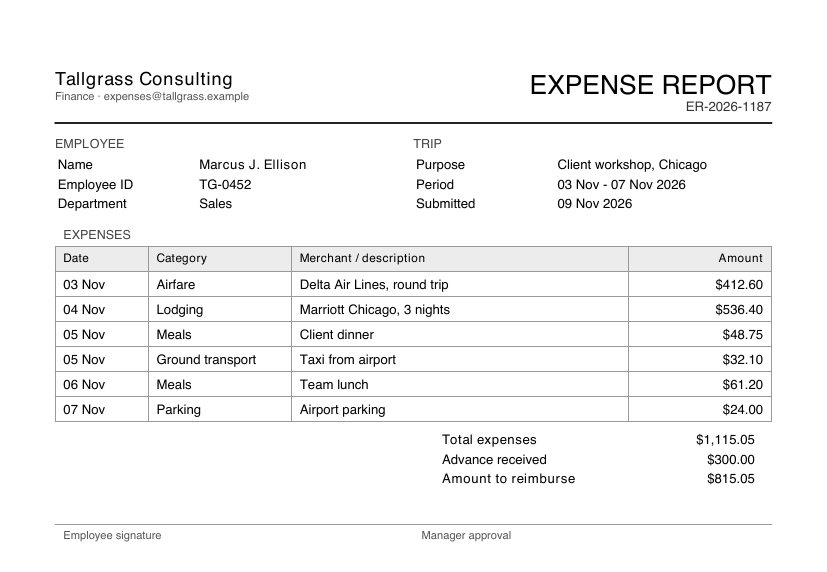
Extracted data
| advance_received | 300 |
| amount_to_reimburse | 815.05 |
| currency | USD |
| department | Sales |
| employee_id | TG-0452 |
| employee_name | Marcus J. Ellison |
| period_end | 2026-11-07 |
| period_start | 2026-11-03 |
| purpose | Client workshop, Chicago |
| report_number | ER-2026-1187 |
| submitted_date | 2026-11-09 |
| total_expenses | 1115.05 |
expenses
| amount | category | date | description |
|---|---|---|---|
| 412.6 | Airfare | 03 Nov | Delta Air Lines, round trip |
| 536.4 | Lodging | 04 Nov | Marriott Chicago, 3 nights |
| 48.75 | Meals | 05 Nov | Client dinner |
| 32.1 | Ground transport | 05 Nov | Taxi from airport |
| 61.2 | Meals | 06 Nov | Team lunch |
| 24 | Parking | 07 Nov | Airport parking |
One made-up document and one run, not a benchmark. Results on your own documents will vary, so test with your files during the free trial.
Fields you can extract
These are the fields used in the example. You can add, remove or rename fields to fit your own process.
What you can automate
Reimbursement
Send the amount to reimburse to payroll or accounting.
Policy checks
Review categories and amounts in a sheet before approval.
Spend reporting
Report spend by employee, department and category.
How it works
Create an inbox and define the fields
List the fields you need or let Airparser suggest them from a sample document.
Send your documents
Upload files, forward emails with attachments to the inbox address, or send them through the API or an automation.
Airparser extracts the data
An AI model reads each document and returns the fields as structured data. You can review the result next to the original.
Export or send it on
Download Excel, CSV or JSON, or send the data to Google Sheets, a webhook, Zapier, Make, n8n or your own system.
Where the data can go
Frequently asked questions
Can it read the receipts attached to the report?
Receipts can be processed separately, see the receipt parser. This page covers the report itself.
Does it return each expense as a row?
Yes. Expenses are returned as a list with date, category, description and amount.
Do I need to build a template for each layout?
No. Airparser uses AI instead of fixed templates, so you describe the fields once and the same inbox can read documents with different layouts. Test it on your own files during the free trial.
Can I check the data before it is sent on?
Yes. Every parsed result can be opened next to the original document, and you can hold results for human review before they are exported or sent to other systems.
Can I try it for free?
Yes. Airparser has a free trial with no credit card, so you can run your own documents before you decide.
More documents
Try it on your own documents
Start free, upload a few files and see the extracted data.
