Packing List Data Extraction with AI
Extract cartons, contents, weights and dimensions from packing lists and match them to invoices and shipments.
Packing lists come with shipments in many layouts. Airparser reads the carton table and the totals, so customs and warehouse teams can use the data without retyping.
A real example
We made up this document and ran it through Airparser with the fields listed below. The table shows exactly what Airparser returned.
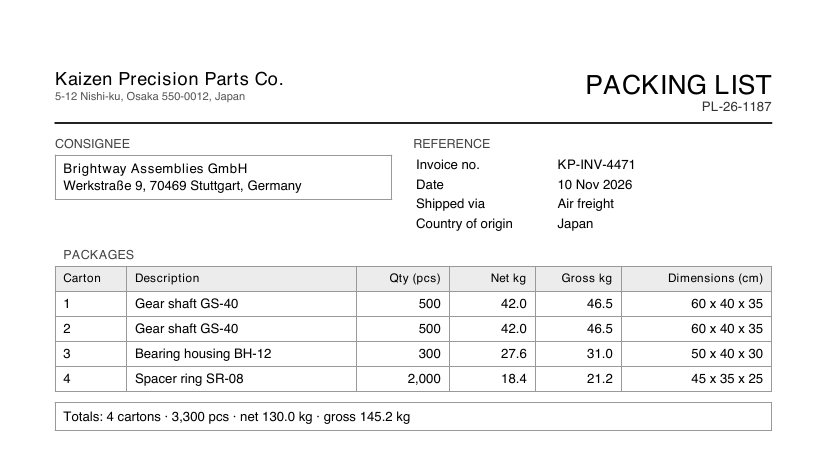
Extracted data
| consignee_address | Werkstraße 9, 70469 Stuttgart, Germany |
| consignee_name | Brightway Assemblies GmbH |
| country_of_origin | Japan |
| date | 2026-11-10 |
| invoice_number | KP-INV-4471 |
| packing_list_number | PL-26-1187 |
| shipper_name | Kaizen Precision Parts Co. |
| shipping_method | Air freight |
| total_cartons | 4 |
| total_gross_weight_kg | 145.2 |
| total_net_weight_kg | 130 |
| total_pieces | 3300 |
packages
| carton | description | dimensions_cm | gross_weight_kg | net_weight_kg | quantity |
|---|---|---|---|---|---|
| 1 | Gear shaft GS-40 | 60 x 40 x 35 | 46.5 | 42 | 500 |
| 2 | Gear shaft GS-40 | 60 x 40 x 35 | 46.5 | 42 | 500 |
| 3 | Bearing housing BH-12 | 50 x 40 x 30 | 31 | 27.6 | 300 |
| 4 | Spacer ring SR-08 | 45 x 35 x 25 | 21.2 | 18.4 | 2000 |
One made-up document and one run, not a benchmark. Results on your own documents will vary, so test with your files during the free trial.
Fields you can extract
These are the fields used in the example. You can add, remove or rename fields to fit your own process.
What you can automate
Warehouse receiving
Check received cartons and pieces against the list.
Customs
Collect weights and quantities for customs entries.
Invoice matching
Compare packing list totals with the commercial invoice.
How it works
Create an inbox and define the fields
List the fields you need or let Airparser suggest them from a sample document.
Send your documents
Upload files, forward emails with attachments to the inbox address, or send them through the API or an automation.
Airparser extracts the data
An AI model reads each document and returns the fields as structured data. You can review the result next to the original.
Export or send it on
Download Excel, CSV or JSON, or send the data to Google Sheets, a webhook, Zapier, Make, n8n or your own system.
Where the data can go
Frequently asked questions
Can it extract each carton as a row?
Yes. Packages are returned as a list with contents, quantity, weights and dimensions.
Does it also work with commercial invoices?
Yes, see the invoice parser for invoice data.
Do I need to build a template for each layout?
No. Airparser uses AI instead of fixed templates, so you describe the fields once and the same inbox can read documents with different layouts. Test it on your own files during the free trial.
Can I check the data before it is sent on?
Yes. Every parsed result can be opened next to the original document, and you can hold results for human review before they are exported or sent to other systems.
Can I try it for free?
Yes. Airparser has a free trial with no credit card, so you can run your own documents before you decide.
More documents
Try it on your own documents
Start free, upload a few files and see the extracted data.
