Work Order Data Extraction with AI
Extract customer, equipment, issue, labor and parts from work orders and job sheets for billing and service reporting.
Service teams complete work orders on paper or PDF, and office staff then retype them for billing. Airparser reads the customer, equipment, issue, labor and parts, so the data is ready for invoicing and reports.
A real example
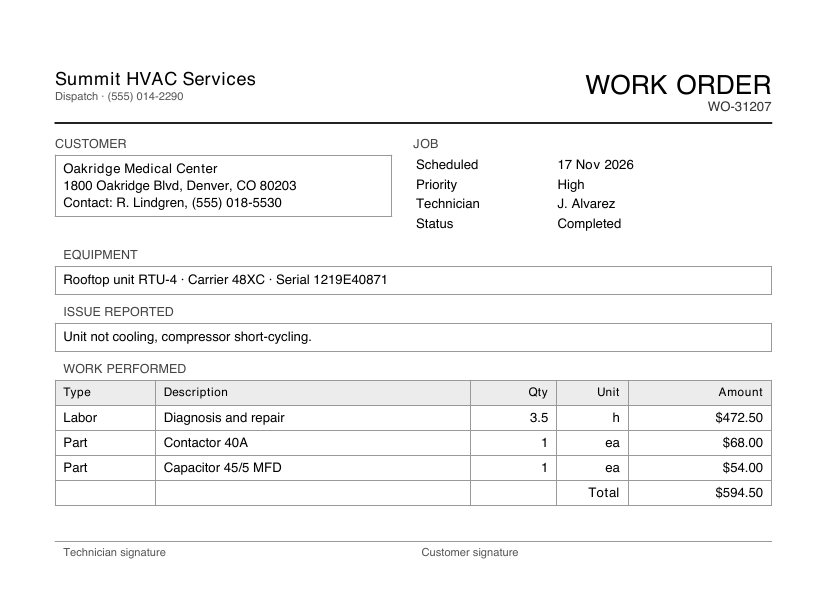
We made up this document and ran it through Airparser with the fields listed below. The table shows exactly what Airparser returned.
Extracted data
| contact_name | R. Lindgren |
| currency | USD |
| customer_address | 1800 Oakridge Blvd, Denver, CO 80203 |
| customer_name | Oakridge Medical Center |
| equipment | Rooftop unit RTU-4 · Carrier 48XC |
| issue_reported | Unit not cooling, compressor short-cycling. |
| priority | High |
| scheduled_date | 2026-11-17 |
| serial_number | 1219E40871 |
| status | Completed |
| technician | J. Alvarez |
| total | 594.5 |
| work_order_number | WO-31207 |
lines
| amount | description | quantity | type | unit |
|---|---|---|---|---|
| 472.5 | Diagnosis and repair | 3.5 | Labor | h |
| 68 | Contactor 40A | 1 | Part | ea |
| 54 | Capacitor 45/5 MFD | 1 | Part | ea |
One made-up document and one run, not a benchmark. Results on your own documents will vary, so test with your files during the free trial.
Fields you can extract
These are the fields used in the example. You can add, remove or rename fields to fit your own process.
What you can automate
Invoicing
Create invoices from labor and parts lines.
Service history
Keep a structured record per piece of equipment.
Performance reporting
Track priority, status and technician across jobs.
How it works
Create an inbox and define the fields
List the fields you need or let Airparser suggest them from a sample document.
Send your documents
Upload files, forward emails with attachments to the inbox address, or send them through the API or an automation.
Airparser extracts the data
An AI model reads each document and returns the fields as structured data. You can review the result next to the original.
Export or send it on
Download Excel, CSV or JSON, or send the data to Google Sheets, a webhook, Zapier, Make, n8n or your own system.
Where the data can go
Frequently asked questions
Can it read labor and parts as separate lines?
Yes. Lines are returned as a list with type, description, quantity, unit and amount.
Does it work on scanned job sheets?
Yes. Airparser can read scans and photos. Test with your own sheets to see how it handles your handwriting and layout.
Do I need to build a template for each layout?
No. Airparser uses AI instead of fixed templates, so you describe the fields once and the same inbox can read documents with different layouts. Test it on your own files during the free trial.
Can I check the data before it is sent on?
Yes. Every parsed result can be opened next to the original document, and you can hold results for human review before they are exported or sent to other systems.
Can I try it for free?
Yes. Airparser has a free trial with no credit card, so you can run your own documents before you decide.
More documents
Try it on your own documents
Start free, upload a few files and see the extracted data.
